Compare sources
Two to six documents side by side. Docsie finds the concepts each one discusses, matches them across sources, and reports what differs, overlaps or appears in only one.
Document comparison →
Docsie Compare
Check documents against each other, against an approved baseline, or against a set of requirements. Every finding resolves to the exact source text on both sides, so you can act on it without re-reading the originals.
Compare 2–6 sources at a time: Docsie shelves, books and articles, uploaded PDFs and videos, websites, or pasted text.
"Comparison" covers three jobs that behave differently. Picking the right one matters more than the word.
Two to six documents side by side. Docsie finds the concepts each one discusses, matches them across sources, and reports what differs, overlaps or appears in only one.
Document comparison →One approved document is pinned as the reference. Everything else is checked against it section by section, and each section is marked matching, differing or missing.
Document review →Content is graded against a rubric you define. Each criterion scores the share of its expectations met; scores roll up by weight. Scoring is computed in code, not by the model.
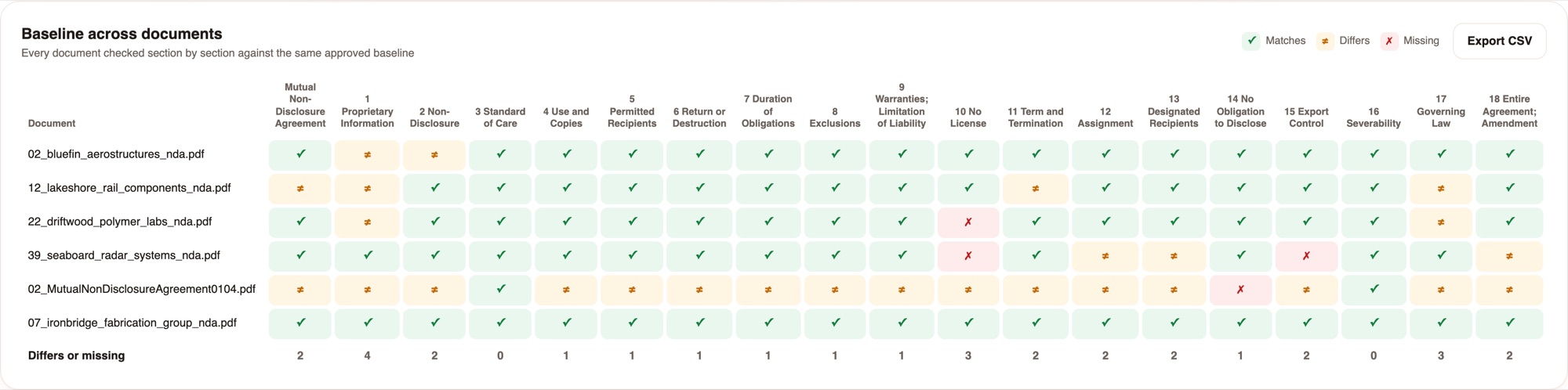
Compliance matrix →Six NDAs checked against one approved baseline. These are screenshots of the product, not mockups.
19 baseline sections across the whole intake. The totals row shows where the drift is concentrated.
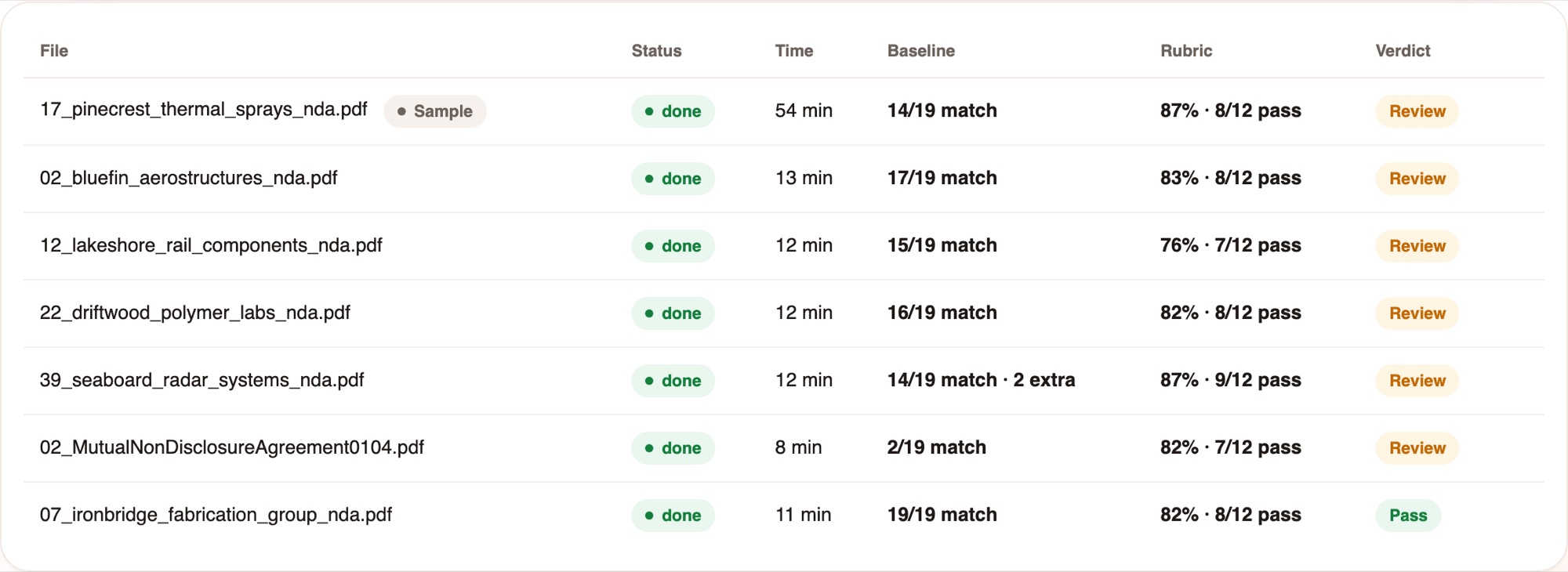
Baseline result, rubric score and verdict in one line. The verdict follows rules you can read, not a model's judgement.
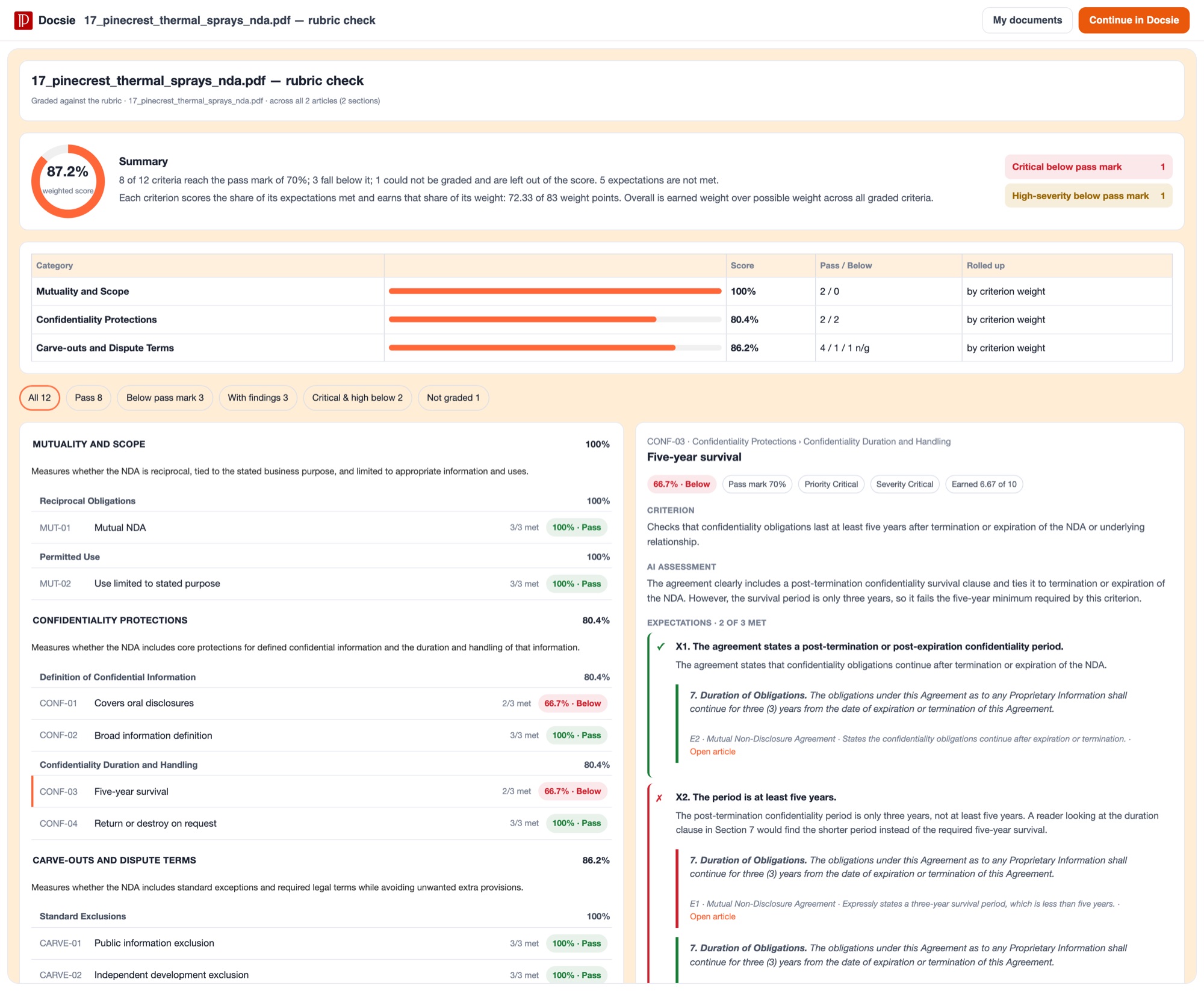
Each criterion scores the share of its expectations met. Critical and high-severity failures are counted separately.
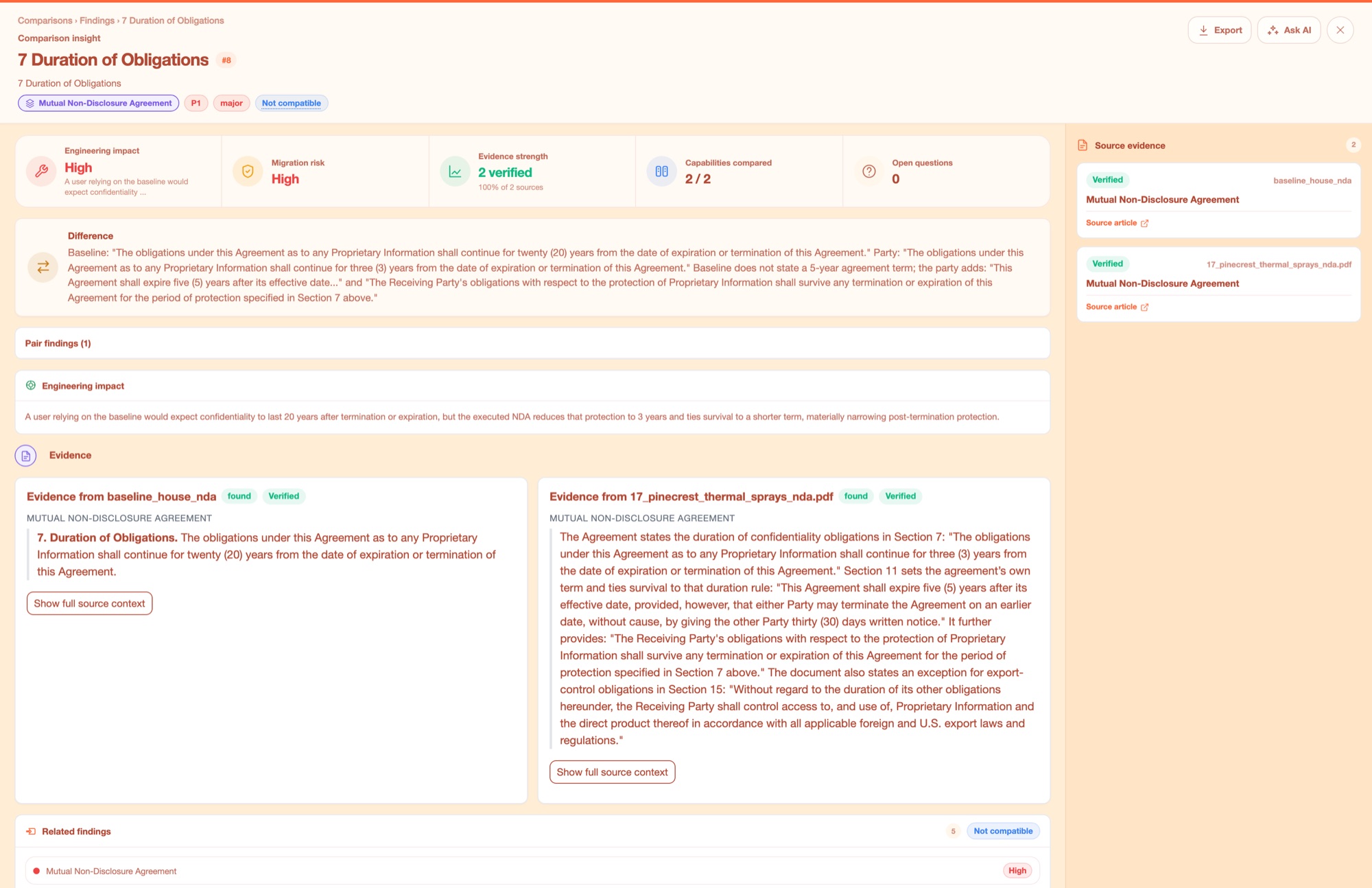
Both sides quoted in full, each marked verified. This is the difference between a score you can act on and a number you have to check by hand.
A factory runs the same two checks over a whole intake. You approve one sample, which freezes the baseline and the rubric, and every document after that is checked exactly the same way.
| Step | What happens |
|---|---|
| Baseline | The approved document is imported word for word and pinned, so every document is checked against the same copy. |
| Rubric | Optional. Criteria drafted from a sentence and edited in a table, or imported from a spreadsheet, a document or a pasted list. |
| Sample | Run one document and read the result. Approving it freezes both references. Changing either means approving a new sample. |
| Each document | Imported, checked against the rubric, checked against the baseline, then given a verdict with reasons such as "2 of 19 baseline sections differ". |
| What you read | A review queue of exceptions with their reasons, a baseline matrix, a rubric matrix, and CSV export of either. |
Each document keeps its own chat session holding both full reports, so you can ask why a specific section failed.
Trace requirements to where they are satisfied across design docs, test plans and supplier documents, with a citation for each.
Requirements traceability matrix →Check incoming contracts against your house standard. Read the clauses that differ instead of the ones that do not.
AI contract review →Compare two revisions of the same document and see what changed, with the wording from both sides.
Redline documents →Two to six sources per comparison. Each can be a Docsie shelf, book or article from any workspace you can read, an uploaded PDF or video, a website URL, or pasted text. PDFs and videos are imported first, and videos are turned into documentation before the comparison runs.
Every citation resolves to the exact source text, and nothing is truncated. Findings show the wording from each side rather than a summary of it. Images get AI-written descriptions, which are labelled as AI-derived.
No. The model decides whether each expectation is met and has to cite evidence for a "met". The arithmetic is computed in code: a requirement scores the share of its expectations met and passes at the pass mark, which is 70% by default, and scores roll up by weight to subcategory, category and overall.
Not reliably today. The engine currently raises flags on documents that turn out to be fine, so in practice every document arrives triaged with reasons rather than sorted into pass and fail. The reasons tell you which sections to look at, which is still far less reading than the whole document, but expect to confirm the clean ones yourself for now.
Not yet. A rubric check grades one body of content at a time. A factory runs the same rubric over many documents in sequence and collects the scores into a matrix, which covers most of the same need.
In a factory, roughly three and a half minutes for a rubric check and around six minutes for a baseline check, per document. Two documents are processed at once by default.
Yes. Reports export to XLSX or CSV, and both the baseline matrix and the rubric matrix have their own CSV export.
Upload something you already have to compare, or point Docsie at content that is already in your workspace. If it is useful, the same checks run across a whole intake without any further setup.