Train customers
Product onboarding · certified-user programs · fewer support tickets
Customer education →
Docsie Learn
Upload a training video or a manual. Docsie writes the lessons, drafts a quiz from the same material and builds the course in Docsie Learn. Enroll people by email, see who finished, and give a certificate to everyone who passes.
Upload up to 3 videos as MP4, MOV, WEBM, MKV or AVI, or paste a link. 10–20 minutes per video is ideal; up to 2 hours is supported. Starting from a document? Turn a PDF or Word manual into a course.
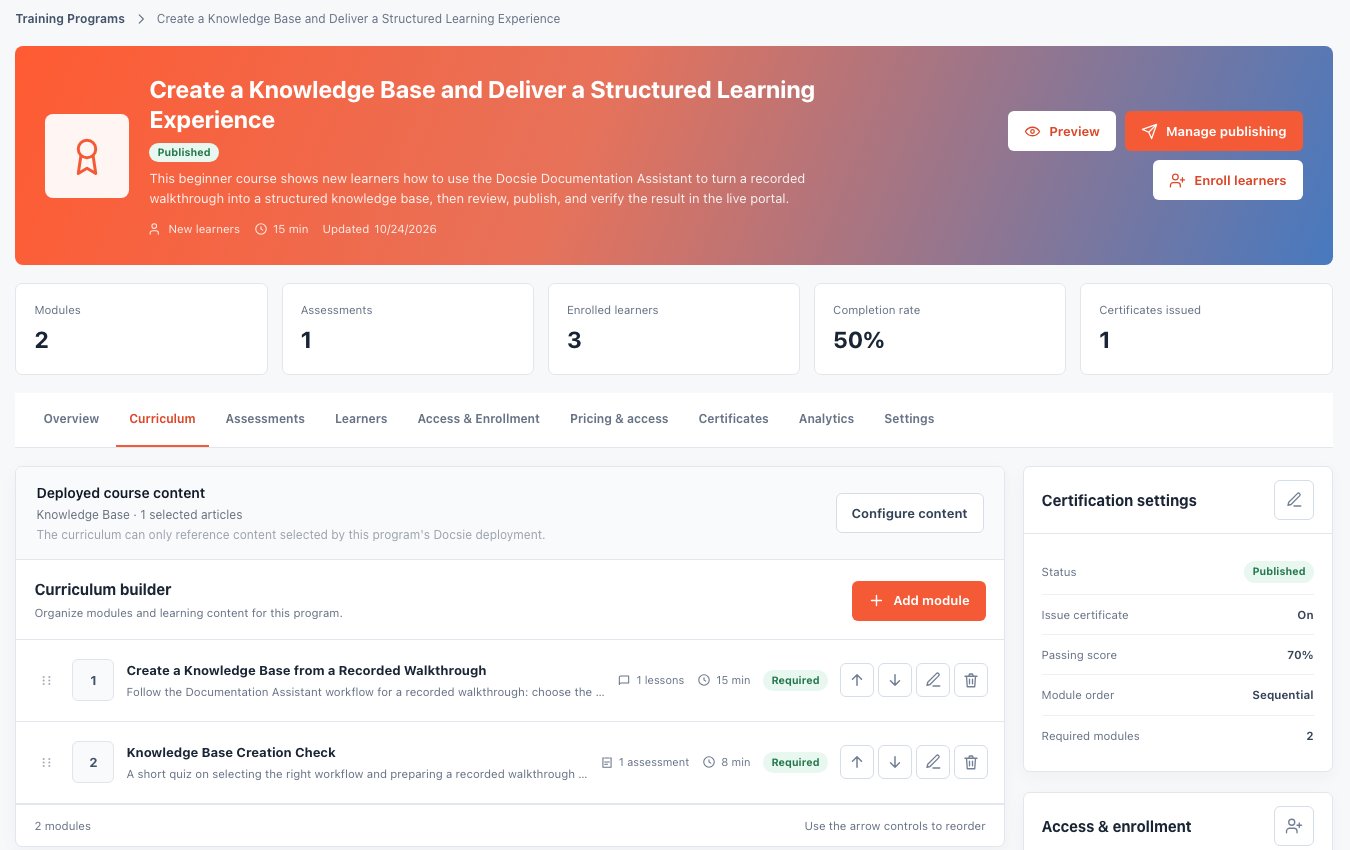
Video to Course made this from Docsie's own 14:54 product overview: a lesson of about 2,500 words with 13 screenshots from the video, and a 4-question quiz with a 70% pass mark.
Pick your scenario
The same course can train your team, certify your partners or onboard your customers.
Product onboarding · certified-user programs · fewer support tickets
Customer education →Resellers · implementation partners · channel readiness
Partner certification →New-hire programs · SOP and compliance training · required courses with due dates
Compliance training →Watch it work
A two-and-a-half-minute tour: a recording becomes documentation and a knowledge base, then a course with enrolled learners, a quiz, progress tracking and a custom certificate.
Create
Most of a course already exists in a recorded walkthrough, a manual or your help center. Docsie starts there, so you edit a draft instead of facing a blank page.
Upload a recording. Docsie turns what is shown and said into lessons grouped in modules, plus a quiz of 3 to 8 multiple-choice questions grounded in the video.
Video to Course →Upload the document and say who the course is for. Docsie builds the lessons from the document's sections and adds a quiz on the same material.
AI course generator →Already have a knowledge base? The course wizard plans a course from articles you pick: modules, lessons and a quiz drawn from the same text.
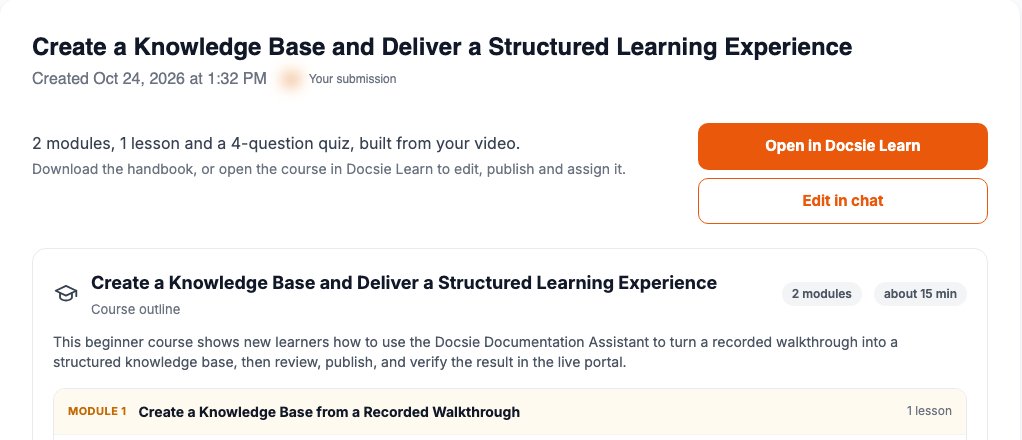
Docs to training courses →The Video to Course result for the product overview: the course outline with its modules, the quiz, and the whole course as a handbook to download as PDF, DOCX or Markdown. Open it in Docsie Learn to edit, publish and assign.
Enroll and deliver
No accounts to set up and no passwords to hand out. Learners take the course in your own portal.
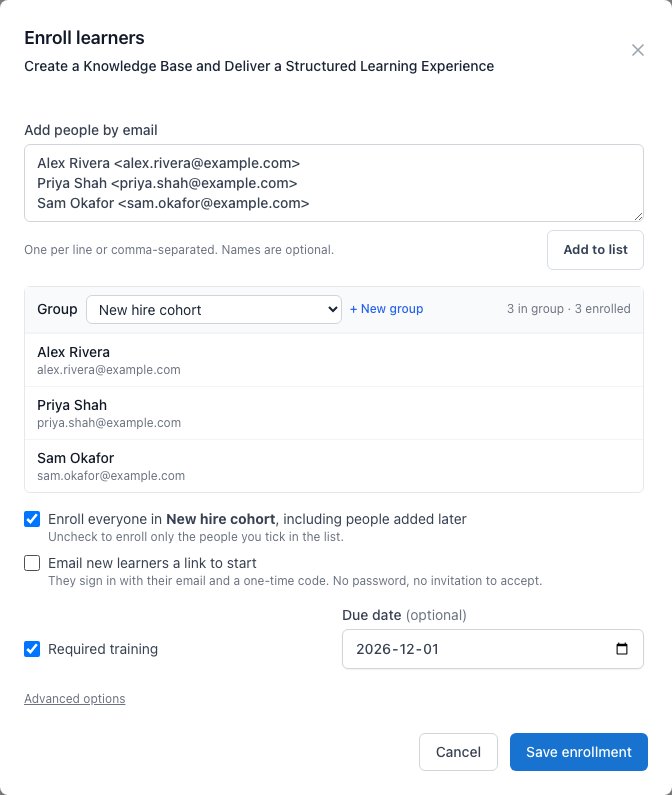
Paste names and emails, pick or create a group, mark the course required and set a due date. Tick one box to email new learners a link.
Paste a list of addresses and Docsie emails each new learner a link to start. Adding people later emails only the new ones.
Put learners into groups, such as a customer, a partner or a department. Enroll everyone in a group, including people added to it later, or pick individuals.
Learners open the link and sign in with a code sent to their email. Portals with single sign-on can use Google, Azure AD or your own identity provider instead.
Mark a course as required and set a due date, and learners see what's due and what's overdue on their own page. Set an end date when access should stop.
Courses sit in a portal with your branding on your own domain, or you can embed them in a page you already have. The Learn interface is available in 17 languages.
Track
Every enrolled person with their status (not started, in progress or completed) and their progress through each module.
For each lesson Docsie records how long the learner spent and how far they scrolled, so "completed" means read.
Each learner's best quiz score and attempts, plus the course's pass rate, average score and average completion time, filtered by group.
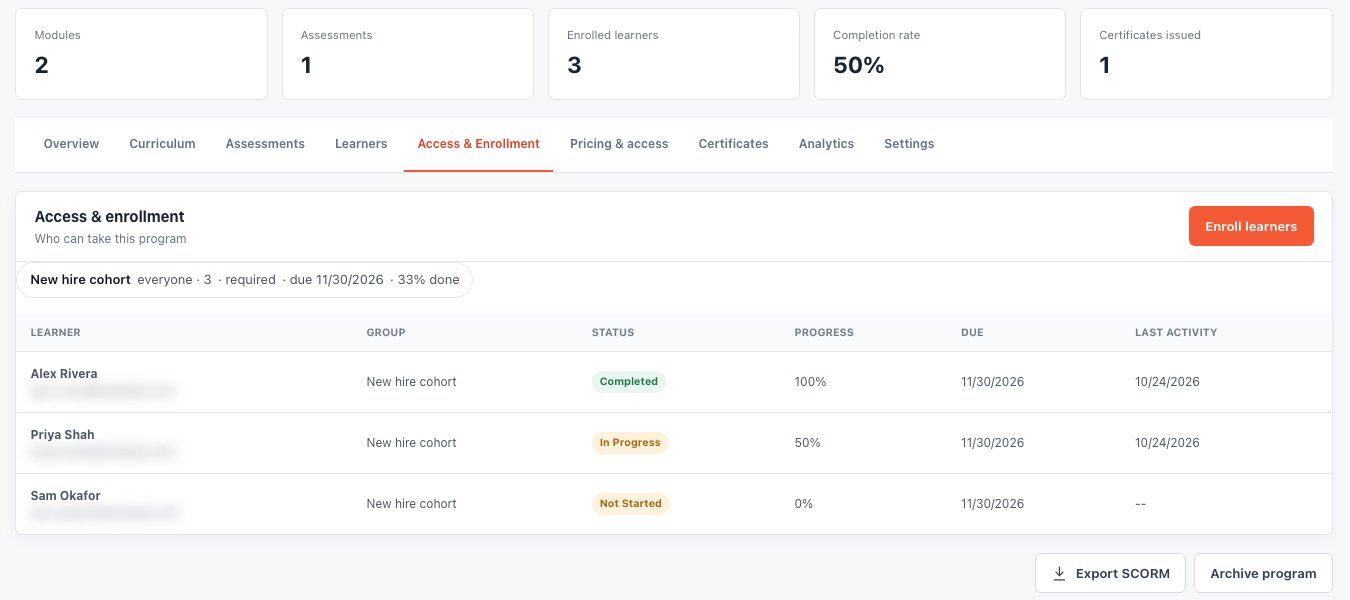
Each learner's status, progress, due date and last activity, under the course's completion rate and certificates issued.
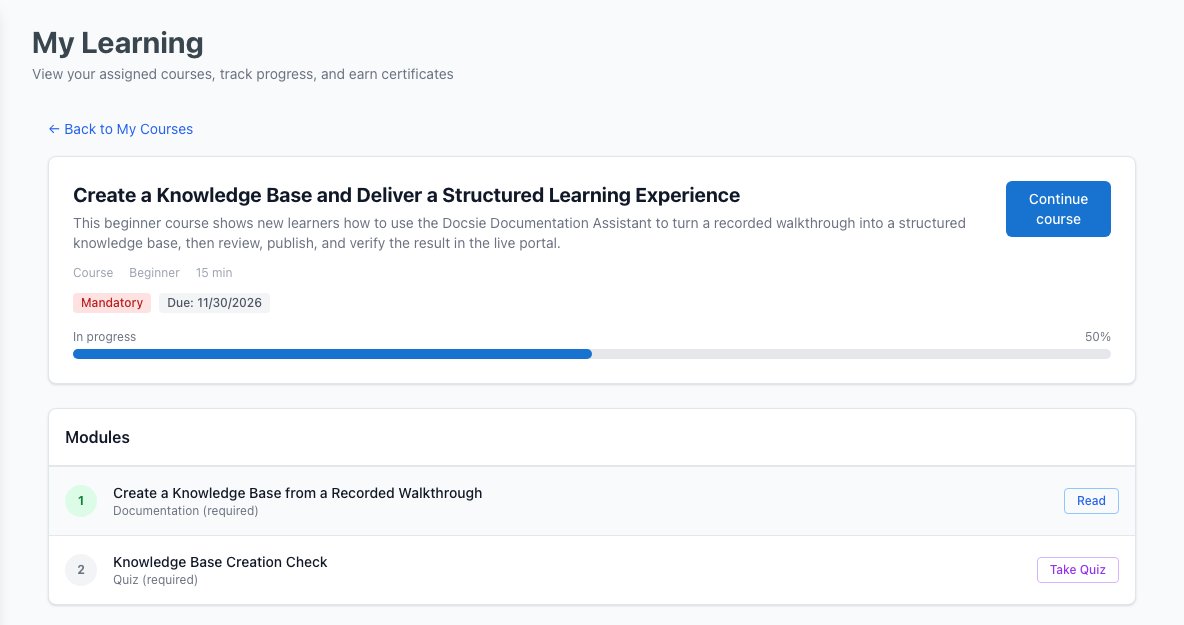
The course marked mandatory with its due date, a progress bar, and each module to read or take.
Certify
Set the passing score (70% by default). Generated quizzes are multiple choice; quizzes you write in Docsie Forms can mix these question types:
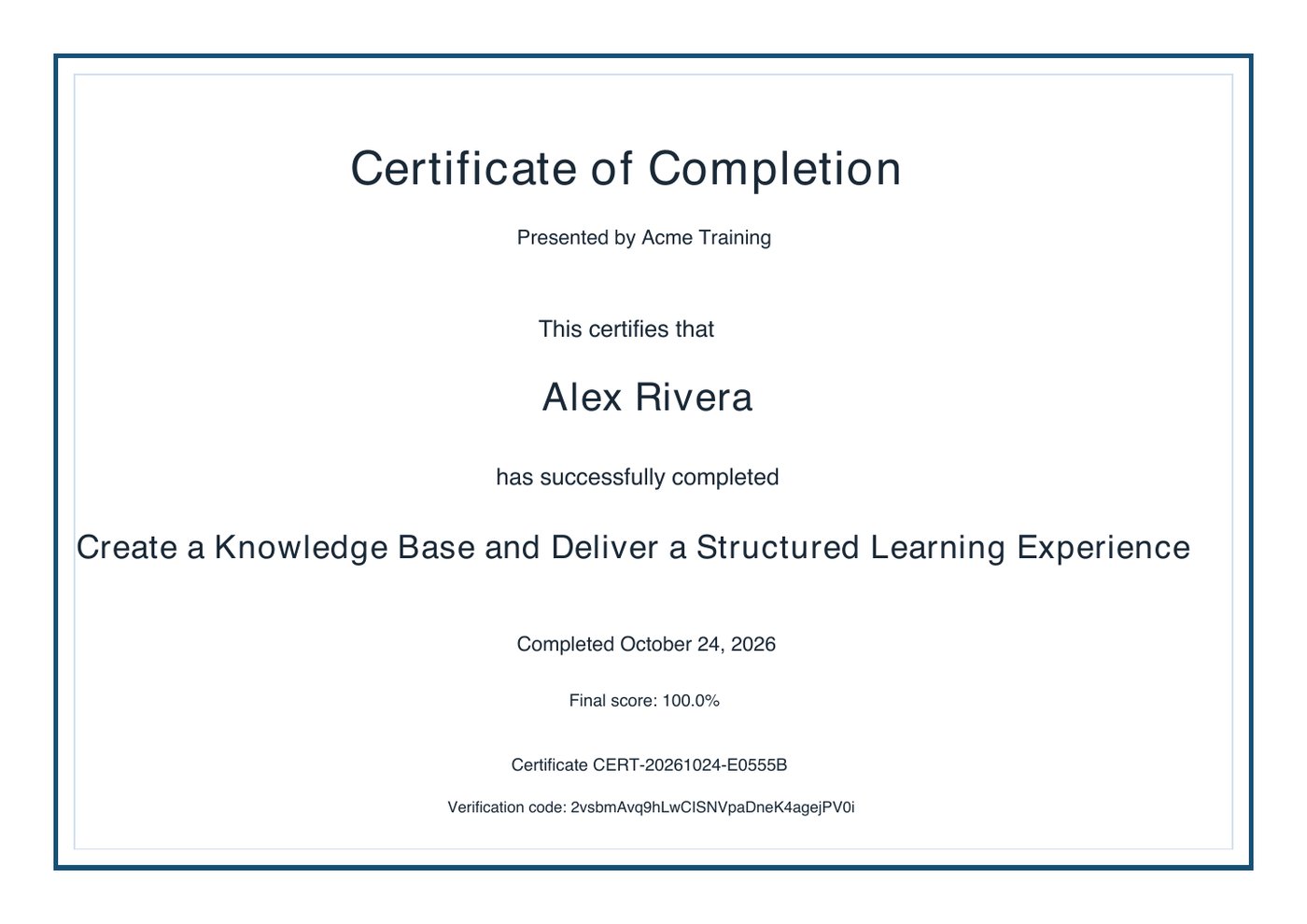
When a learner completes every required module and passes, Docsie issues a PDF certificate with their name, the course, the date, the score, a certificate number and a unique verification code. Learners download it from their own page.
The certificate issued when Alex Rivera scored 100%. Choose your colors, portrait or landscape, A4 or Letter and a background image, or bring your own HTML and CSS.
Start with what you have
FAQ
Upload the recording to Docsie's Video to Course app. Docsie turns it into lessons grouped in modules and drafts a quiz from the same content. The course opens in Docsie Learn as a draft: edit it, add your video to any lesson, then publish and enroll learners.
Yes. PDF to Course builds lessons from the document's sections and adds a quiz. You can also build a course from articles already in your Docsie knowledge base.
The generated lessons are written from the video, with screenshots taken from it. Lessons are Docsie articles, so you can add the recording, or a YouTube video, to any lesson.
No. You enroll people by email and they sign in with a code sent to their inbox. Portals with single sign-on can use Google, Azure AD or your own identity provider.
Yes. Learn shows each learner's status and module progress, how long they spent on each lesson and how far they scrolled, their best quiz score and attempts, and each course's pass rate and average score.
When a learner completes every required module and passes, Docsie issues a PDF certificate with a certificate number and a unique verification code. You choose the design.
Yes, as a SCORM 1.2 package for another LMS. The lessons export in full; quizzes are included as a summary, so learners take the graded quiz in Docsie.
Yes. Learn is included in self-hosted Docsie, which runs on your own Kubernetes cluster with the AI models you choose.
Docsie Learn
Lessons, a quiz, enrolled learners and certificates, built from a recording you already have.