
4.8
on G2
Docsie helps teams needing automated document diff and analysis. AI-powered side-by-side comparison of documents, products, or any content. Auto-discovers dimensions, scores and ranks items, web research mode for competitive analysis.

Two product versions. Two hundred-page manuals. A standard against your current docs. Docsie turns the comparison into a structured audit — findings, severity, verdicts, and source evidence you can inspect yourself. One minute, see it all.
Want the deep dive? Watch the full walkthrough below.
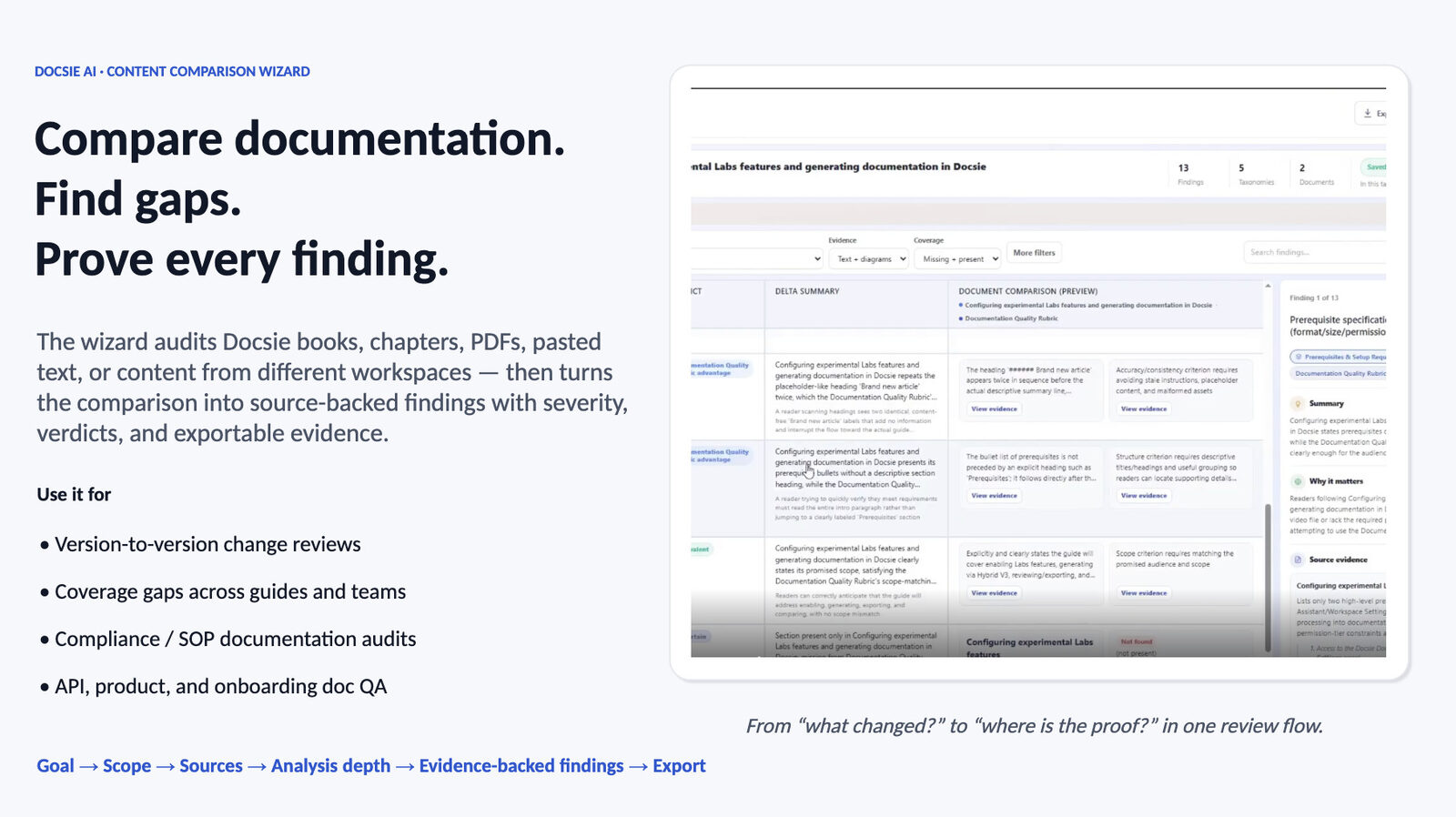
The Content Comparison Wizard doesn't just tell you two documents differ. It breaks the comparison into structured findings — each with a severity, a verdict, a delta summary, and source-verified evidence you can open, question, and export.
Pick what you're trying to understand: Differences, Consistency, Compliance against a standard, Coverage gaps, Changes between versions, Migration paths, or a standalone Documentation Quality audit — or describe a custom goal.
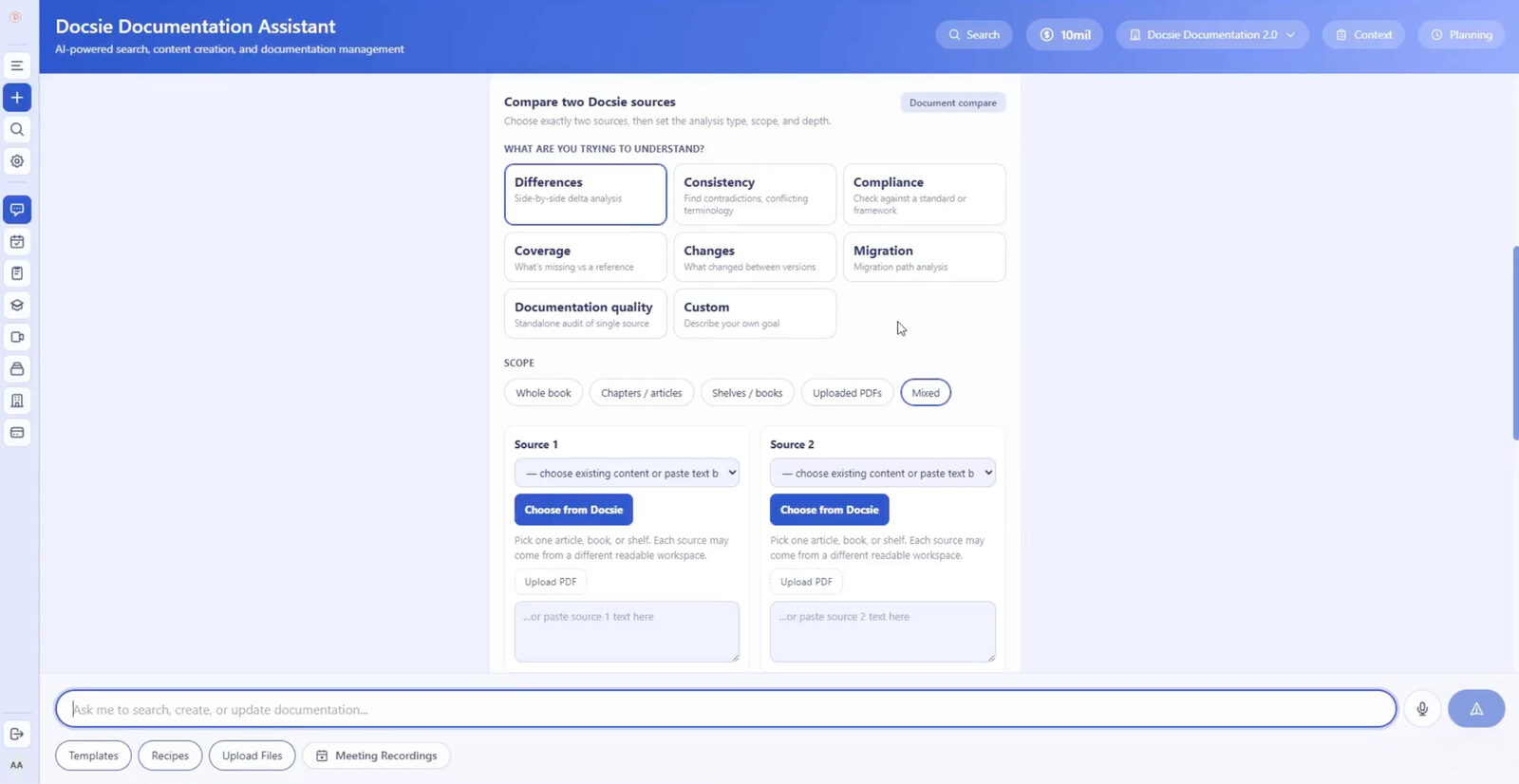
Docsie books, chapters, shelves, uploaded PDFs, pasted text, websites, even videos — and content from two different workspaces. Mix scopes freely: audit a book against a pasted policy, a PDF against live documentation, or two product demo videos against each other.
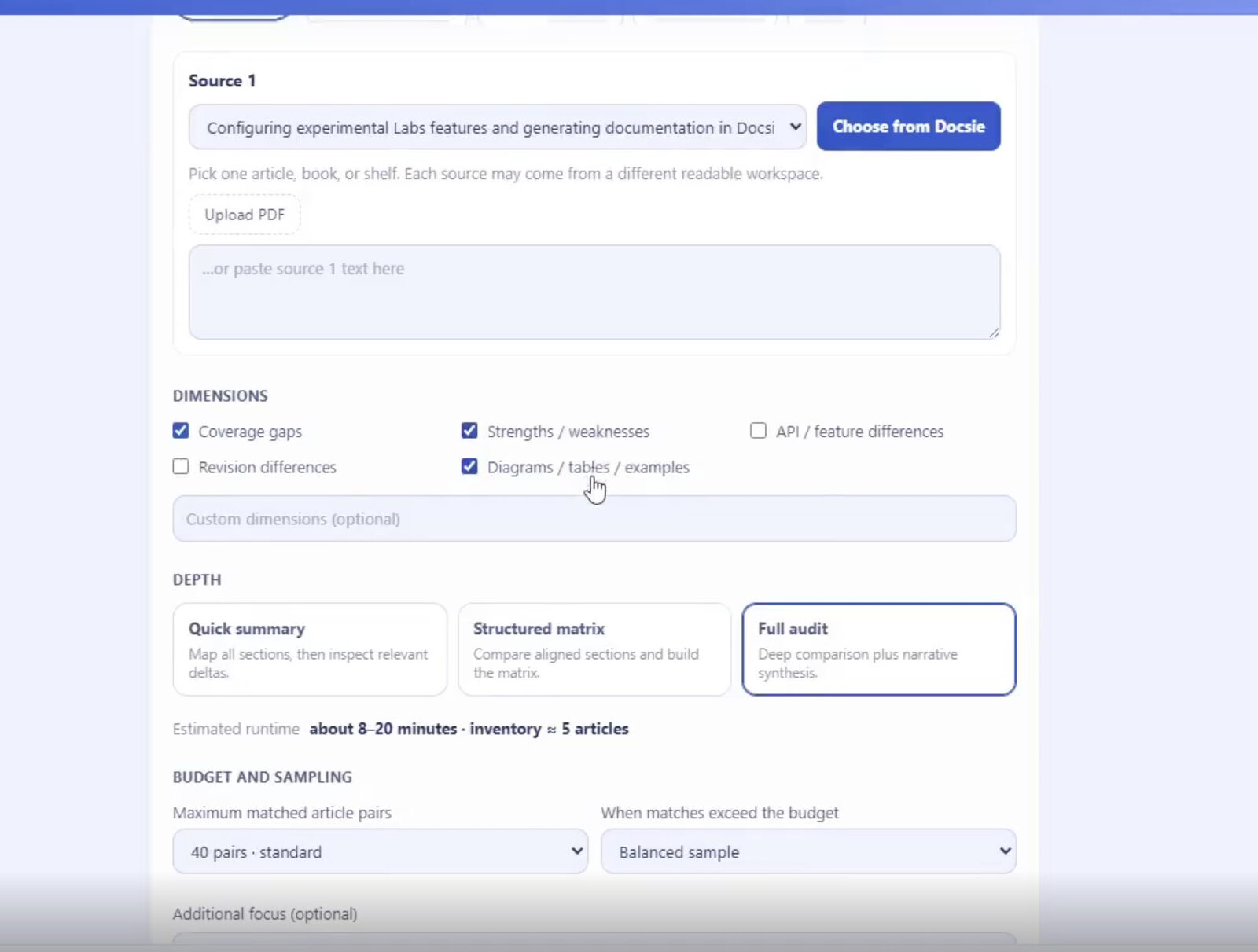
Select analysis dimensions — coverage gaps, strengths and weaknesses, revision differences, diagrams and examples, or your own custom dimensions — then choose Quick Summary, Structured Matrix, or Full Audit depth with budget and sampling controls.
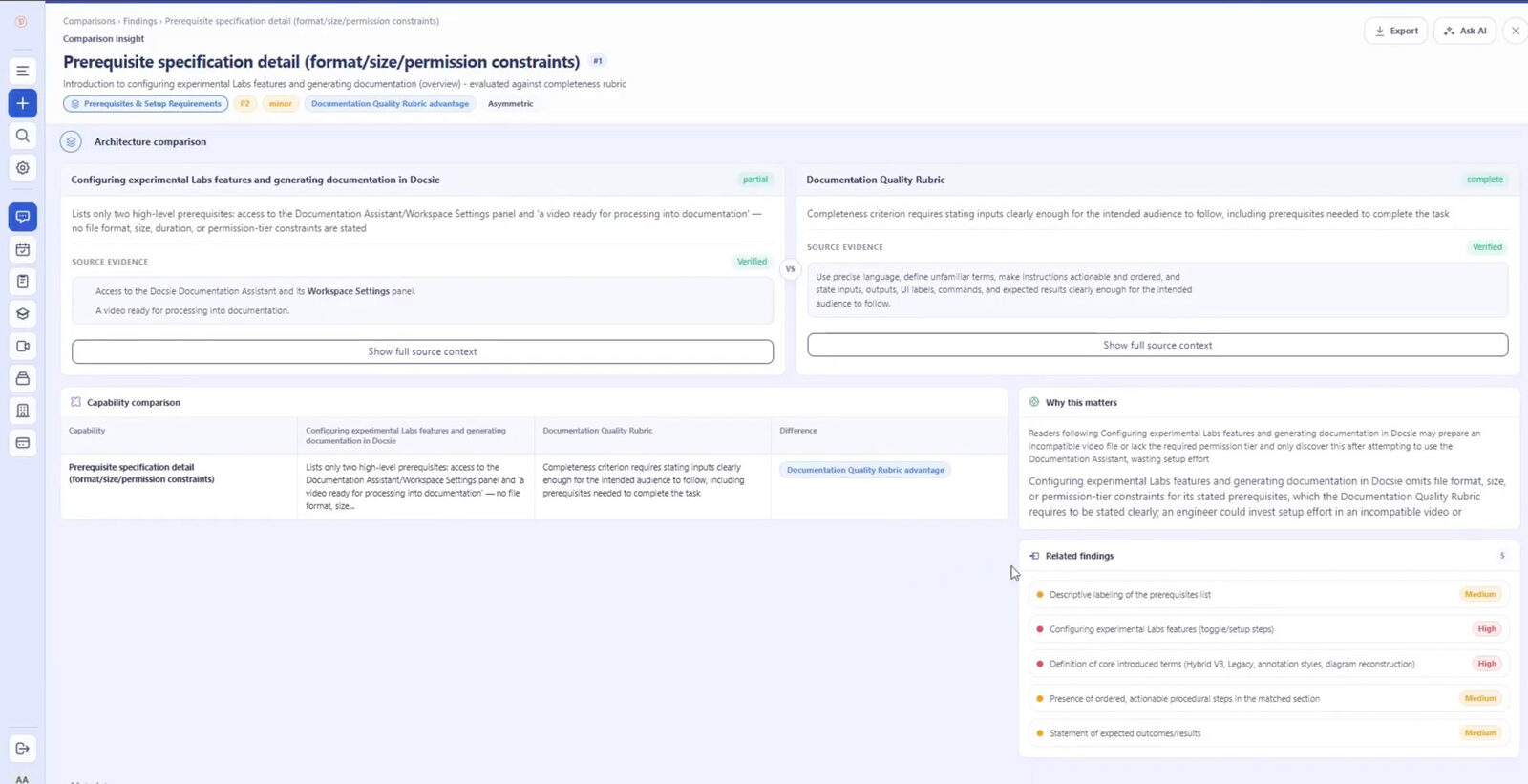
Every finding carries a severity, a verdict, a delta summary, a "why this matters" explanation, and verified source evidence quoted from the original documents. Filter findings, drill into related ones, or ask AI follow-up questions.
Send findings to Excel or your external reporting workflow. The comparison becomes a structured audit your team can act on — not a wall of highlighted text they still have to interpret.
Join forward-thinking teams using Docsie






_Leader_Small-Business_Leader.svg)


Your team is buried in version comparisons, contract redlines, and competitive analysis. Every comparison means opening multiple files, toggling between tabs, and manually tracking what changed.
Why Docsie
AI that actually understands what makes documents different—and why it matters to your decision.
Don't just see what changed—understand which changes impact your decision. Our AI identifies the differences that matter to your specific use case, whether you're reviewing vendor contracts, comparing product specs, or analyzing policy updates.
Stop building comparison spreadsheets manually. Docsie automatically discovers comparison dimensions, scores each option, and ranks them so your team can make confident decisions faster. Every stakeholder sees the same objective view.
Need to compare your product against competitors? Research mode pulls in public information automatically, building competitive comparisons without the manual research grind. Stay on top of your market without dedicating analyst hours.
See how product teams, procurement, and analysts use Docsie to eliminate comparison busywork.

Product managers need to track how their features stack up against competitors, but manually comparing datasheets and marketing sites takes days. Docsie's research mode pulls competitor information and builds instant side-by-side comparisons, so you can make roadmap decisions based on current market reality.

Procurement teams receive vendor proposals in different formats with inconsistent information. Building comparison matrices manually is tedious and error-prone. Docsie extracts key terms, pricing, and commitments from each proposal and generates standardized scorecards automatically.

Legal and compliance teams need to catch every change between contract versions or policy updates, but manual diff tools just highlight text changes without context. Docsie identifies substantive changes—new obligations, altered terms, shifted liability—and explains the business impact.
Everything you need to automate document comparison and analysis.
Clean visual interface shows exactly what changed between any two documents, versions, or sources.
AI identifies the right criteria to compare on—you don't need to define every field manually.
Automatically score and rank options based on your priorities so the best choice is obvious.
Pull in public information from competitor sites and sources to build complete comparisons.
Compare PDFs, Word docs, web pages, and more without converting or reformatting first.
Generate professional reports your team can review, comment on, and share with stakeholders.
Full Walkthrough
Watch a full comparison run end to end: goal, sources, dimensions, depth, the findings screen, filtering, Excel export — plus a coverage analysis and a differences analysis on real documentation.
7 min 58 sec
Common Questions
Everything you need to know about AI document comparison with Docsie.
Q: What types of documents can Docsie compare?
A: Docsie works with PDFs, Word documents, Google Docs, web pages, and most text-based formats. You can compare contracts, product specs, vendor proposals, policy documents, technical documentation—anything your team needs to analyze side-by-side.
Q: How accurate is the AI comparison? Will it miss important changes?
A: Docsie uses advanced AI trained specifically on document analysis. It catches both obvious changes (like different numbers or terms) and subtle ones (like shifted obligations or altered scope). You can review everything the AI flags, so nothing gets missed.
Q: Can I customize what dimensions Docsie uses to compare and score documents?
A: Yes. While Docsie auto-discovers common comparison dimensions, you can add custom criteria specific to your business needs. Define your own scoring rubrics, weight different factors, and create reusable templates for recurring comparison tasks.
Q: Is my confidential vendor or contract information secure?
A: Absolutely. Your documents are encrypted in transit and at rest. We don't use your proprietary documents to train AI models. You control who on your team can access each comparison, and you can delete any comparison data at any time.
Q: Can I use Docsie for compliance audits and regulatory comparisons?
A: Yes. Many compliance and legal teams use Docsie to compare policy versions, track regulatory changes, and maintain audit trails. Every comparison includes timestamps, version history, and detailed change logs suitable for compliance documentation.
Still have questions?
Book a DemoSee how Docsie can help your team today.
No credit card required.


