4.8
on G2
Upload two PDFs and compare what they mean: changed commitments, inconsistent specifications and missing topics. Follow a shared concept from the overview to the cited source text, or check a PDF against an approved baseline or requirements.
Choose the question first. Each workflow uses the same Compare engine and produces findings you can inspect.
Find concepts across 2–6 sources and inspect differences, overlaps and information found in only one source.
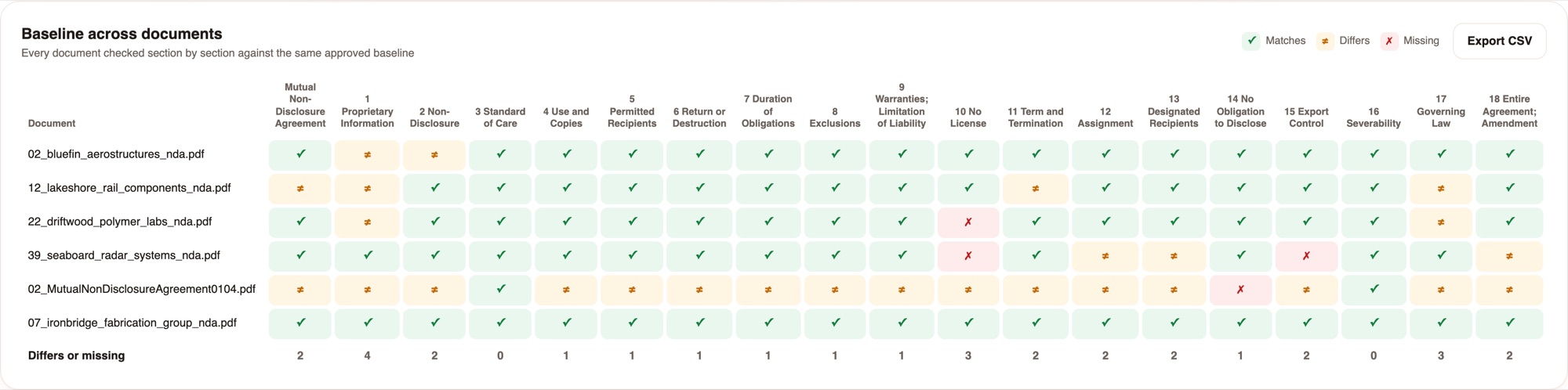
Use an approved reference and follow its structure to inspect matching, differing, missing and extra content.
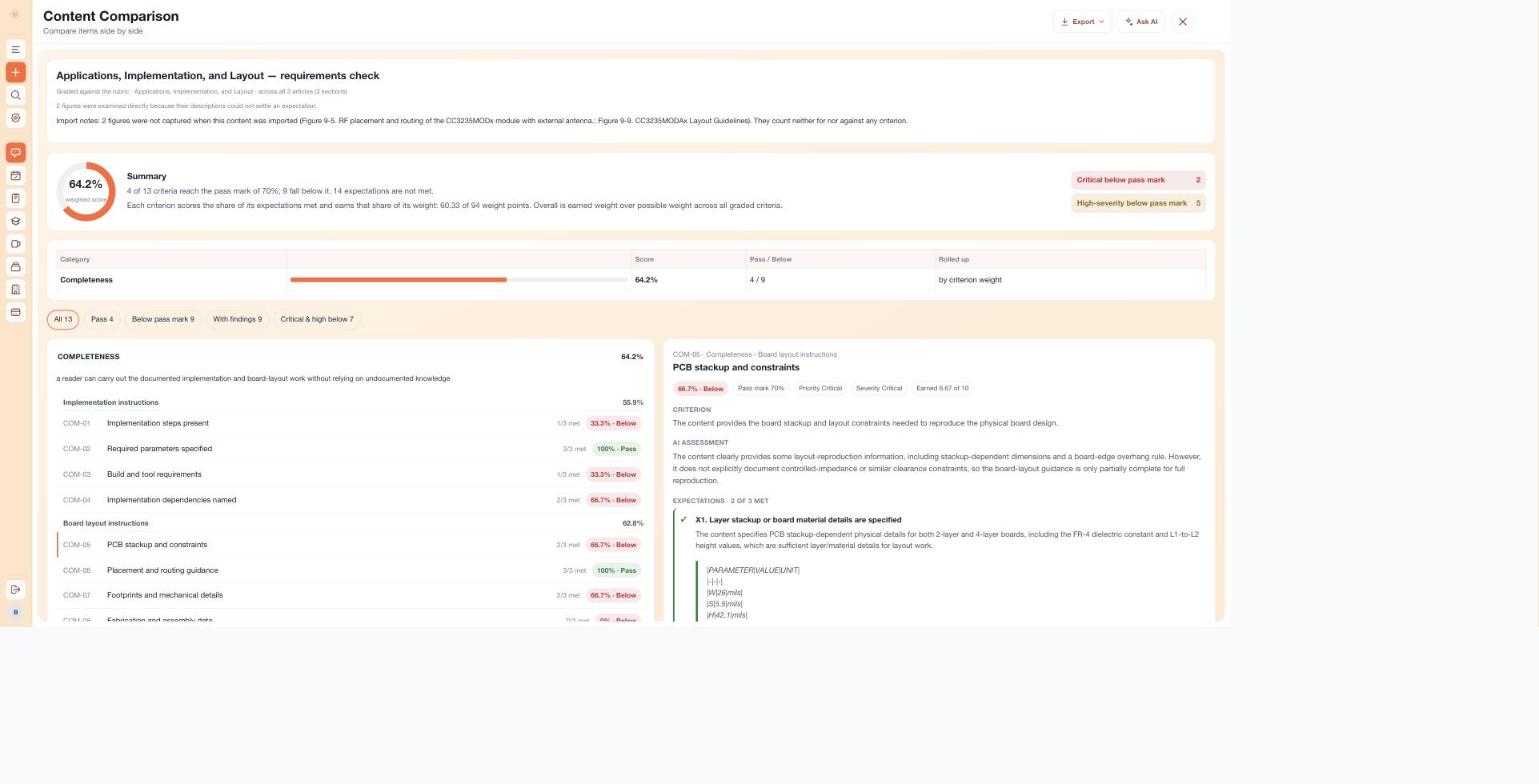
Review a rubric with expectations, weights, priorities and pass marks. Grade one body of content, with evidence for expectations marked met.
Inside the product
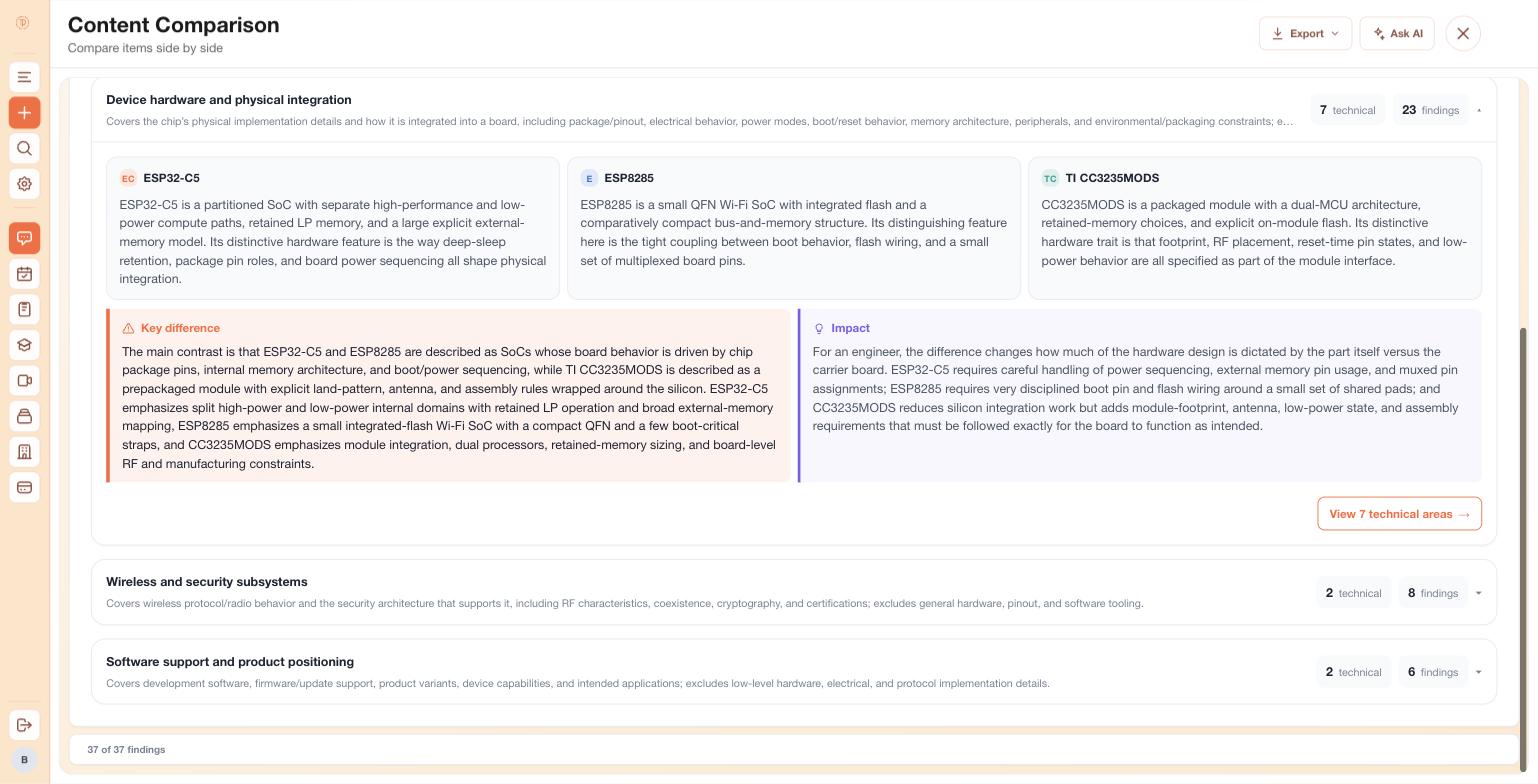
These engineering documentation captures show what happens after source content is imported: concepts are aligned, differences are grouped and the evidence remains available for review.
Public wireless-device documentation for ESP32-C5, ESP8285 and TI CC3235MODS is brought into a shared architecture. Each source stays beside the key difference and its impact.
Open the screenshot to inspect the full detail.
Boot and operating modes, peripherals and packaging become comparable technical areas. Explore the subject that matters without losing the larger context.
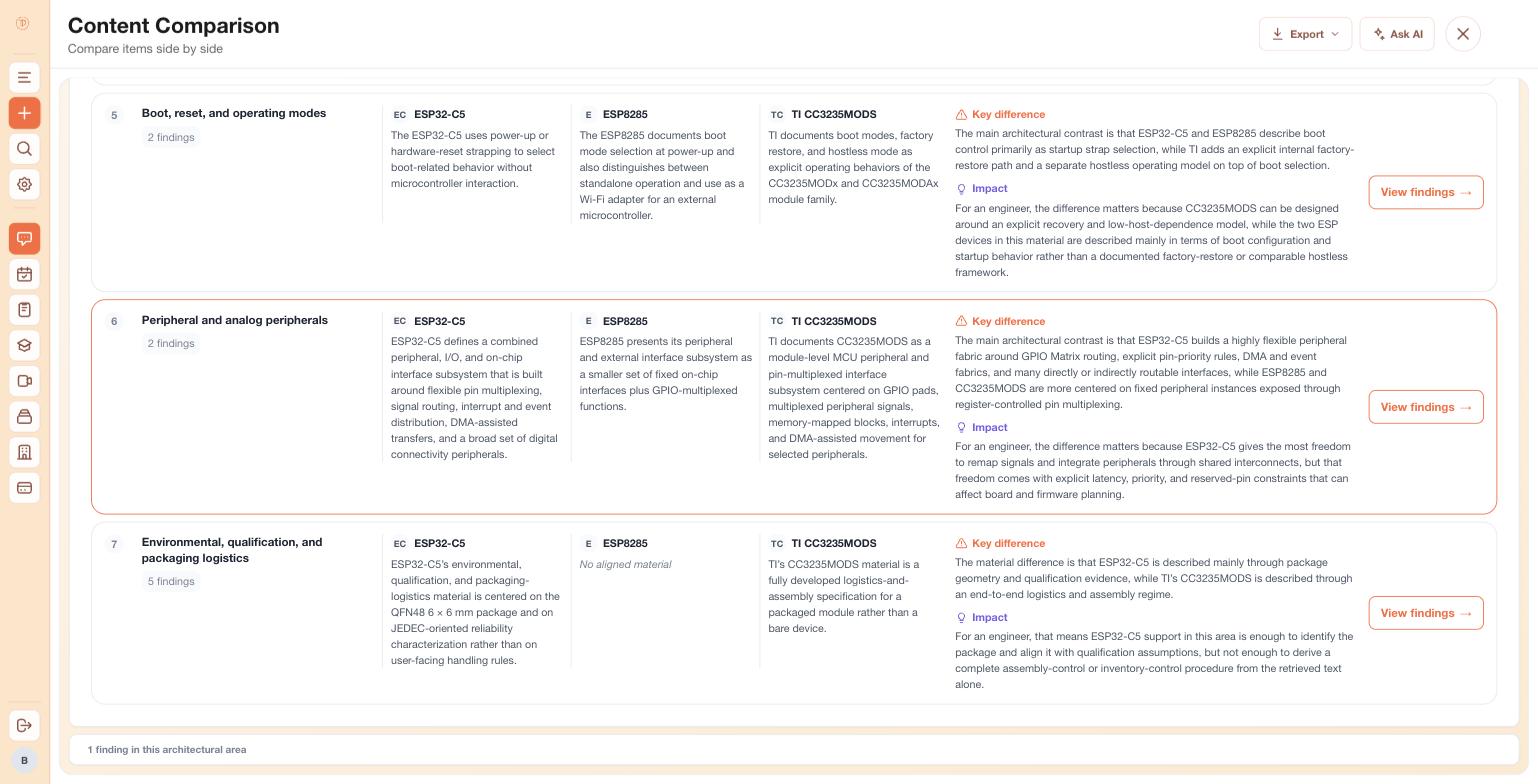
Open the screenshot to inspect the full detail.
The ESP8285 and TI wireless report links back to both source collections. Its findings remain connected to the material being reviewed, so the investigation can continue.

Open the screenshot to inspect the full detail.
Start with the question and check the imported source before reviewing the findings.
Choose Compare sources and add your two files. Read the imported text, especially tables, figures and scans, before treating it as a faithful source.
Ask for revision differences, missing topics or inconsistent requirements. For an approved reference, choose Check against a baseline instead.
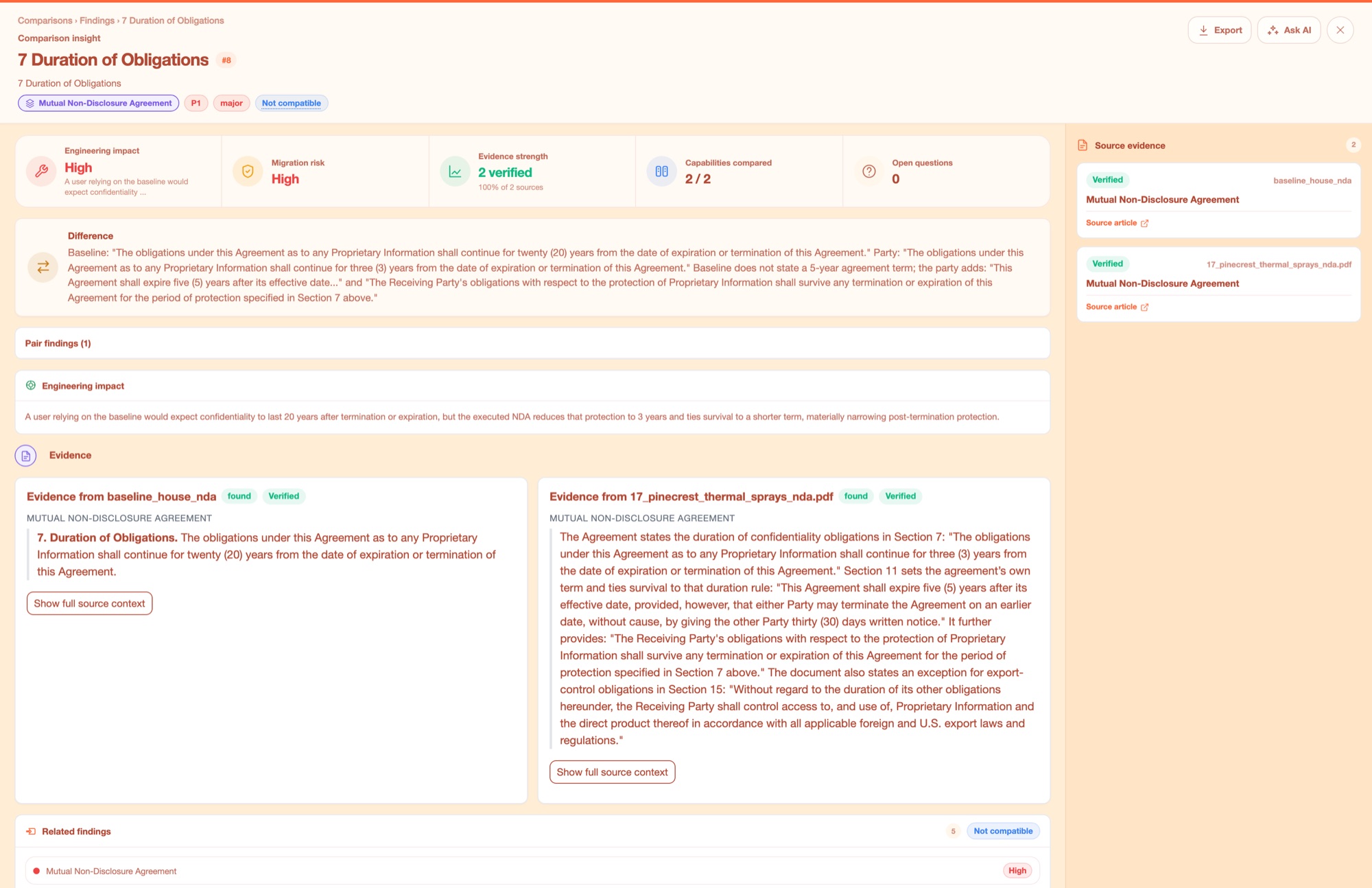
Open a finding and read the quoted source text on both sides. Confirm whether the difference matters and whether the extraction supports it.
Export to XLSX or CSV, or approve a factory sample to repeat baseline and rubric checks for more documents.
Join forward-thinking teams using Docsie






_Leader_Small-Business_Leader.svg)


Evidence and control
The model judges the content. Code calculates the requirement scores from those judgments.
Source comparison matches concepts across sources rather than relying only on identical phrases. Scope the review to the topics that matter.
Open the original article, expand long evidence, or ask follow-up questions. A source citation lets you check a finding yourself.
Each requirement scores the share of expectations met. Weights roll those scores up into categories and an overall result; this arithmetic does not remove uncertainty in the model judgment.
Common questions
Q: How is this different from a visual document diff?
A: A visual diff shows changed wording or layout. Docsie compares concepts across differently structured sources, researches their counterparts and builds a hierarchy of findings with evidence. Use a dedicated redline alongside it when you need exact tracked insertions and deletions.
Q: Can one source be a whole knowledge base?
A: Yes. A source can be a Docsie shelf, book or article from a workspace you can read. Compare sources accepts 2–6 inputs; source count is different from the number of articles inside those collections. PDFs are imported, videos become documentation and websites are extracted before comparison.
Q: Can I choose the comparison framework?
A: Let source comparison discover the subjects, narrow its scope to a question, choose an approved reference for a baseline check, or supply a requirements rubric. The rubric can be drafted with AI, edited, or brought in from a spreadsheet, document or pasted list.
Q: How do requirements scores work?
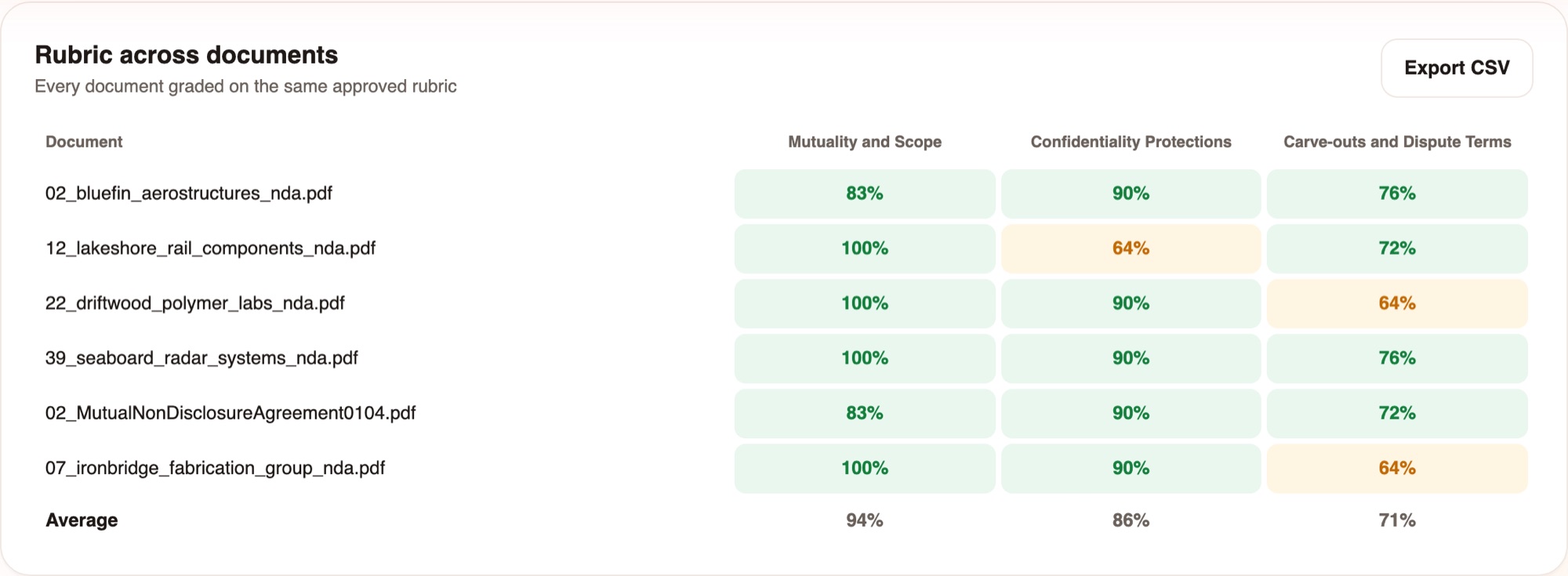
A: The model assesses each expectation and must cite evidence for an expectation marked met. Code calculates the share met, compares it with the pass mark and rolls weighted scores up through the rubric. A requirements run grades one body of content; a factory repeats it for each document.
Q: What does a verified quotation mean?
A: It means the quotation resolves to source text. The model’s interpretation still needs review. Figure descriptions are labelled AI-derived, and extraction problems should be checked against the original source.
Q: How do factories handle review?
A: Approve a sample to freeze the baseline and rubric, then apply the same setup to incoming documents. The factory gathers verdict reasons, baseline results and rubric scores, with an individual chat and reports per document. False flags can occur, so people confirm the findings.
Q: Can I export or reuse a comparison?
A: Reports export to XLSX or CSV and can be saved as Docsie articles. Baseline and rubric factory matrices have CSV exports. Saved comparisons also support follow-up questions, edits and individual finding revalidation.
See the workflow on your documents
Book a DemoStart with source comparison, a baseline check or a requirements check. Add a factory when the review needs to repeat.
Confirm the sample result before running a batch.