A "Before you start" list
The tools, parts and consumables the steps use, listed up front so the operator gathers them before the task begins.

Docsie AI SOP writer · Work instructions
Docsie turns shift notes, maintenance notes and process recordings into work instructions an operator can follow: a "Before you start" list of tools and parts, numbered steps that start with a verb, every value and warning from the source, and a screenshot for each step when you start from a video. It writes in your own template and saves a draft, so nothing reaches the floor until someone reviews and publishes it.
Examples on this page were recorded in Docsie's test environment with a fictional company (Acme Manufacturing) and fictional equipment. No customer documents.
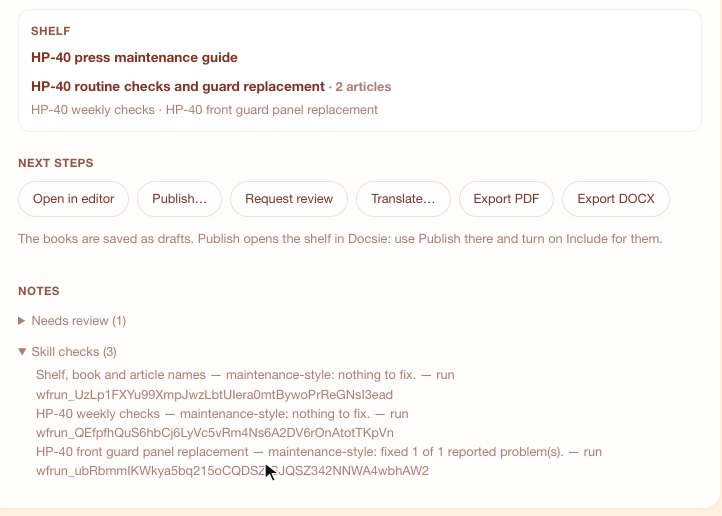
Notes for an HP-40 press became a weekly-checks procedure and a guard-replacement procedure. The house-style skill checked each one, and both stay drafts until someone requests a review or publishes.
What a work instruction needs
A work instruction is only useful if every one reads the same way. Docsie writes to your rules, so each task gets the same structure, terms and level of detail.
The tools, parts and consumables the steps use, listed up front so the operator gathers them before the task begins.
One action per step, in order. Values, warnings and checks from the source stay in the step they belong to.
A reference file in a skill maps what the notes say to part names and numbers, so "the blue drum" becomes HL-46 hydraulic oil with its part number.
When the notes leave out a value or a step, the instruction says so where the fact belongs and lists every open question for the reviewer.
The workspace glossary fixes product and equipment names, so PL400, PL 400 and PL-400 become one name in titles and every step.
A skill's check script reviews each instruction before you see it and reports what it fixed, right on the result card.
From rough notes
Pick the notes in your Docsie workspace and type /rewrite. Approve the outline, and Docsie writes each task into your template. These examples come from the walkthroughs below.
Visual work instructions
Upload a recording of someone doing the task, or link it from Loom, Vimeo or connected storage. Docsie writes the numbered steps and places the matching frame from the video under each one.
A seven-minute troubleshooting recording became a numbered guide. Step 5 says where to go and what the screen should show, with the frame from the video below it.
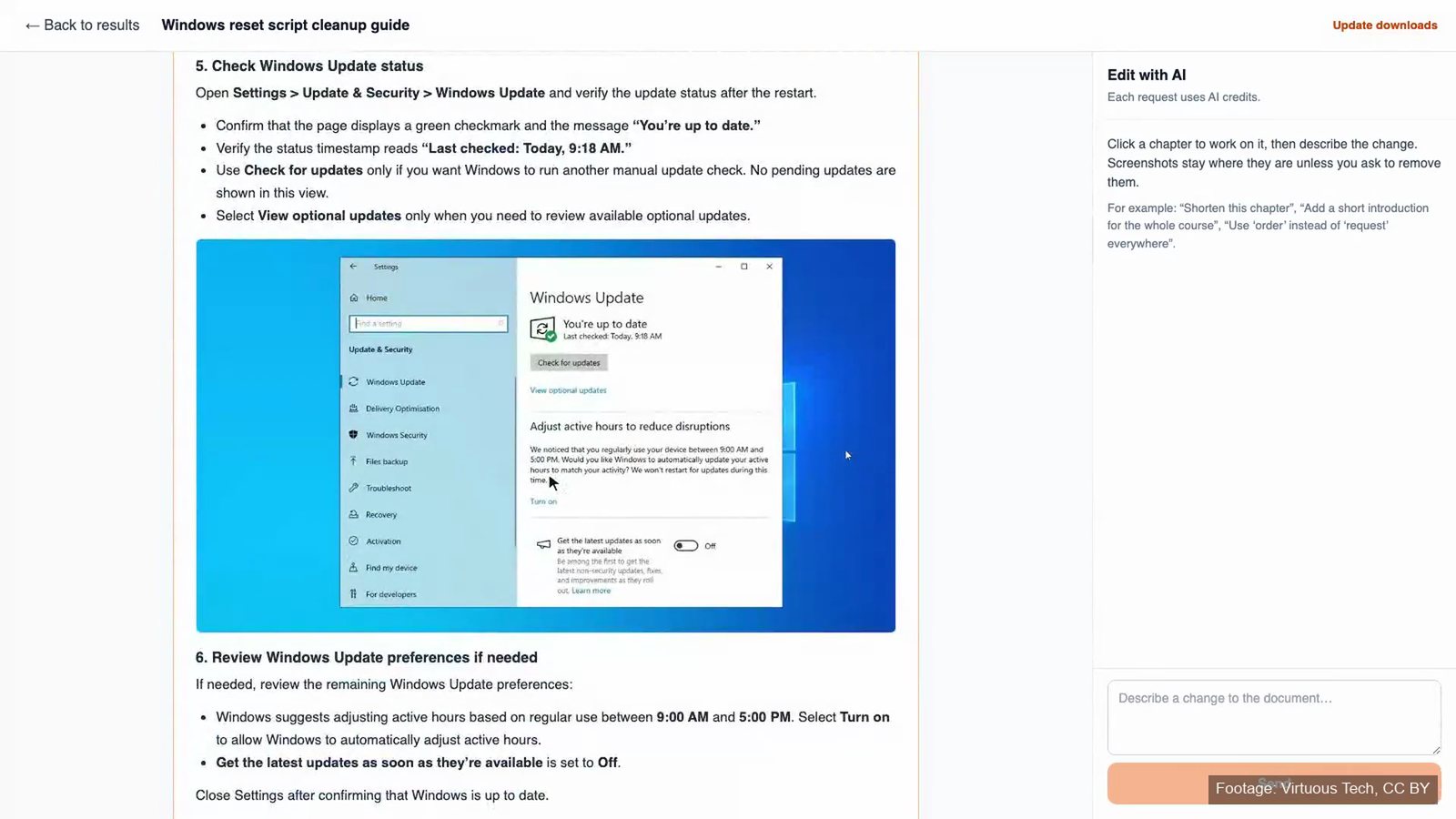
Footage: "Windows Update Error - How To Troubleshoot (2024 Update)" by Virtuous Tech (CC BY).
Your template
Upload your Word work-instruction form and a recording. Docsie writes every step with screenshots from the video, fills the fields the recording supports, and lists what's left for you, such as the approver. Your header and styles stay as the template has them. Rewrites from notes follow your numbered template too, and a teammate reviews the draft before it's released.
SOP vs work instructions
A standard operating procedure (SOP) describes a process: what happens, in what order, who is responsible and why, often across several roles. A work instruction covers one task inside that process at the level a person follows at the station: the tools and parts, each step, and the values, checks and warnings. An SOP usually points to several work instructions.
| SOP | Work instruction | |
|---|---|---|
| Covers | A whole process, often across roles | One task, done by one person |
| Answers | What, who and why | Exactly how |
| Level of detail | Responsibilities, sequence, controls | Tools, parts, numbered steps, values, checks |
| Used | To plan, train and audit | At the workstation, while doing the task |
Docsie writes both from the same notes and recordings, each in its own template.
Keep going
Rough notes into SOPs and manuals in your template, with skills, a glossary and review before publish.
AI SOP writer →A recording and your Word form in; the filled form out, with what's left for you listed.
Auto-fill work instructions →Turn a process recording into a numbered procedure with screenshots.
Videos to SOPs →FAQ
Software for writing, managing and delivering the step-by-step instructions people follow to do one task. In Docsie, you write work instructions from rough notes or a recording of the task, in your own template, then review them and publish them to a portal or export them to Word or PDF.
The tools, parts and materials the task needs; numbered steps in order, each one action; the values, checks and warnings that apply to each step; and screenshots or photos where a step is easier to see than to read. Docsie's examples start each instruction with a "Before you start" list and write every step as a numbered instruction that starts with a verb.
Yes. On a rewrite, pick a procedure template and Docsie writes each note into its sections. To fill a Word work-instruction form from a recording, upload the form and the video: Docsie writes every step with screenshots, fills the fields the recording supports and lists what's left for you.
Yes, when you start from a recording. Docsie writes the numbered steps and places the matching frame from the video under each step.
Docsie doesn't invent it. With a skill that says never to guess, the instruction gets an open question where each missing fact belongs, and the questions are listed again at the end for the reviewer.
No. A rewrite is saved as a draft. Request a review from a teammate, then publish the shelf when it's ready, or export it to Word or PDF.
Docsie work instructions
Walk through notes, recordings and your own work-instruction template with your procedures in mind.