Every line with its time
Everything said in the recording, in order, as readable text. Each line shows when it was said; click the time to play the video from there.
Transcribe video to text →
Docsie Video to Text
Upload a recording or paste a Loom, Vimeo or Google Drive link. Docsie's AI transcribes it, puts the time on every line, and lets you copy the text or download TXT, SRT or VTT. From the same video you also get a step-by-step document with screenshots.
No account needed to start. Read the first 12 lines of the transcript before you pay. Up to 2 hours per video.
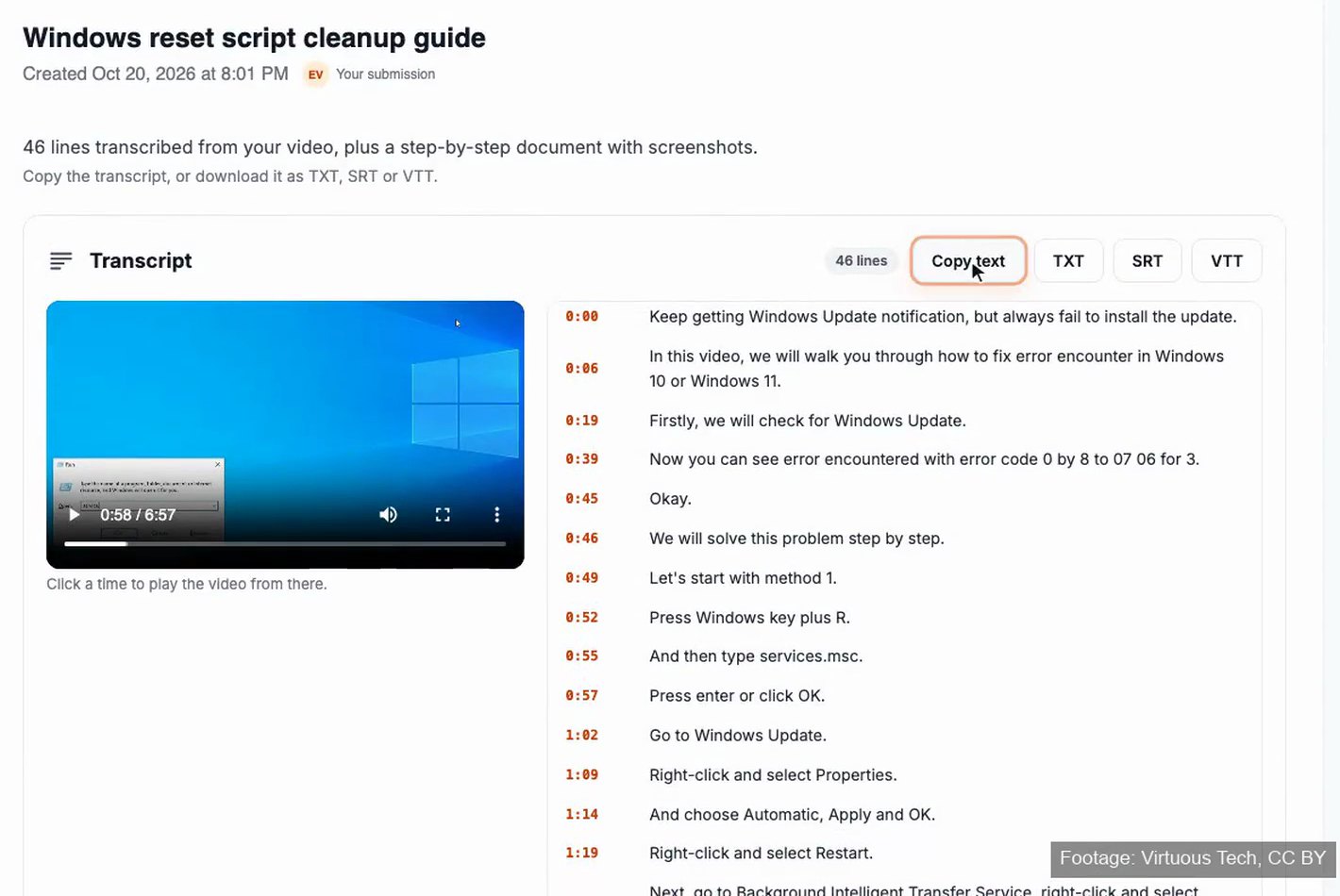
A real result on a 6:57 screen recording: 46 lines, each with its time. Click a time to play that moment, copy the text, or download TXT, SRT or VTT.
Start here
Upload up to 3 videos, or paste a Loom, Vimeo or Google Drive link. You don't need an account to start.
Drag & drop a video
MP4, MOV, WEBM, MKV, AVI · 10 to 20 minutes is ideal, up to 2 hours
Your video opened in a new tab. Finish there. Tab didn't open? Continue here
SOC 2 compliant. Your data is never used to train AI models.
What you get
Every video returns the same set of outputs, whatever kind of recording it is: a meeting, a lecture, an interview, a training session or a screen recording.
Everything said in the recording, in order, as readable text. Each line shows when it was said; click the time to play the video from there.
Transcribe video to text →Copy the text, or download plain text for notes and search, or SRT and VTT with a start and end time on every line for subtitles and captions.
Transcripts with timestamps →Docsie also writes the video up as numbered steps with screenshots taken from the recording. Edit it with AI, or download it as PDF, DOCX or Markdown.
Video to Docs →From the Windows Update recording above, Docsie wrote a cleanup guide: numbered steps, the exact settings path, what to confirm on screen, and screenshots from the recording. Ask for a change in plain language, such as "shorten this chapter", and the screenshots stay in place.
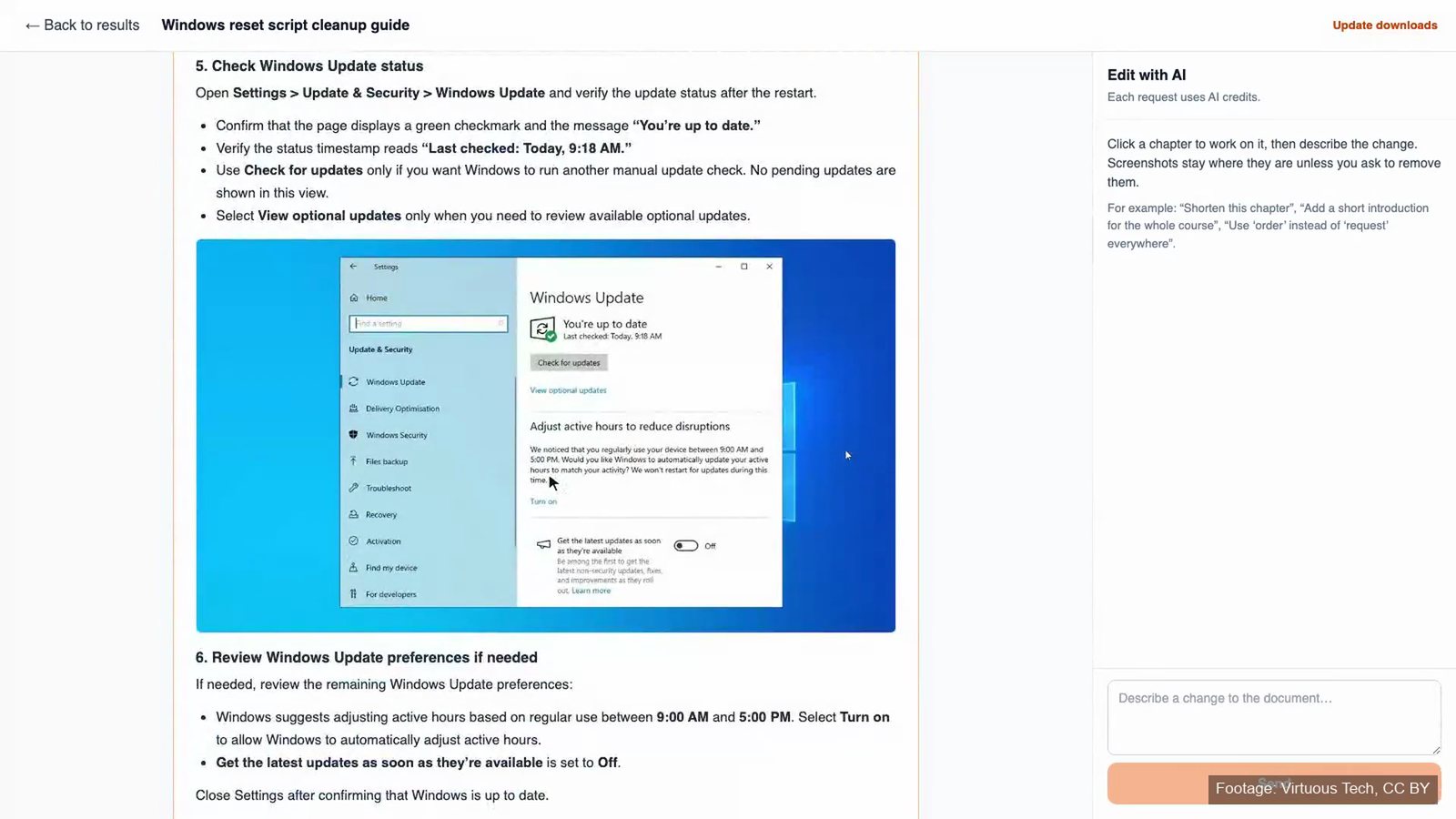
Product captures from Docsie, October 2026. Footage: "Windows Update Error - How To Troubleshoot (2024 Update)" by Virtuous Tech (CC BY). No customer footage.
Watch it work
A seven-minute screen recording, start to finish: add the video, wait for the email, then copy the transcript, download the files and open the document.
How it works
Upload up to 3 files (MP4, MOV, WEBM, MKV or AVI), or paste a Loom, Vimeo or Google Drive link. 10 to 20 minutes is ideal; up to 2 hours works.
You don't need an account to start. When you submit, Docsie sends a code to confirm your email.
Transcription runs in the background and can take up to an hour. Docsie emails you when the transcript is ready.
The first 12 lines show before you pay. Unlock to copy the full transcript, download TXT, SRT or VTT, and open the step-by-step document.
Transcript or something else?
"Video to text" can mean a few different things. Here's which Docsie tool gives you which kind of text.
| You need | What you get | Use |
|---|---|---|
| The words people say | A transcript with a time on every line, to copy or download as TXT | Transcribe video to text |
| Subtitles or captions | SRT and VTT files with a start and end time on every line | Transcript with timestamps |
| Text shown on screen | Error messages, labels, readouts and chat messages, copied as shown, with their times | Extract text from video |
| A how-to guide or SOP | Numbered steps with screenshots, in your own template | Video to Docs |
| The transcript inside your AI assistant | Claude, ChatGPT or Cursor runs Video to Text and reads the timed transcript in the chat | Video to text over MCP |
Guides and tools
A timestamped transcript of meetings, trainings, interviews, lectures and screen recordings.
Transcribe a video →Upload the MP4 as it is, with no audio extraction first. MOV, WEBM, MKV and AVI work the same way.
MP4 to text →When a wall of transcript isn't enough: the text plus a structured document with screenshots.
Video to text converter →What TXT, SRT and VTT are for, how they differ, and how to get an SRT file from a video.
Timestamps, SRT and VTT →Four ways to transcribe a video, from typing it yourself to AI, and how to check the result.
Read the guide →The words on screen rather than the words spoken: codes, labels, readouts and chat threads.
Extract on-screen text →Connect the Docsie MCP server and ask your assistant for a video's transcript, with times.
Video to text over MCP →SOPs, user guides and manuals written from a recording, in your own template.
Video to Docs →Record a walkthrough in the browser, then turn it into text or a guide.
Free screen recorder →FAQ
Video to text turns the speech in a recording into written words: a transcript. A useful transcript also keeps the time of each line, so you can find the moment in the video, and comes as files you can use, such as plain text or subtitle files.
Upload the video, or paste a Loom, Vimeo or Google Drive link, then submit and confirm your email. Docsie transcribes the recording in the background and emails you when it's ready. Copy the transcript, or download it as TXT, SRT or VTT.
Yes. Docsie uses AI to write out everything said in the recording, line by line, with the time of each line. From the same video it also writes a step-by-step document with screenshots of what was on screen.
You can upload a video without paying and read the first 12 lines of the transcript before you decide. The full transcript, the TXT, SRT and VTT downloads, and the step-by-step document come with the paid unlock.
MP4, MOV, WEBM, MKV and AVI files, up to 3 at a time, or a Loom, Vimeo or Google Drive link. Recordings of 10 to 20 minutes work best, and videos up to 2 hours are supported. YouTube links aren't available on free accounts.
Yes. Every line shows the time it was said, and you can click a time to play the video from there. The SRT and VTT files give each line a start and end time, so they work as subtitles and captions.
Video to text is for the words: a timed transcript, plus a step-by-step document from the same video. Video to Docs is for the document itself, such as an SOP, user guide or manual written in your own template.
A transcript covers what people say. For text shown in the video, such as error messages, labels, readouts or chat windows, use Docsie's video text extraction, which copies on-screen text with the time it appears.
Yes. Connect the Docsie MCP server and your assistant can run Video to Text and read the transcript, with the time of each segment, right in the chat. Each run uses your AI credits.
Yes. Download the recording from Zoom, Teams or Google Meet as a video file and upload it, or share it from Google Drive. Docsie transcribes it like any other video.
Docsie is SOC 2 compliant, and your data is never used to train AI models. If your team has specific storage or security requirements, book a demo to go through them.
Docsie Video to Text
Upload a video or paste a link, and read the first lines of the transcript before you pay.