
4.8
on G2
Map every requirement to exactly where it's satisfied in your proposal. Get cited evidence for each claim, weighted scoring against RFP criteria, and exportable matrices reviewers trust.

Join forward-thinking teams using Docsie






_Leader_Small-Business_Leader.svg)


When evaluators question where you addressed a requirement, you need answers in minutes—not days of document archaeology.
Real output
Six NDAs checked against one approved baseline. Every verdict resolves to the exact source text on both sides.
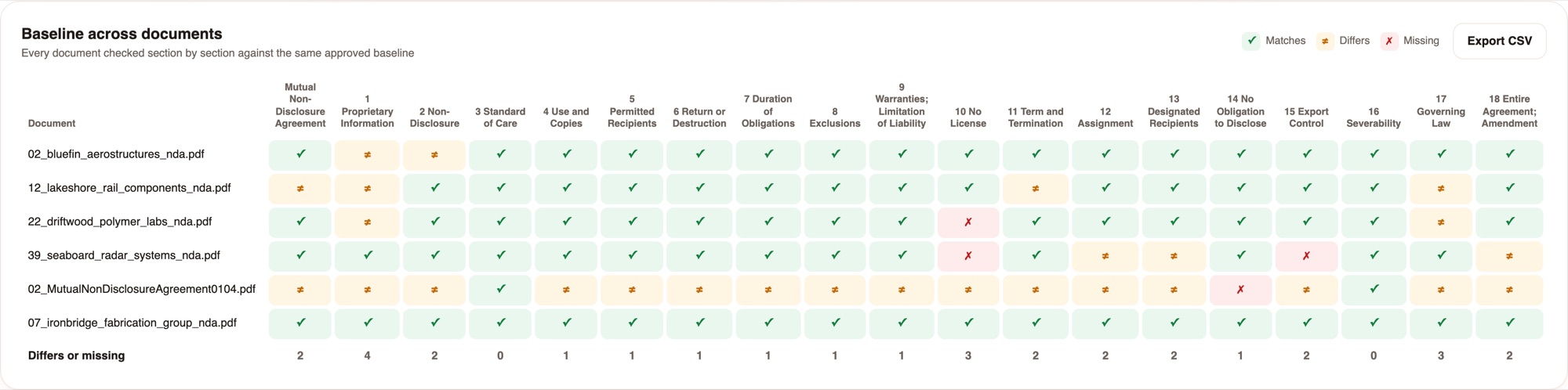
19 baseline sections across the whole intake. The totals row shows where the drift is concentrated - section 1 differs in 4 of 6 documents.
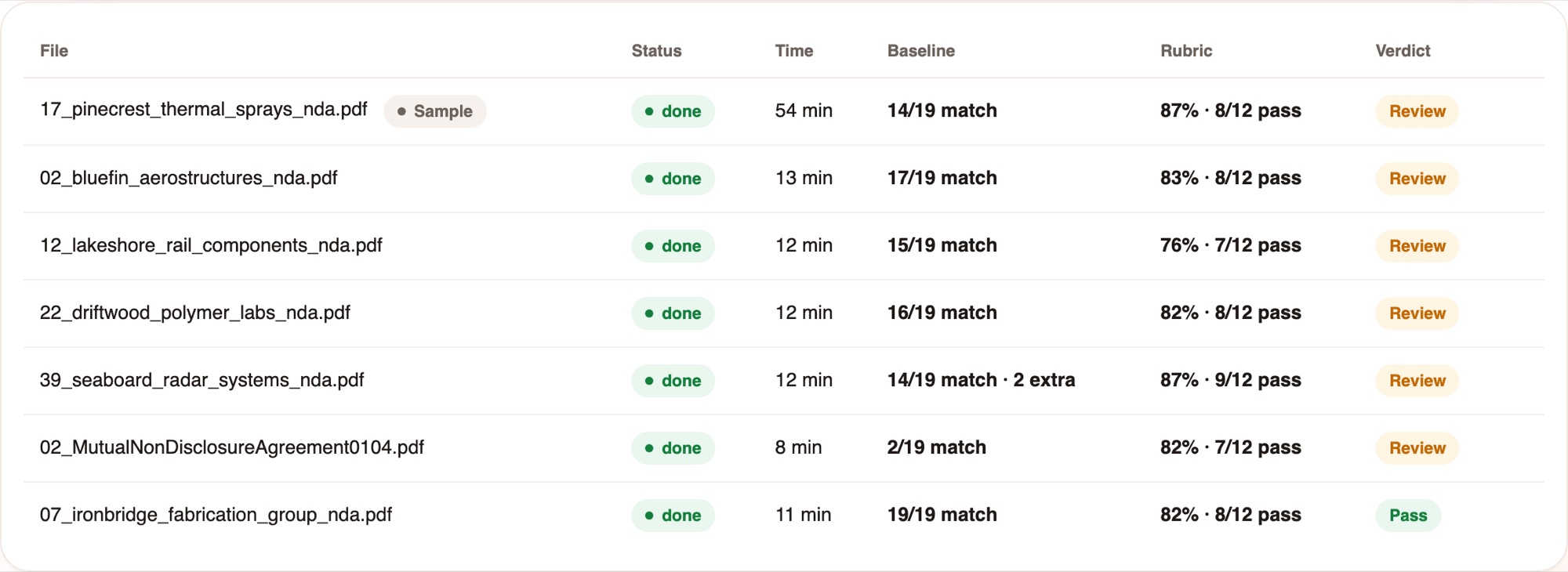
Baseline result, rubric score and the verdict in one line, so reviewers open only the exceptions.
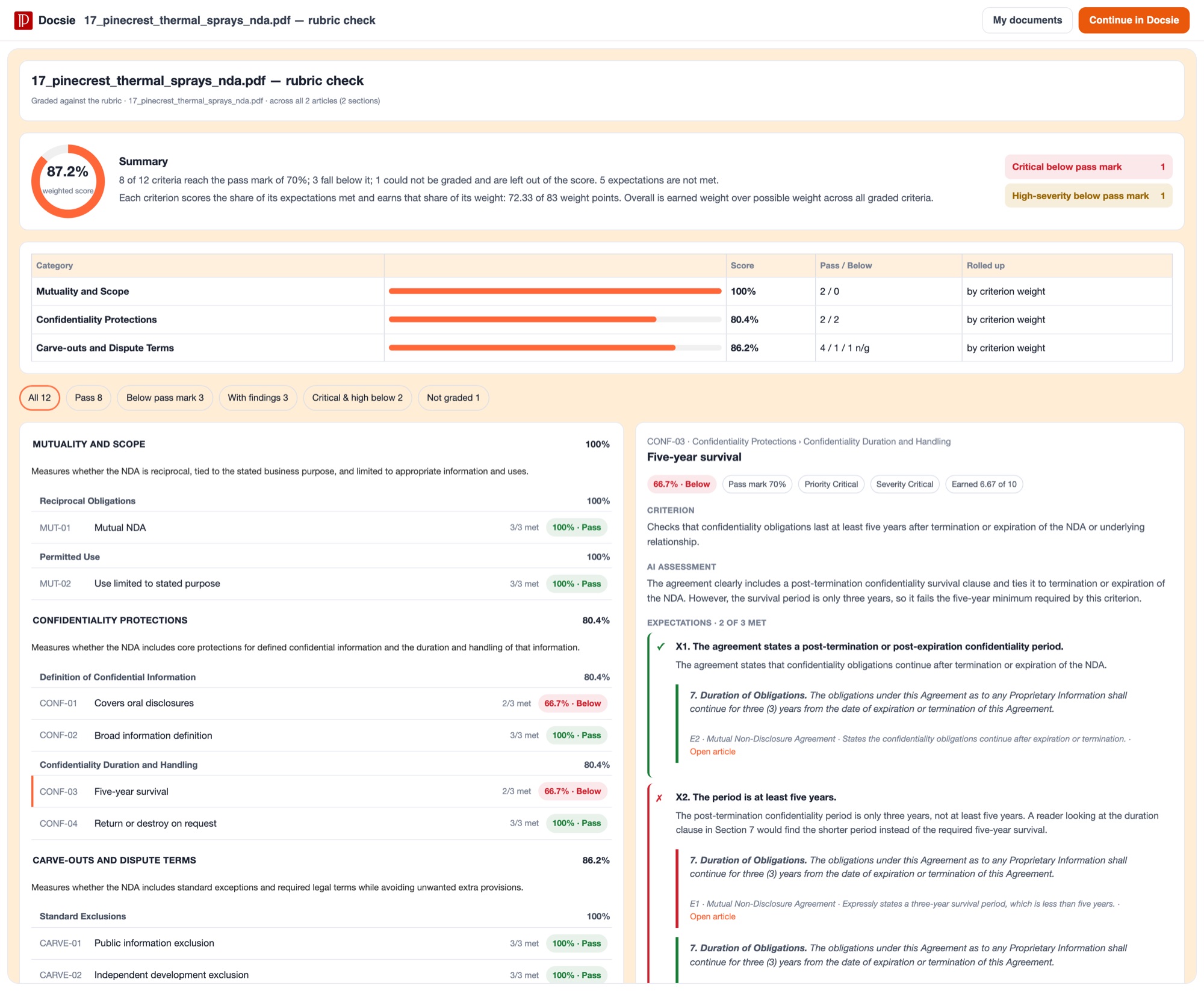
Each criterion scores the share of its expectations met. Scores roll up by weight. Critical and high-severity failures are counted separately.
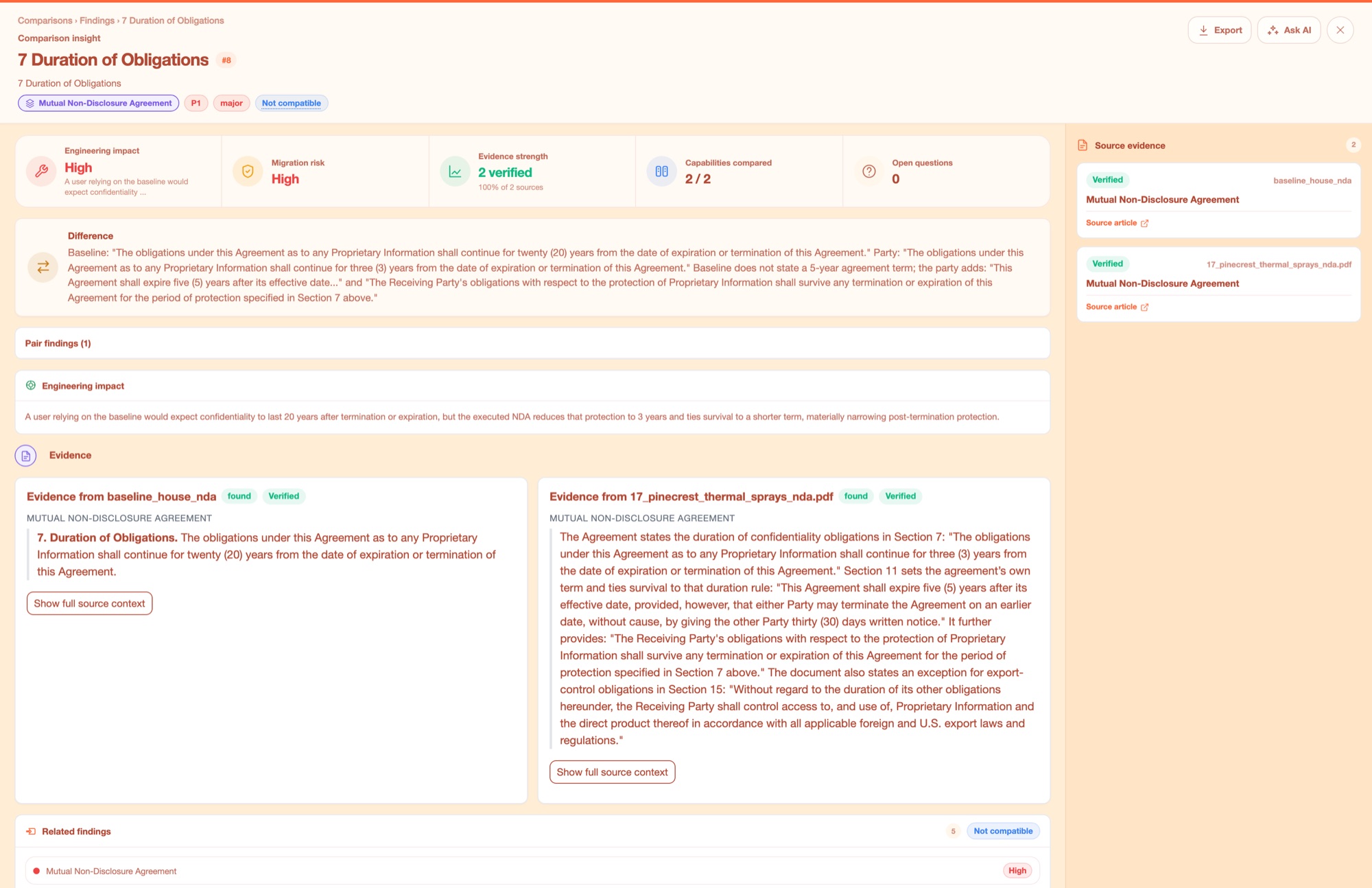
Both sides quoted in full, each marked Verified. This is the difference between a score you can act on and a number you have to re-check by hand.
Why Docsie
Every finding is backed by cited evidence from your actual proposal text—no black box, no guesswork.
Stop ctrl-F hunting through your proposal. Docsie's concept engine identifies where requirements are satisfied across multiple documents, even when the exact wording differs. Every match shows you the source text, not just a page number that might be wrong after the next revision.
RFPs don't weight all requirements equally—your matrix shouldn't either. Configure scoring rubrics that match evaluation criteria, see which requirements have weak coverage, and focus your rewrites where they'll move the score. Computed in code, so it's consistent across every review.
Responding to 50 similar RFPs? Approve one compliance matrix, freeze the baseline, and Docsie checks every subsequent proposal against that standard. Your team only reviews the exceptions—proposals that deviate or have gaps. Turn weeks of compliance work into hours.
See how proposal teams use compliance matrices to win contracts and pass audits.

Federal RFPs can have hundreds of shall statements buried across multiple documents. Compliance teams need to prove they've addressed every single one—and evaluators need to verify those claims quickly. Missing even one requirement can disqualify your entire proposal.

You're getting 20 vendor security assessments per quarter, each with 200+ questions. Most questions are identical across customers, but your answers are scattered across old RFP responses, data sheets, and certification docs. Compliance teams spend days rebuilding the same matrix.

Auditors want to see exactly where your procedures address each regulation. Pointing them to 'Section 4' isn't enough—they need the specific language. Manual compliance matrices take weeks to build and are out of date the moment your SOPs change.
Everything you need to build, verify, and export compliance matrices that withstand scrutiny.
Upload RFPs, SOWs, and regulations—Docsie finds every requirement across all sources.
Maps requirements to responses even when wording differs, with cited evidence for every match.
Configure evaluation criteria that match how your proposal will actually be scored.
See which requirements lack strong responses before you submit, not after you lose.
Approve one matrix, then check dozens of similar proposals against that frozen standard.
Generate camera-ready compliance matrices formatted exactly how evaluators expect them.
Common Questions
What proposal and compliance teams want to know before they start.
Q: How do I upload an RFP and get a compliance matrix?
A: Upload your RFP and your draft proposal (or previous responses if you're starting fresh). Docsie extracts requirements from the RFP and maps them to your proposal text, showing you exactly where each requirement is addressed—or where you have gaps. You can review the matches, adjust the scoring rubric, and export the matrix.
Q: Does Docsie work with scanned PDFs or just text documents?
A: Docsie works with both. If your RFP is a scanned image PDF, it uses OCR to extract the text first. The quality of scanned documents can vary, so you'll get better results with native text PDFs, Word docs, or other digital formats.
Q: Can I use this for non-RFP compliance, like regulatory mapping?
A: Absolutely. Teams use Docsie to map SOPs to FDA regulations, policies to ISO standards, or any scenario where you need to prove one set of documents satisfies requirements in another. If you have requirements and need to show where they're addressed, this works.
Q: Who can see the proposals and RFPs I upload?
A: Only users in your workspace. Documents aren't used to train models or shared outside your organization. You control access permissions, and you can delete documents anytime. Docsie is SOC 2 Type II certified.
Q: Can I get an audit trail showing who created or edited a compliance matrix?
A: Yes. Every matrix includes version history showing who made changes and when. You can export audit logs showing which documents were compared, what rubric was used, and who approved the baseline for factory runs.
Still have questions?
Book a DemoSee how Docsie can help your team today.
No credit card required.


