
4.8
on G2
Compare vendor contracts to your approved template in minutes. Every deviation flagged with exact citations. Stop reading identical clauses—review only what's different or missing.

Join forward-thinking teams using Docsie






_Leader_Small-Business_Leader.svg)


Legal ops and procurement teams waste hours manually comparing incoming contracts to house standards, missing subtle deviations that create risk.
Real output
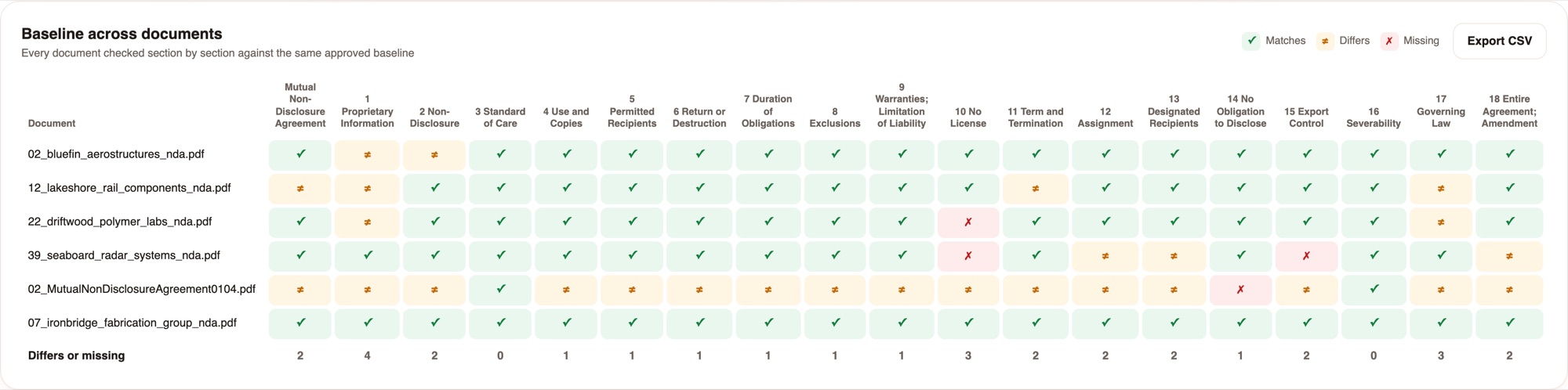
Six NDAs checked against one approved baseline. Every verdict resolves to the exact source text on both sides.
19 baseline sections across the whole intake. The totals row shows where the drift is concentrated - section 1 differs in 4 of 6 documents.
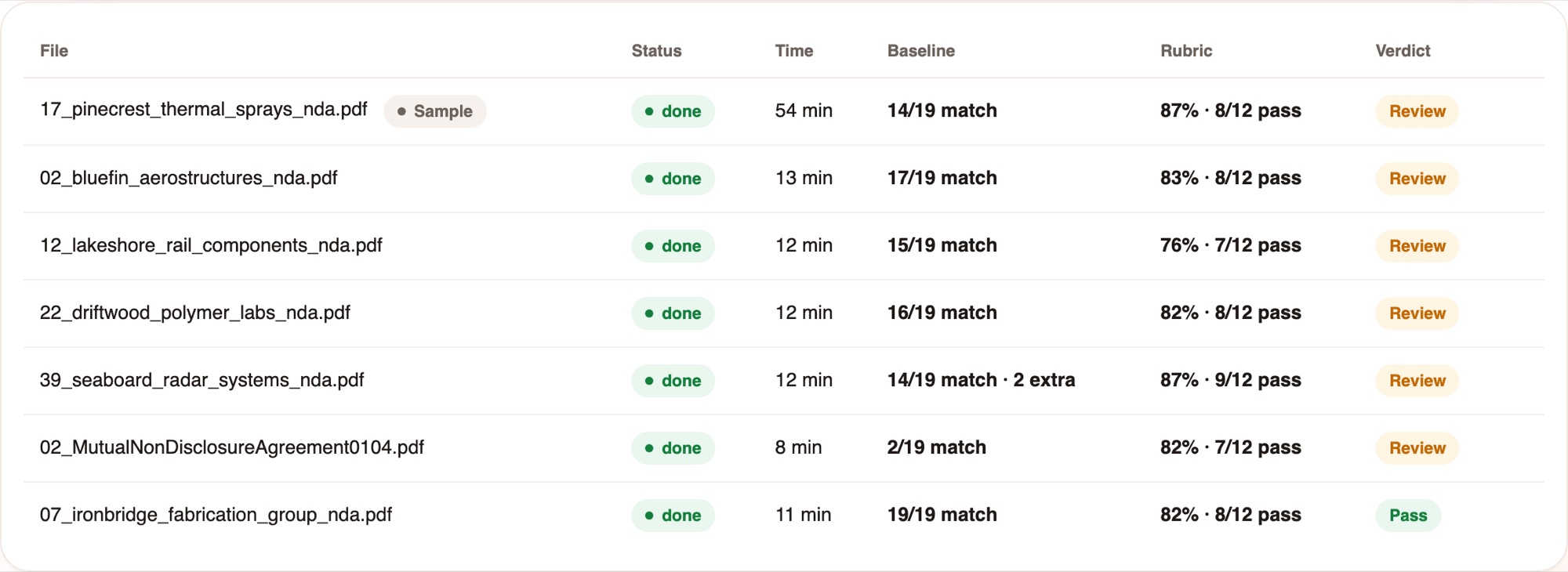
Baseline result, rubric score and the verdict in one line, so reviewers open only the exceptions.
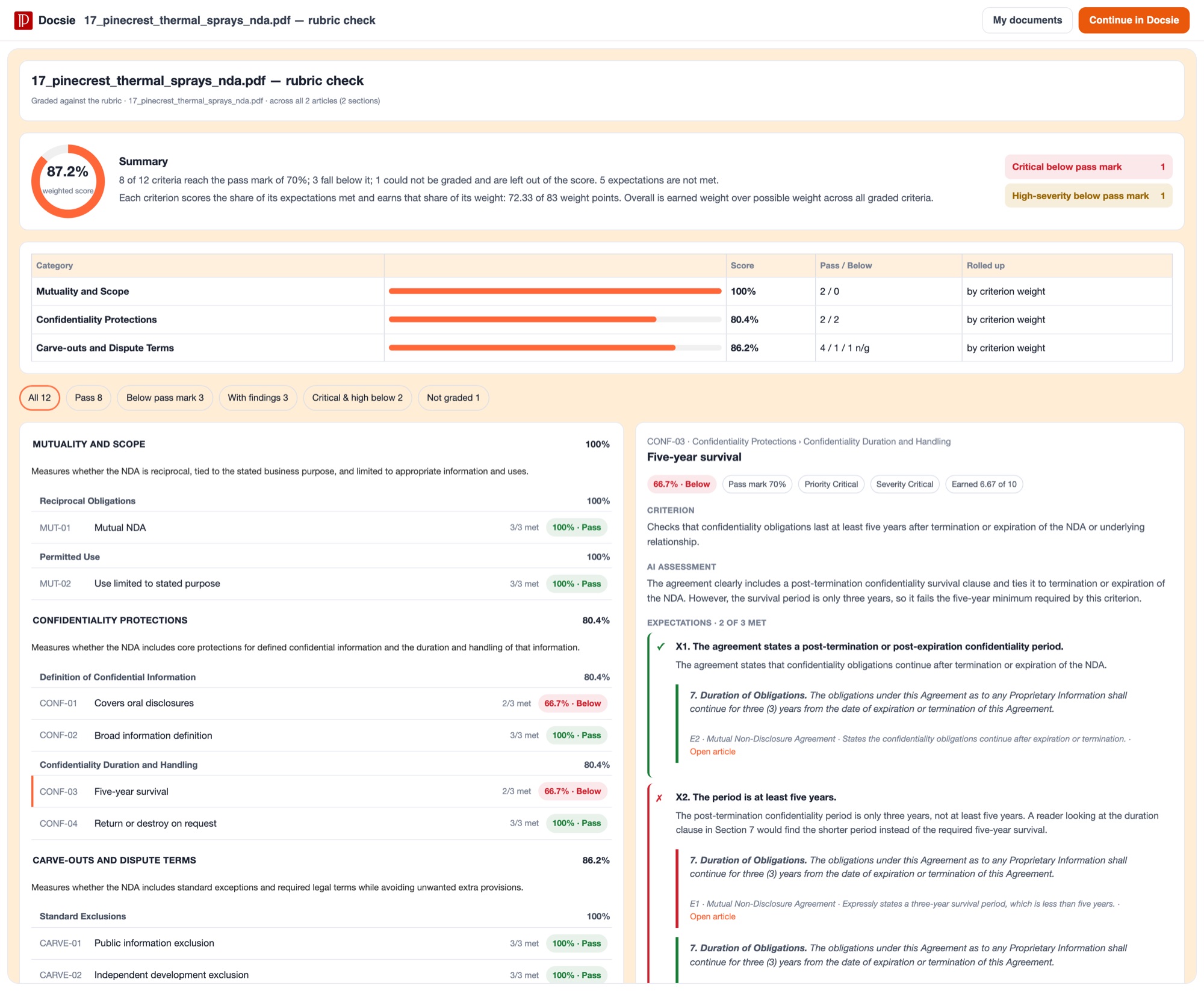
Each criterion scores the share of its expectations met. Scores roll up by weight. Critical and high-severity failures are counted separately.
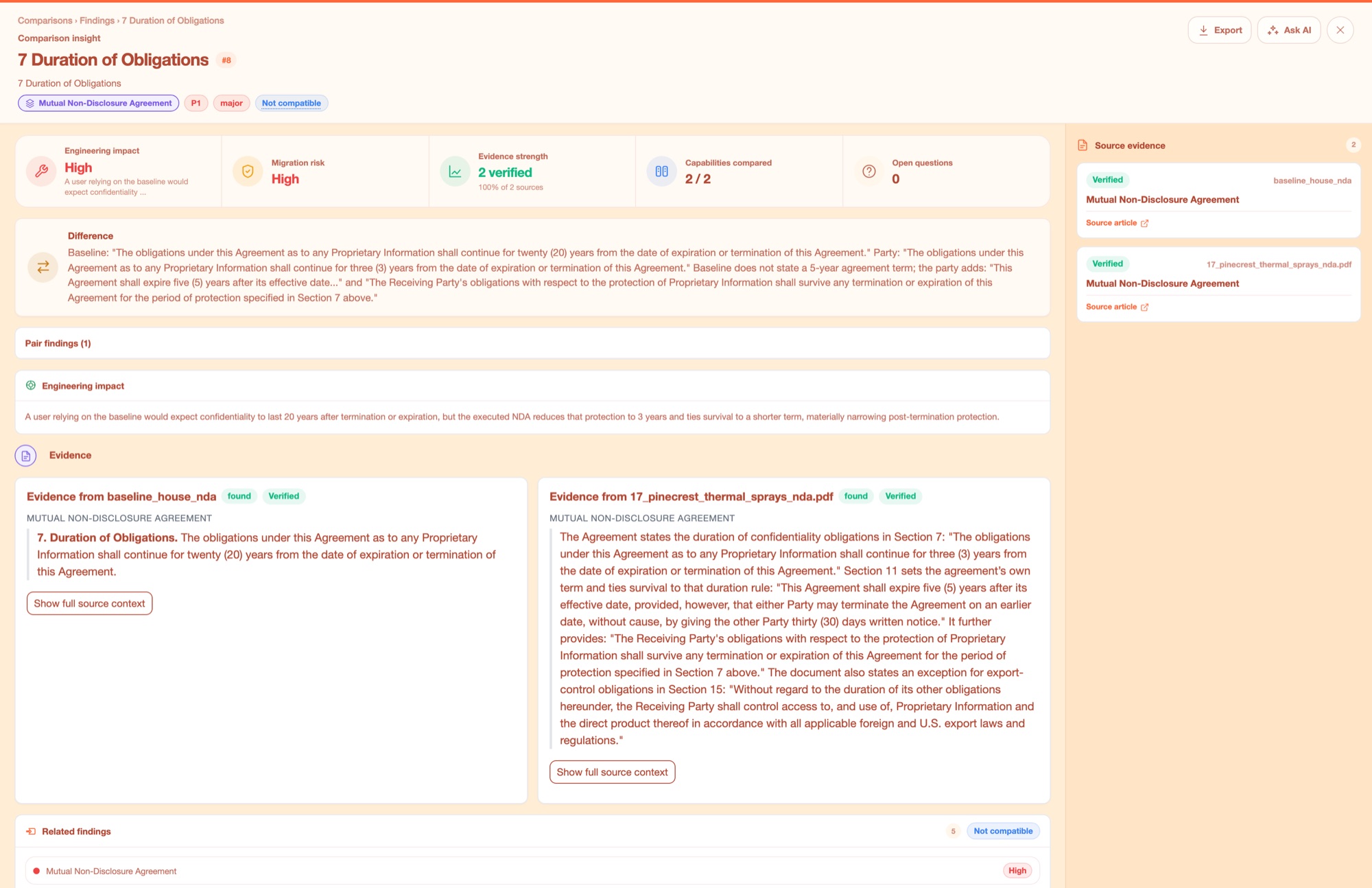
Both sides quoted in full, each marked Verified. This is the difference between a score you can act on and a number you have to re-check by hand.
Why Docsie
Automated comparison with cited evidence for every finding—no hallucinations, no guesswork.
Every deviation links directly to the exact clause in both the incoming contract and your house standard. No vague summaries—your team sees the actual language side-by-side. Scoring is computed in code, not guessed by AI, so you can trust the results.
Approve your baseline once, then every contract after that is checked against the same standard. Junior staff can confidently process routine agreements while senior counsel focuses on material deviations. No more inconsistent interpretations or missed red flags.
During M&A, RFP season, or vendor onboarding surges, run hundreds of contracts through the same review engine. Your team reads only the exceptions—contracts that conform to your standard flow through automatically with full documentation of the review.
Legal ops and procurement teams use Docsie to scale contract review without sacrificing quality.

Your procurement team receives dozens of vendor-drafted NDAs and MSAs every month. Instead of sending every agreement to legal, run them through Docsie to flag deviations from your house form. Legal reviews only the contracts with material differences.

During fiscal quarter-end or RFP season, sales generates more customer redlines than legal can review manually. Docsie compares each redlined contract to your approved playbook, surfacing only the deviations that fall outside approved fallback positions.

Post-acquisition, you inherit hundreds of customer and vendor contracts that need review against your house standards for integration. Docsie compares the entire portfolio to your templates, flagging high-risk deviations and helping you prioritize renegotiation efforts.
Everything you need to review contracts against your house standard at scale.
Upload your approved template and compare any incoming contract to see exactly what's different, missing, or added.
Every finding links to the precise clause in both documents—no vague summaries or hallucinated language.
Define what matters most—liability caps, governing law, notice provisions—and score each contract against your rubric.
Review multiple vendor proposals or track changes across negotiation rounds side-by-side with your standard.
Approve your baseline once, then process hundreds of similar contracts with the same review automatically applied.
Contracts that conform to your standard pass through with documentation—your team reads only the deviations.
Common Questions
What legal ops and procurement teams want to know about AI contract review.
Q: How long does it take to set up contract review for our house standard?
A: Upload your approved template, define which clauses matter most (liability, IP, termination, etc.), and set your scoring rubric. Most teams are running their first comparison within an hour. Once you approve the baseline, it's locked and applied consistently to every contract.
Q: What if our house standard has approved fallback positions?
A: You can define multiple acceptable variations for each clause type—for example, three approved liability cap ranges or two acceptable governing law jurisdictions. Docsie flags deviations outside those guardrails, not legitimate fallback positions your team already approved.
Q: Can we use this for contracts that aren't based on our template?
A: Yes. You can compare any two contracts to see differences, or check a third-party contract against a list of required terms (must-haves like liability caps, insurance minimums, data protection clauses). The tool adapts to vendor paper, customer redlines, or acquired contracts.
Q: Where is our contract data stored and who can access it?
A: Your contracts and baselines are encrypted at rest and in transit. Access is controlled by your team's permissions—only users you authorize can see specific contracts or baselines. Docsie doesn't train models on your proprietary contract language or share it with third parties.
Q: How do we maintain an audit trail for contract approvals?
A: Every comparison generates a report showing what was checked, which deviations were found, and the scored results with citations. These reports are timestamped and stored with the contract record, so you can demonstrate to auditors or executives exactly how each agreement was reviewed and approved.
Still have questions?
Book a DemoSee how Docsie can help your team today.
No credit card required.


