Pick the sources
Type /rewrite in the AI assistant, choose the notes, name the guide and add any writing instructions. Optionally pick a template, a skill and reference material.

Docsie AI SOP writer
Pick shift notes, engineering notes or old drafts in your Docsie workspace and type /rewrite. You approve an outline, then Docsie writes the books and articles in your own template, keeping every value and warning from the sources. Skills, a glossary and reference files hold it to your rules, and nothing reaches readers until someone reviews and publishes it.
Every example on this page was recorded in Docsie's test environment with a fictional company (Acme Manufacturing). No customer documents.
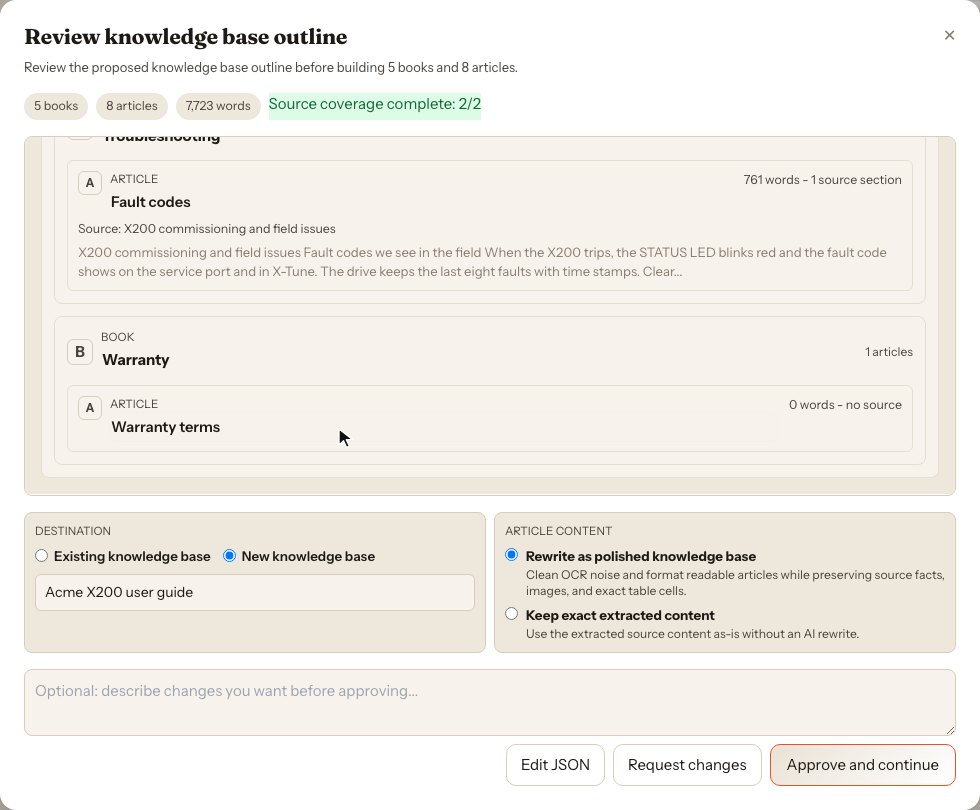
Engineering notes on a motion controller, rewritten into a five-chapter user guide. Each article lists its source; the Warranty page has none, so nothing is invented for it.
How it works
The rewrite works on content already in your workspace: rough notes, shift logs, older articles and drafts.
Type /rewrite in the AI assistant, choose the notes, name the guide and add any writing instructions. Optionally pick a template, a skill and reference material.
Docsie proposes the books and articles, each with the sources it will use. Approve it, or ask for changes first.
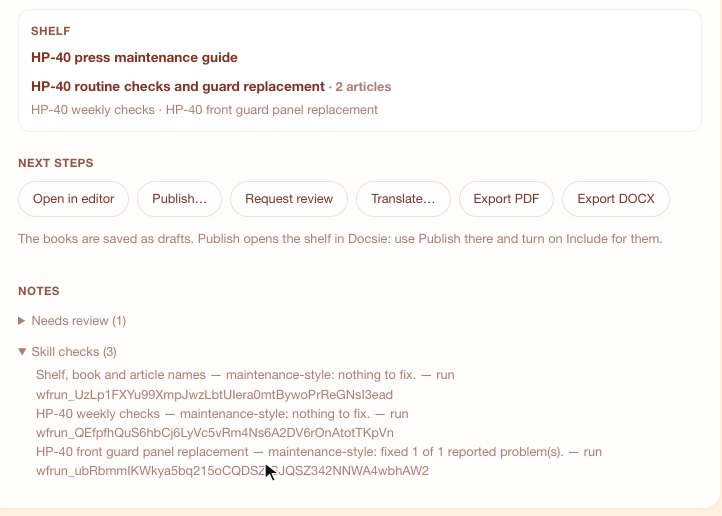
The guide is saved as a draft. From the result card, open it in the editor, request a review, translate it, export PDF or Word, or publish.
Notes vs SOP
Examples from the videos on this page, recorded with a fictional company and fictional equipment.
Write in your template
Notes arrive in bench order, not reading order. The rewrite puts each fact where your template says it belongs, and when the notes are silent it says so instead of guessing.
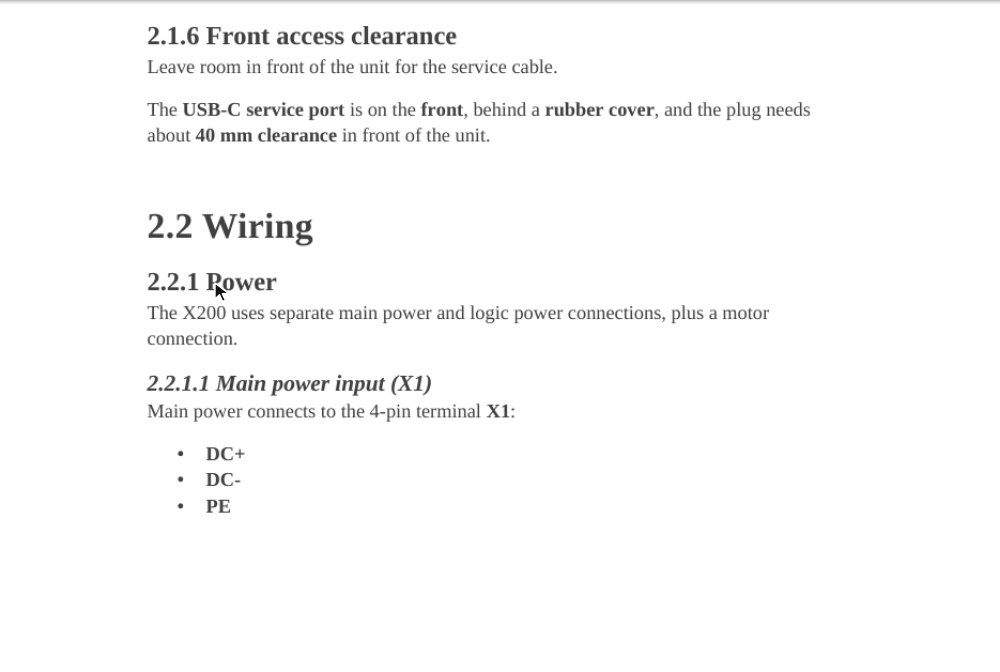
With "Number exports as one guide" on, Export DOCX numbers the user guide from its chapters and sections: 2.2 Wiring, 2.2.1 Power, 2.2.1.1 Main power input.
Skills and reference files
A Docsie skill is a folder: a SKILL.md with a name, a description and your rules in plain sentences, plus reference files with facts the writer may use and an optional check script. Upload it in Skills & Agents, pick it on a rewrite, and the planner, the writer and the checks follow it.
The skill from the first tutorial. A reference file, parts.md, maps what the notes say to part names and numbers, so "top it up from the blue drum" becomes HL-46 hydraulic oil with its part number.
---
name: maintenance-style
description: Acme house style for maintenance procedures.
  Numbered steps, a "Before you start" list, and parts
  named as parts.md names them.
---

# Maintenance style

Write for Acme maintenance technicians.

- Start each article with a section "Before you start"
  that lists the tools and parts its steps use.
- Write every step as a numbered instruction that
  starts with a verb.
- Name each part and consumable the way parts.md
  names it, with its part number the first time it appears.
- Keep every value, warning and check from the sources.
Glossary and checks
Rules tell the writer what to do; a check looks at what it actually wrote. The workspace glossary fixes product names and terms in every rewrite, and a skill's check script verifies each article before you see it.
One check for the shelf, book and article names and one per article. Two had nothing to fix; in the guard procedure, the check found a person's name where a role belongs, and the editor fixed it.
Review, export and publish
A rewrite is saved as a draft. Ask a teammate to review it, export it for a supplier or an audit, then release it to your portal when it's ready.
Pick your starting point
Numbered, verb-first steps with the parts, tools and checks your team uses, in your template.
Work instruction software →Example SKILL.md skills with rules, reference files and a check script.
SKILL.md examples →Chapters and sections from your template, exported to Word with real numbering.
User manuals →Pick a handbook as reference material; its facts land in the right steps and it stays as it was.
AI technical writer →A workspace glossary with wrong spellings, CSV import and style rules, applied to every rewrite.
Style guide →Chapter types with their own skill: procedures one way, the overview another.
Manufacturing SOP templates →Request a review from the result card and follow it on the project board.
Quality management →Publish a shelf and its new books in one step, as a portal or a shareable document.
Content management →Connect your AI assistant to Docsie and run its apps, factories, skills and agents from the chat.
Docsie MCP: apps and agents →FAQ
A tool that turns knowledge you already have into standard operating procedures. Docsie's SOP writer takes rough notes, shift logs or older articles in your workspace, proposes an outline for you to approve, then writes each procedure in your template, keeping every value and warning from the sources.
Pick one process and its owner. Write the purpose and scope, list what is needed before starting, then write numbered steps that each start with a verb, with warnings and checks where they apply. Have someone who does the job review it before it is released. In Docsie you start from your notes: the rewrite drafts the SOP in your template and marks what the notes leave out.
An SOP describes a process: what is done, by whom and why, across a team. A work instruction covers one task inside that process, step by step, at the level of detail an operator follows at the station. Docsie writes both from the same notes, each in its own template.
Yes. Upload a numbered template and the outline follows its chapters, pages and sections. A section the notes don't cover keeps its headings and says the sources do not cover it. With "Number exports as one guide" turned on, Export DOCX numbers the Word file 1, 1.1, 2.2.1 from the structure.
Docsie does not invent the missing facts. A skill can go further: in the open-questions tutorial, the skill writes an open question where each missing fact belongs and lists every question at the end of the article for the reviewer.
A folder of rules Docsie follows when it writes. SKILL.md starts with a short header (a name and a description) followed by the rules in plain sentences. The folder can also hold reference files with facts the writer may use and a check script. Upload it in Skills & Agents, then pick it on a rewrite.
Pick the skill on the rewrite card for one rewrite. To make it automatic, build a workflow with Apply a skill steps and add a trigger that runs it whenever a rewrite finishes; each step reports what it changed. The workspace glossary has its own enforcement switch in Settings.
Yes. Pick existing articles under "Reference material (not rewritten)" on the rewrite card. The outline shows which reference articles each writer gets, the facts are added to the steps they belong to, and the reference documents themselves are not rewritten.
A skill's text goes with every request, so a skill gets one eighth of the model's context window. A larger skill uploads, but a rewrite that picks it is refused before anything starts, and Docsie names the file that does not fit. Shorten the file or split the skill.
No. A rewrite is saved as a draft. Request a review from the result card, then publish the shelf and its books when the guide is ready; portals pick up the change within a few minutes.
Use Docsie video to SOP, which turns a process recording into a procedure with screenshots from the video. The same template, glossary and review apply.
Yes. The result card exports the whole shelf: the PDF has a cover page with the title, summary and date, then every article with its sections and steps, and the DOCX is an editable Word file with the same chapters.
Docsie AI SOP writer
Walk through the SOP writer, skills and review with your own procedures in mind.