Add the footage
Upload a file or paste a link to a screen recording, CCTV export or phone video.

Docsie Video Analysis
Ask what you're looking for and Docsie analyzes the video, frames and audio together. Every finding comes back with its timestamp, the frame and the exact on-screen text.
Up to 40 minutes per video. Upload a file or paste a link. Runs in Docsie's cloud or on your own servers.
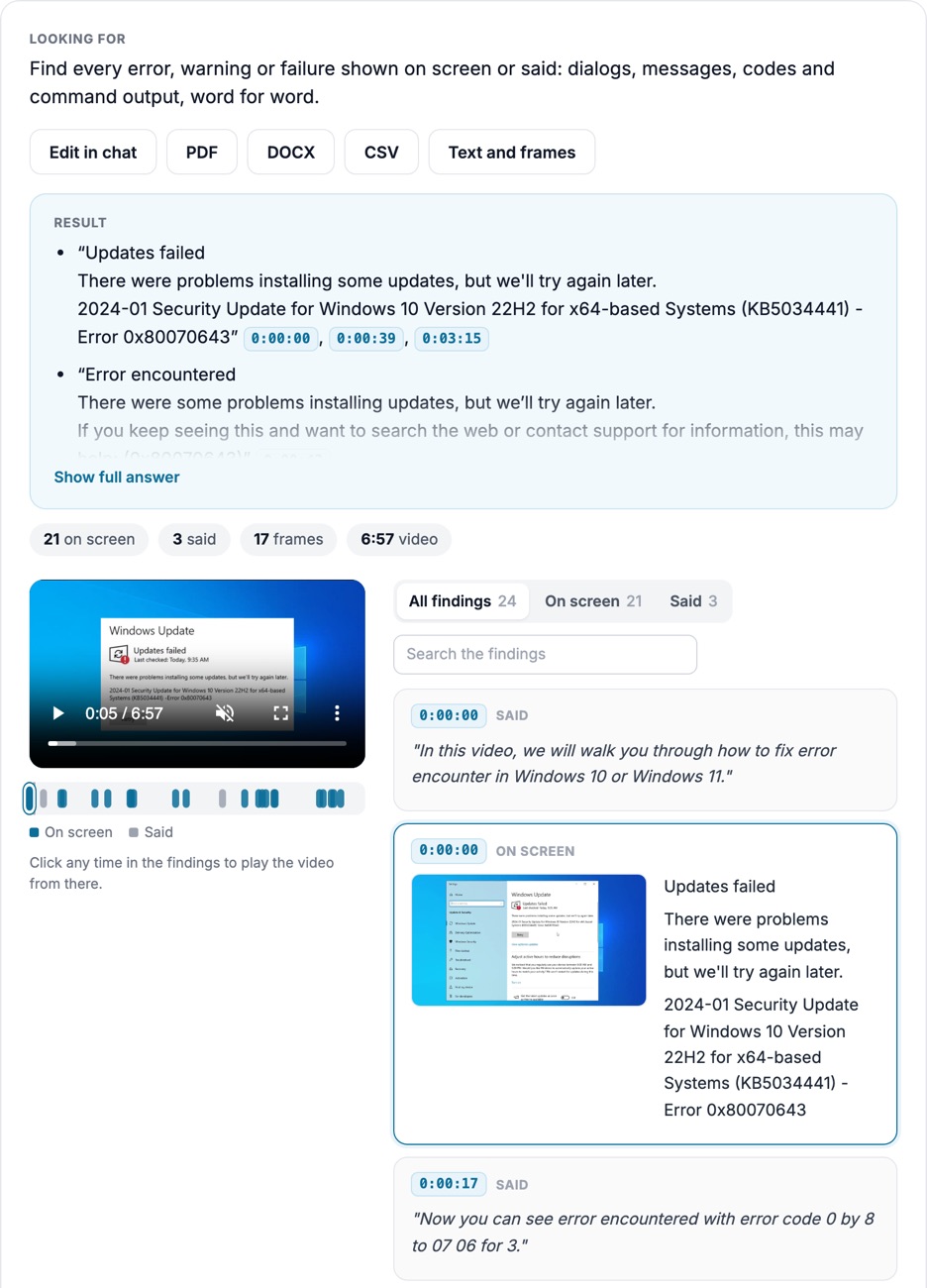
A real result on a 6:57 screen recording: "Error 0x80070643" each time it appears (0:00:00, 0:00:39, 0:03:15), with what the narrator says about it. Run this on your own video →
Try it now
Upload a video or paste a link, then choose what to look for: moments, on-screen text, counts or hazards.
Drag & drop a video
MP4, MOV, AVI, WebM · up to 2 GB and 40 minutes
Your video opened in a new tab. Finish there. Tab didn't open? Continue here
Your files are handled with enterprise security controls and configurable retention.
Watch it work
Short walkthroughs recorded in Docsie on openly licensed footage. Each one shows the question, the result, and how you check every finding against its frame.
How it works
Docsie checks frames across the whole video, together with what is said, so the answer covers what happened on screen and not just the transcript.
Upload a file or paste a link to a screen recording, CCTV export or phone video.
Ask your own question, or start from a preset: find, count, read, measure.
Jump to each moment, confirm it on the frame, and export the report.
A closer look
Real results from Docsie's test environment. Each finding sits next to the video: click a time to play that moment, open the frame, then export the result as CSV, PDF or DOCX.
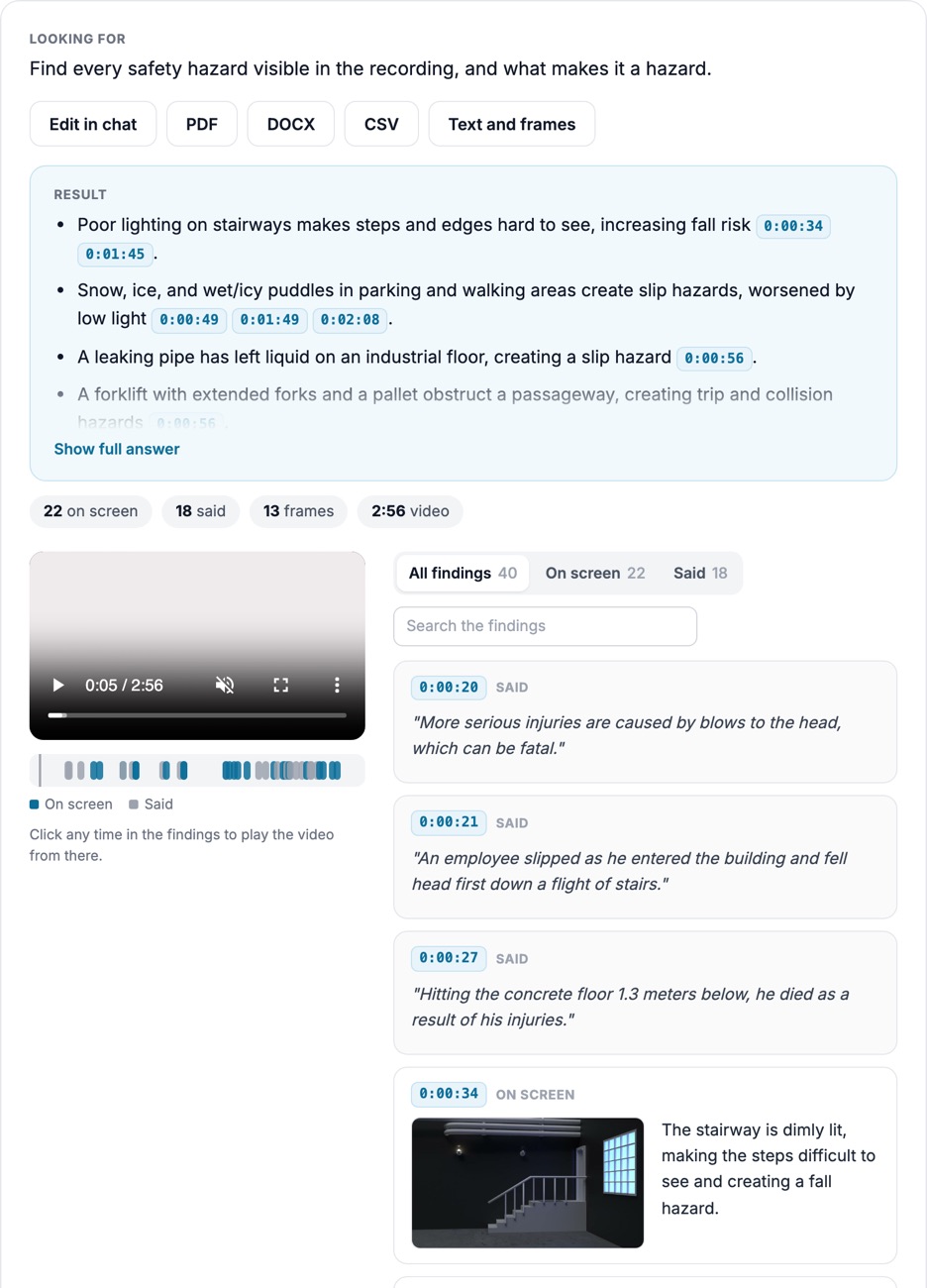
Asked for every safety hazard in a 2:56 training video: a dim stairway, ice in a car park, a leaking pipe, a forklift blocking a passage. The narrator's safety lines are quoted alongside, and the summary is grouped by hazard.
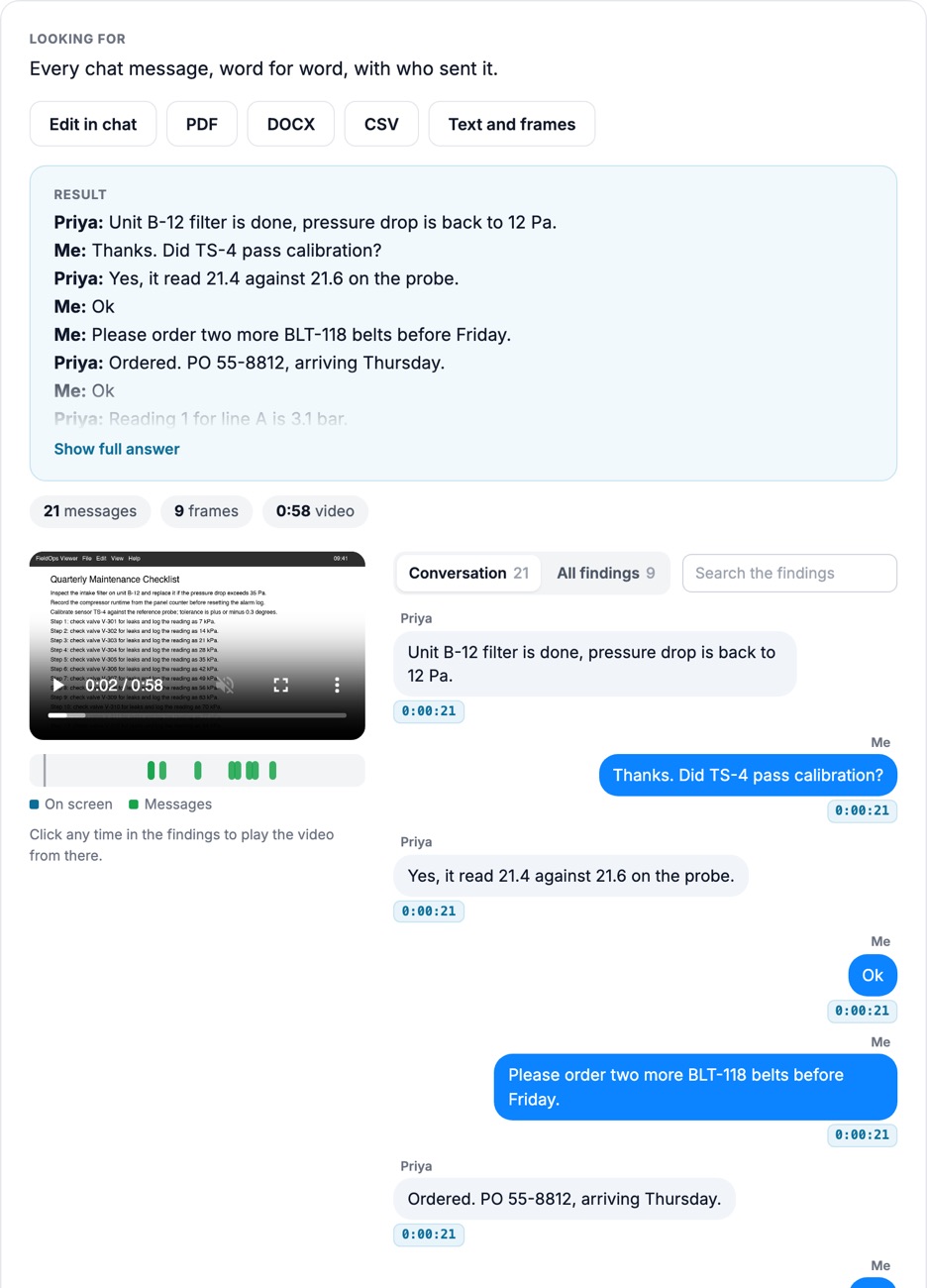
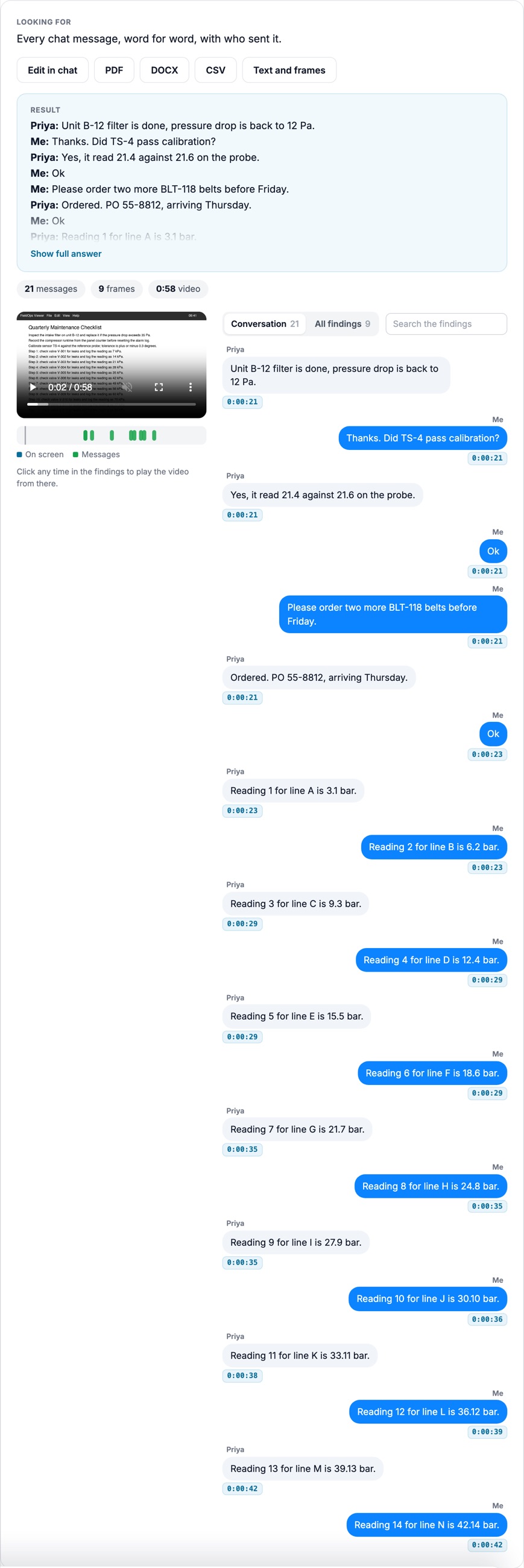
All 21 messages, in order and word for word, laid out as the conversation, each linked to the moment it's on screen.
Same engine, different footage
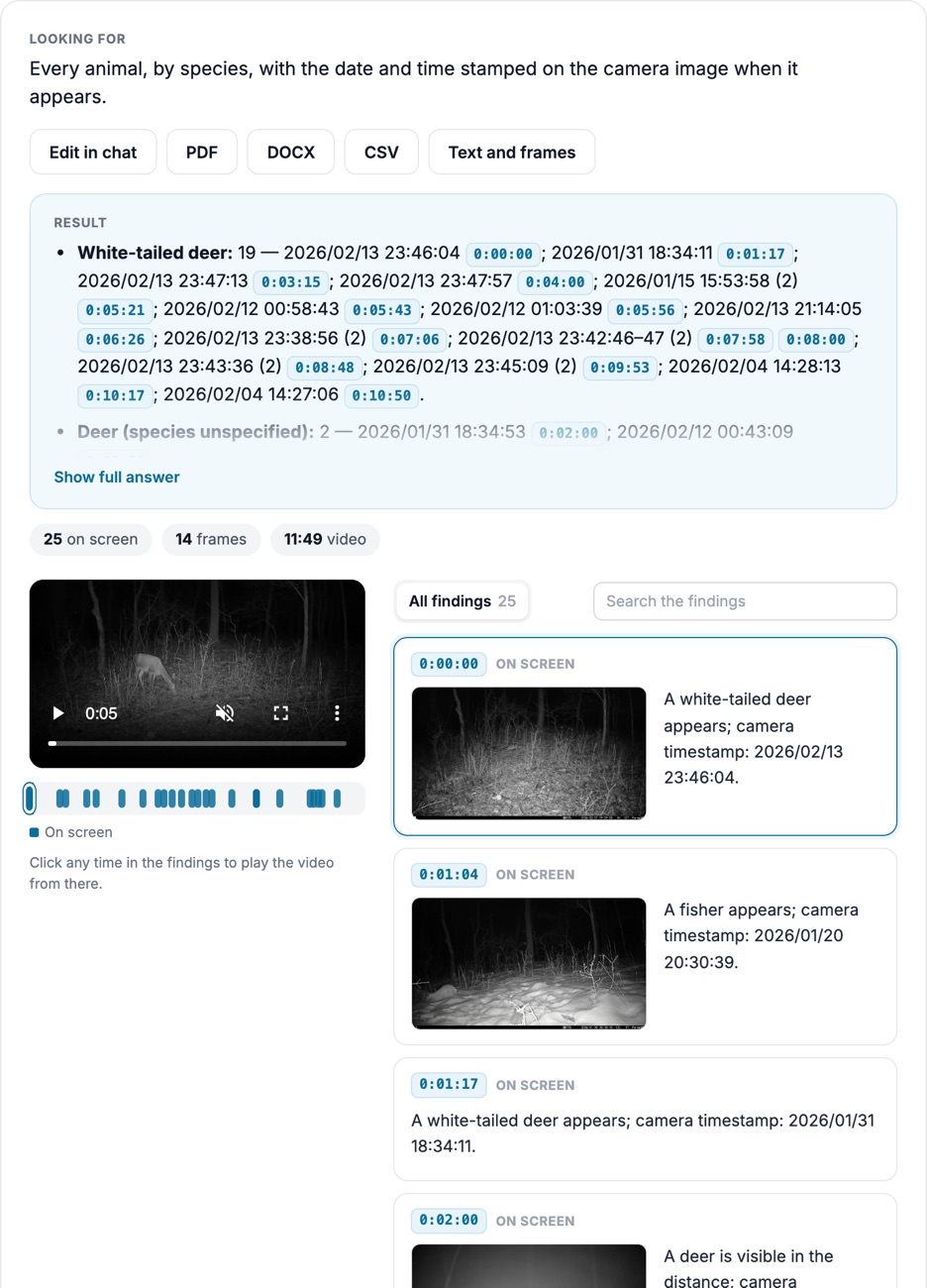
25 sightings by species in an 11:49 trail-camera video, each with the date and time read off the image.
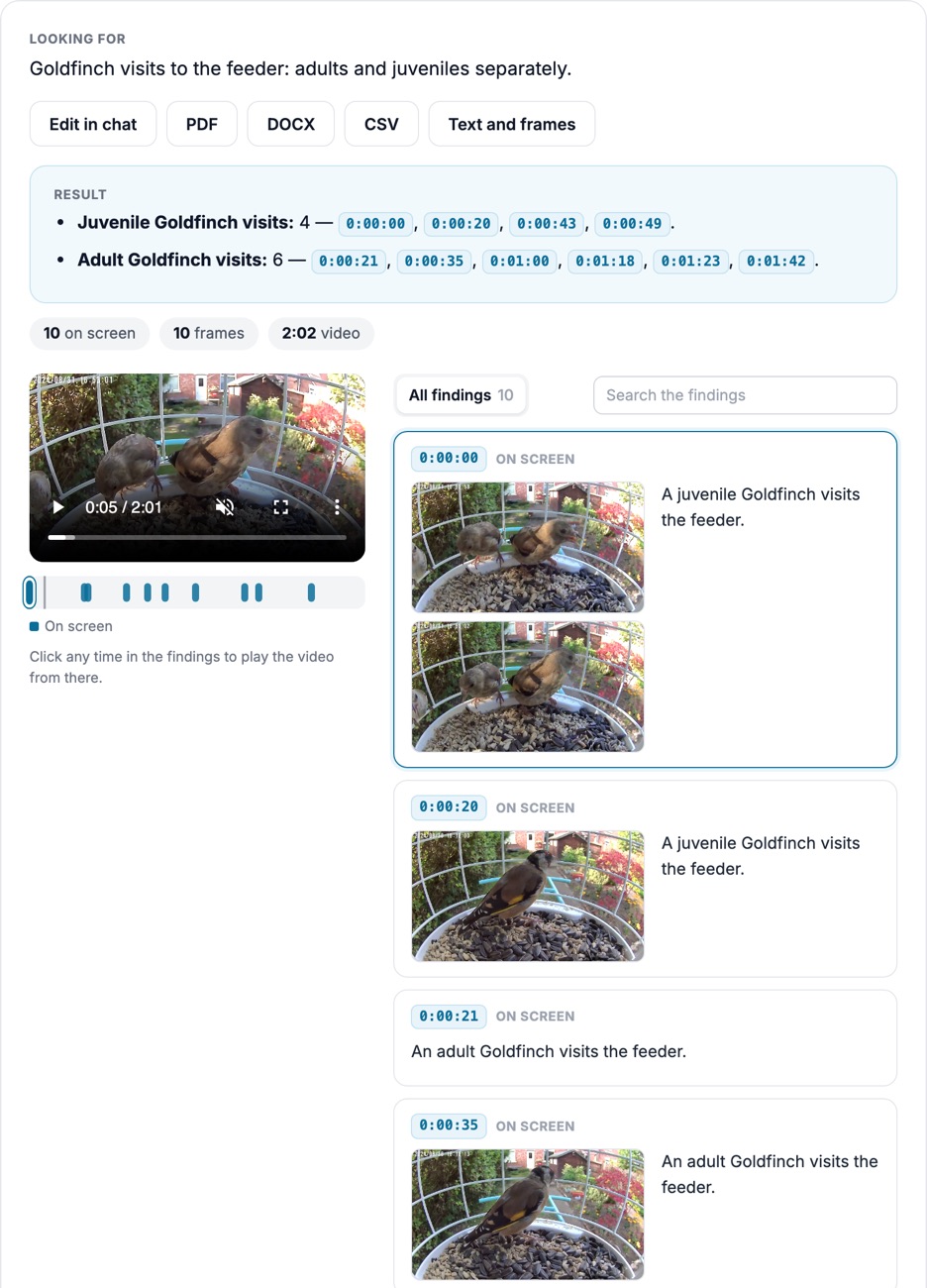
Goldfinch visits to a feeder: 4 juvenile and 6 adult, each with its time and frame.
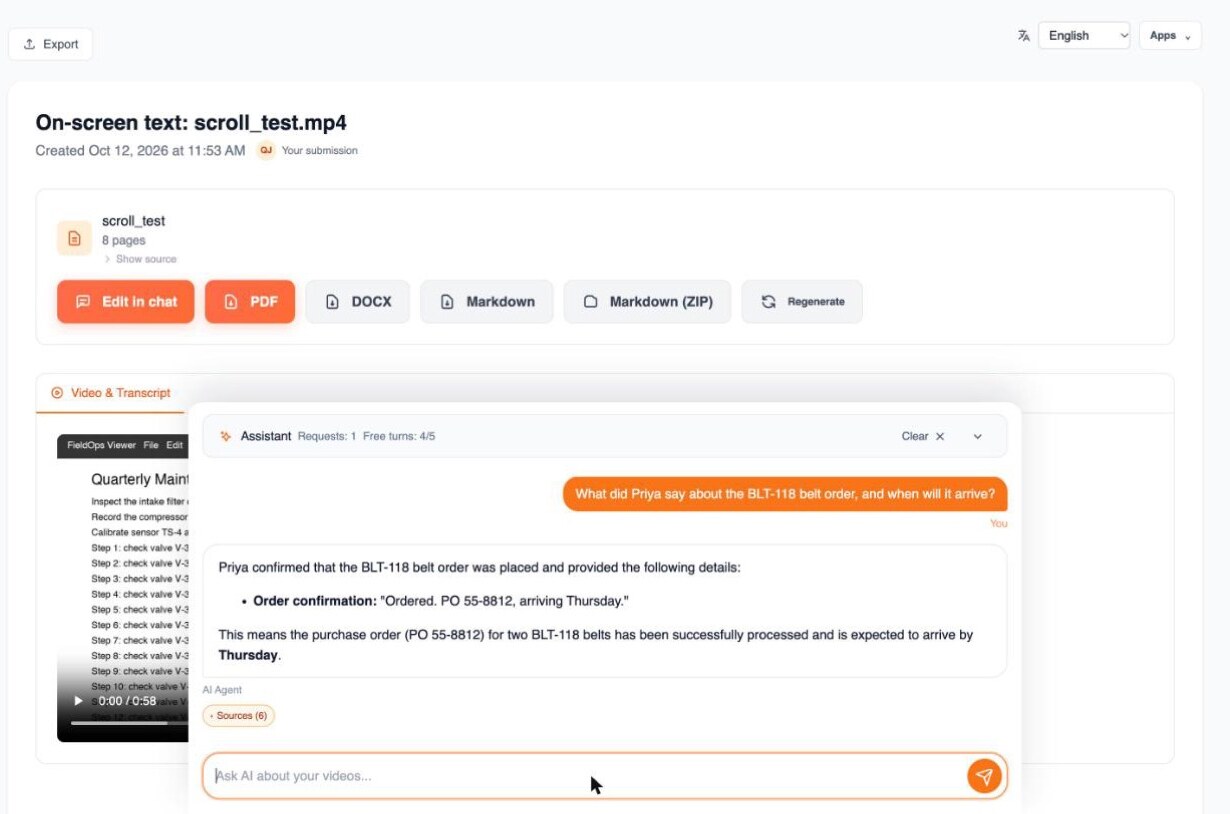
"What did Priya say about the BLT-118 belt order, and when will it arrive?" The assistant quotes her message, "Ordered. PO 55-8812, arriving Thursday.", and lists its sources.
Product captures from Docsie's test environment, October 2026. Footage: CC BY videos by Virtuous Tech, the Finnish Workers' Compensation Center, Forest Moments and Garden Birds Galore, and a screen recording generated for testing. No customer footage. AI can miss moments or misread low-resolution text, so every finding links to its frame for review.
After the analysis
A result isn't a dead end. Export it, refine it, ask about it, or turn what the video shows into documentation your team keeps.
Download the result as PDF, DOCX or CSV, or as text with its frames, ready for a report or a ticket.
Adjust the result in chat, or ask the assistant about the video. Answers quote the findings and list their sources.
When the footage shows how something is done, Video to Docs turns it into a step-by-step guide with screenshots.
Video to Docs →Pick a starting point
Each preset opens Video Analysis with the right question already set up. You can always type your own.
AI video search: describe a moment and get every time it happens, with the frame.
Find moments in video →On-screen text and chat threads, copied word for word, with sender and time.
Extract text from video →One clean still per step, phase or event, not every frame.
Extract frames from video →Visits, vehicles, people passing or reps, logged per moment.
Count objects in video →Track an object and estimate speed, height and time, with the method shown.
Video motion analysis →Cycle times per step, waits and rework, from one video of the work.
Video time study →Swing, pitch and stroke positions, faults and rep counts, frame by frame.
Sports video analysis →Foot contacts, support phases and step timing. Observations, not a diagnosis.
Gait analysis from video →PPE and hazards on site footage; defects in drone, pipe and walk-around video.
Video inspection and safety →Built for teams that review footage
CCTV canvass · phone screen recordings · interviews
Video evidence review for investigations →Time studies · PPE and safety · inspection footage
Inspection and safety from video →Swing and stroke phases · rep counts · gait and posture
Sports video analysis →Real results
Explore the NASA mission report and ROV text extraction with playback, search and timestamped frames. The other examples show product captures from CC BY footage and a recording generated for testing.
Play the mission animation, search the findings, jump to each moment and inspect its source frame. The actual Docsie report from launch to splashdown.
Explore the interactive report →Interactive report · Video OCRSearch changing telemetry, jump to each source frame and see where the overlay disappears. A partial extraction with its limits disclosed.
Explore the interactive report →“Find every error, warning or failure shown on screen or said.” Error 0x80070643 at 0:00:00, 0:00:39 and 0:03:15.
“Every chat message, word for word, with who sent it.”
“Find every safety hazard visible in the recording, and what makes it a hazard.”
“Every animal, by species, with the date and time stamped on the camera image.” 19 white-tailed deer sightings, plus fisher, cottontail, opossum and fox.
“Goldfinch visits to the feeder: adults and juveniles separately.” 4 juvenile and 6 adult visits.
Review you can check
A timestamp and the frame it came from, so a person confirms each one before it goes in a report.
Messages, codes, labels and readouts are copied as they appear, not paraphrased. Unreadable text is flagged rather than guessed.
Run in Docsie's cloud, or self-host so footage never leaves your network. Originals are never altered.
Self-hosted Docsie →FAQ
General chat assistants mostly work from a transcript or a handful of sampled frames. Docsie Video Analysis is built for footage review: it checks frames across the whole video, returns a timestamp for each finding and copies on-screen text exactly.
Yes. Upload the video or paste a link, then ask in plain language. The AI watches the frames and listens to the audio, and every answer points to the moments it came from, so you can check it.
Docsie returns findings for the whole video, each with a timestamp and a frame, keeps on-screen text verbatim, exports a report, and can run on your own servers.
It's web-based video analysis software. Use it in the browser, or deploy it on your own infrastructure.
It can transcribe, but most questions are about what you can see: who appears, what is on screen, when something changes. Speech is used alongside the frames.
Up to 40 minutes per video. For longer recordings, split them into parts and analyze each one.
No. It describes what is visible, such as clothing, vehicles and actions. It does not do face recognition or match people to identities.
Yes, when the overlay is legible. Each finding then carries both the video timestamp and the camera's own clock, which helps when cameras disagree.
Use Docsie's cloud, or deploy Docsie on your own infrastructure so footage stays inside your network.
Open the frame behind each finding and check that it shows what the finding says. AI can miss moments or misread low-resolution text; unreadable text is flagged rather than guessed, and a person confirms the findings.
Docsie Video Analysis
Turn hours of video into findings you can check, cite and export.