4.8
on G2
Log each heel strike, support phase and step from a side or front view, or compare posture across angles. Every observation has its frame. It informs a professional; it doesn't diagnose.
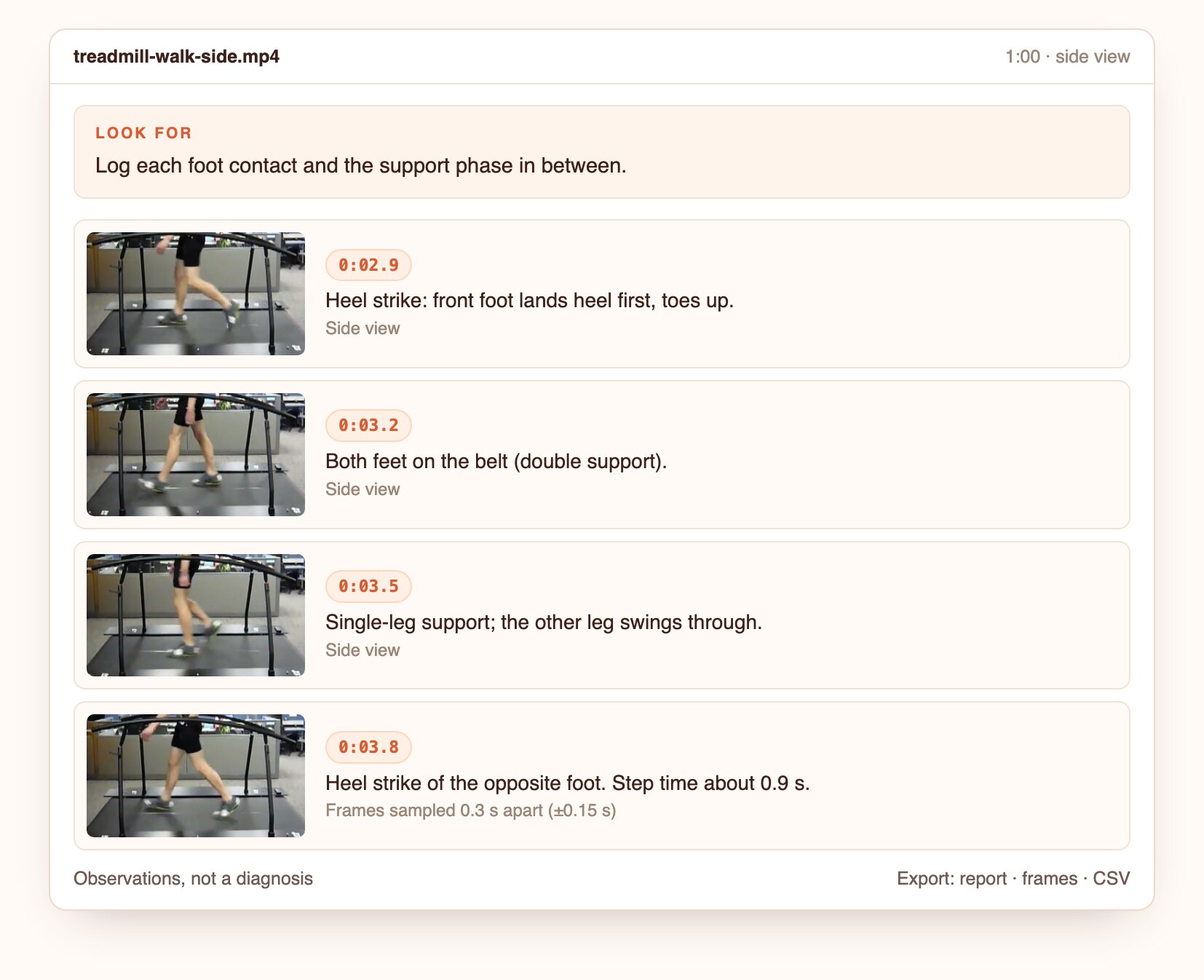
Each observation is tied to a frame, so the person reviewing it can see exactly what was noted.
Heel strike, double support, single-leg support and toe-off, logged with timestamps.
Step and stride times are estimated from the frames, with the sampling precision shown.
Compare front, side and back views and note asymmetries, frame by frame.
How it looks
Illustrative findings built from frames of public CC BY and US federal videos. Product captures from the first live runs replace these.
Four observations from a side view, with step time and its precision.
Open the screenshot to inspect the full detail.
Questions to ask
Real questions from our live-examples corpus, each paired with a public video. Results are published as Docsie produces them.
“This clip shows a runner's legs from the side. For each visible foot contact, give the timestamp, say whether the foot lands heel-first, midfoot or forefoot, whether the foot lands ahead of…” Source: Bill Sodeman, CC BY-SA.
“This split-screen video shows the same runner in two different shoes. For each side, timestamp several foot contacts and describe the foot strike (heel, midfoot, forefoot), where the foot…” Source: Runningpoint, CC BY.
“List each camera plane shown (side/sagittal, front/frontal, overhead) with timestamps. For each plane, describe what the runner's gait shows: foot placement relative to the body, knee and…” Source: MyMichiganHealth, CC BY.
“This side-view clip shows a person walking on an instrumented treadmill whose belt speed is perturbed. For at least five consecutive strides of the near-side leg, give the timestamps of…” Source: Human Motion and Control Laboratory, CC BY.
“Timestamp each workstation setup step shown (chair height, feet, hips and knees, backrest, monitor height and distance, keyboard and mouse position). For each step, describe the presenter's…” Source: Phillip Pavlidis, CC BY.
“Describe the astronaut's running gait on the COLBERT treadmill: count steps over a 10-second stretch to estimate cadence, describe foot strike, trunk lean and arm swing, and explain how the…” Source: NASA Johnson Space Center, public domain.
From a phone video to observations a professional can review.
Upload a file or paste a link.
Ask in plain language, or start from this preset.
Open the frame behind each finding, then export the report, frames and CSV.
Join forward-thinking teams using Docsie






_Leader_Small-Business_Leader.svg)


Common questions
Q: Can I do a gait analysis from a phone video?
A: Yes, for observation. A steady side view of several strides, with the feet in frame, works best. Higher frame rates give more precise timing.
Q: Is this a medical diagnosis?
A: No. Docsie reports observations with frames. Interpretation belongs to a qualified clinician or coach.
Q: What frame rate do I need?
A: Standard 30 fps works for phases. 60 fps or slow motion makes step timing more precise, and the result states its precision.
Q: Can it compare two pairs of shoes or two sessions?
A: Yes. Analyze both videos with the same question and compare the observations side by side.
Q: Can it check posture?
A: Yes, from front, side and back views. It notes what is visible, such as alignment and asymmetry, and doesn't diagnose.
Q: How long can a video be?
A: Up to 40 minutes per video. Longer recordings are split, and the findings are merged onto one timeline.
Q: Where does my footage go?
A: Use Docsie's cloud, or deploy Docsie on your own infrastructure so footage stays inside your network.
See it on your own footage
Book a DemoObservations with frames, for the professional who reviews them.
Up to 40 minutes per video. Cloud or self-hosted.