
How to Define a Business Group in Oracle EBS
This guide shows you how to define a business group in Oracle EBS (Oracle E-Business Suite). The business group is the top-level organization. You create it in the Organizations form, classify it as a business group, and complete its Business Group Info. When you finish, you have the top-level structure for your organization's HR and financial data.
Video: Training How to Create Business Group in Oracle R12 - Part 11 by Sohatech World (2021). All credit for the demonstration goes to the creator; watch the original on YouTube. The written guide below was generated from this video by Docsie. Creator? Request a change or removal.
This guide shows you how to define a business group in Oracle EBS (Oracle E-Business Suite). The business group is the top-level organization. You create it in the Organizations form, classify it as a business group, and complete its Business Group Info. When you finish, you have the top-level structure for your organization's HR and financial data.
Prerequisites
Before you begin, make sure you have the following:
- Permission to create organizations in your Oracle environment.
- Access to the Purchasing or Inventory responsibility. This guide uses "Purchasing, Vision Operations (USA)".
- A location already created for the legal entity. This guide uses ABC Company Address.
Understand the organizational hierarchy
The business group sits at the top of the Oracle organizational structure. The structure has these layers:
- Business Group (top layer)
- Legal Entities
- Ledgers (one ledger can have multiple operating units)
- Operating Units (one operating unit can have multiple inventories)
- Inventories (one inventory can have multiple sub-inventories)
Switch to the appropriate responsibility
You can use either the Purchasing or Inventory responsibility to create a business group. This example uses the "Purchasing, Vision Operations (USA)" responsibility.
Open the Organizations form
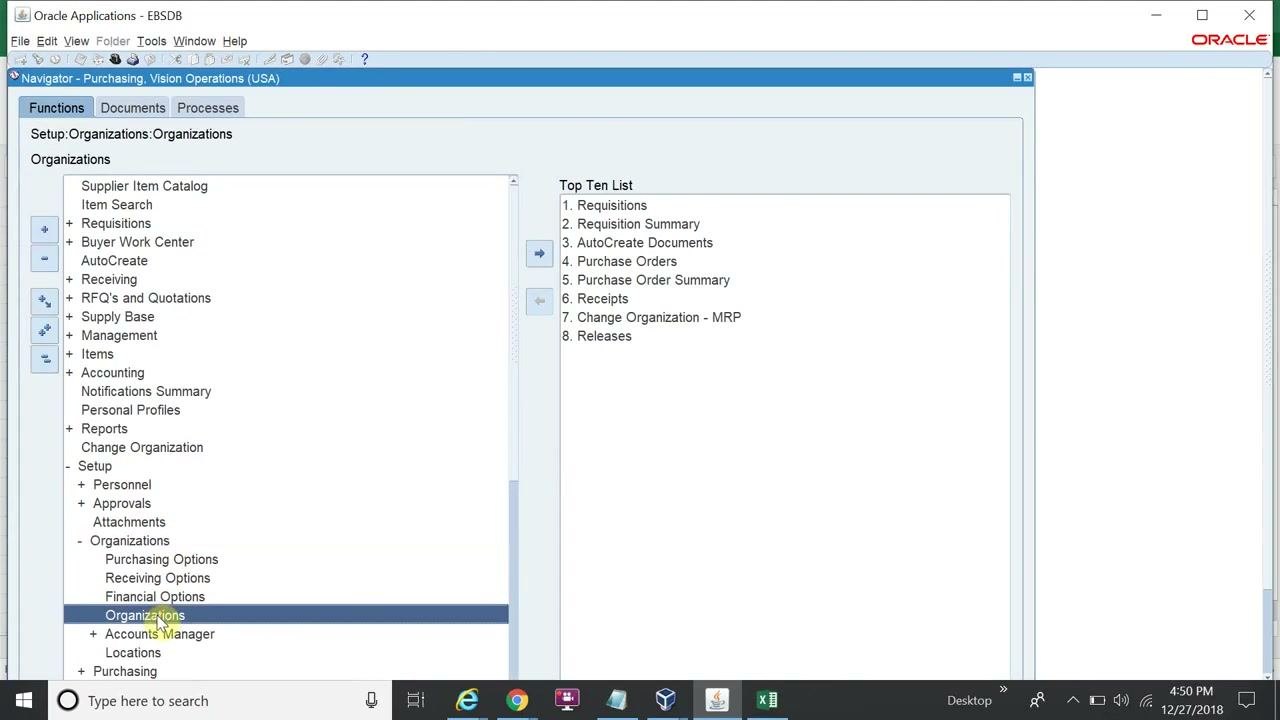
- In the Oracle Applications Navigator, expand Setup > Organizations > Organizations. You find this path in the left navigation pane under the Purchasing responsibility. The right pane shows the "Top Ten List" for quick access to common functions.
- Click Organizations under the Organizations submenu.
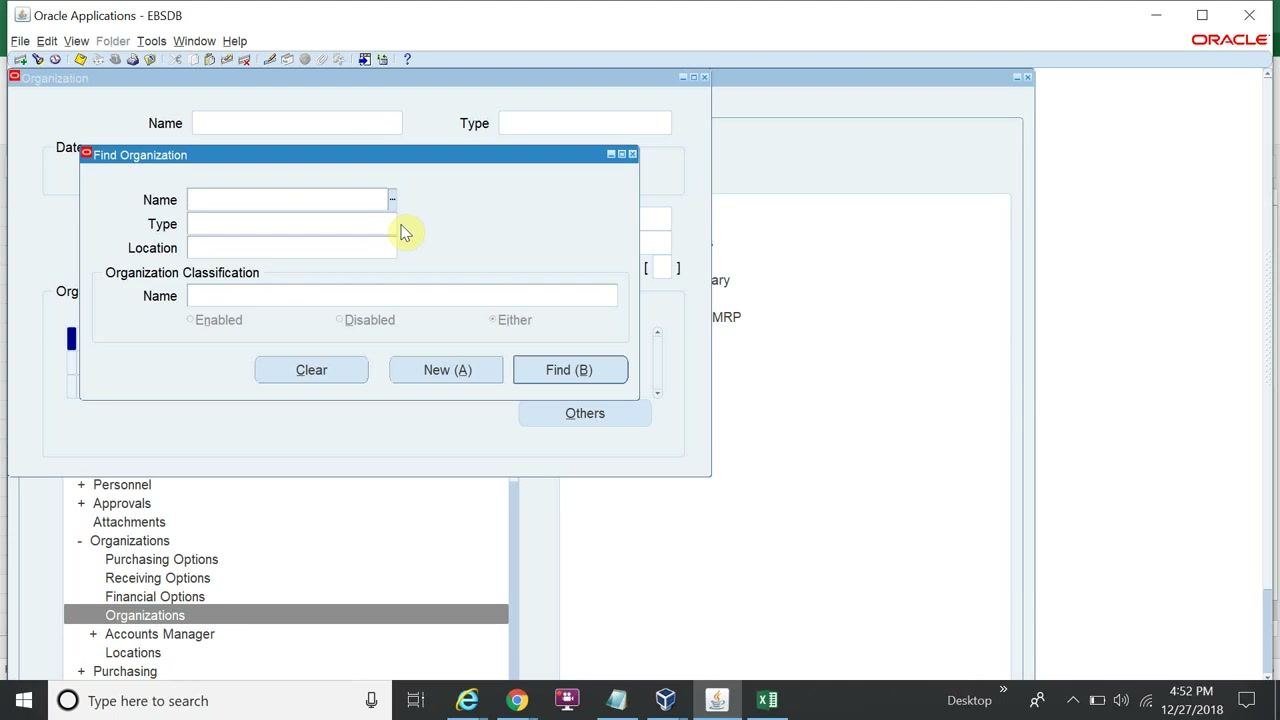
The "Find Organization" dialog box appears.
Start a new organization
In the "Find Organization" dialog, click New (A). The "Organization" form opens for data entry.
Enter the business group name
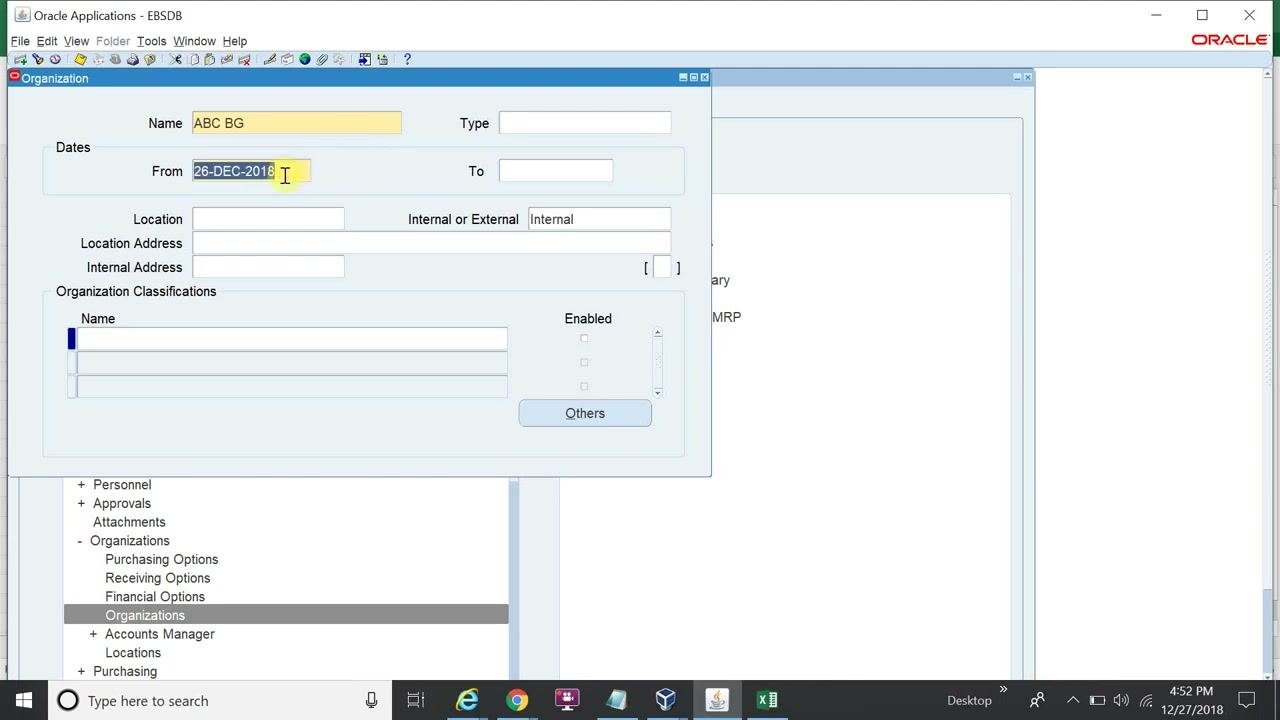
Click the Name field in the "Organization" form and enter ABC BG.
Set the organization dates
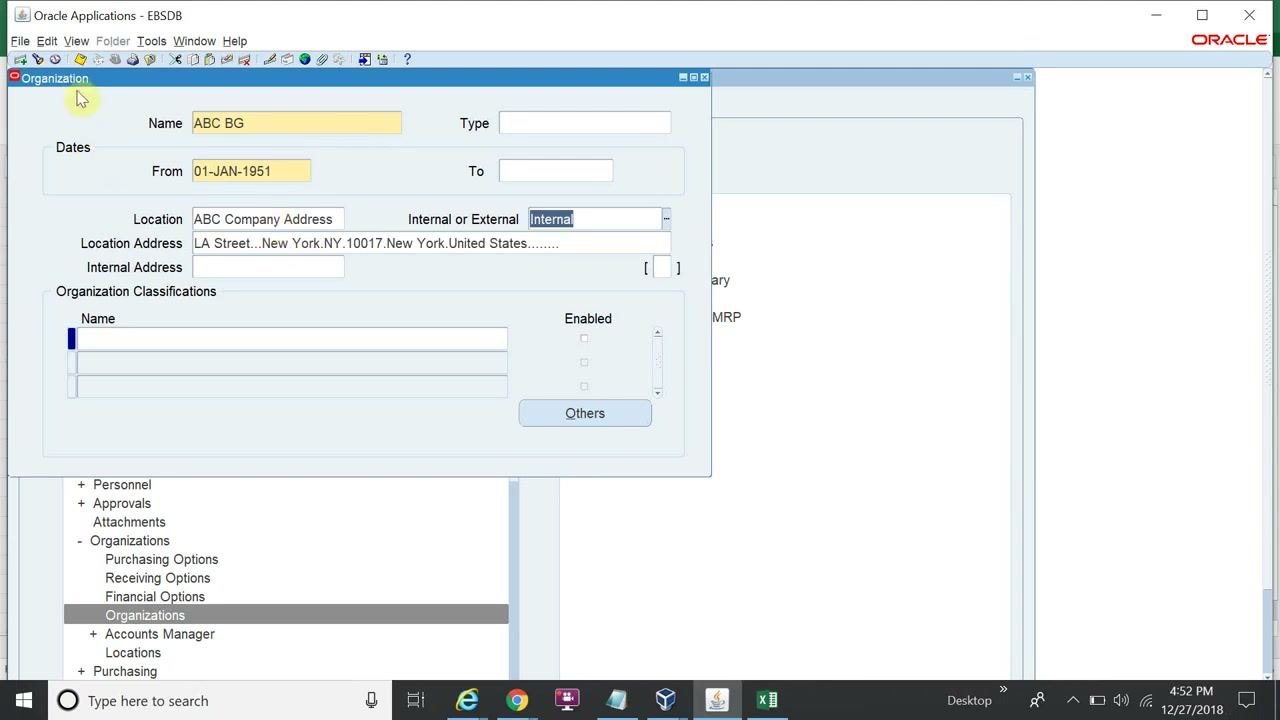
Make sure the From date is set. For example, use 01-JAN-1951 or the date your organization requires. Leave the To date blank unless you want to set an end date for the business group.
Assign the location
- In the Location field, enter or select the location you created for the legal entity, for example ABC Company Address.
- Check that the Location Address fills in automatically, for example "LA Street...New York, NY, 10017, New York, United States".
- Confirm that Internal or External is set to Internal.
Classify the organization as a business group
- In the Organization Classifications section, click the field under Name. A list of organization classifications appears.
- Select Business Group.
- Click OK.
Enable the business group classification
In the Enabled column next to "Business Group", select the check box to enable the classification.
Save the organization
Click the Save icon (diskette) in the toolbar, or use the menu, to save your changes.
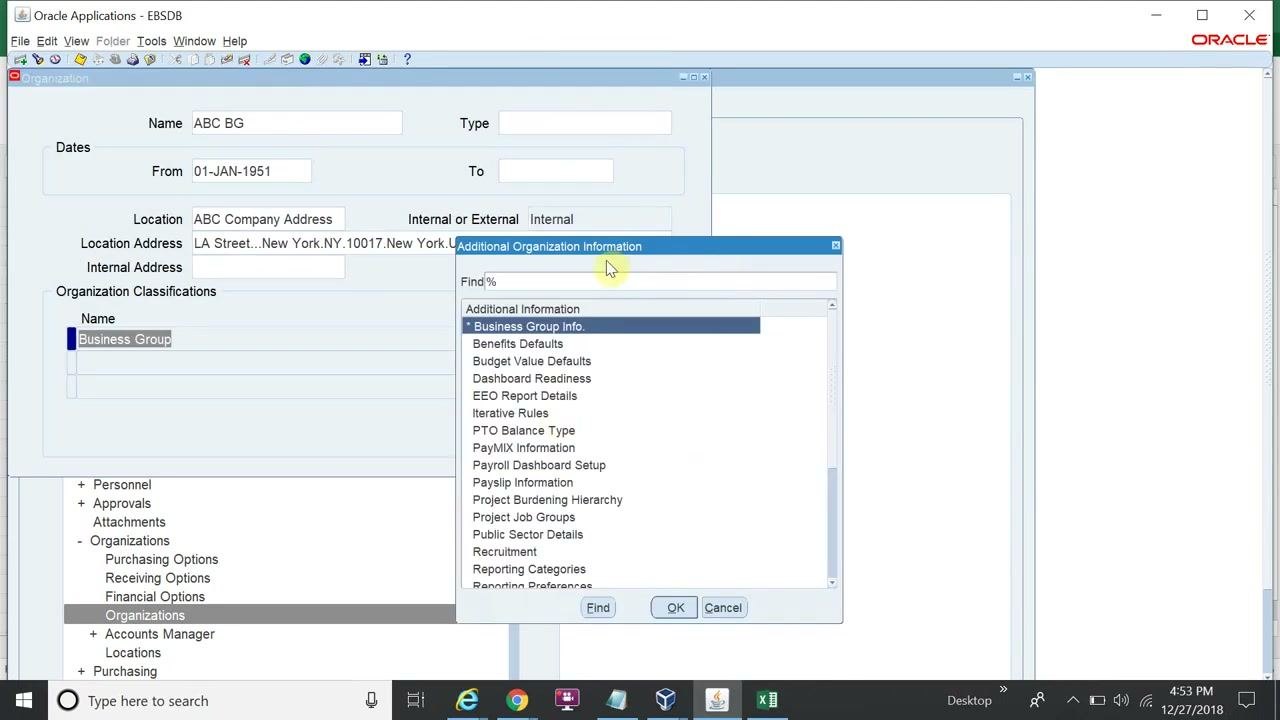
Open the Business Group Info. window
- Click Others in the "Organization" form.
- In the "Additional Organization Information" dialog, select Business Group Info.
- Click OK.
Most fields in the "Additional Organization Information" dialog are optional unless you are implementing HRMS (Human Resource Management System) features. For financial purposes, you only need to complete the Business Group Info. section.
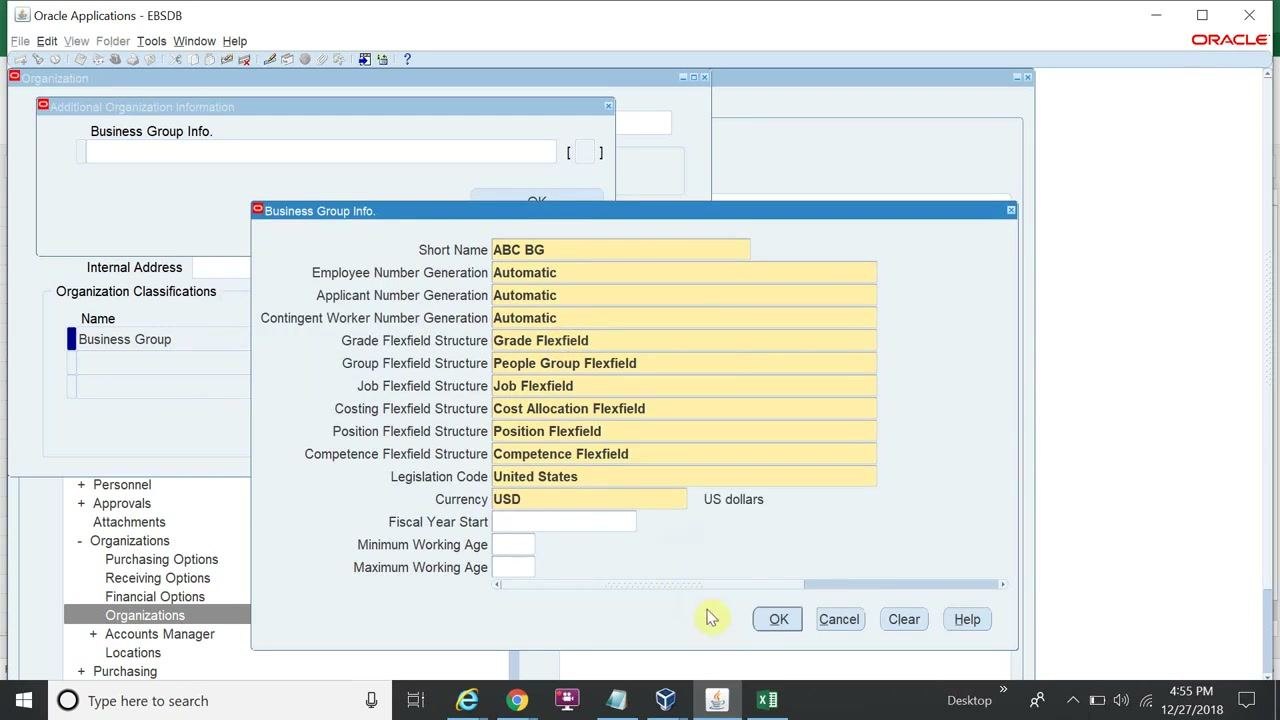
Complete the business group information
In the "Business Group Info." window, make sure all required fields are filled in:
- Short Name:
ABC BG - Employee Number Generation:
Automatic - Applicant Number Generation:
Automatic - Contingent Worker Number Generation:
Automatic - Grade Flexfield Structure:
Grade Flexfield - Group Flexfield Structure:
People Group Flexfield - Job Flexfield Structure:
Job Flexfield - Costing Flexfield Structure:
Cost Allocation Flexfield - Position Flexfield Structure:
Position Flexfield - Competence Flexfield Structure:
Competence Flexfield - Legislation Code:
United States - Currency:
USD(US dollars)
Confirm that all values are correct before you continue.
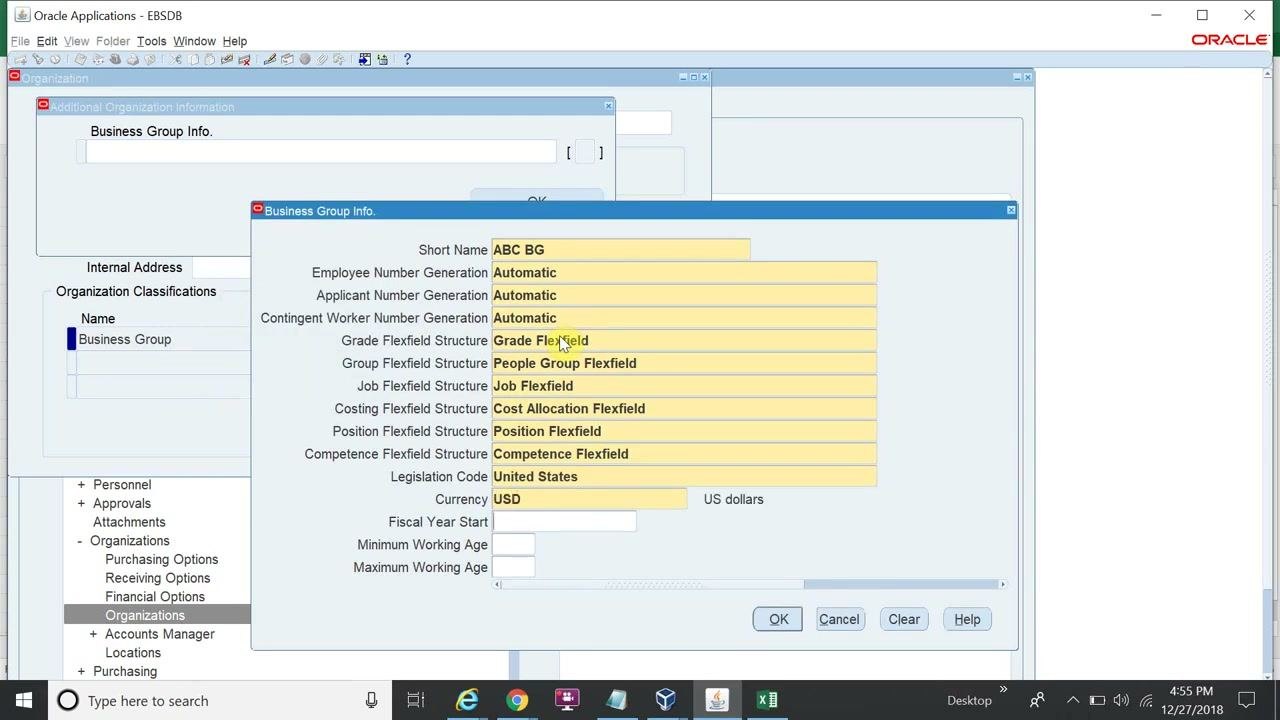
Complete the remaining fields if required
If your business group setup requires them, fill in Currency, Fiscal Year Start, Minimum Working Age, and Maximum Working Age.
Save the business group information
Click OK to save the information and close the "Business Group Info." window.
Verify the business group information
After you save, the "Additional Organization Information" window shows a one-line summary of the values you entered, for example:
ABC BG|Automatic|Automatic|Automatic|Grade Flexfield|People Group Flexfield|...
Check that the summary matches your entries and that the Enabled check box for the Business Group is selected.
Summary
You now know how to define a business group in Oracle EBS. You opened the Organizations form from Setup > Organizations > Organizations and created the organization ABC BG with its dates and location. You classified it as a Business Group, enabled the classification, and saved it. Then you completed Business Group Info. and verified the result in the "Additional Organization Information" window.
Generation details: cost, quality tiers
Docsie billed 3,500 credits ($2.45) to analyze this 7-minute video at standard quality. The rewrite, template fill and Word/PDF exports were included. The same video at each quality tier:
| Quality | Frames sampled | Credits | Approx. cost |
|---|---|---|---|
| Draft | every 16-30 s | 1,750 | $1.22 |
| Standard (this guide) | every 8-15 s | 3,500 | $2.45 |
| Detailed | every 4-7 s | 7,000 | $4.90 |
| Ultra | every 1-3 s | 14,000 | $9.80 |
Credits priced at $0.70 per 1,000; plans include a monthly allowance. Enterprise customers on on-premise or bring-your-own-model deployments run this on their own inference and pay no per-video credits.
Generated by Docsie Video-to-Docs on 2026-11-15 from a 6-minute video. Screenshots are frames from the source video and belong to their creator, Sohatech World, whose original is embedded above. If you own this video and want the guide removed or credited differently, contact us and we will act within one business day.