
4.8
on G2
 Screen Studio
 Guidde
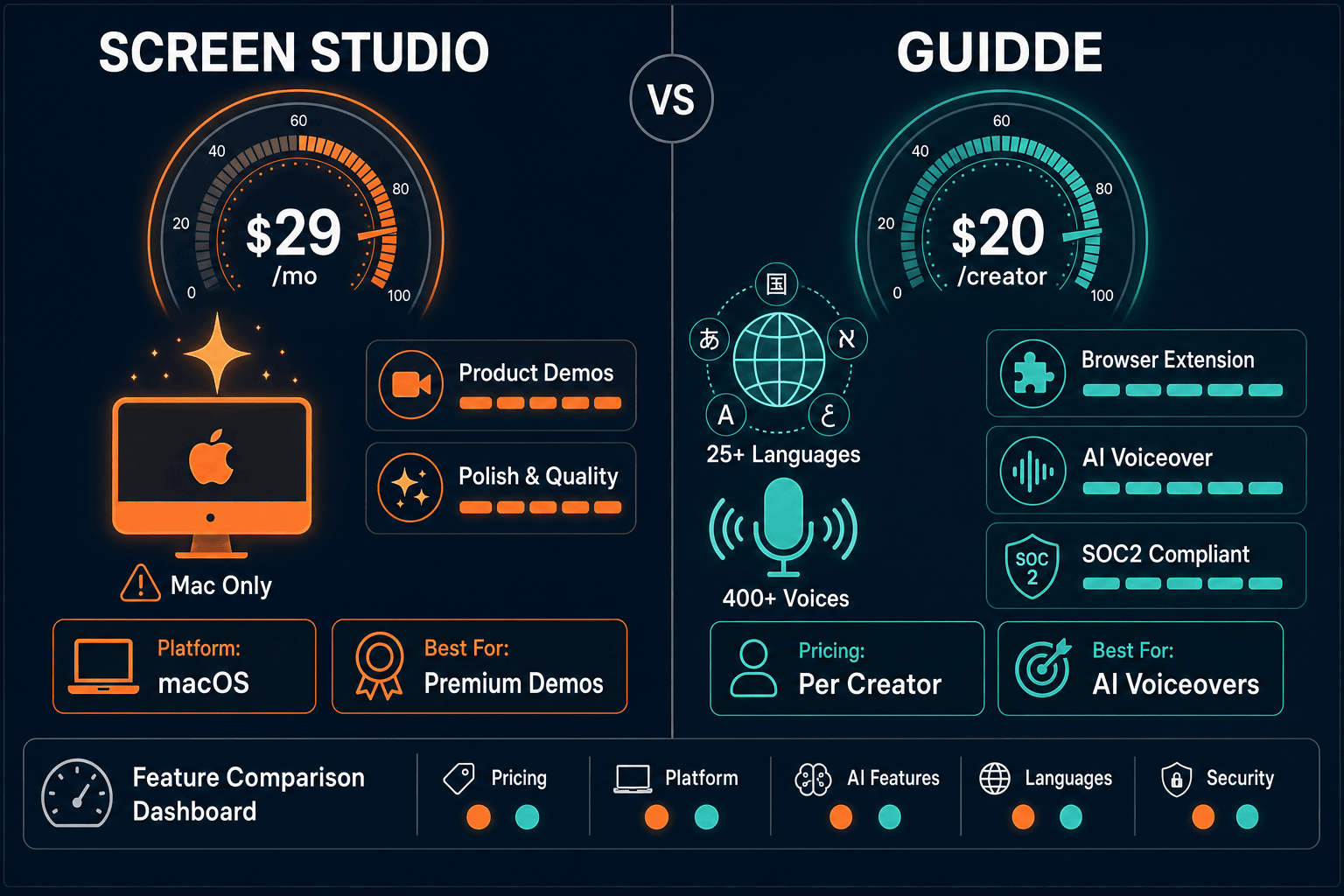
Screen Studio charges a flat subscription for its polished Mac recorder, while Guidde uses per-creator pricing that scales quickly with team size. This page breaks down every pricing tier, what you actually get at each price point, and which tool delivers better value—before recommending a free, open-source alternative that outperforms both.

Screen Studio delivers excellent value for individual Mac creators who need polished marketing videos at a predictable flat price, but it is a single-user, Mac-only tool with no path to documentation, team collaboration, or cross-platform use.
Feature Matrix
A side-by-side breakdown of features across every pricing tier for Screen Studio and Guidde, so you know exactly what you are paying for.
| Feature / Plan Detail |
Screen Studio
|
Guidde
|
|---|---|---|
| Free Plan Available | ||
| Starting Price (Monthly Billing) | $29/month | $20/creator/month (Pro) |
| Starting Price (Annual Billing) | $9/month billed yearly | $16/creator/month billed yearly |
| Free Tier Limit | No free plan | 25 videos with watermark |
| Unlimited Videos / Recordings | Pro and above only | |
| Watermark Removal | Pro and above ($20+/mo) | |
| Desktop App (Mac) | Business tier only ($44+/mo) | |
| Windows / Linux Support | ||
| Browser Extension Capture | ||
| AI Voiceover Generation | Business+ (200+ voices); Enterprise (400+ voices) | |
| MP4 / GIF Export | Pro and above | |
| Blur / Redaction Tools | Pro and above | |
| Custom Branding / Branded Player | Business and above | |
| SSO (SAML) | Enterprise only | |
| Auto-Translation | Enterprise only | |
| Team Size Limit | Single user (no team tiers listed) | Up to 5 creators on Business; unlimited on Enterprise |
| Custom Pricing / Enterprise Plan | ||
| Knowledge Base / Video Library | Shareable links only | |
| Integrations (Notion, Confluence, Zendesk) | ||
| Video-to-Docs / Structured Documentation |
Pricing data sourced from official product pages as of May 2026. Screen Studio pricing verified 2026-05-05. Re-verify before making purchasing decisions as SaaS pricing changes frequently.
Strengths & Weaknesses
Deep Dive
An honest, in-depth analysis of value for money, scalability costs, and hidden limitations across both pricing models.
Screen Studio's annual plan at $9/month ($108/year) is one of the most affordable polished screen recorders available for Mac users who need beautiful marketing videos. You get every feature—zoom, cursor polish, backgrounds, webcam overlay, 4K export—at that single price. Guidde's free plan is generous for evaluation, but the Pro tier at $16–$20/creator/month offers a narrower feature set by comparison. The real value gap appears when you consider that neither tool produces written documentation from recordings, meaning teams often pay for a second tool to handle the docs workflow.
Screen Studio does not have a team pricing model—it is a single-user Mac app. If five team members each need a license, that is five separate $9/month annual subscriptions ($540/year total), with no shared workspace or collaboration features. Guidde scales per creator but hits a wall at five seats on the Business plan ($175–$220/month for five creators). Beyond five creators, teams must negotiate Enterprise pricing. For growing documentation teams, both tools present compounding costs: Screen Studio through individual licenses, Guidde through per-creator seat inflation and forced Enterprise upgrades at relatively small team sizes.
Screen Studio's hidden cost is platform lock-in—Windows and Linux users simply cannot use it at any price, creating parallel tooling budgets for cross-platform teams. Guidde's hidden costs emerge through feature gating: desktop app capture, AI voiceover, and branded player are locked to Business ($44/creator/month), while auto-translation and advanced analytics require Enterprise custom pricing. Both tools also share a structural hidden cost—neither converts recordings into searchable written documentation, meaning teams must budget for a separate knowledge base platform. This downstream documentation gap is often the largest unplanned cost when evaluating either tool.
Screen Studio uses a straightforward all-inclusive subscription model—pay one price, get all features. This transparency is genuinely appealing for individual Mac creators who know exactly what they are paying and what they receive. Guidde uses a tiered per-creator model that mirrors SaaS conventions but introduces friction as teams grow. The Business tier's five-creator cap feels artificially low for mid-size teams, and the jump to Enterprise pricing removes cost predictability. For teams evaluating long-term documentation tooling, the pricing philosophy matters as much as the headline number—and both models have distinct trade-offs worth understanding before committing.
Pricing Breakdown
Every published pricing tier for both tools, including what is included and excluded at each level, so you can calculate the real cost for your team size.
Pricing Verdict
Screen Studio wins on simplicity and value for individual Mac creators—$108/year for every feature is genuinely compelling. However, it is a single-user Mac tool with no team, enterprise, or documentation pathway. Guidde offers more structured tiering and a useful free plan, but its per-creator pricing escalates sharply, the Business plan's five-creator cap creates forced upgrade pressure, and key features like desktop capture and AI voiceover are locked behind higher tiers. Both tools produce video output only—neither routes recordings into written documentation or a knowledge base, which is the most significant shared limitation for teams that need recordings to become searchable, versioned content assets.
Our Recommendation
Screen Studio delivers excellent value for individual Mac creators who need polished marketing videos at a predictable flat price, but it is a single-user, Mac-only tool with no path to documentation, team collaboration, or cross-platform use. Guidde offers a more structured SaaS pricing model with a useful free tier and AI voiceover capabilities, but per-creator costs escalate quickly, the Business tier caps at five creators, and neither tool converts recordings into the structured written documentation most support and product teams ultimately need.
Choose Screen Studio if you need. .
Choose Guidde if you need. .
Choose Docsie Recorder if you need. .
Winner: Docsie Recorder
Docsie Recorder is free and open-source, runs on Mac, Windows, and Linux, and delivers recorder-grade editing (zooms, crop, trim, speed regions, backgrounds, annotations, and blur regions) that matches or exceeds what Screen Studio offers on Mac. Critically, it does what neither competitor does at any price—it routes recordings directly into Docsie's Video-to-Docs pipeline, turning one capture session into structured Markdown, DOCX, or PDF documentation published into a versioned knowledge base. Teams pay only Docsie AI credits for conversion, avoiding Screen Studio's platform lock-in and Guidde's per-creator seat inflation, while gaining downstream CONVERT, MANAGE, DELIVER, and LEARN capabilities that neither tool can provide.
Decision Helper
A direct framework for picking between Screen Studio, Guidde, and Docsie based on your specific needs.
Polished Mac-only product demos with cinematic zoom and motion.
AI-powered video documentation generator with voiceover.

Convert real video into searchable docs, then deploy multi-tenant portals.
Common Questions
Q: Is Screen Studio cheaper than Guidde?
A: For a single user, Screen Studio's annual plan at $9/month ($108/year) is significantly cheaper than Guidde's Pro plan at $16/creator/month ($192/year). However, Screen Studio offers no free plan, while Guidde's free tier allows 25 videos with a watermark. For teams of three or more creators, Guidde's per-creator pricing ($48–$132/month for three creators on Pro to Business) can exceed Screen Studio's per-user cost, especially when desktop capture requires the Business tier at $44/creator/month.
Q: Does Guidde's free plan have enough features for professional use?
A: Guidde's free plan is useful for evaluation but not for professional output. The 25-video limit, mandatory Guidde watermark, and absence of MP4 download or AI voiceover make it impractical for customer-facing or team documentation at any scale. Pro ($16–$20/creator/month) removes the watermark and enables exports, while desktop app capture and AI voiceover require the Business tier at $35–$44/creator/month.
Q: What happens when a Guidde Business team exceeds five creators?
A: Guidde's Business plan is hard-capped at five creators. Teams that grow beyond five must move to Enterprise pricing, which is negotiated custom pricing with no published rate. This creates a significant and unpredictable cost cliff for growing teams, making Guidde's per-creator model difficult to budget for organizations expecting to scale their documentation team over time.
Q: Does Screen Studio offer team or enterprise pricing?
A: Screen Studio does not publish any team, multi-seat, or enterprise pricing tier. It is designed as a single-user Mac application, and each team member who needs access must purchase an individual subscription. There are no shared workspaces, admin controls, SSO, or compliance features available at any price point, which limits its suitability for enterprise documentation workflows.
Q: Is there a better alternative to both Screen Studio and Guidde?
A: Yes—Docsie Recorder addresses the core limitations of both tools. Screen Studio is Mac-only and produces only video output; Guidde's per-creator pricing scales poorly and its Business plan caps at five creators. Docsie Recorder is free, open-source, and runs on Mac, Windows, and Linux. It records and edits screen video locally with professional-grade tools, then routes recordings directly into Docsie's Video-to-Docs pipeline to generate structured Markdown, DOCX, or PDF documentation published into a versioned knowledge base—something neither Screen Studio nor Guidde offers at any price.
Q: Which tool is better if my team needs both video output and written documentation?
A: Neither Screen Studio nor Guidde produces structured written documentation from recordings—Screen Studio outputs video and GIF only, while Guidde generates auto-step guides that are ancillary to its video output and cannot be managed as versioned documentation. Docsie Recorder is the only tool in this comparison that connects screen recording directly to a full documentation workflow, converting recordings into Markdown, DOCX, PDF, and knowledge base articles with version control and multi-tenant portal delivery.
Docsie Recorder is free, open-source, and runs on Mac, Windows, and Linux—with no per-creator pricing and no platform lock-in. Record, edit locally, and route your recordings directly into Docsie's Video-to-Docs pipeline to generate structured documentation published into a versioned knowledge base. Get everything Screen Studio and Guidde charge for, plus the documentation workflow neither tool offers.
Free to download and record. Docsie AI credits used only for Video-to-Docs conversion.