
How to Fill Out a Chain of Custody Form
This guide explains how to fill out a chain of custody form for laboratory sample testing. It walks through each section of the form — client information, sample details, requested analyses, turnaround service, submission signatures, and reporting preferences — so your samples are processed correctly by the laboratory.
Video: How to Fill Out a Chain of Custody (COC) by Caduceon Environmental Laboratories (2023). All credit for the demonstration goes to the creator; watch the original on YouTube. The written guide below was generated from this video by Docsie. Creator? Request a change or removal.
This guide explains how to fill out a chain of custody form for laboratory sample testing. It walks through each section of the form — client information, sample details, requested analyses, turnaround service, submission signatures, and reporting preferences — so your samples are processed correctly by the laboratory.
Prerequisites for filling out a chain of custody form
Before you begin, make sure you have the following on hand:
- Your labeled sample bottles, ready for submission.
- A blank Chain of Custody form.
- A pen for entering details and signing the form.
- A sealed zipper lock bag to hold the completed form together with your samples.
Sample identification
Complete the Client Information section in the top left corner of the form with your organization name, contact name, address, invoicing address (if different from your main address), telephone number, email address, quote number, PO number, and project name or number. These fields establish the study or batch identity tied to the samples.
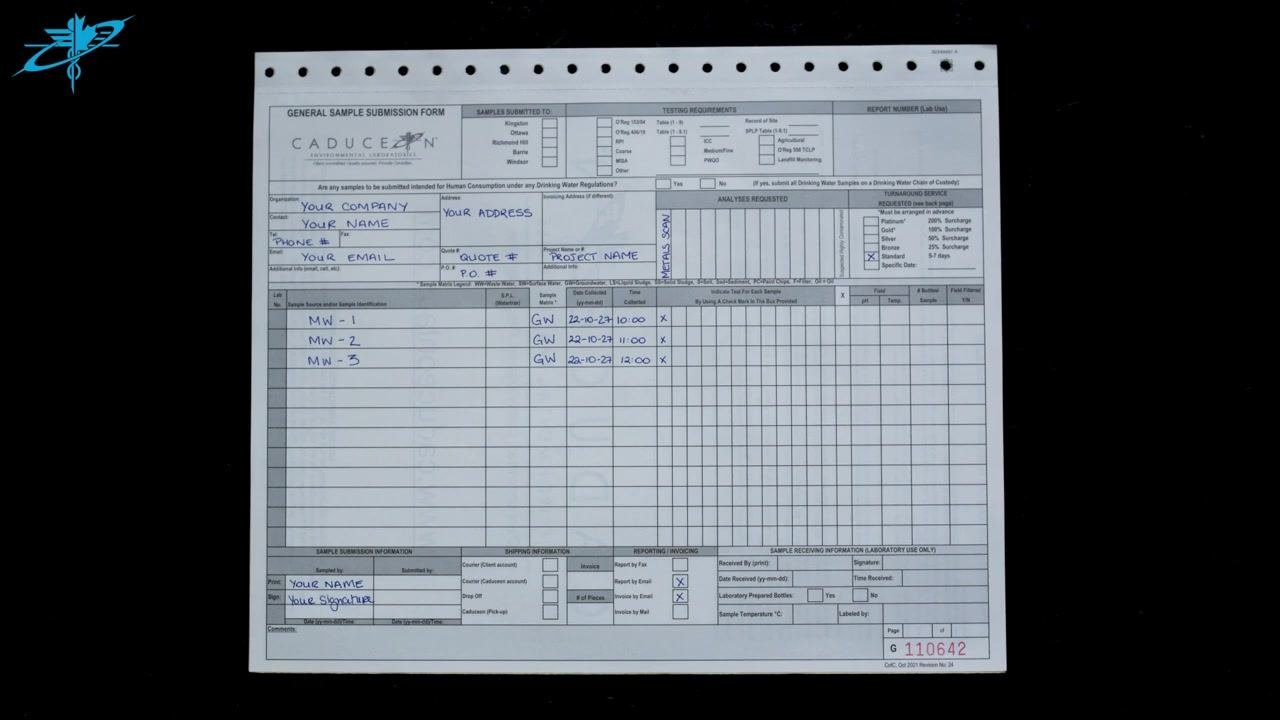
For each sample, complete the Sample Information section on the left side of the form using the details below.
| Field | What to enter | Example |
|---|---|---|
| Sample ID / Source | Same identifier as written on the sample bottle | MW-1, MW-2, MW-3 |
| Matrix | Type of sample material | GW (Groundwater), SW (Surface Water) |
| Study / Project | Project name or number entered in the Client Information section | PROJECT NAME |
| Container count | Not captured on this form; record separately if your laboratory requires it | — |
| Preservative | Not captured on this form; record separately if your laboratory requires it | — |
| Required tests | Analysis parameters listed in the Analyses Requested section, marked with an "X" against each sample | METALS SCAN |
Collection details
Enter the Date Collected in the format yy-mm-dd (for example, 22-10-27) and the Time Collected (for example, 10:00, 11:00, 12:00) for each sample in the Sample Information section. The collection location is generally identified through the sample ID itself, such as a monitoring well designation. If your laboratory requires the collector's name, collection method, or field observations, record these separately, as the standard form does not include dedicated fields for them.
Transfer log
Complete the Sample Submission Information section at the bottom left of the form to document the custody transfer at submission.
- Print your name in the Print field.
- Sign your name in the Sign field.
- Enter the date and time of submission if required.
- Add any relevant notes in the Comments field.
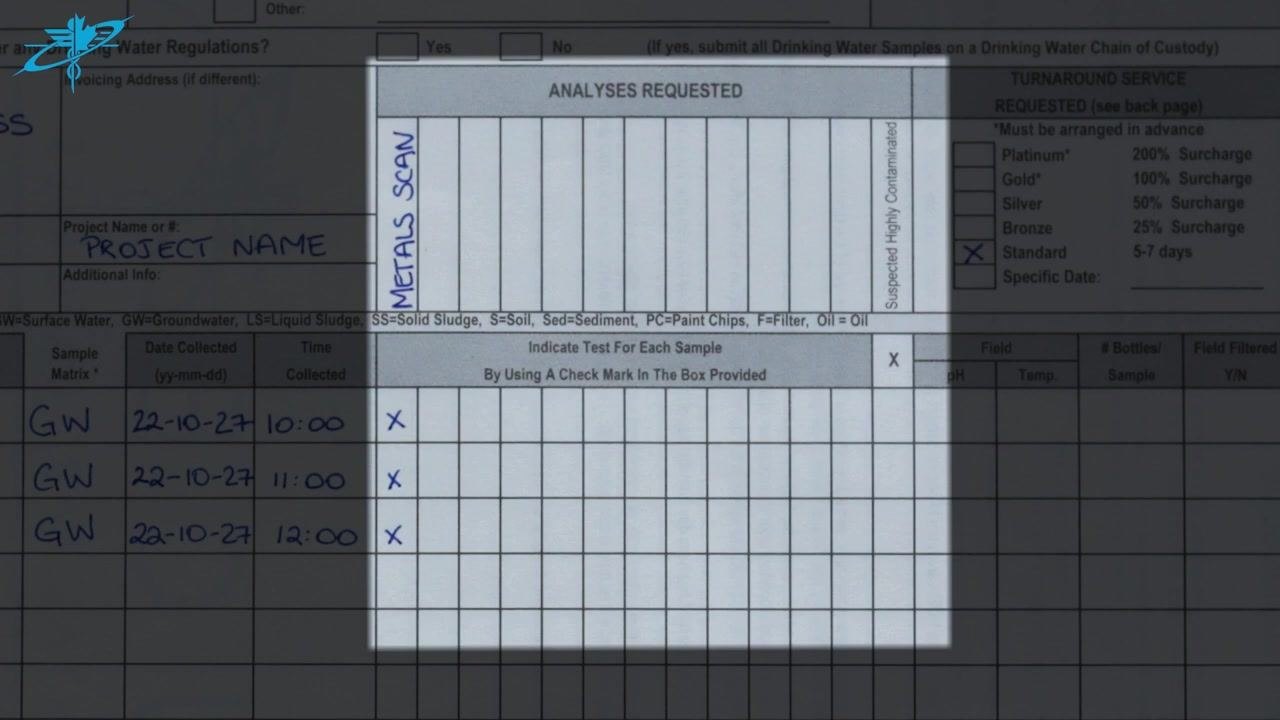
Use the table below to keep the custody transfer clear for audit purposes.
| Field | Where recorded |
|---|---|
| Released by | Printed name and signature in the Print and Sign fields |
| Received by | Completed by laboratory personnel on receipt |
| Date / Time | Date and time of submission |
| Condition | Any condition concerns noted in the Comments field |
| Signature | Signature entered in the Sign field |
Storage conditions
The form does not include dedicated fields for required temperature, light protection, or hold time. If your laboratory tracks these details, record them in a separate storage and monitoring log and reference that log when needed.
Testing assignment
List the requested analyses and mark the samples they apply to in the Analyses Requested section, in the middle of the form.
- List each analysis parameter on its own line, such as METALS SCAN.
- In the grid below the parameter list, place an "X" in the box for each sample and parameter combination to show which samples require which tests.
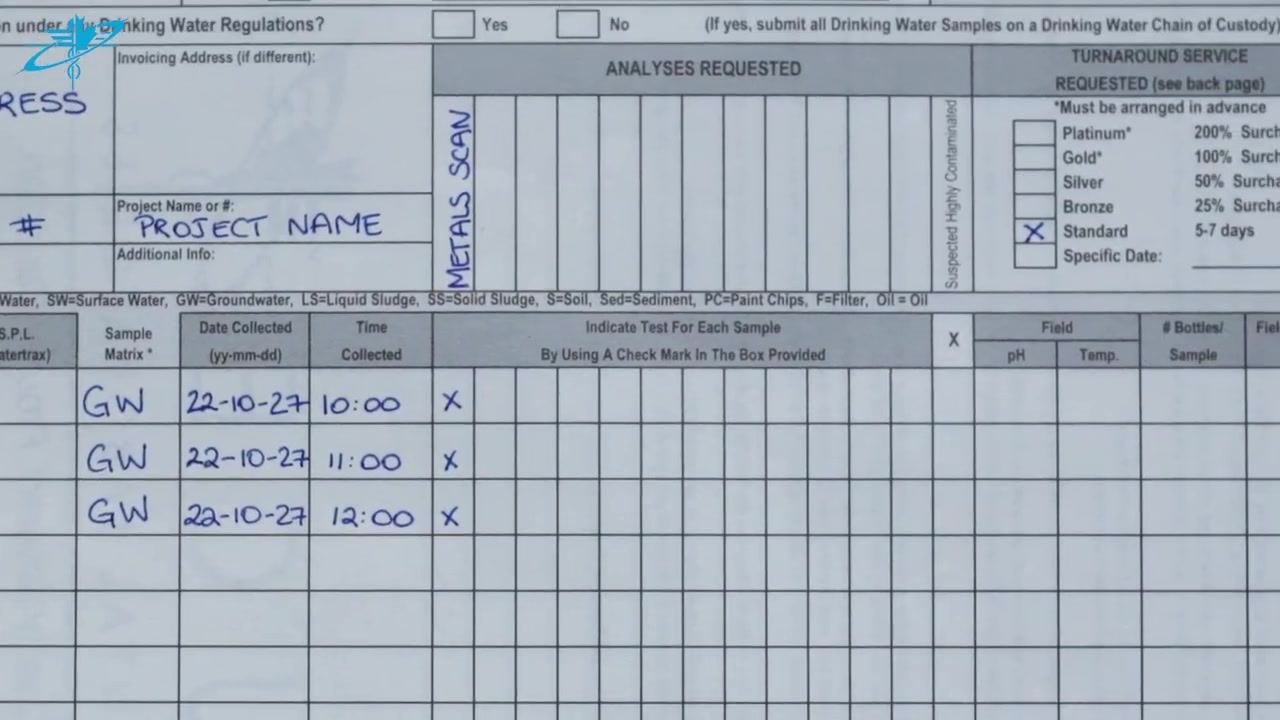
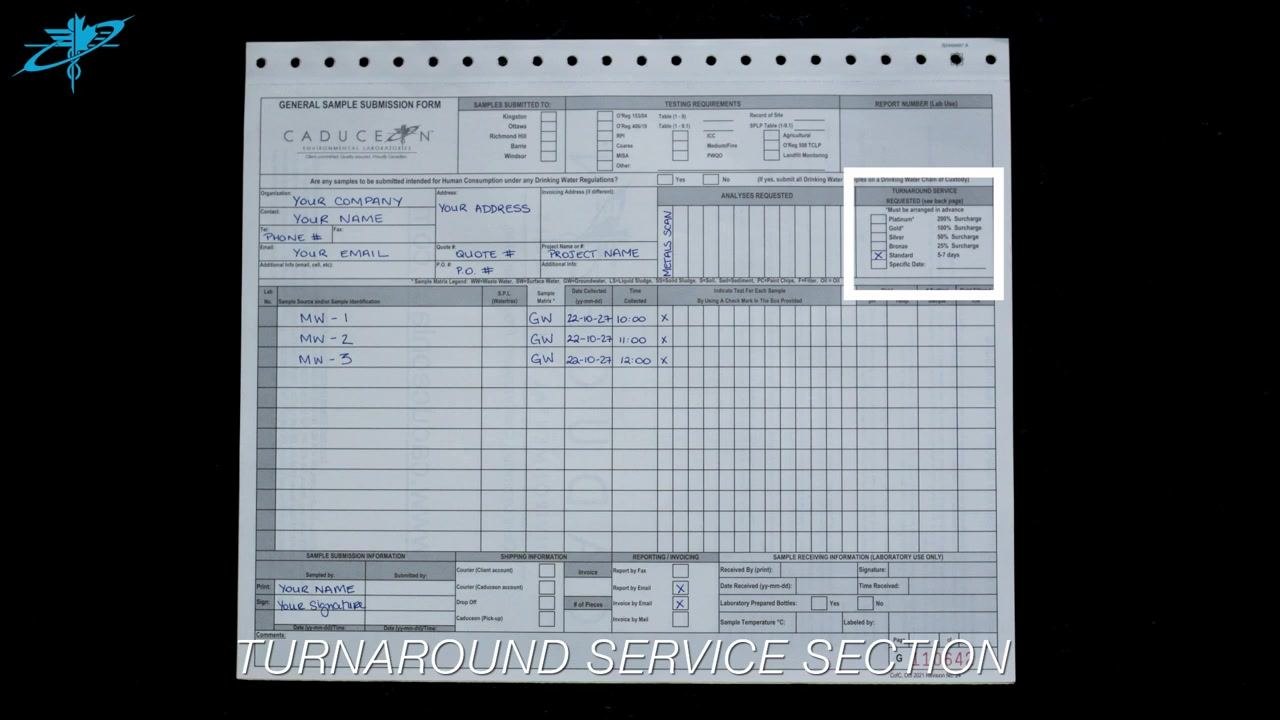
Select the required turnaround time in the Turnaround Service section, in the top right of the form, by checking the appropriate box: Standard (5–7 days), Bronze, Silver, Gold, Platinum, or a specified date. For example, mark the Standard box with an "X" for standard turnaround.
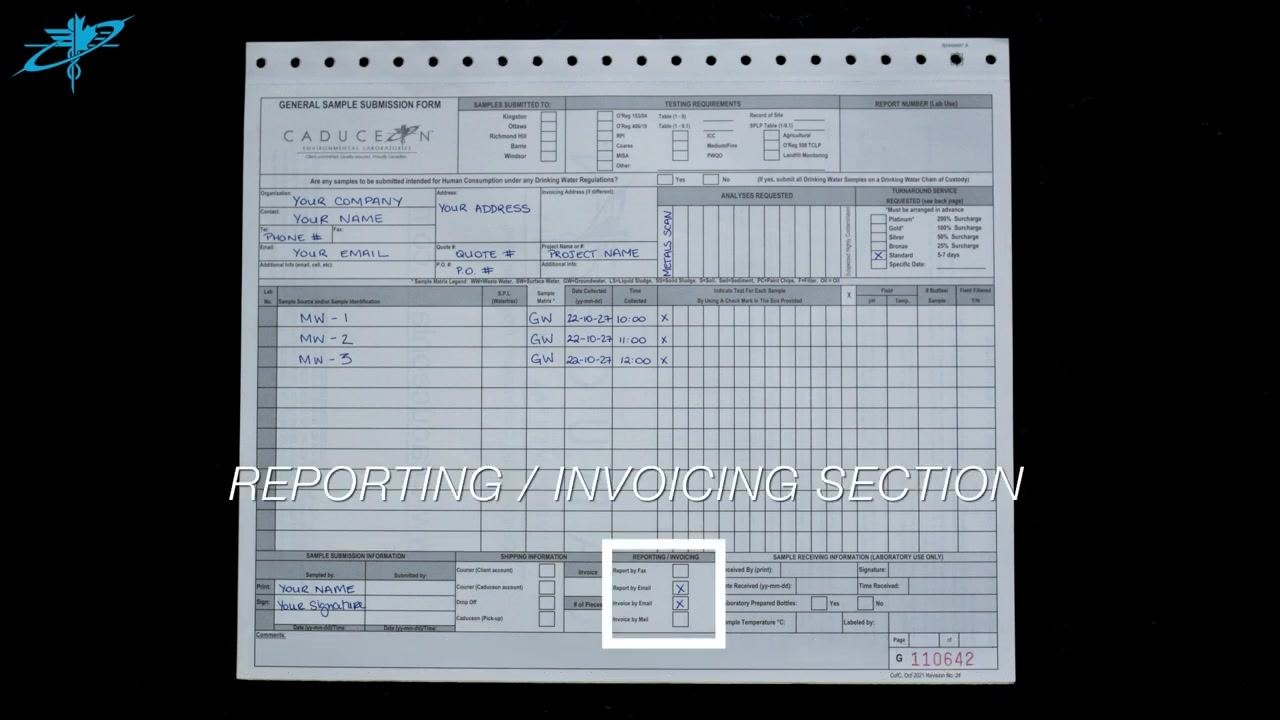
Specify how you want to receive results and invoices in the Reporting/Invoicing section:
- Check Report by Fax to receive results by fax.
- Check Report by Email to receive results by email.
- Check Invoice by Email to receive invoices by email.
- Check Invoice by Mail to receive invoices by postal mail.
Mark your selections clearly with an "X".
Identify your servicing laboratory (for example, your local CADUCEON Environmental Lab) so the request routes correctly; analyst assignment and due date are determined by the laboratory based on your selected turnaround.
Deviations
Use the Comments section at the bottom of the form to record anything outside the standard fields, such as special handling instructions or clarifications for the laboratory.
Before sealing the form, double-check all information for accuracy and completeness. This check helps catch deviations such as missing labels, mismatched sample IDs, or incomplete sections before the samples leave your custody.
If you find a deviation you cannot resolve, or need help completing the form, contact your local CADUCEON Environmental Lab using the contact information provided by your laboratory or on their website.
Final disposition
Once every section is complete, place the finished form in a sealed zipper lock bag together with your samples for submission to the laboratory. The form does not include fields for sample retention, archiving, return, or destruction approval; follow your laboratory's own procedure for these dispositions after testing is complete.
What's next
Before you submit the samples, confirm the following:
- All six required sections are filled out: Client Information, Sample Information, Analyses Requested, Turnaround Service Requested, Sample Submission Information, and Reporting and Invoicing.
- Special instructions are included in the Comments section if needed.
- Reporting and invoicing preferences are clearly marked.
- The form is placed in a sealed zipper lock bag with your samples.
Your chain of custody submission is now ready for laboratory processing.
Generation details: cost, quality tiers, downloads
Docsie billed 1,500 credits ($1.05) to analyze this 3-minute video at standard quality. The rewrite, template fill and Word/PDF exports were included. The same video at each quality tier:
| Quality | Frames sampled | Credits | Approx. cost |
|---|---|---|---|
| Draft | every 16-30 s | 750 | $0.52 |
| Standard (this guide) | every 8-15 s | 1,500 | $1.05 |
| Detailed | every 4-7 s | 3,000 | $2.10 |
| Ultra | every 1-3 s | 6,000 | $4.20 |
Credits priced at $0.70 per 1,000; plans include a monthly allowance. Enterprise customers on on-premise or bring-your-own-model deployments run this on their own inference and pay no per-video credits.
Generated by Docsie Video-to-Docs on 2026-09-10 from a 2-minute video. It was generated straight into Docsie's Sample Chain of Custody template, so every section of that template is filled from the video. Screenshots are frames from the source video and belong to their creator, Caduceon Environmental Laboratories, whose original is embedded above. If you own this video and want the guide removed or credited differently, contact us and we will act within one business day.