
How to Write a Standard Operating Procedure
As your business grows and you hire more employees, new team members often lack direction and ask frequent questions, which can be frustrating and time-consuming to manage. Learning how to write a standard operating procedure (SOP) solves this problem by giving your team clear instructions they can follow without constant supervision. This document explains how to write a standard operating procedure that lets tasks get done right the first time, reduces repetitive questions and mistakes, and frees up your time for higher-leverage activities that grow your business.
Video: Creating SOPs: How To Write Standard Operating Procedures (Step By Step) by Jordan Ross (2023). All credit for the demonstration goes to the creator; watch the original on YouTube. The written guide below was generated from this video by Docsie. Creator? Request a change or removal.
Purpose
As your business grows and you hire more employees, new team members often lack direction and ask frequent questions, which can be frustrating and time-consuming to manage. Learning how to write a standard operating procedure (SOP) solves this problem by giving your team clear instructions they can follow without constant supervision. This document explains how to write a standard operating procedure that lets tasks get done right the first time, reduces repetitive questions and mistakes, and frees up your time for higher-leverage activities that grow your business.
An SOP is a documented process that outlines exactly how to perform a specific task within your business. Without one, employees "probably don't know how to" complete tasks correctly, which leads to inconsistency and wasted time correcting errors.
SOPs stand for Standard Operating Procedures — documented processes that ensure consistency and quality across your operations while freeing you to focus on high-impact, business-growing activities.
Scope
This procedure applies to any solopreneur, small business owner, or agency owner who needs to document processes across departments such as marketing, sales, operations, fulfillment, and account management. It does not apply to highly complex tasks that cannot be easily standardized — for those, build a dedicated training program instead of an SOP.
The most common reason founders avoid writing SOPs is lack of time. This procedure is designed to optimize and streamline the SOP creation process so that limitation is no longer a barrier.

Required resources
Before you begin, gather the following:
- A screen-recording tool such as Loom
- A transcription tool such as Descript (or a similar service)
- An admin or team member who can convert transcripts into written, step-by-step documentation
- A running list of every process across your business that needs to be documented
Before creating any SOPs, make a comprehensive list of all the processes you need to document — covering every area of your business, including marketing, sales, operations, fulfillment, and account management.
How to write a standard operating procedure: step-by-step
Step 1: Prioritize high-impact processes
Identify the 20% of processes that will realistically make 80% of the impact on your business. Document these high-leverage tasks first, and focus your initial SOP creation efforts on these areas for maximum efficiency.

Step 2: Record a Loom video of the task
As you perform each task that needs an SOP, record yourself using Loom. Narrate each step clearly, addressing your current or future team members, and explicitly state each step as you go (for example, "This is step one, this is step two, this is step three"). The goal is a video walkthrough that can be easily transcribed and referenced later.

Step 3: Transcribe the video and delegate SOP writing
Upload your Loom video to Descript (or a similar transcription tool). Hire an admin to take the transcript from Descript and convert it into a detailed, step-by-step written SOP, following your spoken instructions to accurately document each step.
Step 4: Define the vision and purpose
For every SOP, clearly state the vision and purpose: why this operating procedure exists and what it aims to achieve. This context helps team members understand why following the SOP matters.
Step 5: List all required resources
Identify every resource, tool, and piece of software needed to complete the task. Include hyperlinks to relevant documents, platforms, or tools, and specify any virtual locations or accounts required for the process.

Step 6: Define what "done" means
Clearly define what it means for the task or SOP to be considered complete. Set explicit standards for completion to avoid ambiguity and ensure quality — this step is crucial to prevent team members from applying inconsistent or subpar standards.
Specify how to determine when an SOP is fully executed by providing measurable or observable outcomes that indicate the task is finished.

Step 7: Write the step-by-step process
Use the transcript and your admin's documentation to produce a clear, step-by-step written SOP. Ensure each step is easy to follow and leaves no room for misinterpretation. Review the SOP for completeness and clarity before sharing it with your team.
Step 8: Optimize the SOP for all learning styles
Every SOP should include three formats: written instructions, pictures or screenshots, and a video walkthrough. Embed the video directly in the SOP document, and have your admin capture relevant screenshots while transcribing, inserting them alongside each step. This caters to different learning preferences, whether team members learn best by reading, watching, or viewing images.
Confirm that every SOP you create contains:
- A step-by-step written process
- Screenshots or images illustrating key actions
- An embedded or linked video walkthrough
Providing all three formats guarantees that every team member can effectively learn and execute the task.
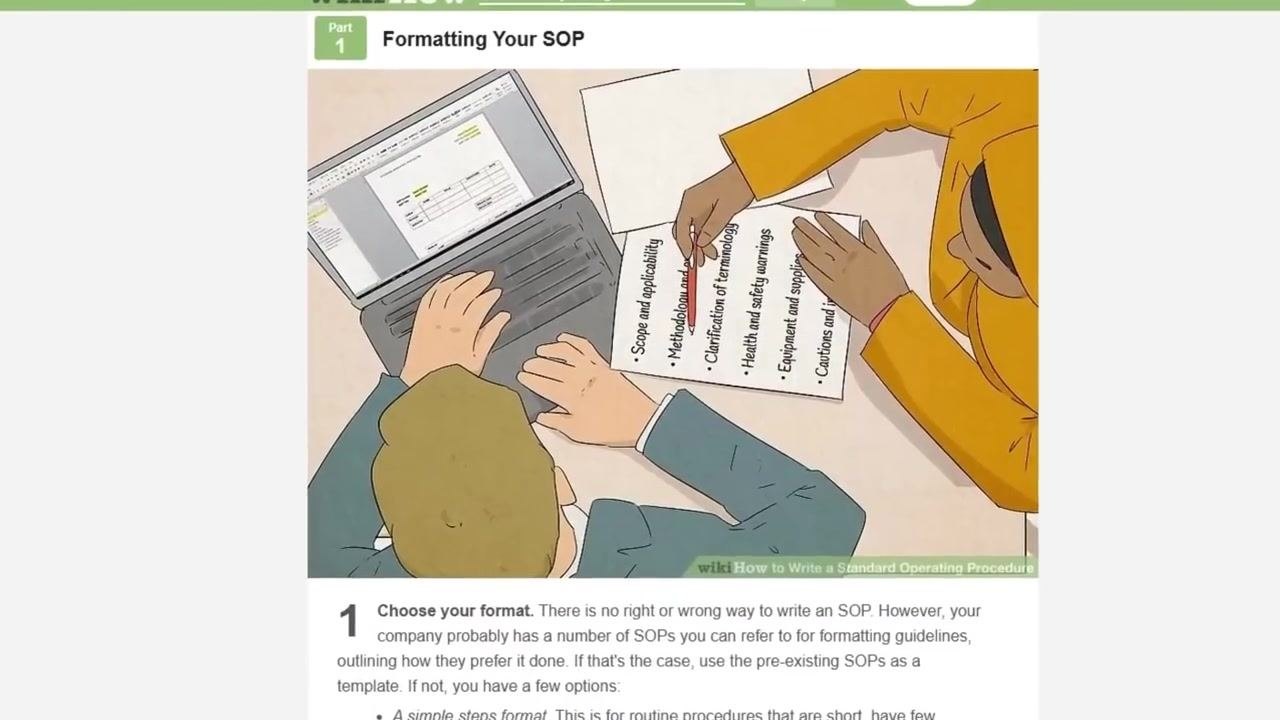
For formatting inspiration, reference resources such as wikiHow. Use clear section headers (for example, "Formatting Your SOP") and illustrations or screenshots that show both the process and the finished document. Highlight important elements such as scope, methodology, terminology, safety warnings, equipment, and cautions.
Verification and summary
Before finalizing an SOP, verify that it:
- Documents a high-impact process prioritized among the top 20% of tasks
- Was recorded step by step in a Loom video and accurately transcribed
- States a clear vision and purpose for why the procedure exists
- Lists all required resources, tools, and links
- Defines explicit, unambiguous completion criteria for "done"
- Includes written instructions, screenshots, and an embedded video walkthrough
Following these steps produces effective, actionable SOPs that empower your team, ensure consistency, and free up your time for higher-level business growth.
What's next
For personalized help building SOPs, trainings, and procedures to scale your agency, visit 8figureagency.co and book a call for expert guidance on building and optimizing your agency's SOPs and operations.


Generation details: cost, quality tiers
Docsie billed 2,500 credits ($1.75) to analyze this 5-minute video at standard quality. The rewrite, template fill and Word/PDF exports were included. The same video at each quality tier:
| Quality | Frames sampled | Credits | Approx. cost |
|---|---|---|---|
| Draft | every 16-30 s | 1,250 | $0.88 |
| Standard (this guide) | every 8-15 s | 2,500 | $1.75 |
| Detailed | every 4-7 s | 5,000 | $3.50 |
| Ultra | every 1-3 s | 10,000 | $7.00 |
Credits priced at $0.70 per 1,000; plans include a monthly allowance. Enterprise customers on on-premise or bring-your-own-model deployments run this on their own inference and pay no per-video credits.
Generated by Docsie Video-to-Docs on 2026-09-10 from a 4-minute video. Screenshots are frames from the source video and belong to their creator, Jordan Ross, whose original is embedded above. If you own this video and want the guide removed or credited differently, contact us and we will act within one business day.