
How to Implement an OSS Note in SAP
Learning how to implement an OSS Note in SAP is a core maintenance skill for keeping your system stable and free of known errors. SAP Notes (also called OSS Notes) are official documents released by SAP to address bugs, program errors, syntax errors, or to provide important system information. This guide walks you through recognizing an error, finding the correct note, reviewing its resolution, and applying it in your SAP system.
Video: SAP NOTE IMPLEMENTATION by SAP BASIS (2024). All credit for the demonstration goes to the creator; watch the original on YouTube. The written guide below was generated from this video by Docsie. Creator? Request a change or removal.
Learning how to implement an OSS Note in SAP is a core maintenance skill for keeping your system stable and free of known errors. SAP Notes (also called OSS Notes) are official documents released by SAP to address bugs, program errors, syntax errors, or to provide important system information. This guide walks you through recognizing an error, finding the correct note, reviewing its resolution, and applying it in your SAP system.
Understanding SAP Note implementation
SAP Notes fall into two categories:
- Correction Notes – contain code corrections or technical fixes that you can implement directly in the SAP system.
- Informative Notes – provide information, guidance, or manual steps to resolve an issue, but do not include direct code changes.
Each note describes the issue, the resolution or fix, and instructions for implementation. Some notes are implemented automatically, while others require manual steps. You should use SAP Notes whenever you encounter dumps, program errors, syntax errors, or other known issues, and you should check for new notes regularly as part of ongoing system maintenance.
Prerequisites
Before you begin implementing an OSS note in SAP, make sure you have:
- Access to the SAP Easy Access screen.
- The necessary authorizations to implement notes or make system changes.
View the list of runtime errors
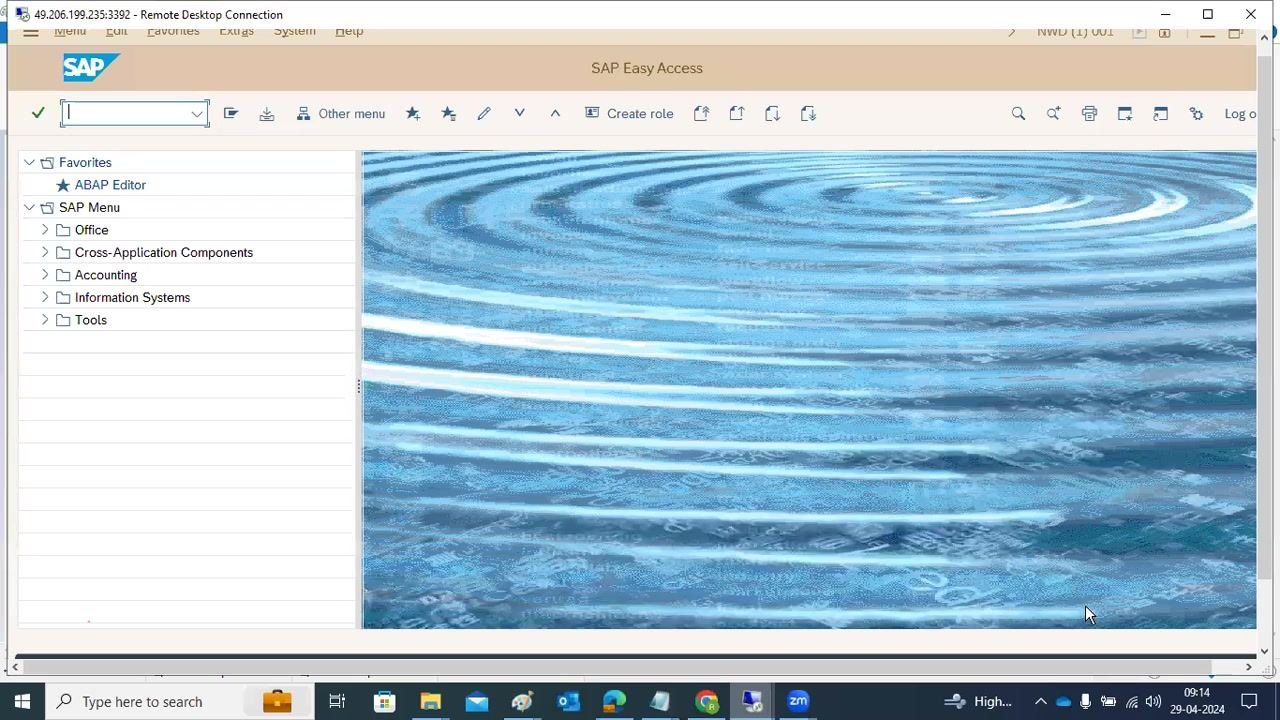
Start on the SAP Easy Access screen to begin investigating the error. The left panel shows navigation options such as Favorites, ABAP Editor, and SAP Menu folders (Office, Cross-Application Components, Accounting, Information Systems, Tools), while the top bar offers options for creating roles and other menu actions.
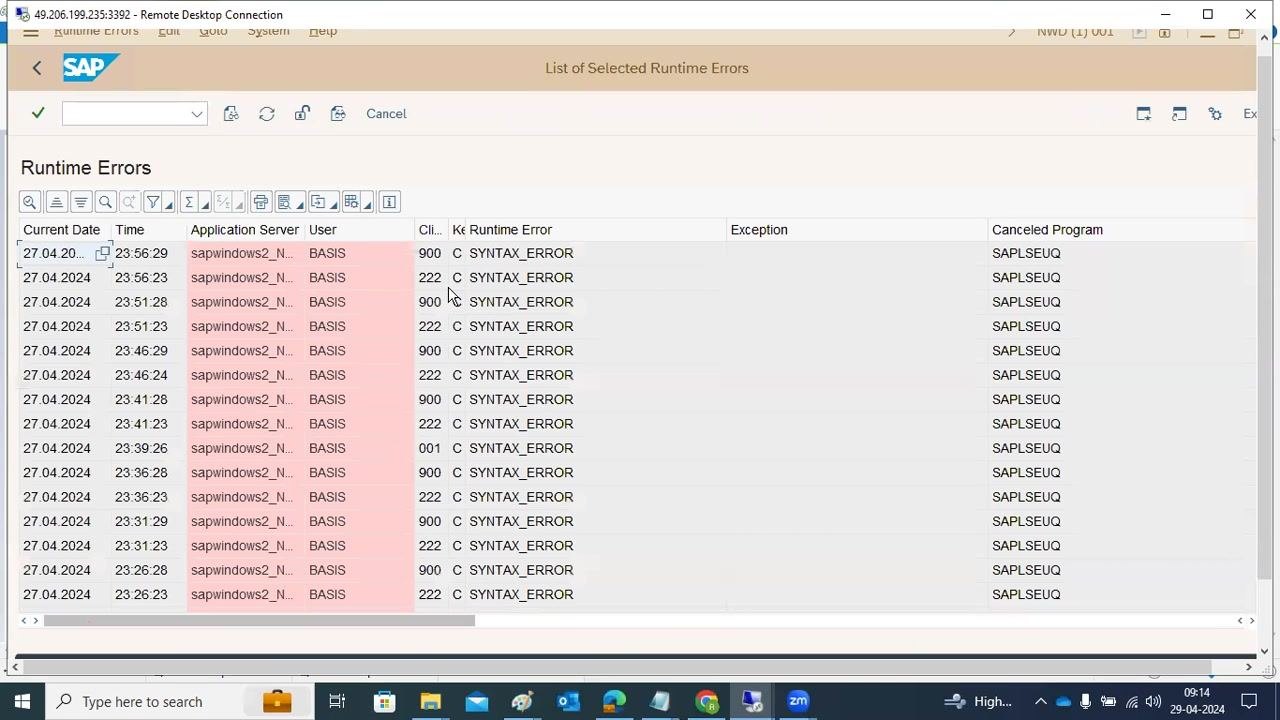
Open the runtime error log to view a list of recent errors. The log displays columns such as Current Date, Time, Application Server, User, Client, Runtime Error, Exception, and Canceled Program. Many entries are labeled SYNTAX_ERROR and are associated with the program SAPLSEUQ; these critical issues appear highlighted in red.
Analyze the error details
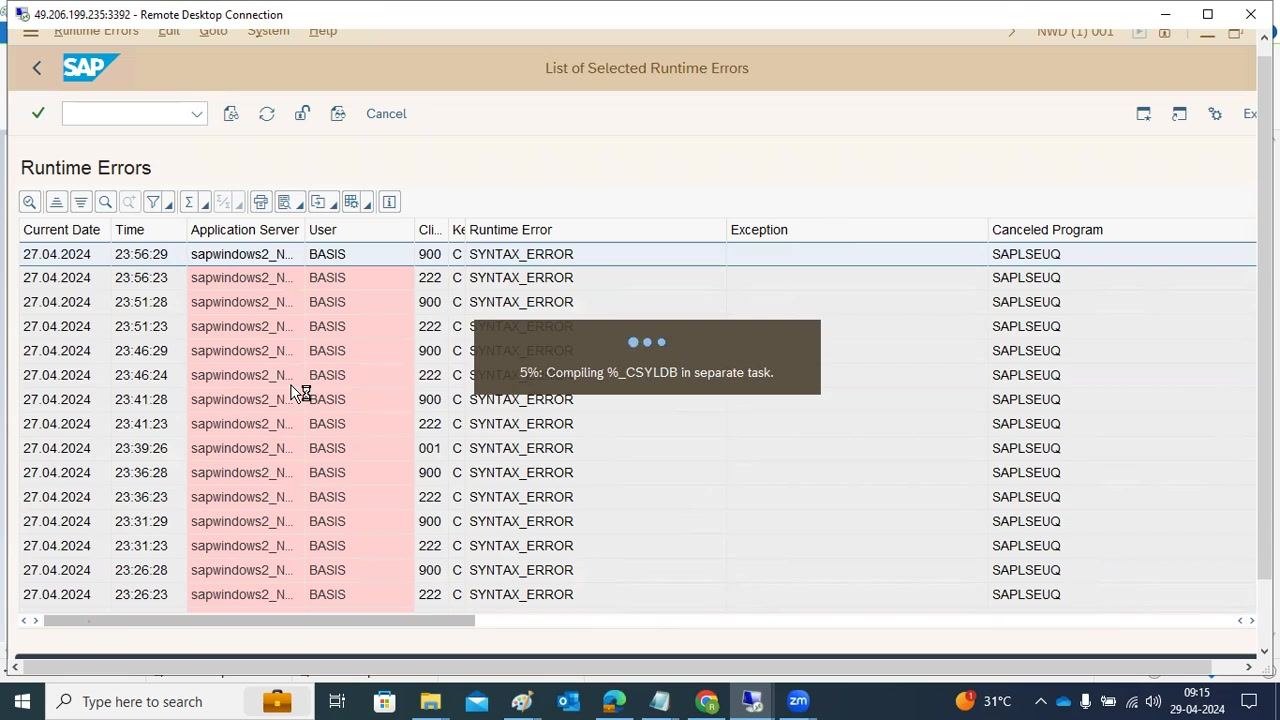
Select a specific error entry to open its detailed description. Review the error category (for example, ABAP programming error), the runtime error type (SYNTAX_ERROR), the ABAP program (SAPLSEUQ), and the application component (BC-DWB-UTL-BRR).
Check the What happened? section for a summary of the error, including the specific statement or type that caused the failure (for example, Type "BCWBN_CINTKEYSYS" is unknown). Then review the Error analysis section for technical details such as the include, row, and module type where the error occurred.
Search for the relevant SAP Note
Open a web browser and navigate to a search engine. Copy the error message or a key excerpt, for example:
"the current ABAP program 'SAPLSEUQ' had to be terminated because it found a statement that could not be executed. In include 'IF_CWB_DWB_OBJECT' in line 41 of program 'SAPLSEUQ', the following syntax errors have occurred: Type 'BCWBN_CINTKEYSYS' is unknown."
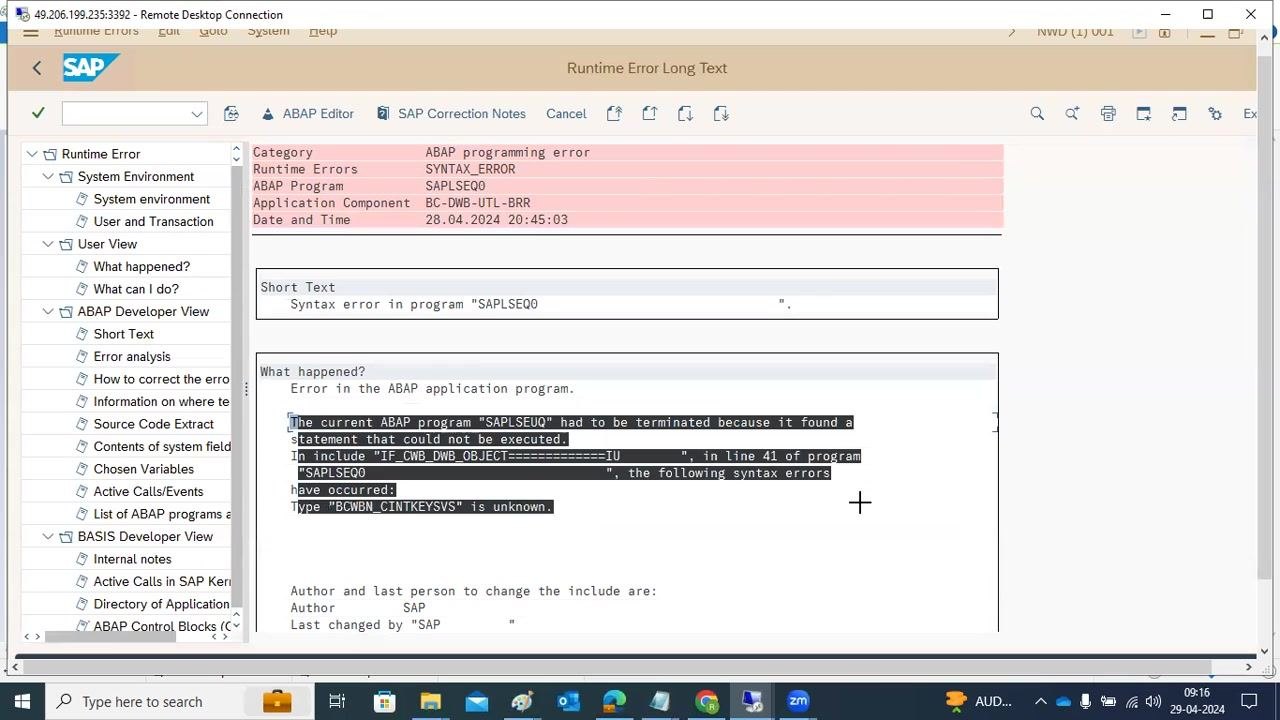
Paste the error message into the search bar and run the search. Review the results for SAP Notes or Knowledge Base Articles (KBAs) that match the error. In this case, the relevant result is SAP Note 2854490, titled "SYNTAX_ERROR: type_CWBNTREASON is unknown."
Review the SAP Note details and error context
Open the relevant SAP Note (2854490) in your web browser and confirm the following details:
- Title: 2854490 - SYNTAX_ERROR: type CWBNREASON is unknown
- Release Date: 27.04.2023
- SAP_BASIS Version: 7.X
- Implemented Note: 2232814
- Cause: The manual steps of SAP Note 2232814 were not followed.
- Resolution: Create the domain and data element CWBNREASON as per SAP Note 2232814, or transport both objects to the affected system.
- Additional Guidance: If dumps occur or the import fails with RC12, follow KBA 2861287, or restore the system to a point before SAP Note 2232814 was implemented.
Review the resolution steps
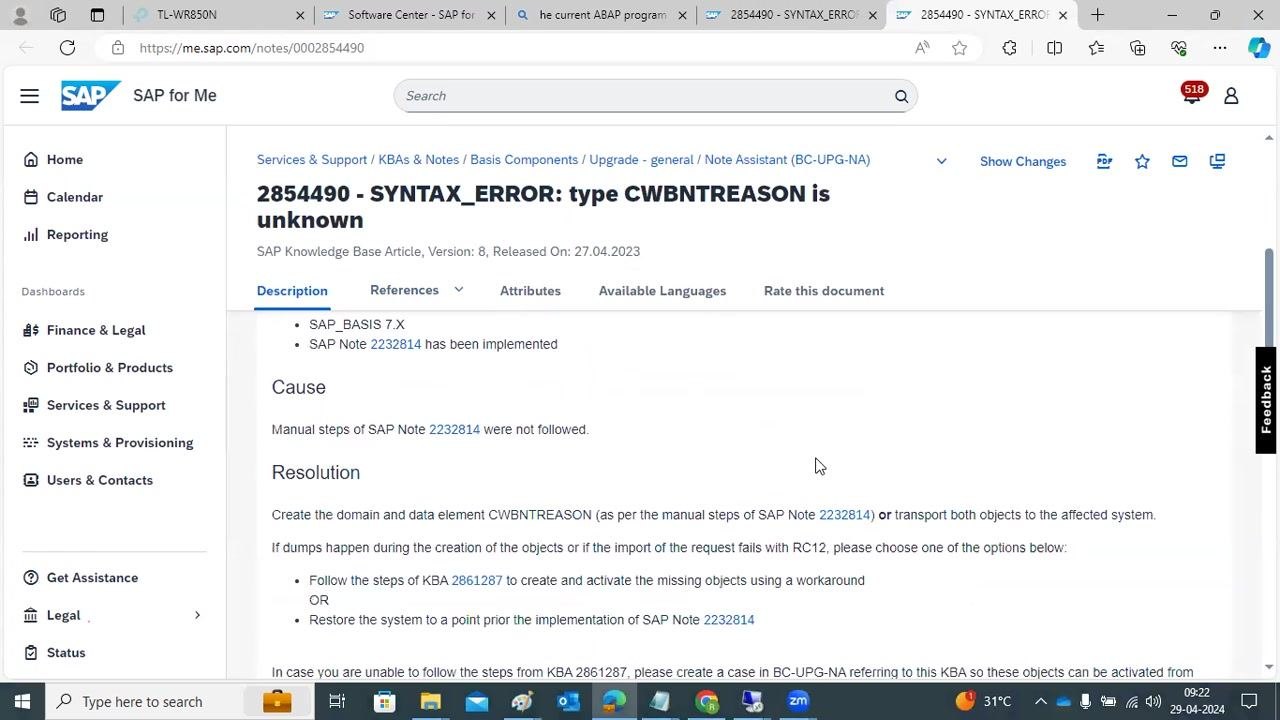
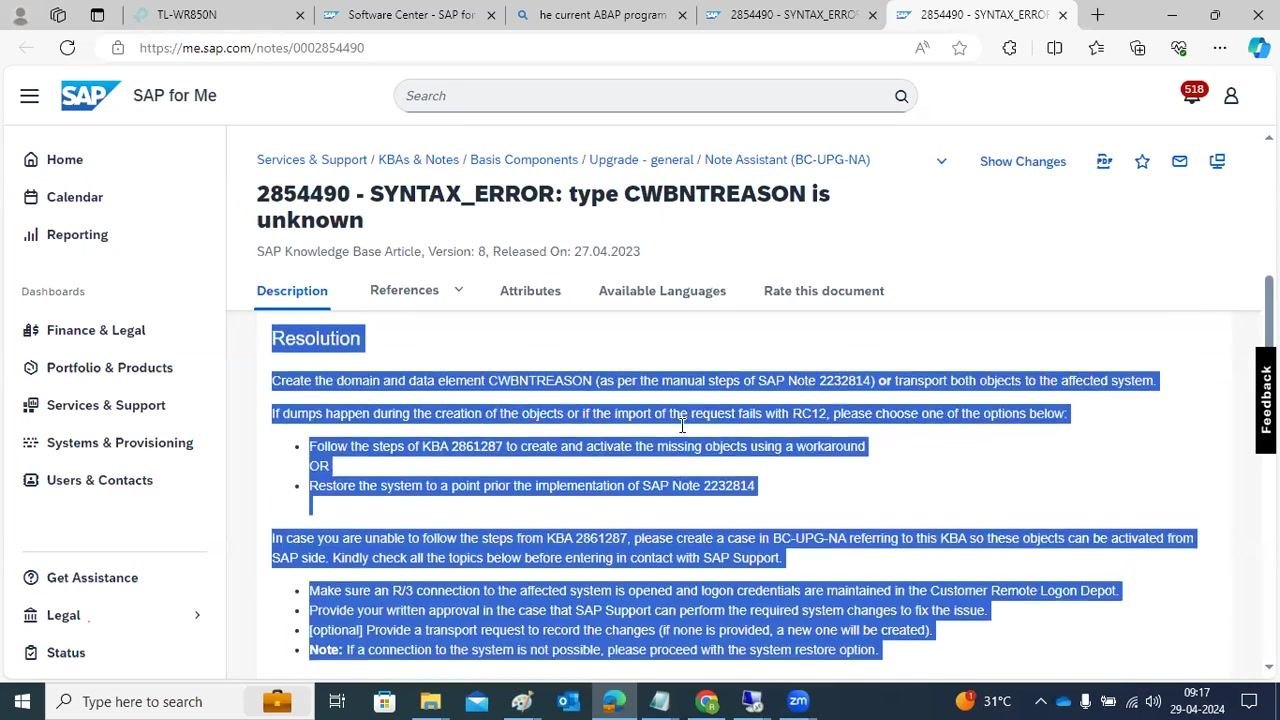
On the SAP for Me portal, open SAP Note 2854490 and read the Resolution section carefully:
- Create the domain and data element CWBNTREASON following the manual steps of SAP Note 2232814, or transport both objects to the affected system.
- If dumps occur during object creation, or the import fails with RC12, choose one of the following:
- Follow the steps of KBA 2861287 to create and activate the missing objects using a workaround.
- Restore the system to a point prior to the implementation of SAP Note 2232814.
- If you cannot follow the steps from KBA 2861287, create a case in BC-UPG-NA referencing this KBA so SAP Support can activate the objects.
- Before contacting SAP Support, make sure that:
- The R/3 connection to the affected system is open and logon credentials are maintained in the Customer Remote Logon Depot.
- You provide written approval for SAP Support to perform the required changes.
- You optionally provide a transport request to record the changes (if none is provided, SAP will create a new one).
- If a connection is not possible, you proceed with the system restore option instead.
Note all prerequisites and recommendations before proceeding.
Before implementing the resolution, gather all necessary information and credentials for your SAP system:
- Download or review SAP Note 2232814 and KBA 2861287 as referenced in the resolution.
- Confirm you have access to the affected SAP system and the ability to create or transport objects.
- If you need SAP Support, prepare the necessary approvals and transport requests as outlined above.
Apply the SAP Note using SNOTE
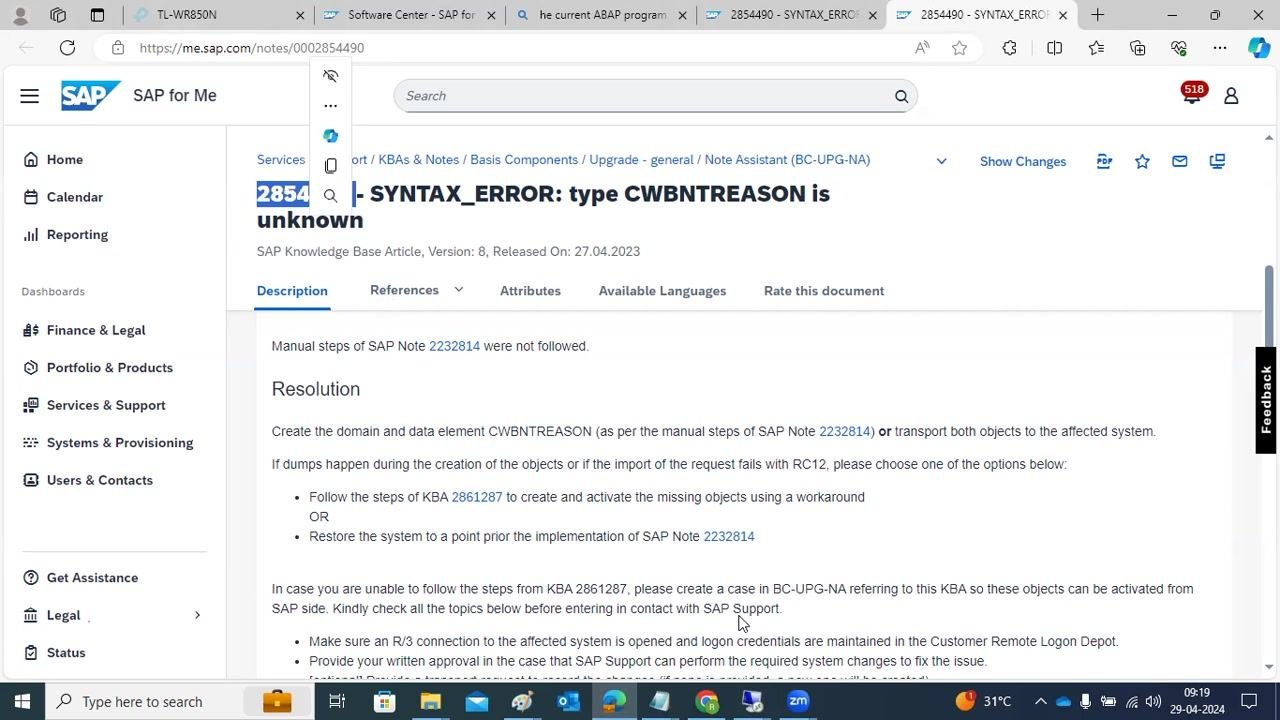
To implement an OSS note in SAP, use transaction code SNOTE to apply the correction instructions provided in the note.
Copy the SAP Note number (2854490) from the SAP Note page, then go to the SAP GUI and enter transaction code SNOTE. Paste or enter the note number in the Note Assistant to begin the implementation process.
Complete the required manual steps
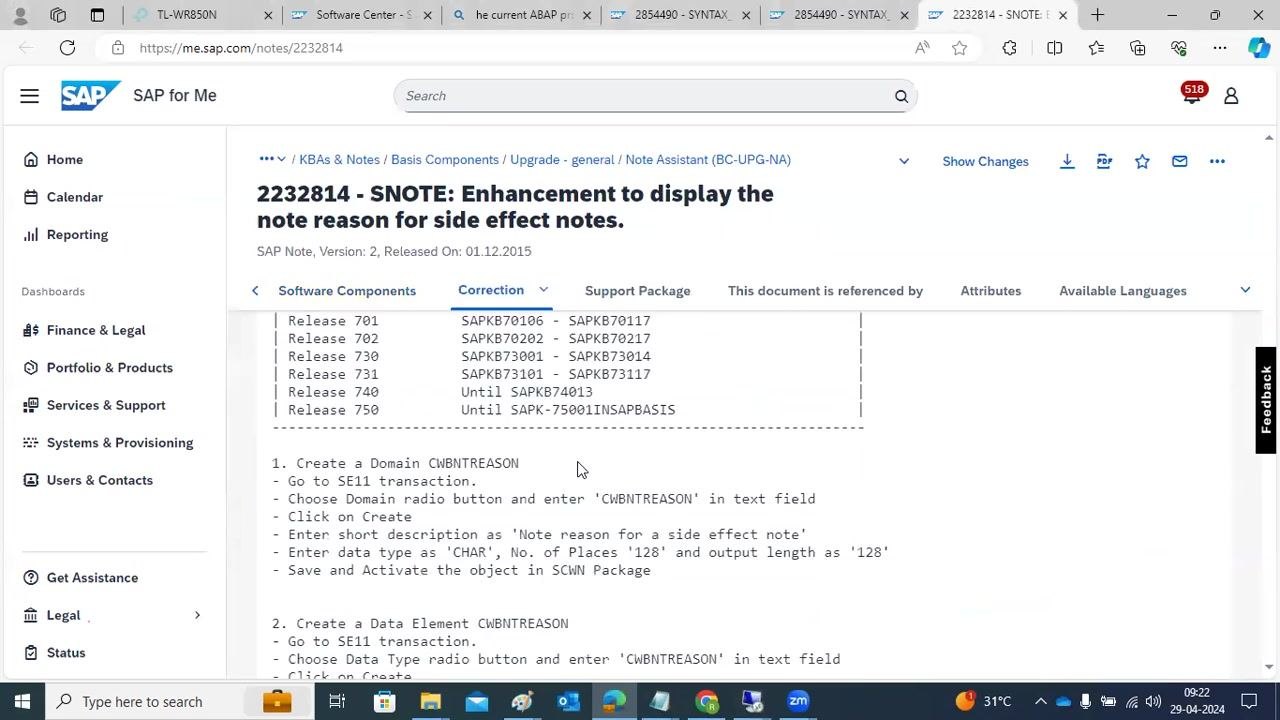
Open SAP Note 2232814 for detailed instructions on the manual activities needed to resolve the error. This note provides step-by-step guidance for creating the required domain and data element.
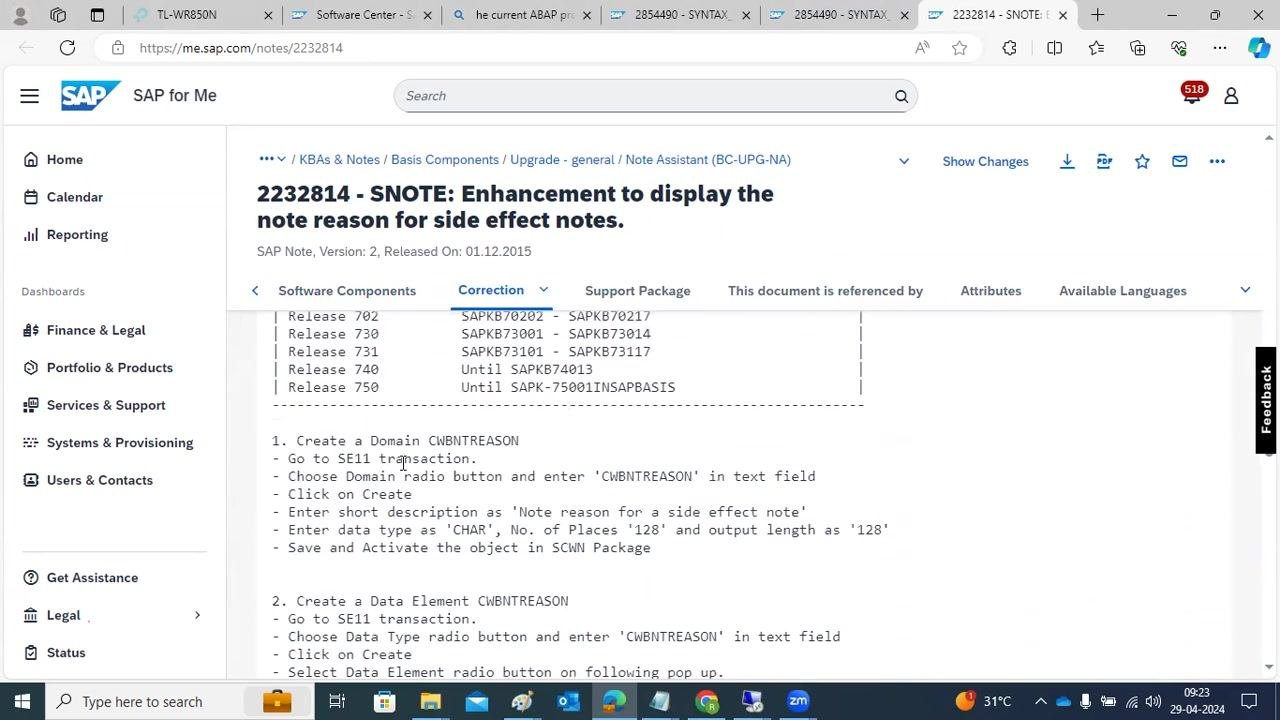
Follow the instructions to create the domain CWBNTREASON:
- Go to transaction code SE11.
- Choose the Domain radio button and enter
CWBNTREASONin the text field. - Click Create.
- Enter a short description:
Note reason for a side effect note. - Set the data type to
CHAR, the number of places to128, and the output length to128. - Save and activate the object in the SCWN Package.
The note may also instruct you to create a data element using similar steps.
Verify implementation and system status
After completing the manual steps or transporting the required objects, recompile the affected ABAP programs. Check the SAP GUI to confirm that the syntax error is resolved and that the relevant transaction codes open without issue. If errors persist, review the SAP Note and referenced KBAs again, or contact SAP Support for further assistance.
Summary
- SAP Note implementation is essential for maintaining system stability and resolving known issues.
- Correction Notes provide direct fixes, while Informative Notes provide guidance for manual resolution.
- Always review the content and instructions of a note fully before implementation.
- Use the SAP Easy Access screen and the runtime error log to identify and diagnose the issue.
- Search for the error message to locate the matching SAP Note, then review its Cause and Resolution sections.
- Use transaction SNOTE to apply correction instructions, and follow any referenced manual-step notes or KBAs exactly as documented.
- Document all changes and steps taken for future reference and compliance.
What's next
After confirming the syntax error is resolved, continue monitoring the runtime error log for recurring issues. If problems persist after implementing the note and its referenced manual steps, escalate to SAP Support with all required information, including connection details, approvals, and transport requests.
Generation details: cost, quality tiers
Docsie billed 6,000 credits ($4.20) to analyze this 12-minute video at standard quality. The rewrite, template fill and Word/PDF exports were included. The same video at each quality tier:
| Quality | Frames sampled | Credits | Approx. cost |
|---|---|---|---|
| Draft | every 16-30 s | 3,000 | $2.10 |
| Standard (this guide) | every 8-15 s | 6,000 | $4.20 |
| Detailed | every 4-7 s | 12,000 | $8.40 |
| Ultra | every 1-3 s | 24,000 | $16.80 |
Credits priced at $0.70 per 1,000; plans include a monthly allowance. Enterprise customers on on-premise or bring-your-own-model deployments run this on their own inference and pay no per-video credits.
Generated by Docsie Video-to-Docs on 2026-10-14 from a 11-minute video. Screenshots are frames from the source video and belong to their creator, SAP BASIS, whose original is embedded above. If you own this video and want the guide removed or credited differently, contact us and we will act within one business day.