
4.8
on G2
 Scribe
 Tango
Tango
Scribe and Tango both charge per user for screenshot-based workflow documentation, but their pricing structures, free plan limits, and enterprise costs differ significantly. This comparison breaks down every plan, what you get at each price point, and where each tool's pricing model breaks down at scale.
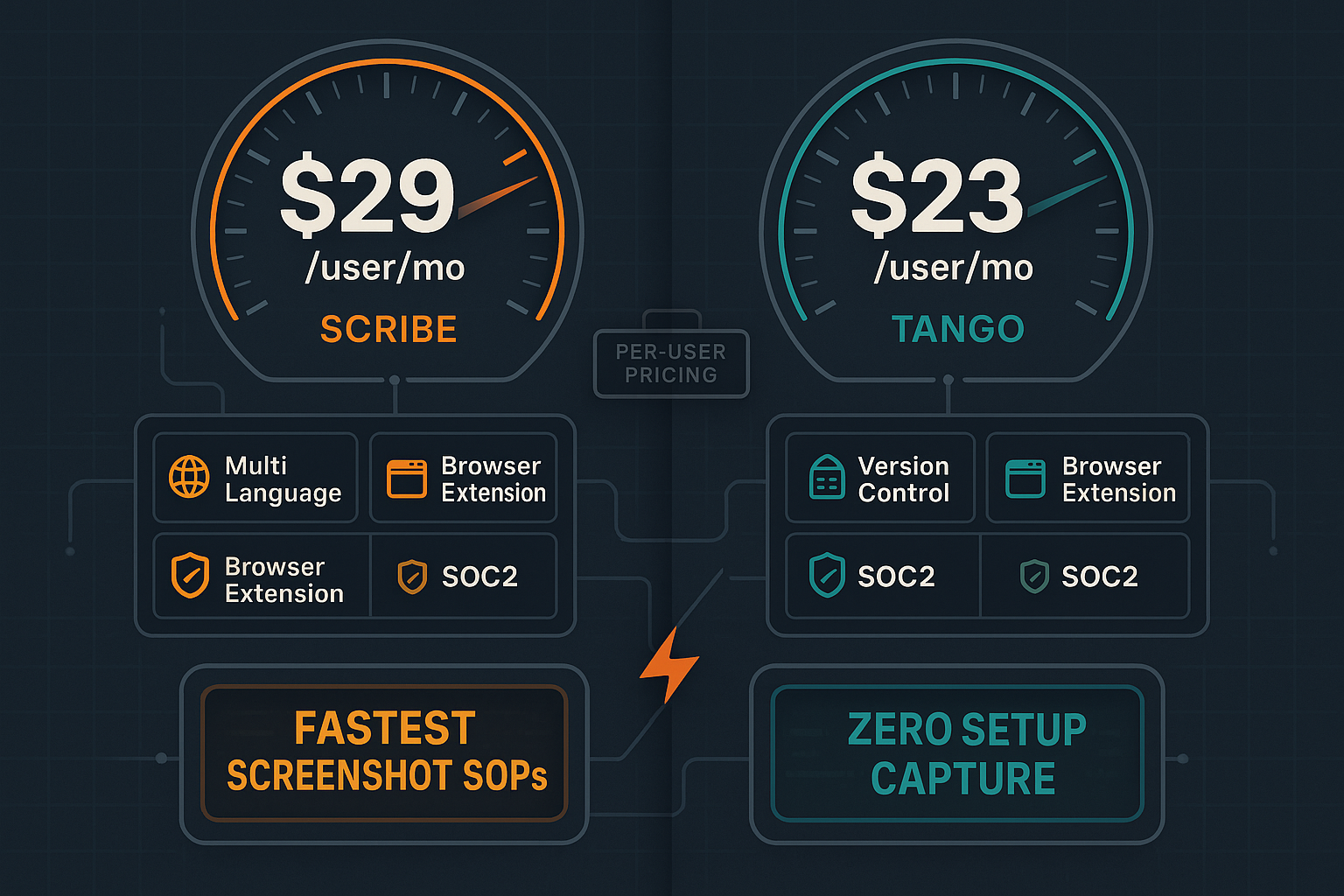
Scribe and Tango are closely matched tools at similar price points — both capture browser workflows as annotated screenshots and both gate enterprise security behind custom pricing.
Pricing Feature Matrix
A detailed breakdown of features available at each pricing tier for Scribe and Tango, so you can compare true value at every level.
| Feature / Plan |
Scribe
|
Tango
|
|---|---|---|
| Free Plan Available | ||
| Free Plan User Limit | Unlimited users | Up to 10 users |
| Free Plan Content Limit | Unlimited guides (browser only) | 15 workflows only |
| Free Plan Watermark | Yes — Scribe watermark | No watermark |
| Starting Paid Price | $29/user/month (Personal) | $23–24/user/month |
| Team Minimum Cost | $75/month (5 seats) | $115–120/month (5 users) |
| Desktop App Capture | Pro Personal+ ($29/user) | Pro+ ($23–24/user) |
| PDF Export | Pro Personal+ | Pro+ |
| Custom Branding / Remove Watermark | Pro Personal+ | Partial (branded exports, Pro+) |
| Team Workspace & Collaboration | Pro Team ($15/seat, 5 min) | Pro+ |
| Approval Workflows | Pro Team+ | |
| Version History | 14 days (Pro), 365 days (Enterprise) | |
| Analytics | Pro Team+ | Advanced (Pro+) |
| In-App Guided Walkthroughs | Enterprise only (Nuggets) | |
| Automatic PII / PHI Blurring | Enterprise only (AI PII/PHI redaction) | Enterprise only (auto PII blurring) |
| SSO (SAML / SCIM) | Enterprise only | Enterprise only |
| Enterprise Pricing (reported) | $18,000–$39/user/year | Custom (undisclosed) |
| API Access | ||
| Multi-Tenant Portals | ||
| Video-to-Docs Conversion |
Pricing data as of February 2026, based on publicly available information and reported user costs. Enterprise pricing for both tools requires direct sales contact.
Strengths & Weaknesses
Deep Dive Analysis
An in-depth look at value for money, scalability costs, and hidden limitations across both tools' pricing models.
Scribe's free plan is generous on volume (unlimited browser guides) but watermarked and browser-only. Tango's free plan removes the watermark but caps you at 15 workflows — a ceiling most teams hit within weeks. On paid tiers, Tango's Pro ($23–24/user) undercuts Scribe Personal ($29/user) slightly, but neither plan includes approval workflows or meaningful version control. Scribe's Pro Team ($15/seat with a 5-seat minimum) can actually be cheaper per seat for team use, but mandates $75/month minimum. Both tools deliver comparable core output — annotated screenshots — at similar price points, making the choice largely dependent on which specific features matter most to your team.
Both tools use per-user pricing, which compounds aggressively as teams grow. Scribe's Enterprise tier has been reported by users at $18,000 to $39/user/year — making it one of the more expensive options in the process documentation category for larger organizations. Tango's Enterprise pricing is undisclosed, requiring a sales conversation. Neither tool offers a workspace-based or flat-rate model that would allow cost predictability at scale. For a 50-person team, Scribe Pro Team would run approximately $750/month ($9,000/year), while Tango Pro would reach $1,150–1,200/month ($13,800–14,400/year), neither including enterprise security features.
Both tools lock their most critical enterprise features behind opaque custom tiers. SSO, SCIM, and PII/PHI redaction on Scribe require Enterprise — adding significant cost beyond the already high per-seat fees. Tango gates in-app guided walkthroughs (Nuggets), 365-day version history, and automatic PII blurring at Enterprise, meaning teams on Pro are missing key security and compliance features. Neither tool offers API access at any public pricing tier, so any custom integration or automation requires Enterprise negotiation. Approval workflows — essential for compliance-heavy industries — are only available in Scribe's Pro Team tier and completely absent from Tango's plans.
Side-by-Side Pricing
Every published pricing plan for Scribe and Tango compared side by side, including what's included, what's gated, and total cost of ownership at different team sizes.
Pricing Verdict
Scribe offers more flexibility in its free tier (unlimited guides vs. Tango's 15-workflow cap) but charges more for individual paid access at $29/user vs. Tango's $23–24/user. For teams, Scribe's Pro Team tier at $15/seat becomes competitive but requires a 5-seat minimum. Tango's free plan is better for small teams testing the tool without volume limits on users, but the 15-workflow cap makes it impractical for real use. Both tools' Enterprise pricing is opaque and expensive — Scribe's reported $18,000+ floor is a significant commitment for features that should arguably be standard. Neither tool's pricing model rewards growth or scales economically for large organizations. For teams expecting to document at scale — especially across multiple clients or departments — the per-seat model of both tools creates unpredictable cost growth without unlocking meaningfully different capabilities.
Our Recommendation
Scribe and Tango are closely matched tools at similar price points — both capture browser workflows as annotated screenshots and both gate enterprise security behind custom pricing. Scribe edges ahead on free plan volume and has more robust approval workflows and PII redaction; Tango has a slightly lower Pro price point and offers in-app guided walkthroughs at Enterprise. Neither tool provides version control, API access, multi-tenant portals, or any video-to-docs capability at any pricing tier.
Choose Scribe if you need...
Choose Tango if you need...
Choose Docsie if you need...
Winner: Docsie
Docsie's workspace-based AI credit model delivers better economics at team scale than either Scribe's or Tango's per-user pricing. At $199/month for up to 15 users, Docsie costs less than either competitor for a team of that size — and includes capabilities neither tool offers at any price point, including video-to-docs conversion, multi-tenant client portals, version control, API access, a built-in LMS, and 100+ language auto-translation. Both Scribe and Tango charge more per user to do less.
Decision Helper
A direct framework for picking between Scribe, Tango, and Docsie based on your specific needs.
Browser process capture that auto-generates step-by-step guides.
Workflow capture tool turning clicks into screenshot how-tos.

Convert real video into searchable docs, then deploy multi-tenant portals.
Common Questions
Q: What is the real minimum cost to use Scribe for a team?
A: Scribe's Pro Team plan requires a minimum of 5 seats at $15/seat/month, making the effective floor $75/month even if your team has only 2 or 3 active users. If you need desktop capture but only have one or two users, the Pro Personal plan at $29/user/month is your only option, which is actually more expensive per seat than the team plan. For enterprise features like SSO and PII redaction, costs have been reported at $18,000 or more annually.
Q: Does Tango's free plan actually work for a real team?
A: Tango's free plan supports up to 10 users without a watermark, which is better than Scribe's watermarked free tier. However, the 15-workflow cap is the critical limitation — most teams documenting even a handful of internal processes will exhaust this within days or weeks. Once you hit the cap, you must upgrade to Pro at $23–24/user/month or stop creating new documentation. The free plan is best treated as an extended trial rather than a sustainable option.
Q: Which tool is cheaper for a team of 20 users?
A: At 20 users, Tango Pro would cost approximately $460–480/month, while Scribe Pro Team would cost $300/month (20 seats at $15/seat). Scribe's team plan is meaningfully cheaper for larger groups due to its lower per-seat rate. However, both tools exclude SSO, PII redaction, and advanced security features at these price points, requiring an Enterprise upgrade — and opaque custom pricing — to access those capabilities.
Q: Do Scribe or Tango charge extra for integrations?
A: Neither Scribe nor Tango charges separately for their published integrations — tools like Confluence, Notion, SharePoint, and ClickUp are included at the paid tiers. However, neither tool offers API access at any publicly priced tier, meaning custom integrations, automation pipelines, or programmatic content management require Enterprise negotiation with both vendors.
Q: Is there a better alternative to both Scribe and Tango for documentation teams?
A: Yes — Docsie offers a fundamentally different pricing model and capability set. At $199/month for up to 15 users, Docsie costs less per user than either Scribe or Tango's paid tiers while including features neither tool offers at any price point. Docsie converts existing training videos, PDFs, and websites into structured documentation (not just new screen captures), supports 100+ language auto-translation, provides multi-tenant portals for client delivery, includes version control and API access, and has a built-in LMS with course builder and certifications. For teams that need more than screenshot-based SOPs, Docsie delivers significantly more value per dollar.
Q: When does the per-user pricing model of Scribe and Tango become a problem?
A: Per-user pricing becomes financially painful once teams exceed 15–20 active users, where monthly costs on either platform reach $300–500/month for features that are still missing API access, version control, and multi-tenant delivery. Organizations that expect to grow their documentation teams, onboard seasonal staff, or add external collaborators face compounding costs with no pricing relief. Docsie's workspace-based model with AI credits sidesteps per-seat inflation entirely, making it more predictable and economical for growing teams.
Docsie gives you workspace-based pricing that doesn't inflate per user, video-to-docs conversion for any existing content, multi-tenant portals for client delivery, version control, API access, and 100+ language support — all the things Scribe and Tango charge Enterprise rates for or simply don't offer. Start free and convert your first 10-minute training video at no cost.
Free AI credits included. No credit card required. Cancel anytime.