
4.8
on G2
 Scribe
 Tango
Tango
Both Scribe and Tango offer enterprise tiers for browser-based workflow documentation, but how do they stack up on security, compliance, scalability, and administration? This head-to-head breaks down their enterprise readiness—and shows why Docsie is the stronger choice for serious enterprise knowledge management.
Scribe edges out Tango on enterprise readiness due to its HIPAA support, IP whitelisting, AI PHI redaction, and a published enterprise SLA — features that matter in regulated industries.
Enterprise Feature Matrix
A detailed side-by-side comparison of enterprise security, compliance, administration, scalability, and support features between Scribe and Tango.
| Enterprise Feature |
Scribe
|
Tango
|
|---|---|---|
| SSO (SAML) | Enterprise only | Enterprise only |
| SCIM User Provisioning | Enterprise only | Enterprise only |
| SOC 2 Compliance | ||
| GDPR Compliance | ||
| HIPAA Support | Enterprise (PHI redaction) | |
| IP Whitelisting | Enterprise only | |
| Automatic PII / PHI Redaction | Enterprise (AI-powered) | Enterprise (PII blurring) |
| Data Residency Options | ||
| Audit Logs | ||
| Role-Based Access Control | ||
| Version History | 14 days (Pro) / 365 days (Enterprise) | |
| Uptime SLA | Enterprise SLA | Not published |
| Dedicated Support | ||
| Multi-Tenant Portals | ||
| API Access | ||
| Custom Domain | ||
| Analytics & Reporting | Advanced (Pro+) | |
| Approval Workflows | Pro Team+ | |
| Air-Gap / Private Infrastructure |
Data as of February 2026. Enterprise features require the respective vendor's Enterprise tier. Pricing and features based on publicly available information and vendor documentation.
Strengths & Weaknesses
Deep Dive
An in-depth analysis of enterprise readiness across four critical dimensions — security and compliance, scalability and performance, administration and control, and support and SLA.
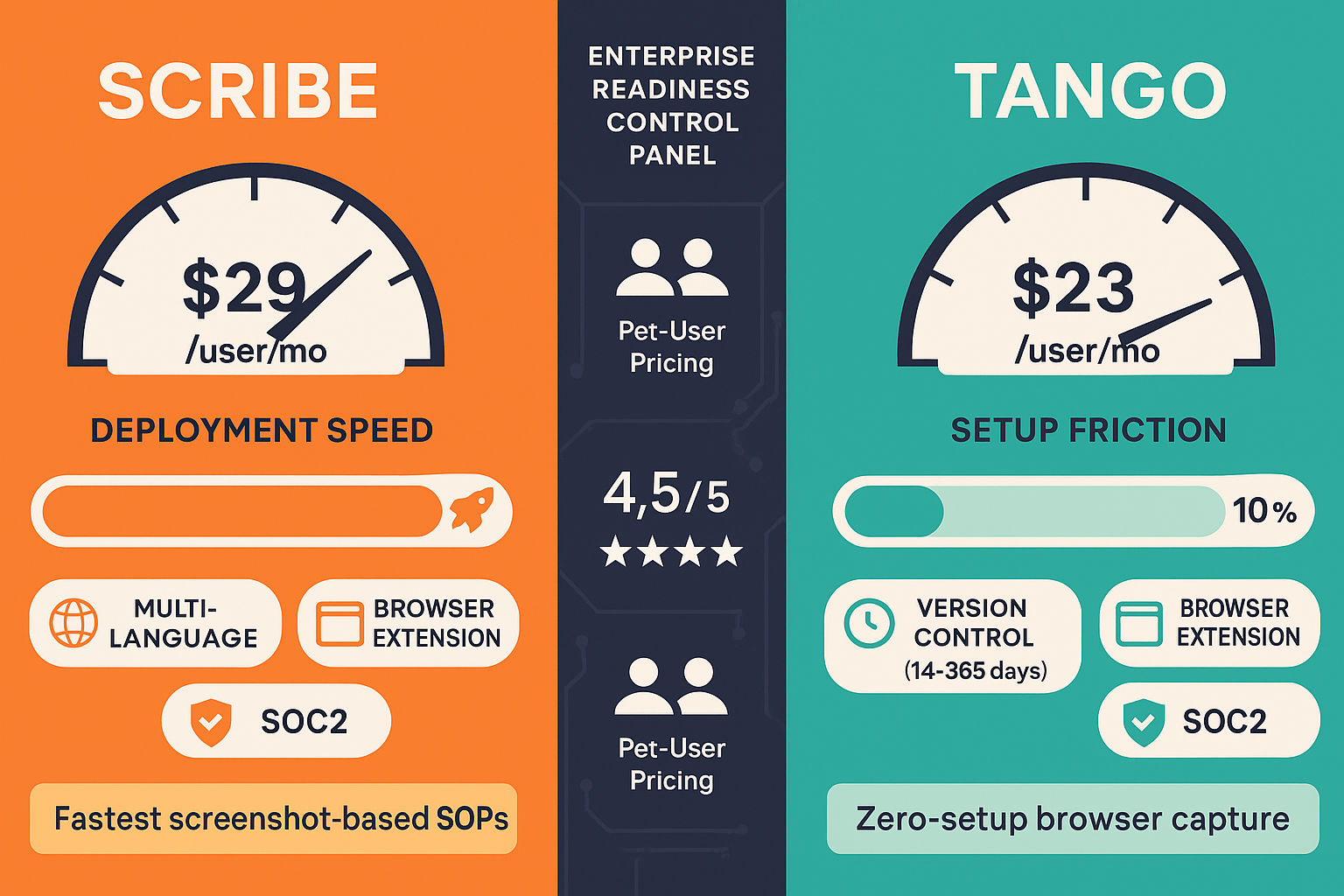
Scribe has a stronger compliance posture for enterprise use cases. Both tools are SOC 2 and GDPR compliant, but Scribe extends to HIPAA with AI-powered PHI redaction on its Enterprise tier — a meaningful differentiator for healthcare and financial services. Scribe also offers IP whitelisting for network-level access control. Tango provides automatic PII blurring on Enterprise but stops short of HIPAA support and lacks IP whitelisting entirely. Neither tool offers data residency options, EU-specific hosting, or audit logs — significant gaps for regulated industries requiring full traceability and geographic data controls.
Neither Scribe nor Tango publishes transparent scalability benchmarks or infrastructure details for enterprise deployments. Scribe offers an enterprise SLA but does not publicly specify uptime guarantees. Tango does not publish an uptime SLA at all. Both tools are designed primarily for internal team use and do not support multi-tenant architectures, meaning they cannot scale to serve multiple client organizations from a single deployment. Neither provides API access, which limits programmatic content management and automation at scale. Custom domain support is also absent from both platforms, constraining enterprise deployment flexibility.
Both Scribe and Tango provide role-based access control and SAML SSO with SCIM provisioning on their Enterprise tiers, covering the basics of identity and access management. Scribe adds approval workflows starting at Pro Team level, which gives content administrators a review gate before documentation goes live. Tango offers 365-day version history on Enterprise, which is useful for content auditing over time. However, neither platform provides audit logs — a critical requirement for enterprise compliance reporting. Neither offers API access for custom administrative automation, and both lack granular permission structures beyond basic role assignments.
Scribe explicitly offers a dedicated support plan and an enterprise SLA, though specific uptime figures are not publicly disclosed. Customers at the enterprise tier can expect priority response times and an assigned support contact. Tango similarly offers dedicated support on its Enterprise tier but does not publish an SLA or uptime commitment — a transparency gap that enterprise procurement teams should probe during vendor evaluation. Neither tool offers a self-service onboarding academy or built-in LMS for administrator training. Both vendors operate relatively young platforms (Scribe founded 2019, Tango founded 2021), and enterprise support maturity is still developing compared to established documentation platforms.
Our Recommendation
Scribe edges out Tango on enterprise readiness due to its HIPAA support, IP whitelisting, AI PHI redaction, and a published enterprise SLA — features that matter in regulated industries. Tango's 365-day version history and in-app guided walkthroughs offer value for software adoption use cases, but its lack of HIPAA compliance, absent uptime SLA, and pivot toward CRM automation raise concerns about its long-term commitment to documentation-first enterprise buyers.
Choose Scribe if you need...
Choose Tango if you need...
Choose Docsie if you need...
Winner: Docsie
Docsie addresses the critical enterprise gaps shared by both Scribe and Tango — no audit logs, no API access, no data residency, no multi-tenant portals, and no compliance monitoring. Docsie delivers SOC 2 Type II, GDPR, HIPAA-ready, SOX, and ITAR compliance with audit logs, granular permissions, EU data residency, and a 99.9% uptime SLA. Its multi-tenant architecture powers unlimited branded client portals from one knowledge base, while its six-pillar CONVERT → MANAGE → DELIVER → LEARN → AUTOMATE → MONITOR framework provides the complete enterprise knowledge orchestration that neither Scribe nor Tango can offer.
Decision Helper
A direct framework for picking between Scribe, Tango, and Docsie based on your specific needs.
Browser process capture that auto-generates step-by-step guides.
Workflow capture tool turning clicks into screenshot how-tos.

Convert real video into searchable docs, then deploy multi-tenant portals.
Common Questions
Q: Does Scribe or Tango support HIPAA compliance?
A: Only Scribe offers HIPAA support, available on its Enterprise tier with AI-powered PHI redaction that automatically blurs sensitive patient or financial information in captured screenshots. Tango does not support HIPAA compliance on any tier, making Scribe the clear choice for healthcare or financial services teams with PHI data requirements. However, neither tool offers the full compliance monitoring stack — including real-time frame-by-frame video analysis for HIPAA violations — that platforms like Docsie provide.
Q: Do either Scribe or Tango provide audit logs for compliance reporting?
A: Neither Scribe nor Tango provides audit logs on any pricing tier as of 2026. This is a significant gap for enterprise buyers in regulated industries who require full traceability of user actions, content changes, and access events for compliance reporting and security audits. Enterprise buyers who need audit logs should evaluate platforms purpose-built for enterprise knowledge management, such as Docsie, which includes audit logging as a standard enterprise feature.
Q: Which tool offers better identity management for large enterprises?
A: Both Scribe and Tango offer SAML SSO and SCIM provisioning exclusively on their Enterprise tiers, so neither has a clear advantage in identity standards coverage. Scribe adds IP whitelisting for network-level access control, which Tango does not offer. Neither tool supports OAuth, OIDC, Azure AD native integration, or Okta at a documented level, limiting their flexibility compared to enterprise platforms with broader SSO ecosystem support.
Q: Is there a better alternative to both Scribe and Tango for enterprise documentation?
A: Yes — Docsie is purpose-built for enterprise knowledge orchestration and addresses the critical gaps both tools share. Docsie offers SOC 2 Type II, GDPR, HIPAA-ready, SOX, and ITAR compliance with audit logs, EU data residency, 99.9% uptime SLA, full API access, and multi-tenant portals that deliver branded documentation to unlimited client organizations. Unlike Scribe and Tango, which are limited to internal browser workflow capture, Docsie converts any content — video, PDF, website — into structured knowledge bases and delivers them at enterprise scale with built-in LMS, autonomous agents, and real-time compliance monitoring.
Q: How do Scribe and Tango compare on enterprise pricing transparency?
A: Neither tool publishes enterprise pricing openly. Scribe's Enterprise tier has been reported at $18,000–$39/user/year by customers, making it one of the more expensive options in the process documentation category. Tango lists Enterprise pricing as custom with no published floor. Both tools use per-user pricing models that can become costly for large organizations. Enterprise buyers should request detailed pricing breakdowns and SLA documentation before committing to either platform.
Q: Can Scribe or Tango support multi-client or multi-tenant documentation delivery?
A: No — neither Scribe nor Tango supports multi-tenant portals or client-facing documentation delivery. Both platforms are designed exclusively for internal team use, with no ability to create separate branded portals for different client organizations from a single knowledge base. Agencies, consultancies, and implementation partners that need to deliver documentation to multiple clients simultaneously will find both tools fundamentally unsuitable for that use case and should evaluate Docsie, which is specifically designed for multi-tenant enterprise delivery.
Docsie delivers what both Scribe and Tango lack for enterprise teams — audit logs, data residency, multi-tenant portals, API access, built-in LMS, real-time compliance monitoring for HIPAA, SOX, ITAR, and GDPR, and a 99.9% uptime SLA. One platform to convert, manage, deliver, train, automate, and monitor your enterprise knowledge — at scale, across 100+ languages, for multiple clients simultaneously.
No credit card required. Free AI credits included. Enterprise SLA and custom onboarding available.