
4.8
on G2
 Screen Studio
 ScreenApp
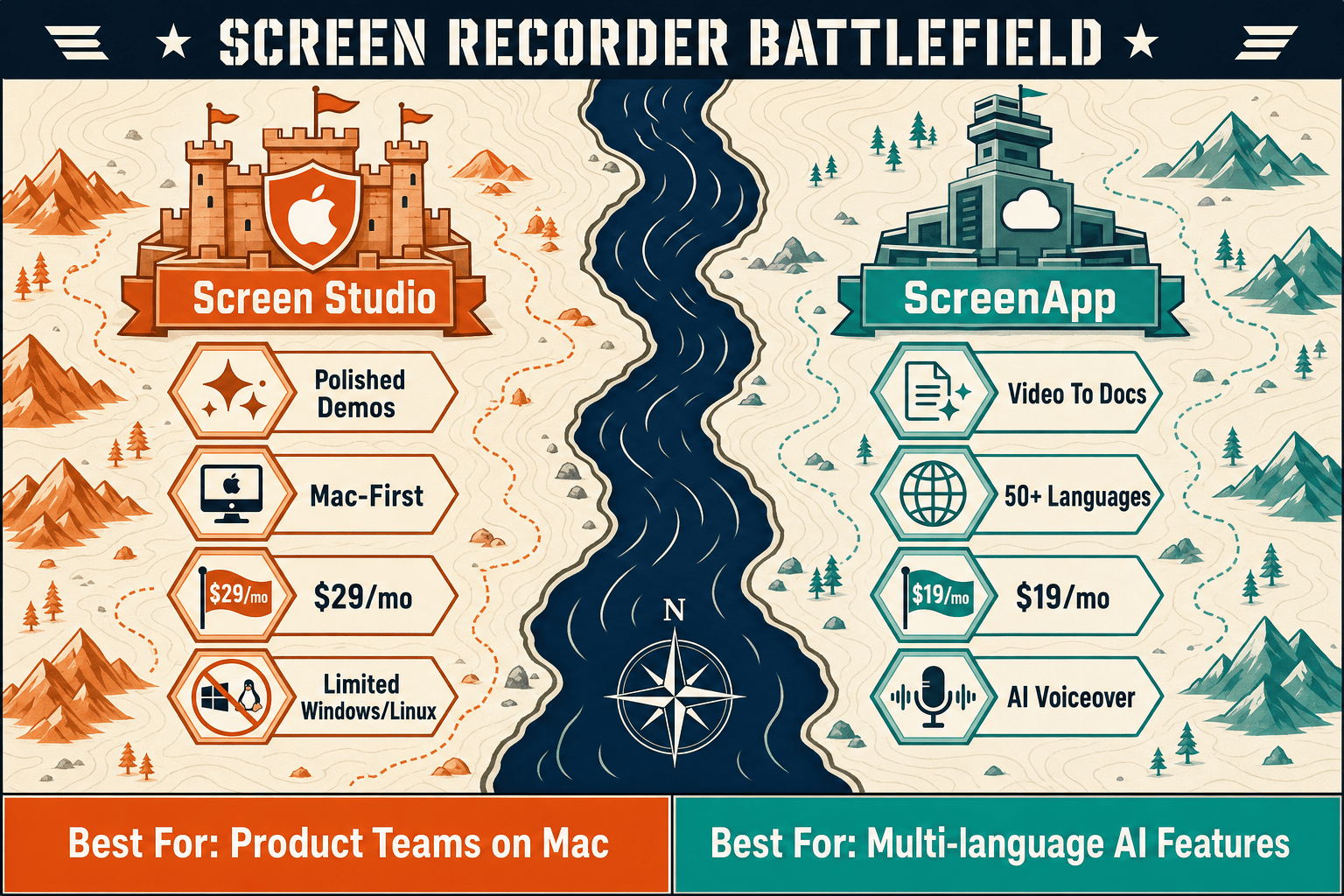
Screen Studio charges $29/month or $9/month billed yearly for a polished Mac-only recorder. ScreenApp starts free and scales to $34/month for AI-powered video-to-docs. Both have real gaps — read on to see which fits your budget, and why Docsie Recorder is a free alternative that covers what both miss.
Screen Studio is the right choice for Mac-only solo creators who want the most polished video output at the lowest annual price — $9/month buys everything, and the motion quality is genuinely best-in-class for marketing demos.
Feature & Pricing Matrix
A side-by-side breakdown of features available at each pricing tier for Screen Studio and ScreenApp, so you can see exactly what your money buys.
| Feature / Plan |
Screen Studio
|
ScreenApp
|
|---|---|---|
| Free Plan Available | ||
| Entry Price | $9/mo (billed yearly) | $0 free / $19/mo Growth |
| Monthly (no commitment) Price | $29/month | $19/mo Growth, $34/mo Business |
| Enterprise / Team Pricing | No team tier listed | From $199/month |
| Mac Support | Browser-based (any OS) | |
| Windows Support | ||
| Linux Support | ||
| Screen & Window Recording | ||
| Webcam Overlay | ||
| Automatic Zoom & Cursor Polish | ||
| Backgrounds & Visual Effects | ||
| AI Transcription | ||
| Video-to-Docs Conversion | ||
| Meeting Bot (Zoom/Meet/Teams) | Growth and above | |
| Markdown / DOCX / PDF Export | ||
| API Access | Business ($34/mo) and above | |
| SSO (SAML) | Enterprise ($199/mo) only | |
| SOC 2 Type II | ||
| Knowledge Base / Doc Management | ||
| Multi-Tenant Portals |
Pricing verified from official sources as of May 2026. SaaS pricing changes frequently — confirm current rates before purchasing. Screen Studio has no team or enterprise tier listed; ScreenApp enterprise pricing is custom-quoted.
Strengths & Weaknesses
Deep Dive
An in-depth look at value for money, scalability costs, and hidden limitations across both pricing models — and what each tool actually delivers for its price.
Screen Studio's annual plan at $9/month is compelling for solo Mac creators who want polished video output — you get every feature the product offers for a low flat rate. ScreenApp's Growth plan at $19/month annual delivers significantly more output variety — unlimited AI transcriptions, video-to-docs conversion, meeting bot, and multi-format export — making it the stronger value for teams that need written documentation, not just video. For pure video polish on a Mac, Screen Studio wins on price. For anyone needing cross-platform access or document output, ScreenApp offers more per dollar.
Screen Studio has no team pricing, which means each additional user on your team needs their own individual subscription. At $9/month annually per person, a five-person team pays $540/year just for recording — with no collaboration features to show for it. ScreenApp scales more deliberately with Business at $34/month covering team features and API access, and Enterprise from $199/month for unlimited users and SSO. However, ScreenApp's per-user seat model means costs grow predictably but can still surprise growing teams. Neither tool offers a genuinely flat team rate that stays affordable at 20 or 50 users.
Screen Studio's biggest hidden cost is what it cannot do. At any price, you cannot export to Markdown, DOCX, or PDF; you cannot publish to a knowledge base; and you cannot use it on Windows or Linux. Teams that also need written documentation are paying twice — once for Screen Studio and again for a separate docs tool. ScreenApp's hidden cost is tier-gating: free users get watermarked output and only 3 recordings, API access requires jumping to $34/month, and enterprise security features like SSO and audit logs demand the $199/month tier. Neither tool includes knowledge base management, version control, or multi-tenant portal delivery at any price.
Pricing Breakdown
Every plan, every tier, side by side — so you can see exactly what each tool costs and what you get.
Pricing Verdict
Our Recommendation
Screen Studio is the right choice for Mac-only solo creators who want the most polished video output at the lowest annual price — $9/month buys everything, and the motion quality is genuinely best-in-class for marketing demos. ScreenApp is the better choice for cross-platform teams who need AI transcription, video-to-docs conversion, and multi-format export in one $19/month subscription. The honest trade-off is that Screen Studio produces beautiful videos with no doc output, while ScreenApp produces useful documents with no visual polish — and neither tool manages or publishes the content it creates.
Choose Screen Studio if you need. .
Choose ScreenApp if you need. .
Choose Docsie Recorder if you need. .
Winner: Docsie Recorder
Docsie Recorder is free and open-source, runs natively on Mac, Windows, and Linux, and delivers recorder-grade editing features — zoom, crop, trim, speed regions, backgrounds, annotations, and blur regions — without the Mac-only restriction of Screen Studio or the browser-only limitations of ScreenApp. More importantly, it is the only recorder in this comparison that natively connects to a Video-to-Docs pipeline, turning your recording into structured documentation that feeds directly into Docsie's knowledge base workflow. Where Screen Studio stops at a video file and ScreenApp stops at a document export, Docsie Recorder starts a full documentation lifecycle — convert, manage, version, deliver, and learn — from a single recording session.
Decision Helper
A direct framework for picking between Screen Studio, ScreenApp, and Docsie based on your specific needs.
Polished Mac-only product demos with cinematic zoom and motion.
Online recorder + AI transcription and summaries.

Convert real video into searchable docs, then deploy multi-tenant portals.
Common Questions
Q: Is Screen Studio really $9/month, or is that misleading?
A: $9/month is the per-month cost when you commit to an annual plan — you pay roughly $108 upfront for the year. If you pay month-to-month without committing annually, the price is $29/month. Both plans include all Screen Studio features with no tier differences. Verify current pricing on screen.studio before purchasing, as SaaS pricing changes frequently.
Q: Does ScreenApp's free plan work for real projects?
A: ScreenApp's free plan is best treated as a demo environment rather than a working plan. It limits you to 3 recordings total and adds a watermark to all video output. For any real project or team workflow, you will need the Growth plan at $19/month annual minimum. The 7-day trial on Growth requires a credit card.
Q: What happens to Screen Studio pricing if my team grows?
A: Screen Studio has no team or enterprise pricing tier — every user on your team needs their own individual subscription. At $9/month annually, a team of five pays $540/year for recording alone, with no shared workspace, collaboration features, or admin controls to show for it. If team pricing matters, ScreenApp's Business or Enterprise tiers are the more appropriate choice for multi-user workflows.
Q: Does ScreenApp charge per seat on top of the monthly fee?
A: Yes. ScreenApp's per-user seat model means costs increase as you add team members beyond the base plan. The Growth plan's $19/month is per user, so a five-person team paying annually would spend $1,140/year. The Enterprise tier at $199/month and above offers unlimited users, which becomes more economical at scale. Factor in team size carefully when comparing total annual cost.
Q: Is there a better alternative to both Screen Studio and ScreenApp?
A: Yes — Docsie Recorder is a free, open-source desktop recorder that addresses the core limitations of both tools. Unlike Screen Studio, it runs on Mac, Windows, and Linux with no subscription required. Unlike ScreenApp, it is a native desktop app with recorder-grade editing features including zoom, crop, trim, backgrounds, and annotations. Most importantly, Docsie Recorder connects directly to Docsie's Video-to-Docs pipeline, turning your recordings into structured Markdown, DOCX, and PDF documentation that feeds into a full knowledge base workflow — something neither Screen Studio nor ScreenApp can do at any price.
Q: Which tool is better value for a team that needs both video and written documentation?
A: ScreenApp at $19/month annual offers better dollar-for-dollar value for teams that need written output — it exports to Word, PDF, Markdown, and TXT alongside video, and includes AI transcription and meeting bot features. Screen Studio produces no documentation output at any price. However, neither tool manages, versions, or publishes the documentation it generates. Teams with serious documentation needs will find both tools incomplete and typically end up paying for a separate knowledge base platform on top of either recorder.
Docsie Recorder is free, open-source, and runs on Mac, Windows, and Linux — giving you polished recording features without Screen Studio's Mac-only lock-in or ScreenApp's browser limitations. Record once, convert to structured documentation, and publish to a versioned knowledge base through Docsie's full CREATE → CONVERT → MANAGE → DELIVER workflow. No subscription required to start recording.
Free and open-source recorder. Video-to-Docs conversion uses Docsie AI credits.