
4.8
on G2
 Screen Studio
 Guidde
Screen Studio is a polished Mac-only recorder with no enterprise controls. Guidde offers SOC 2 compliance and SSO on its Enterprise tier but locks key features behind per-creator pricing. Neither tool is purpose-built for enterprise documentation governance. Here is how they stack up—and why Docsie Recorder is the more enterprise-ready alternative.
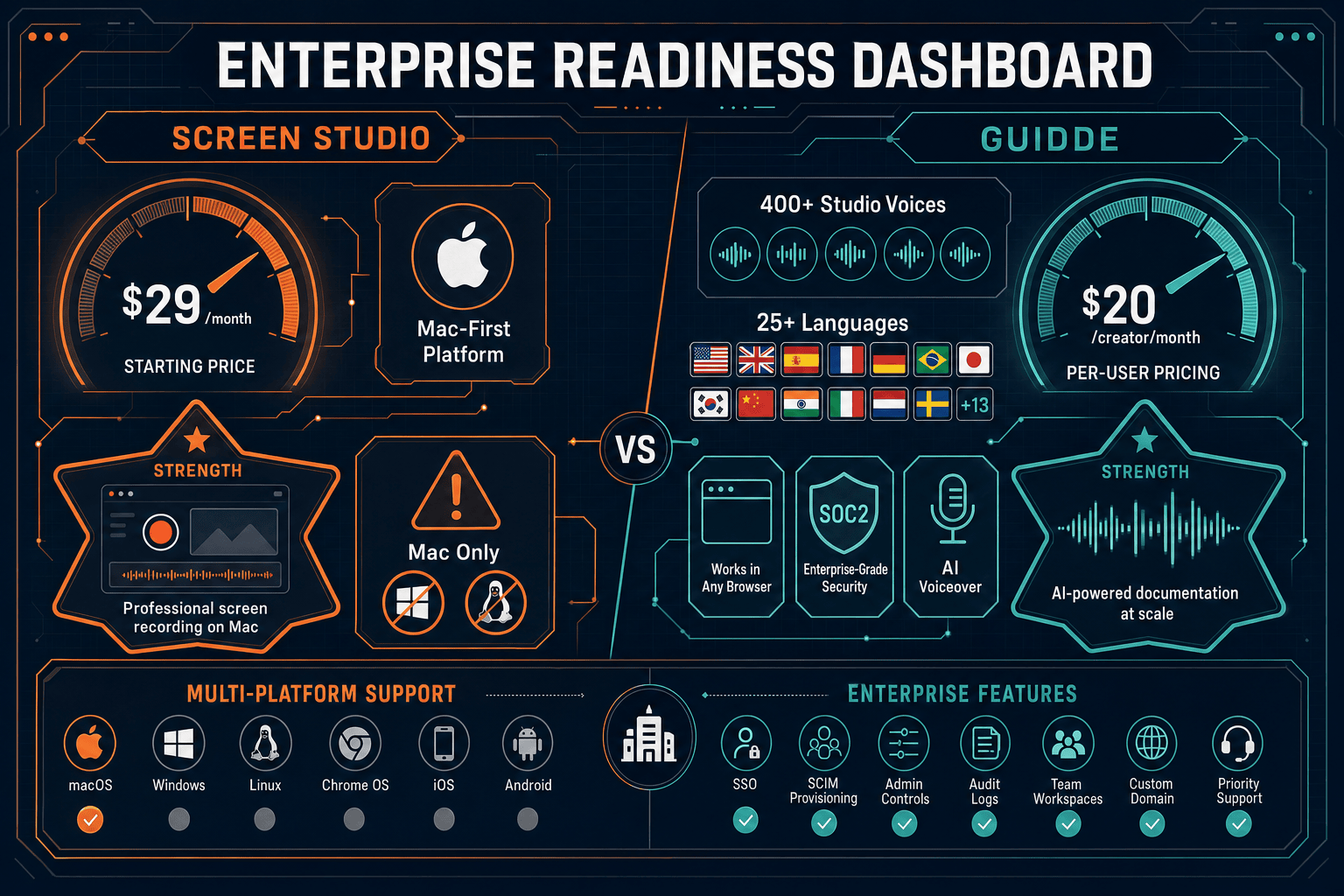
Guidde is the more enterprise-ready of the two tools, offering SOC 2 Type II compliance, SAML SSO, role-based access control, and PII redaction—all essential enterprise capabilities that Screen Studio simply does not have.
Enterprise Feature Matrix
A head-to-head comparison of enterprise-critical features including security, compliance, administration, scalability, and support across both tools.
| Enterprise Capability |
Screen Studio
|
Guidde
|
|---|---|---|
| Free Tier Available | ||
| Cross-Platform Support (Mac/Win/Linux) | Mac only | Chrome/Edge + desktop (Business+) |
| SSO / SAML Support | Enterprise only | |
| SOC 2 Type II Compliance | ||
| GDPR Compliance | ||
| Audit Logs | ||
| Role-Based Access Control | ||
| Data Residency Options | ||
| PII / Sensitive Data Redaction | Enterprise only | |
| Advanced Analytics | Enterprise only | |
| Auto-Translation / Multi-Language | Enterprise only (25+ languages) | |
| Dedicated Support | Enterprise only | |
| Uptime SLA | N/A (local app) | Not published |
| API Access | ||
| Custom Branding / White-Label | ||
| Multi-Tenant Portal Delivery | ||
| Version Control for Documentation | ||
| Knowledge Base Publishing | Video library only | |
| Enterprise Pricing Model | $9–$29/month flat | Custom (per-creator) |
Data as of May 2026. Based on publicly available vendor documentation and official pricing pages. Enterprise features for Guidde require the Enterprise tier; verify current terms before purchase.
Strengths & Weaknesses
Deep Dive Analysis
An in-depth look at the four enterprise readiness dimensions that matter most: security and compliance, scalability and performance, administration and control, and support and SLA.
Guidde holds SOC 2 Type II certification and GDPR compliance—meaningful credentials for enterprise procurement. It also offers PII redaction on its Enterprise tier. Screen Studio has no published compliance certifications whatsoever. Its local-first architecture means recordings never leave the device, which provides an informal data-containment benefit, but there is no formal certification, data processing agreement infrastructure, or compliance attestation. For enterprise security teams running vendor reviews, Guidde clears a baseline bar that Screen Studio does not approach. Neither tool offers data residency, encryption-at-rest guarantees, or compliance monitoring.
Screen Studio is a single-user Mac desktop application. There is no concept of team scaling, concurrent users, or organizational deployment. Its $9–$29/month flat pricing is simple but reflects a fundamentally individual-user product. Guidde scales by adding creators but caps the Business plan at five seats, pushing larger teams to negotiate Enterprise pricing. The per-creator model grows expensive quickly for organizations with many content contributors. Neither tool publishes an uptime SLA or infrastructure performance guarantee. For enterprises expecting predictable costs and documented reliability commitments, both tools leave significant questions unanswered.
Guidde provides role-based access control, a branded video player, and advanced analytics at the Enterprise tier—a meaningful starting point for admin oversight. Screen Studio offers none of these: no admin console, no user roles, no content governance, and no usage visibility. Neither tool provides audit logs, which are a standard requirement in regulated industries. Neither offers an API for programmatic content management or toolchain integration. Guidde's integrations with Confluence, Zendesk, and Notion help distribute content but do not substitute for true documentation governance, version control, or approval workflows that enterprise knowledge management demands.
Guidde provides dedicated support for Enterprise customers and has a structured tiered support model. Screen Studio's support posture is not documented for enterprise buyers—there is no published SLA, no enterprise support tier, and no dedicated account management. Neither tool publishes a formal uptime SLA for its cloud components. Guidde's shareable video links and hosted player depend on cloud infrastructure with no guaranteed availability commitment. For enterprise buyers who require documented response time commitments, escalation paths, and contractual uptime guarantees, both tools fall short of what mature enterprise software vendors typically offer.
Our Recommendation
Guidde is the more enterprise-ready of the two tools, offering SOC 2 Type II compliance, SAML SSO, role-based access control, and PII redaction—all essential enterprise capabilities that Screen Studio simply does not have. Screen Studio is a superb Mac recording tool for individuals and small teams, but it has no enterprise security posture, no cross-platform support, and no documentation governance capabilities. For organizations running formal vendor evaluations, Guidde clears a baseline enterprise bar; Screen Studio does not. That said, neither tool delivers the full enterprise documentation workflow that modern organizations require.
Choose Screen Studio if you need. .
Choose Guidde if you need. .
Choose Docsie Recorder if you need. .
Winner: Docsie Recorder
Docsie Recorder is free, open-source, and runs on Mac, Windows, and Linux—immediately solving Screen Studio's platform exclusivity problem. More importantly, it connects directly to Docsie's Video-to-Docs pipeline, turning any recording into structured documentation that flows into a full enterprise knowledge base with version control, multi-tenant portals, SSO, audit logs, and API access. Where Screen Studio stops at a video file and Guidde stops at a voiceover tutorial, Docsie Recorder feeds a CREATE → CONVERT → MANAGE → DELIVER workflow that enterprise documentation teams actually need.
Decision Helper
A direct framework for picking between Screen Studio, Guidde, and Docsie based on your specific needs.
Polished Mac-only product demos with cinematic zoom and motion.
AI-powered video documentation generator with voiceover.

Convert real video into searchable docs, then deploy multi-tenant portals.
Common Questions
Q: Does Screen Studio meet enterprise security requirements?
A: No. Screen Studio has no published SOC 2, GDPR, or other compliance certification. It has no SSO, audit logs, role-based access control, or data residency options. Its local Mac app architecture means recordings stay on-device, which has informal data-containment value, but this does not substitute for formal compliance attestation. Enterprise security teams running vendor reviews will find Screen Studio fails most standard procurement checklists.
Q: Is Guidde SOC 2 compliant and suitable for regulated industries?
A: Guidde holds SOC 2 Type II certification and is GDPR compliant, making it a more credible option for enterprise procurement than Screen Studio. It offers SAML SSO and PII redaction on its Enterprise tier. However, Guidde lacks audit logs and data residency options, which are requirements in highly regulated industries like healthcare (HIPAA) or finance (SOX). Teams in those sectors should verify current compliance scope with Guidde directly before committing.
Q: Does either tool offer audit logs for enterprise governance?
A: Neither Screen Studio nor Guidde offers audit logs. Audit logs are a standard enterprise requirement for tracking who created, modified, or shared content—especially for compliance frameworks like SOC 2, HIPAA, and ISO 27001. This is a meaningful gap in both tools for enterprise buyers who need a documented content trail. Docsie, by contrast, provides audit logs as part of its enterprise platform.
Q: Which tool is better for large enterprise teams with many content creators?
A: Guidde is marginally better positioned, as it has an Enterprise tier with unlimited creators, SSO, and advanced analytics. However, its Business plan is capped at five creators and uses per-creator pricing that grows expensive quickly. Screen Studio has no enterprise team tier at all. Neither tool was designed for large-scale enterprise content operations. Organizations with dozens of creators and governance requirements will find both tools underpowered.
Q: Is there a better alternative to both Screen Studio and Guidde for enterprise documentation?
A: Yes—Docsie Recorder addresses the core limitations of both. Screen Studio is Mac-only and stops at video output with no enterprise controls. Guidde offers some compliance credentials but locks critical features behind expensive per-creator pricing and lacks audit logs, data residency, and API access. Docsie Recorder is free, open-source, and cross-platform, and it feeds recordings directly into Docsie's enterprise documentation platform with SSO, audit logs, version control, multi-tenant portals, and API access included.
Q: Can I use Screen Studio or Guidde to build a structured enterprise knowledge base?
A: Neither tool supports structured enterprise knowledge base publishing. Screen Studio exports video files and shareable links with no documentation layer. Guidde produces video tutorials and basic step guides but lacks version control, approval workflows, and multi-tenant portal delivery. Building an enterprise knowledge base requires a platform layer that both tools are missing. Docsie Recorder bridges this gap by routing recordings into Docsie's full knowledge base workflow, turning a screen recording session into versioned, searchable, and governed documentation.
Screen Studio is Mac-only and has no enterprise controls. Guidde's enterprise features are real but limited—no audit logs, no data residency, no API access, and per-creator pricing that scales poorly. Docsie Recorder is free, open-source, cross-platform, and connects directly to a full enterprise documentation platform with SSO, audit logs, version control, multi-tenant portal delivery, and API access. Record once, convert to structured docs, govern at enterprise scale.
Free to download and record. Docsie AI credits used only for Video-to-Docs conversion.