
4.8
on G2
 Docsie Recorder
 Screen Studio
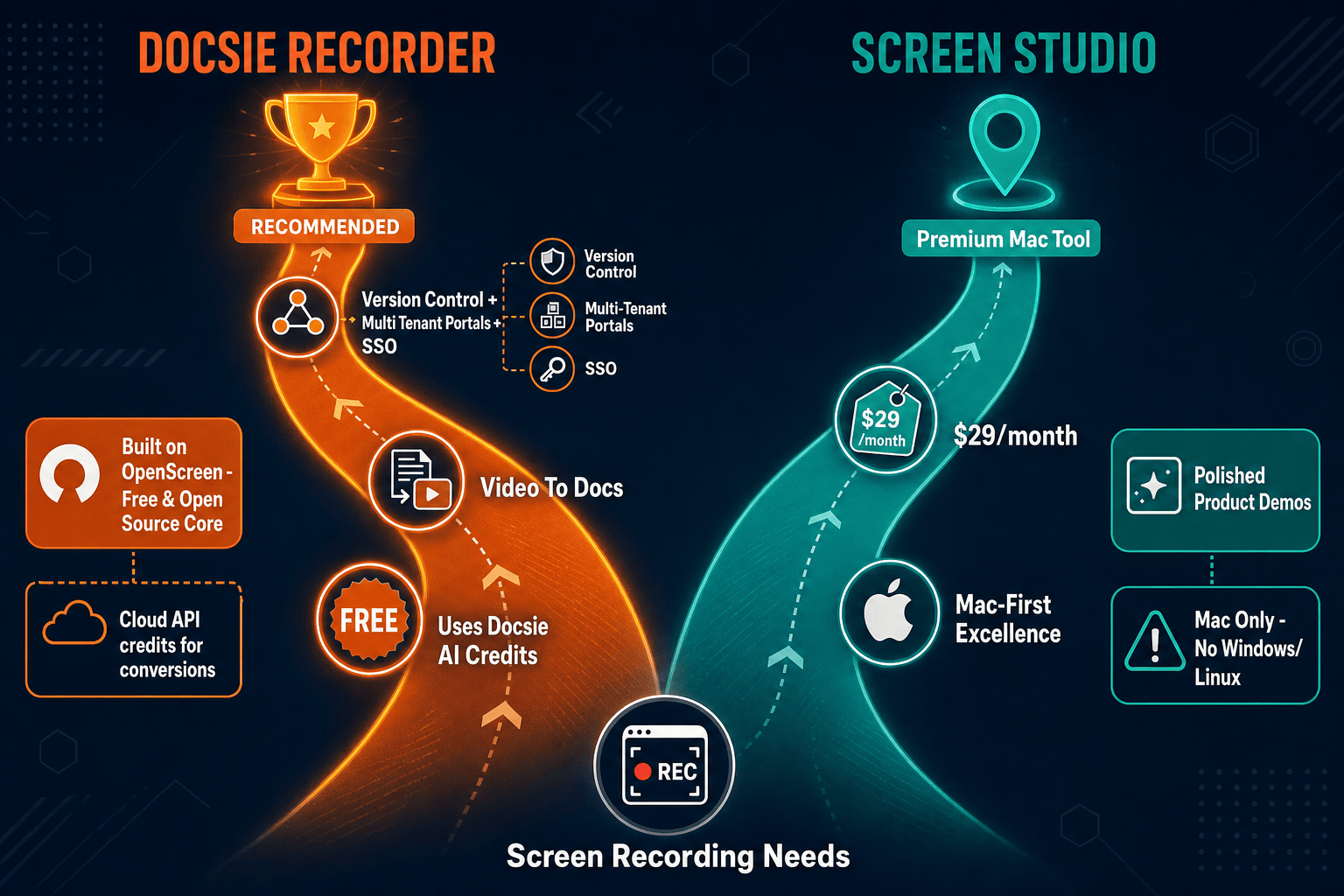
Screen Studio is the gold standard for polished Mac screen recordings, but it stops at video output with no SSO, no audit logs, and no cross-platform support. Docsie Recorder is a free, open-source recorder that runs on macOS, Windows, and Linux, routes recordings into a structured documentation pipeline, and connects to the Docsie platform for enterprise-grade compliance, access control, and knowledge base governance.

For enterprise buyers, Docsie Recorder and Screen Studio cover narrow slices (free and best-known polished mac recorder for product demos and tutorials) while Docsie adds SSO, audit trails, multi-tenant portals, and compliance monitoring in one platform.
Enterprise Feature Matrix
A side-by-side look at the recording, editing, documentation, and enterprise governance features that matter most to teams evaluating a Screen Studio alternative with real organizational controls.
| Feature |
Docsie Recorder
Our Pick
|
Screen Studio
|
|---|---|---|
| Free to use | ||
| Open-source recorder core | ||
| Mac support | ||
| Windows support | ||
| Linux support | ||
| Window and full-screen capture | ||
| Microphone capture | ||
| System audio capture | ||
| Webcam overlay | ||
| Automatic and manual zoom | ||
| Cursor polish and smoothing | ||
| Backgrounds and visual effects | ||
| Crop, trim, and speed regions | ||
| Annotations and blur regions | Partial | |
| Local MP4 export | ||
| Local GIF export | ||
| Video-to-docs conversion | ||
| Markdown export | ||
| DOCX export | ||
| PDF export | ||
| Knowledge base publishing | ||
| Versioned documentation management | ||
| Multi-tenant portal delivery | ||
| SSO (SAML / OAuth / OIDC) | ||
| Audit logs | ||
| Role-based access control | ||
| API access | ||
| Enterprise deployment path |
Data as of 2026. Docsie Recorder recording/editing features are delivered by the free desktop app. SSO, audit logs, RBAC, versioning, portals, and API access are delivered through the Docsie platform. Screen Studio features are based on publicly available documentation as of 2026-05-05; confirm current pricing and feature set before relying on this comparison.
Strengths & Weaknesses
Deep Dive
An in-depth comparison of how Docsie Recorder and Screen Studio perform across Security & Compliance, Scalability & Performance, Administration & Control, and Support & SLA — the four pillars enterprise procurement teams evaluate.
Docsie Recorder's open-source MIT core is fully auditable, giving security teams transparency over what runs on employee machines. The downstream Docsie platform adds SSO via SAML, OAuth, OIDC, Azure AD, and Okta; audit logs for every content action; role-based access control; SOC 2 Type II and GDPR compliance; and EU data residency options. Screen Studio is a closed-source Mac app with no SSO, no audit logs, no RBAC, and no published compliance certifications. For regulated industries or any team with a security review process, Screen Studio presents an opaque binary with no enterprise security controls whatsoever.
Docsie Recorder runs natively on macOS, Windows, and Linux, meaning a single enterprise recorder policy covers every operating system in the organization without exceptions or workarounds. Recordings connect to the Docsie platform, which supports multi-tenant portal delivery — one knowledge base serving unlimited branded customer or team portals. Screen Studio is Mac-only, immediately excluding Windows and Linux users and creating a two-tool problem for mixed OS environments. There is no concept of multi-tenant delivery, shared workspaces, or platform-level scaling — each user operates as an independent island exporting video files.
Enterprise IT teams need centralized control over who creates content, who approves it, who can publish it, and what happens to it over time. Docsie's platform layer provides workspace-level RBAC, approval workflows, version inheritance, content reuse blocks, and API access for scripted administration. The recorder itself produces structured project files (.docsiescreen) that feed directly into those managed workflows. Screen Studio has no administration layer. There are no team workspaces, no approval gates, no content lifecycle controls, and no API. Each recording lives on a local disk or a shareable link with no organizational governance attached.
Docsie offers documented enterprise support tiers with SLA commitments, dedicated account management on enterprise plans, and a public roadmap backed by an active development team. The open-source recorder core also benefits from community visibility — bugs are public and fixes are traceable. Screen Studio is an indie Mac app with community-level support. There is no published uptime SLA for shareable links, no dedicated enterprise support tier, and no contractual SLA that enterprise procurement teams can attach to a vendor agreement. For teams where documentation tooling is business-critical, that gap represents real organizational risk.
Our Recommendation
Screen Studio is an exceptional Mac recorder for individual creators who need polished video output quickly. It is not an enterprise tool. It has no SSO, no audit logs, no RBAC, no cross-platform support, no API, and no documentation workflow beyond a shareable video link. Docsie Recorder starts from the same recorder-grade capability set — zoom, crop, trim, speed regions, backgrounds, annotations — adds cross-platform support, an open-source auditable core, and a direct pipeline into the Docsie platform where all enterprise governance lives. For any team with more than one OS, any security review, or any need for content to become structured documentation, Docsie Recorder is the only viable choice.
Choose Docsie Recorder if you need...
Choose Screen Studio if you need...
Winner: Docsie Recorder
Docsie Recorder is the clear enterprise winner. It delivers comparable recorder-grade editing capabilities — zoom, crop, trim, speed regions, backgrounds, motion blur, annotations, blur regions — across macOS, Windows, and Linux with a free, open-source, auditable core. Beyond recording, it connects to the Docsie platform for SSO, audit logs, RBAC, versioned knowledge base publishing, multi-tenant portal delivery, and API-driven automation. Screen Studio produces beautiful videos on Mac but has zero enterprise governance infrastructure. For any organization with a security review, a mixed OS fleet, or a need for recordings to become managed documentation, Docsie Recorder is the only enterprise-ready option in this comparison.
Decision Helper
A direct framework for picking between Docsie Recorder, Screen Studio, and Docsie based on your specific needs.
Docsie's free browser-based recorder that pipes captures straight into Docsie SOPs.
Premium Mac screen recorder with cinematic auto-zoom and polished output.

Convert real video into searchable docs, then deploy via multi-tenant portals.
Common Questions
Q: Does Screen Studio support SSO for enterprise login?
A: No. Screen Studio has no SSO of any kind — no SAML, no OAuth, no OIDC, no Azure AD, and no Okta integration. It is a standalone Mac app where each user manages their own local installation. Docsie Recorder connects to the Docsie platform, which supports SAML, OAuth, OIDC, Azure AD, and Okta SSO for centralized identity management across the entire documentation workflow.
Q: Can security teams audit what Docsie Recorder does on employee machines?
A: Yes. Docsie Recorder is built on an open-source MIT core, meaning the recording and editing logic is fully transparent and can be reviewed by any security team. Screen Studio is a closed-source binary with no public source code. For organizations that require software transparency as part of their security posture, only Docsie Recorder can satisfy that requirement.
Q: Does Screen Studio have audit logs or content governance?
A: No. Screen Studio produces video files and shareable links with no audit trail attached. There is no record of who recorded what, who shared it, or who accessed it at the platform level. Docsie's platform layer provides full audit logs covering content creation, editing, approval, and publishing actions, which is a baseline requirement for most enterprise compliance frameworks.
Q: Our organization uses Windows and Linux alongside Mac. Which tool supports all three?
A: Only Docsie Recorder. It ships native desktop builds for macOS, Windows, and Linux, meaning one recorder policy can cover your entire fleet. Screen Studio is Mac-only and has no official Windows or Linux support. For any organization with a mixed OS environment, Screen Studio immediately creates a two-tool problem.
Q: We need recordings to feed our internal knowledge base — can Screen Studio do that?
A: No. Screen Studio outputs video files and shareable links. It has no video-to-docs conversion, no Markdown or DOCX export, and no knowledge base integration. Docsie Recorder sends recordings directly to Docsie's Video-to-Docs pipeline, generating structured documentation that publishes into a versioned, governed knowledge base with multi-tenant portal delivery.
Q: Is there a free option for enterprise evaluation?
A: Docsie Recorder is entirely free to download and use for recording and editing — no account, no subscription, no trial limit on the core recorder. Video-to-Docs conversion uses Docsie AI credits, which can be evaluated before committing. Screen Studio requires a paid subscription starting at $29/month with no free tier; confirm current trial terms on the Screen Studio website before evaluating.
Docsie Recorder gives your entire team a free, open-source, cross-platform screen recorder that feeds directly into SSO-controlled, audit-logged, versioned knowledge base workflows. No subscription required to record, edit, and export.
Free MIT recorder core. No account required to record and export MP4 or GIF. Video-to-Docs conversion uses Docsie AI credits.