
4.8
on G2
 Confluence
 Document360
Confluence is Atlassian's enterprise wiki built for internal engineering teams. Document360 is a purpose-built external knowledge base platform with AI writing tools. Both are strong — but neither covers video-to-docs conversion, multi-tenant client portals, or autonomous knowledge workflows. This comparison breaks down every key feature so you can choose the right tool — or discover why Docsie outperforms both.
Confluence leads with market-leading enterprise wiki with the strongest brand recognition in internal documentation; Document360 leads with purpose-built for external customer knowledge bases. Neither converts real video into docs and deploys multi-tenant portals; Docsie does both.
Feature Matrix
A comprehensive feature-by-feature comparison across documentation capabilities, AI features, delivery, enterprise security, and integrations.
| Feature |
Confluence
|
Document360
|
|---|---|---|
| Primary Use Case | Internal enterprise wiki | External customer knowledge base |
| AI Content Generation | ||
| AI Assistant Name | Rovo AI (80+ connectors, 20+ agents) | Eddy AI (FAQ gen, decision trees) |
| Video to Documentation | ||
| Screen Recording Support | ||
| Real-World Video Support | ||
| Auto-Translation | Via Rovo AI agents | 50+ languages |
| Multi-Language Support | 50+ languages | |
| Version Control | Unlimited page history | |
| Multi-Tenant Client Portals | ||
| Custom Domain | ||
| Custom Branding | ||
| Embeddable Widget | ||
| AI Chatbot | Rovo Chat | Eddy AI chatbot |
| Approval Workflows | ||
| Analytics & Reporting | ||
| SSO (SAML/OAuth) | ||
| SOC 2 Compliance | ||
| GDPR Compliance | ||
| Audit Logs | ||
| Role-Based Access Control | ||
| API Access | ||
| Free Plan Available | Up to 10 users | |
| Pricing Transparency | Published per-user pricing | Quote-based, sales-led only |
| Helpdesk Integrations | Jira, Slack, Teams | Zendesk, Intercom, Freshdesk |
| Built-in LMS / Course Builder | ||
| Content Reuse & Snippets | ||
| Autonomous Agents | ||
| Real-Time Compliance Monitoring |
Data as of February 2026. Features based on publicly available vendor documentation and product pages. Document360 discontinued its free tier in November 2024.
Strengths & Weaknesses
Deep Dive
Confluence organizes content into Spaces and Pages — a flexible but unstructured model that works well for internal wikis but becomes disorganized at scale without governance. Document360 uses a more disciplined Category → Article hierarchy designed specifically for external knowledge bases, with content reuse snippets and approval workflows built in. Both offer version control and real-time collaboration, but Document360's editorial workflow is more mature for teams with review processes. Neither platform offers the hierarchical Shelves → Books → Articles structure with client-specific content variants that more advanced documentation platforms provide.
Confluence's Rovo AI is a broad enterprise AI suite — 80+ app connectors, 20+ pre-built agents, cross-tool search across Jira and other Atlassian products, and capabilities like release notes and OKR generation. It's powerful for Atlassian-ecosystem automation but requires that ecosystem to unlock full value. Document360's Eddy AI focuses on knowledge base tasks — 50+ language auto-translation, FAQ auto-generation, and interactive decision trees. Neither platform offers autonomous agents that can ingest, process, and publish content without human intervention, nor do they support converting existing training videos into structured documentation at scale.
This is where the two tools diverge most sharply. Document360 was purpose-built for external delivery — it supports custom domains, custom branding, embeddable widgets, and SSO-gated customer portals. Confluence is primarily internal — no custom domains, no white-label branding, and no multi-tenant architecture for delivering documentation to multiple external clients. However, both tools share a critical limitation — neither supports true multi-tenant portals where one knowledge base powers unlimited separately branded client portals, each with its own domain, access controls, and content rules. This gap is significant for agencies, consultancies, and implementation partners serving multiple enterprise clients.
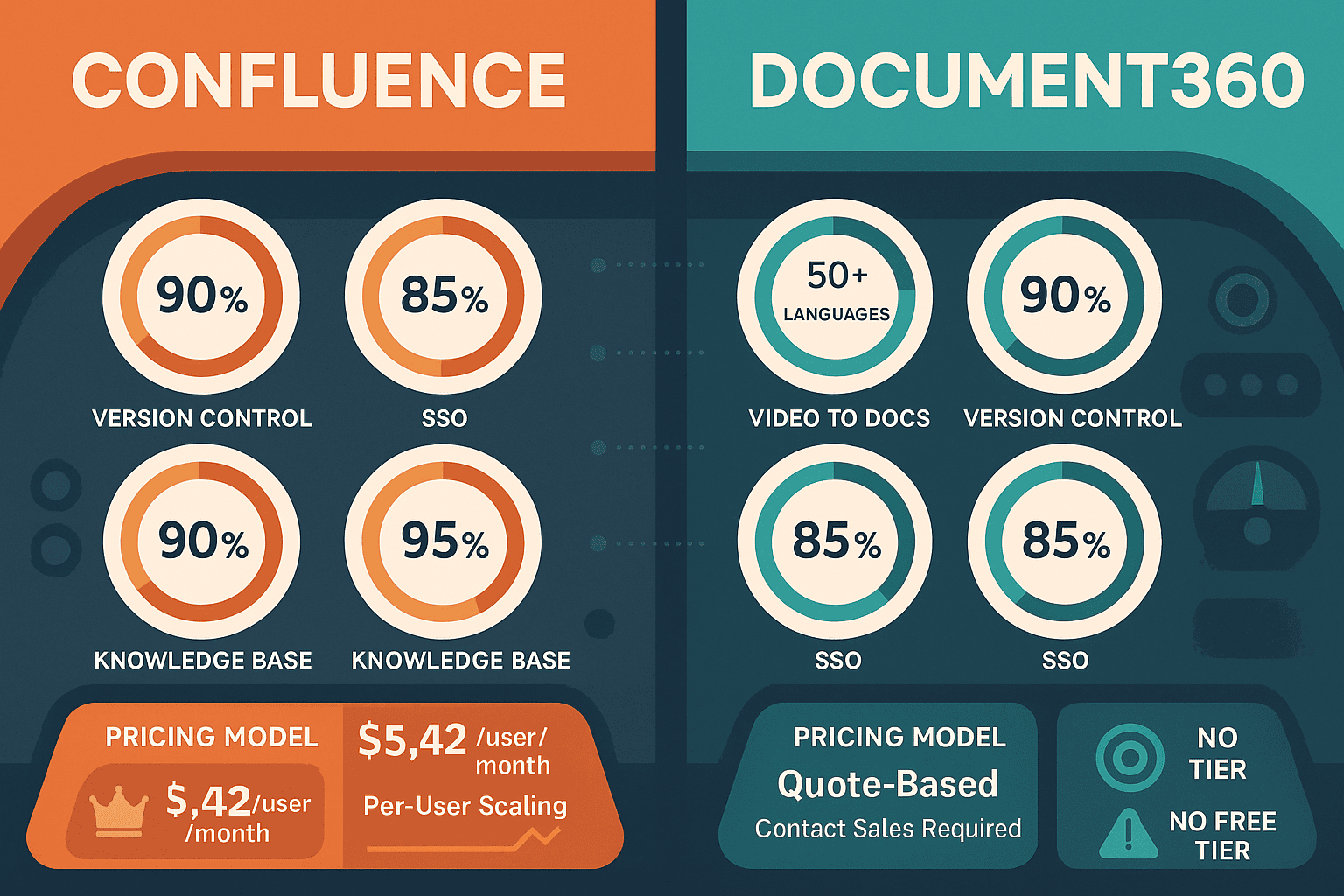
Confluence offers transparent per-user pricing starting at $5.42/user/month (Standard) with a generous 10-user free tier — making it accessible for evaluation without a sales call. Document360 moved to fully opaque, sales-led pricing in late 2024, discontinuing its free tier and hiding all plan costs behind a contact-sales gate. This makes Confluence significantly easier to evaluate and procure for self-serve buyers, but Confluence's per-user model becomes expensive for large teams — the cost compounds with Atlassian's 5–8% annual price increases. Document360 offers a 14-day trial but no transparent pricing benchmark, creating procurement friction for budget-conscious buyers.
Our Recommendation
Confluence and Document360 serve fundamentally different documentation needs. Confluence is the go-to internal enterprise wiki for Atlassian-heavy engineering teams who need deep Jira integration and broad AI-assisted cross-tool search. Document360 is the stronger choice for teams building external customer knowledge bases with editorial workflows, multi-language support, and help desk integrations. Neither tool, however, can convert existing training videos into structured documentation, deliver content across multiple client-branded portals, or provide an integrated LMS with certifications — capabilities increasingly critical for enterprises managing knowledge at scale.
Choose Confluence if you need...
Choose Document360 if you need...
Choose Docsie if you need...
Winner: Docsie
Both Confluence and Document360 excel in their respective niches — internal wikis and external knowledge bases — but both lack the capabilities modern enterprise documentation teams increasingly require. Neither can convert existing training videos into structured docs, neither supports multi-tenant portals for multi-client delivery, neither includes a built-in LMS with certifications, and neither offers autonomous agents for touchless knowledge operations. Docsie's six-pillar platform closes all of these gaps simultaneously with transparent pricing, a free plan, and SOC 2 Type II compliance — making it the superior choice for organizations that have outgrown single-purpose documentation tools.
Decision Helper
A direct framework for picking between Confluence, Document360, and Docsie based on your specific needs.
Atlassian's team wiki, deeply tied to Jira and the Atlassian suite.
Self-service knowledge base with versioning and analytics for SaaS support.

Multi-tenant knowledge platform with video-to-docs and AI chatbot.
Common Questions
Q: What is the key difference between Confluence and Document360?
A: Confluence is an internal enterprise wiki tightly integrated with Atlassian's ecosystem (Jira, Trello, Bitbucket), designed for engineering and product teams managing internal knowledge. Document360 is a purpose-built external knowledge base platform with stronger editorial workflows, custom branding, multi-language support, and help desk integrations. If your primary audience is internal employees on Jira, Confluence wins. If your primary audience is external customers, Document360 is more capable.
Q: Does Document360 still have a free plan?
A: No. Document360 discontinued its free tier in November 2024. Existing users on free plans were grandfathered, but new users cannot access any free tier. Document360 now requires a sales conversation for all new accounts, with no published pricing. A 14-day free trial is available, but procurement requires contacting sales. This is a significant change from its previous self-serve model.
Q: Can either Confluence or Document360 convert training videos into documentation?
A: Not meaningfully. Confluence has no video processing capability whatsoever. Document360 acquired Floik, which adds screen-recording-to-interactive-demo functionality — but this only works with new screen captures, not existing training videos, real-world footage, or pre-recorded content. Neither platform can ingest a library of existing training videos and convert them into structured, searchable documentation automatically.
Q: Which tool is better for teams serving multiple external clients?
A: Neither Confluence nor Document360 supports true multi-tenant portals. Confluence is designed for internal use and lacks custom domains entirely. Document360 supports custom domains and branding but is single-tenant — you cannot deliver one knowledge base to multiple separately branded client portals simultaneously. Teams serving multiple enterprise clients typically need a platform with native multi-tenant architecture, which both tools lack.
Q: Is there a better alternative to both Confluence and Document360?
A: Yes — Docsie addresses the critical gaps both tools share. Docsie converts any video (training footage, screen recordings, real-world operations) into structured documentation, delivers content through multi-tenant portals with per-client custom branding and domains, includes a built-in LMS with course builder, certifications, and progress tracking, and provides autonomous agents for touchless knowledge workflows — all on a platform with transparent pricing and a free plan. For teams that have outgrown single-purpose tools, Docsie's six-pillar platform covers the full CONVERT → MANAGE → DELIVER → LEARN → AUTOMATE → MONITOR lifecycle.
Q: How do Confluence and Document360 pricing models compare?
A: Confluence uses transparent per-user pricing ($5.42/user/month Standard, $10.44/user/month Premium) with a free tier for up to 10 users — making it easy to evaluate and self-serve purchase. Document360 switched to fully opaque, quote-based pricing in 2024 with no published rates and requires a sales conversation to proceed. For budget-conscious or self-serve buyers, Confluence is far more accessible. However, Confluence's per-user model compounds at scale with recurring annual price increases of 5–8%.
Start creating professional documentation that your users will love