
4.8
on G2
 Screen Studio
 Tella
Tella
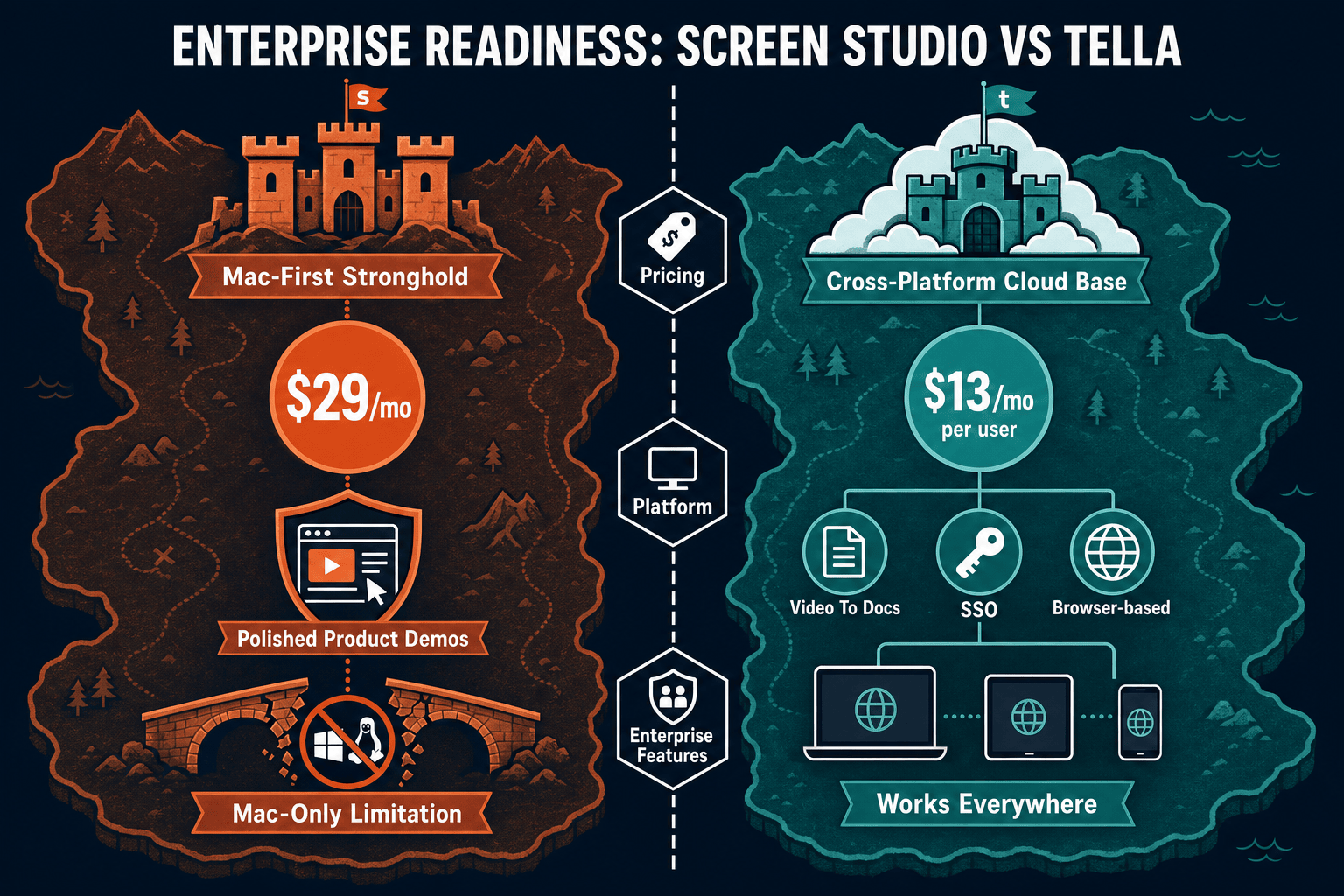
Screen Studio is a polished Mac-only screen recorder with no enterprise controls, while Tella is a browser-based video tool with a custom enterprise tier. Neither was built with enterprise documentation governance in mind. This page compares their real enterprise capabilities and recommends a more complete alternative.
Screen Studio is not enterprise-ready by any standard measure — it is a Mac-only individual creator tool with no access controls, compliance documentation, or team administration.
Enterprise Feature Matrix
A feature-by-feature comparison of enterprise capabilities including security, compliance, administration, scalability, and support across both tools.
| Enterprise Feature |
Screen Studio
|
Tella
|
|---|---|---|
| Free Plan Available | ||
| Enterprise Pricing Tier | ||
| SSO (SAML / OAuth) | Verify with vendor | |
| Role-Based Access Control | ||
| Audit Logs | ||
| Data Residency Options | ||
| SOC 2 Compliance | Verify with vendor | |
| GDPR Compliance | Verify with vendor | |
| Uptime SLA | Not applicable (local app) | Verify with vendor |
| Dedicated Support / CSM | ||
| Admin Dashboard | ||
| Team Collaboration | ||
| Custom Domain | ||
| API Access | ||
| Multi-Tenant Portals | ||
| Version Control for Content | ||
| Windows / Linux Support | ||
| Open Source / Auditable Codebase | ||
| Knowledge Base Publishing | ||
| Video-to-Docs Workflow |
Data as of May 2026. Enterprise features are based on publicly available information and vendor documentation. SSO and compliance claims for Tella should be verified directly with the vendor before procurement.
Strengths & Weaknesses
Deep Dive Analysis
An in-depth analysis of the four enterprise dimensions that matter most to IT, security, and documentation teams evaluating these tools.
Screen Studio has no documented security or compliance posture for enterprise — no SOC 2, GDPR controls, or data handling disclosures beyond what the macOS app inherently provides. Since recordings stay local, data residency is implicit but there are no controls for sharing links. Tella has a custom enterprise tier that implies security features, but SOC 2 certification, GDPR data processing agreements, and HIPAA readiness must be verified directly with the vendor. Neither tool publishes audit logs, data residency configuration, or breach notification procedures for enterprise customers.
Screen Studio is a local desktop application and scales only as far as individual Mac users — there is no centralised content store, no team workspace, and no infrastructure to scale. Tella is cloud-based and scales better across teams with browser-based access on any OS and a team sharing layer. However, Tella's uptime SLA, storage limits, and performance guarantees under enterprise load are not publicly documented and must be confirmed. For organisations needing predictable performance at hundreds of concurrent users or global CDN delivery of documentation, neither tool provides transparent infrastructure commitments.
Screen Studio offers zero administrative controls — there is no admin dashboard, no user provisioning, no content governance, and no centralised policy enforcement. It is designed for individual creators, not IT-managed deployments. Tella provides role-based access control and a team workspace, giving managers some visibility into shared content. However, it lacks SSO for automated provisioning and deprovisioning, audit logs for compliance reporting, and granular permission models needed for regulated industries. Neither tool supports multi-tenant content delivery, custom domain documentation portals, or version-controlled knowledge base governance.
Screen Studio does not publish dedicated business support tiers, SLA commitments, or a customer success programme. Support appears to be standard product support for individual subscribers. Tella's enterprise tier explicitly includes dedicated support and custom terms, which is a meaningful differentiator over Screen Studio. However, formal SLA uptime guarantees, incident response timelines, and named customer success managers are not publicly specified and need to be negotiated. For regulated enterprises requiring 99.9% uptime SLA, documented escalation paths, and contractual support commitments, Tella is the stronger of the two but still falls short of purpose-built enterprise documentation platforms.
Our Recommendation
Screen Studio is not enterprise-ready by any standard measure — it is a Mac-only individual creator tool with no access controls, compliance documentation, or team administration. Tella is meaningfully more enterprise-aware with a custom tier, RBAC, and dedicated support, but it still lacks confirmed SSO, audit logs, data residency, API access, and a managed documentation layer, leaving significant gaps for regulated or large-scale enterprise deployments.
Choose Screen Studio if you need. .
Choose Tella if you need. .
Choose Docsie Recorder if you need. .
Winner: Docsie Recorder
Docsie Recorder addresses the core enterprise gaps both Screen Studio and Tella share. It is free and open-source with auditable code, runs on macOS, Windows, and Linux, and records locally Where both competitors stop at video output, Docsie Recorder connects directly to Docsie's Video-to-Docs pipeline to generate structured documentation, which then flows into Docsie's enterprise platform for versioned management, SSO-protected portal delivery, multi-tenant publishing, and compliance monitoring. Teams get a CREATE-to-MANAGE workflow with genuine enterprise controls instead of two separate point tools with documented governance gaps.
Decision Helper
A direct framework for picking between Screen Studio, Tella, and Docsie based on your specific needs.
Polished Mac-only product demos with cinematic zoom and motion.
Branded studio recordings with scenes and effects.

Convert real video into searchable docs, then deploy multi-tenant portals.
Common Questions
Q: Does Screen Studio support SSO for enterprise identity management?
A: No. Screen Studio has no SSO support of any kind — no SAML, no OAuth, and no integration with identity providers like Okta or Azure AD. It is designed as an individual Mac app with a single-user licence model. Enterprises requiring automated user provisioning and deprovisioning through an IdP cannot use Screen Studio in a managed deployment.
Q: Does Tella have SOC 2 certification and GDPR compliance?
A: Tella has a custom enterprise tier that implies security and compliance features, but SOC 2 Type II certification and formal GDPR data processing agreements are not prominently published on their public documentation as of May 2026. Before procurement, enterprise security teams should request Tella's current compliance certifications, data processing addendum, and penetration test reports directly from the vendor.
Q: Which tool provides audit logs for compliance reporting?
A: Neither Screen Studio nor Tella publicly documents audit log capability as a standard feature. Screen Studio has no team infrastructure to generate audit logs. Tella's enterprise tier may include some admin visibility, but formal tamper-proof audit logs suitable for SOX, HIPAA, or ISO 27001 reporting are not confirmed. Enterprises needing comprehensive audit trails should verify this requirement explicitly with Tella before signing a contract.
Q: Can either tool support multi-tenant documentation portals for different departments or clients?
A: No. Neither Screen Studio nor Tella supports multi-tenant portal architecture. Screen Studio produces shareable video links with no portal layer. Tella provides a team content workspace but not isolated branded portals per department, client, or product line. This is a significant gap for enterprise teams managing documentation across multiple business units or serving external clients.
Q: Is there a better alternative to both Screen Studio and Tella for enterprise teams?
A: Yes — Docsie Recorder is a free, open-source desktop recorder that runs on macOS, Windows, and Linux, addressing Screen Studio's Mac-only limitation immediately. Unlike both competitors, Docsie Recorder connects directly to Docsie's Video-to-Docs pipeline, converting recordings into structured documentation managed in a versioned knowledge base with SSO, role-based access, audit logs, and multi-tenant portal delivery. Enterprise teams get a complete CREATE-to-DELIVER workflow with documented governance controls rather than assembling separate point tools that each leave enterprise requirements unmet.
Q: Which tool is better for a cross-platform enterprise team evaluating screen recorders?
A: Tella is the only viable option between the two for cross-platform enterprise teams, since Screen Studio is strictly Mac-only and cannot be deployed to Windows or Linux users. However, Tella's enterprise governance controls are not fully documented publicly. For a genuinely cross-platform enterprise recorder with an auditable open-source codebase and a downstream enterprise documentation workflow, Docsie Recorder provides a stronger foundation than either tool.
Docsie Recorder is a free, open-source screen recorder for macOS, Windows, and Linux that connects directly to Docsie's enterprise platform — giving your team SSO, audit logs, versioned knowledge bases, multi-tenant portals, and a Video-to-Docs pipeline. Everything Screen Studio and Tella leave out, Docsie covers.
Free to download and record. Docsie AI credits used only when converting recordings to structured docs.