
4.8
on G2
 Screen Studio
 Scribe
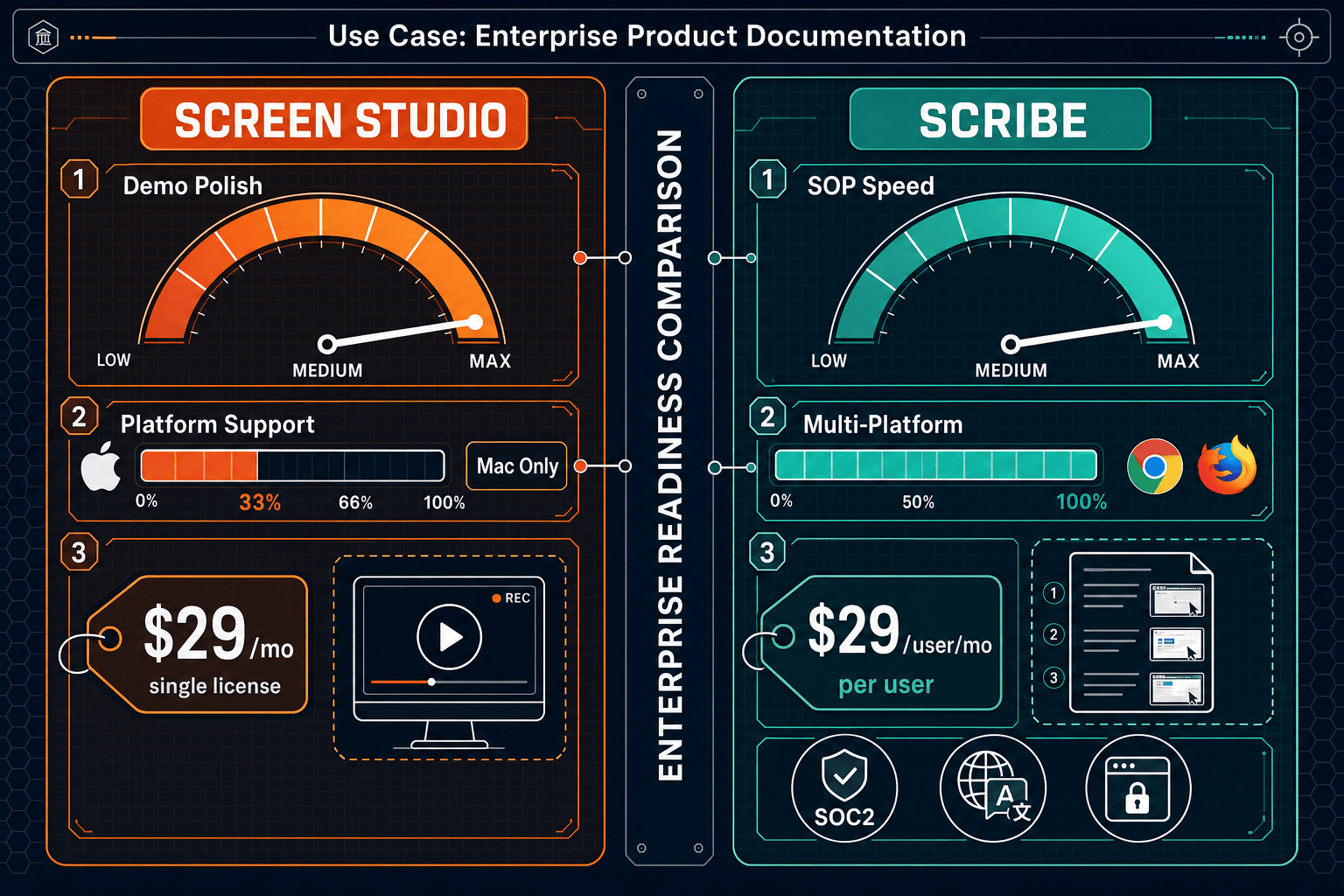
Screen Studio is a polished Mac-only video recorder with no enterprise infrastructure. Scribe is a screenshot-based SOP tool with an Enterprise tier that includes SSO and compliance features. Neither offers the cross-platform, open-source recording pipeline plus full knowledge base governance that enterprise documentation teams need.
Screen Studio is not an enterprise product — it is a beautifully polished Mac recorder with no compliance posture, no admin controls, and no cross-platform support.
Enterprise Feature Matrix
A focused comparison of enterprise-grade capabilities including security, compliance, administration, scalability, and support between Screen Studio and Scribe.
| Enterprise Capability |
Screen Studio
|
Scribe
|
|---|---|---|
| SSO / SAML Support | Enterprise only | |
| SCIM User Provisioning | Enterprise only | |
| Role-Based Access Control | ||
| Audit Logs | ||
| SOC 2 Compliance | ||
| GDPR Compliance | ||
| HIPAA / PHI Handling | Enterprise (PHI redaction) | |
| IP Whitelisting | Enterprise only | |
| Data Residency Options | ||
| Uptime SLA | Enterprise SLA | |
| Dedicated Support | ||
| Team / Admin Console | ||
| Approval Workflows | Pro Team+ | |
| Analytics & Reporting | Pro Team+ | |
| Windows Support | ||
| Linux Support | ||
| API Access | ||
| Custom Branding | Pro+ | |
| Multi-Tenant Portals | ||
| Version Control for Docs |
Data as of 2026. Screen Studio enterprise features are not documented on the official site. Scribe Enterprise pricing has been reported at $18,000+ annually. Re-verify before purchasing.
Strengths & Weaknesses
Deep Dive
An in-depth analysis of four enterprise-critical dimensions where Screen Studio and Scribe diverge most sharply.
Scribe holds a meaningful compliance edge here. It is SOC 2 certified, GDPR compliant, and offers HIPAA PHI redaction at the Enterprise tier alongside IP whitelisting, SAML SSO, and SCIM provisioning. Screen Studio has no published compliance posture whatsoever — no SOC 2, no GDPR documentation, and no HIPAA provisions. For any enterprise operating in a regulated industry, Screen Studio is effectively disqualified from security review before procurement even begins. Scribe's compliance story is credible but incomplete: the absence of audit logs and data residency options leaves gaps that regulated enterprises in finance and healthcare will flag immediately.
Screen Studio is a local Mac application, so "scalability" as an enterprise concept does not apply — there is no central admin plane, no usage analytics, and no way to manage recordings across a distributed team. Scribe operates as a cloud SaaS with team workspaces, meaning it can grow with headcount, but its per-user pricing model ($15/seat with a 5-seat minimum, scaling to a reported $18,000+ Enterprise contract) creates significant cost pressure as organizations expand. Neither tool offers multi-tenant delivery for client-facing documentation at scale, and neither provides version control to manage documentation across product releases or regulatory review cycles.
Scribe provides a meaningful administrative layer that Screen Studio entirely lacks. Pro Team and above include team workspaces, role-based access control, approval workflows, and content analytics. Enterprise adds SAML SSO and SCIM for automated user lifecycle management and IP whitelisting for network-level control. Screen Studio offers none of these — there is no team account structure, no permission model, and no admin console. For IT and InfoSec teams evaluating either tool, Scribe is the only viable candidate, though the absence of audit logs and API access remains a notable gap for organizations requiring full administrative accountability and programmatic integration.
Scribe explicitly offers dedicated support and a formal uptime SLA at the Enterprise tier, giving procurement teams the contractual assurances required for business-critical deployments. Screen Studio does not publish any SLA, dedicated support offering, or enterprise support channel — its shareable link infrastructure uptime is unverified and there is no enterprise contract pathway documented on the official site. For teams that require a signed SLA, a named support contact, and a formal escalation path, Scribe's Enterprise tier at least provides the contractual framework, even if its $18,000+ annual price point demands careful ROI scrutiny against the limited feature set delivered.
Our Recommendation
Screen Studio is not an enterprise product — it is a beautifully polished Mac recorder with no compliance posture, no admin controls, and no cross-platform support. Scribe is a more credible enterprise candidate with SOC 2, GDPR, SAML SSO, and a formal SLA, but its $18,000+ annual Enterprise price, absence of audit logs and API access, zero video capability, and purely internal focus leave significant gaps that security-conscious enterprises will surface in procurement review.
Choose Screen Studio if you need. .
Choose Scribe if you need. .
Choose Docsie Recorder if you need. .
Winner: Docsie Recorder
Docsie Recorder is the only tool in this comparison that combines a free, open-source cross-platform recorder with a genuine enterprise documentation pipeline. Where Screen Studio stops at a polished video file and Scribe stops at a screenshot-based SOP with no video capability, Docsie Recorder feeds directly into Docsie's CONVERT → MANAGE → DELIVER workflow — turning one recording into structured docs, publishing them to versioned knowledge bases, and delivering them through multi-tenant portals with SSO, audit logs, custom domains, and API access. Enterprise teams get recording-grade capture, compliance-grade governance, and client-facing delivery in a single connected workflow that neither competitor can match.
Decision Helper
A direct framework for picking between Screen Studio, Scribe, and Docsie based on your specific needs.
Polished Mac-only product demos with cinematic zoom and motion.
Browser process capture that auto-generates step-by-step guides.

Convert real video into searchable docs, then deploy multi-tenant portals.
Common Questions
Q: Does Screen Studio have any enterprise security or compliance features?
A: No. Screen Studio has no documented SOC 2 certification, GDPR compliance program, HIPAA provisions, SSO integration, SCIM provisioning, audit logs, or role-based access controls. It is a Mac desktop application designed for individual creators and small teams. Any enterprise with a formal security review process will find Screen Studio unable to meet baseline procurement requirements.
Q: Is Scribe's Enterprise tier worth the reported $18,000+ annual cost?
A: It depends heavily on your use case. Scribe Enterprise does provide SOC 2, GDPR, HIPAA PHI redaction, SAML SSO, SCIM, IP whitelisting, dedicated support, and a formal SLA — all legitimate enterprise requirements. However, the complete absence of audit logs, API access, data residency options, video capability, and multi-tenant delivery means you are paying a significant enterprise premium for a tool that remains limited to internal, screenshot-based SOP creation with no programmatic integration pathway.
Q: Can either Screen Studio or Scribe deliver documentation to external clients or customers?
A: No. Screen Studio produces video files and shareable links with no portal or multi-tenant delivery infrastructure. Scribe is explicitly designed for internal documentation — it has no multi-tenant portal capability, no custom domain support, and no mechanism for delivering branded documentation experiences to external clients or customers. Both tools are internal-only by design.
Q: Which tool supports Windows and Linux enterprise environments?
A: Scribe supports Windows through its Chrome extension and desktop app, making it viable in mixed enterprise environments. Screen Studio is Mac-only with no Windows or Linux support, making it a hard blocker for any enterprise running a heterogeneous operating environment. Neither tool supports Linux, which rules both out for engineering organizations with significant Linux desktop deployments.
Q: Is there a better alternative to both Screen Studio and Scribe for enterprise documentation teams?
A: Yes — Docsie Recorder addresses the core limitations of both tools in a single workflow. Screen Studio stops at polished video with no enterprise governance. Scribe stops at screenshot SOPs with no video capability and a steep Enterprise price. Docsie Recorder is a free, open-source cross-platform recorder (Mac, Windows, Linux) that feeds directly into Docsie's enterprise platform — converting recordings into structured docs with version control, multi-tenant portals, SSO, API access, and compliance-grade governance. It is the only option in this comparison that connects recording to enterprise knowledge base delivery without requiring a $18,000+ annual contract.
Q: Can I use Screen Studio and Scribe together to cover both video and SOP documentation needs?
A: Technically yes, but the combination creates organizational friction rather than solving it. Screen Studio would handle Mac-based video recording while Scribe handles browser-based screenshot SOPs, but the two outputs — polished video files and annotated screenshot guides — live in completely separate systems with no shared governance layer, no unified version control, and no cross-platform recording capability. Enterprises typically find that a single connected workflow from recording to knowledge base publication delivers better ROI than stitching together two point tools with incompatible output formats and separate vendor contracts.
Docsie Recorder is free, open-source, and runs on Mac, Windows, and Linux. It records and edits screen videos locally, then connects directly to Docsie's Video-to-Docs pipeline to turn recordings into structured Markdown, DOCX, PDF, and published knowledge base content.
Free and open-source recorder core. Video-to-Docs conversion uses Docsie AI credits.