
4.8
on G2
 Screen Studio
 RecordIt
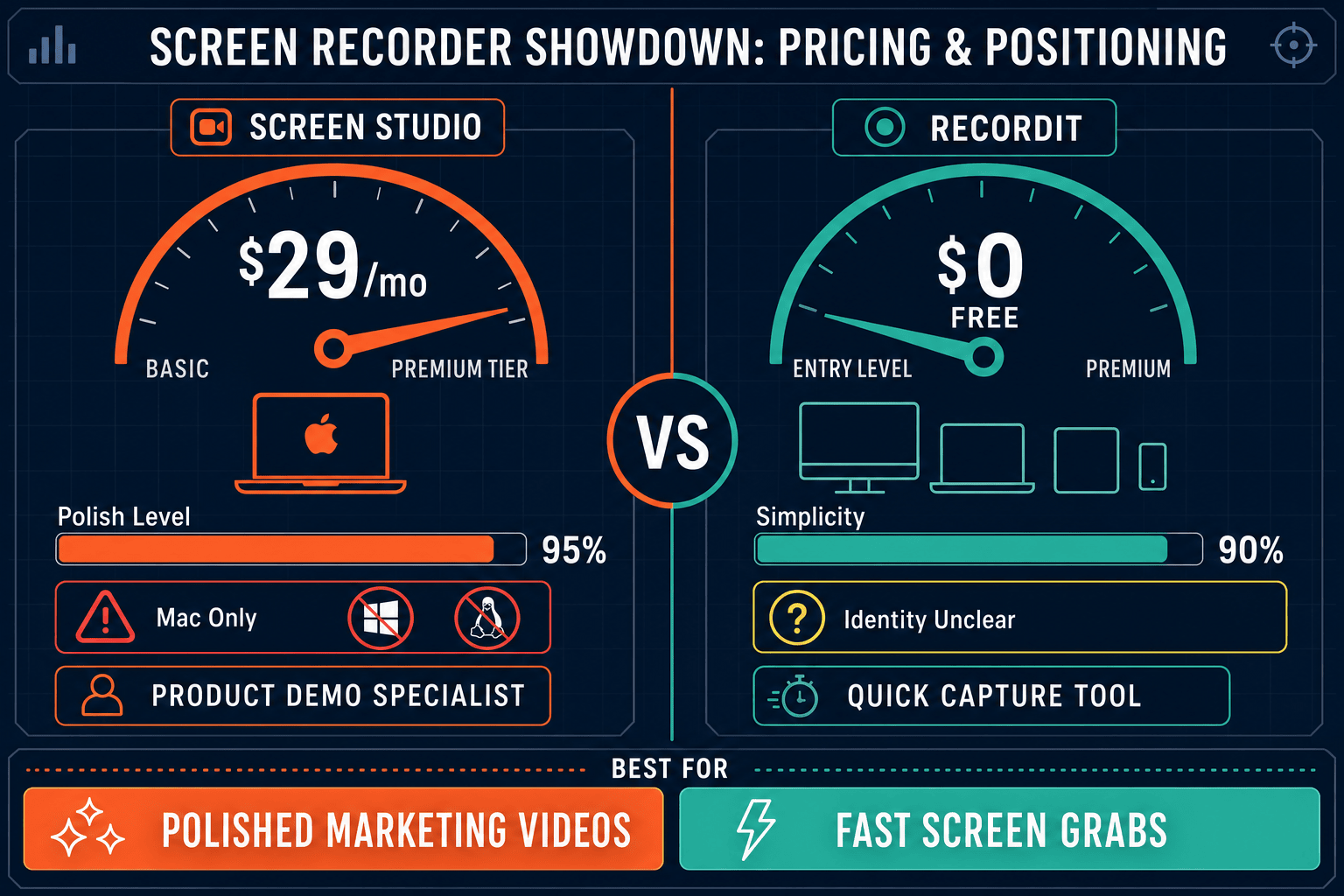
Screen Studio charges $29/month (or $9/month billed yearly) for a polished Mac-only recorder. RecordIt offers a free screen recording workflow with cloud sharing and transcription. Neither tool turns recordings into structured documentation. This page compares their pricing honestly and shows where Docsie Recorder offers better long-term value.
Screen Studio is the clear winner on recording quality and visual polish — its automatic zoom, cursor smoothing, and 4K export make it the top Mac recorder for product demos and marketing content.
Feature Matrix
A side-by-side breakdown of recording features, editing capabilities, output formats, and documentation workflows available across both tools' pricing tiers.
| Feature |
Screen Studio
|
RecordIt
|
|---|---|---|
| Free Plan Available | ||
| Starting Price | $9/month (billed yearly) | $0 |
| Mac Support | Verify | |
| Windows Support | Verify | |
| Linux Support | ||
| Browser-Based Recording | Verify | |
| Webcam Overlay | Verify | |
| Microphone Audio | ||
| System Audio Capture | Verify | |
| Automatic Zoom & Cursor Polish | ||
| Backgrounds & Visual Effects | ||
| Crop, Trim & Speed Regions | ||
| iOS Device Recording | ||
| AI Transcription | ||
| Debug Context Capture | ||
| Shareable Links | ||
| Video Export (up to 4K 60fps) | Verify | |
| GIF Export | ||
| Video-to-Docs Conversion | ||
| Knowledge Base Publishing | ||
| Markdown / DOCX / PDF Export | ||
| Version Control | ||
| Multi-Tenant Portals | ||
| SSO / Enterprise Access |
Data as of May 2026. Screen Studio pricing verified from the official site on 2026-05-05. RecordIt pricing based on publicly available information from recordit.dev. Verify current terms before making a purchasing decision.
Strengths & Weaknesses
Deep Dive
An in-depth look at the three dimensions that matter most when choosing between these two tools on price — value for money, scalability costs, and hidden costs or limitations.
Screen Studio's yearly plan at $9/month is a reasonable ask for Mac users who need polished marketing videos and product demos. The automatic zoom, cursor smoothing, motion blur, and 4K export justify the cost for creators who produce video content regularly. RecordIt offers genuine value at $0 for engineering teams logging bugs — transcription and debug context come free. However, both tools cap their value at the video layer. Neither converts recordings into written documentation, so any team that needs written guides pays again for a separate documentation tool on top of either subscription.
Screen Studio charges per user on a subscription model. As your team grows, each new Mac user adds $9–$29/month to the bill with no team tier that provides consolidated billing, shared asset libraries, or collaborative editing. RecordIt's free tier is sustainable for small engineering teams sharing occasional bug recordings, but it has no verified path to a paid team plan with governance, analytics, or advanced storage. Neither tool scales into documentation management — so organizations that grow beyond simple video sharing face a secondary cost to adopt a knowledge base platform, paying twice for what should be one unified workflow.
Screen Studio's biggest hidden cost is platform lock-in. Mac-only means Windows and Linux colleagues need a different recorder, creating fragmented workflows and duplicate spend. There is no way to repurpose a Screen Studio recording as a structured document, help article, or knowledge base entry — so documentation teams must re-author everything from scratch after watching the video. RecordIt's hidden cost is uncertainty. Its product identity and canonical domain remain ambiguous as of mid-2026, which introduces risk for teams building workflows around it. Both tools share the same structural gap: recording ends at a file or share link, never at a publishable doc.
Pricing Breakdown
A direct comparison of all available pricing tiers for both tools, including what you get at each price point and where the value ceiling sits.
Screen Studio offers a clear two-tier model — pay monthly at full price or commit annually for a steep discount. The yearly plan at $9/month is genuinely competitive for a prosumer Mac recorder. RecordIt wins on price with a free tier that covers basic recording, transcription, and sharing. However, neither tool offers a paid team plan with governance, and neither generates documentation from recordings. Teams evaluating these tools on price alone will find RecordIt cheaper upfront but limited in scope, and Screen Studio more capable but Mac-only and subscription-dependent. The real hidden cost for both is the separate documentation tooling budget required downstream.
Our Recommendation
Screen Studio is the clear winner on recording quality and visual polish — its automatic zoom, cursor smoothing, and 4K export make it the top Mac recorder for product demos and marketing content. RecordIt wins on accessibility, offering a genuinely free workflow for engineers sharing bug recordings and debug context. The two tools serve completely different buyer profiles and rarely compete directly. What they share is a common ceiling — both stop at the video layer and leave documentation teams to re-author content from scratch.
Choose Screen Studio if you need. .
Choose RecordIt if you need. .
Choose Docsie Recorder if you need. .
Winner: Docsie Recorder
Docsie Recorder is free, open-source, and cross-platform — eliminating Screen Studio's Mac lock-in and RecordIt's feature ceiling at no cost. More importantly, it is the only recorder in this comparison that natively routes recordings into Docsie's Video-to-Docs pipeline, turning one recording into structured documentation published directly into a versioned knowledge base. Teams that currently pay for Screen Studio and then re-author documentation manually can replace that dual workflow with a single Docsie Recorder session that outputs both the video and the written article.
Decision Helper
A direct framework for picking between Screen Studio, RecordIt, and Docsie based on your specific needs.
Polished Mac-only product demos with cinematic zoom and motion.
Quick GIF screen captures with instant share links.

Convert real video into searchable docs, then deploy multi-tenant portals.
Common Questions
Q: How much does Screen Studio cost in 2026?
A: Screen Studio offers two plans — $29/month billed monthly, or approximately $9/month when billed annually (around $108/year). There is no free plan. Pricing was verified from the official site on 2026-05-05, but SaaS pricing changes frequently so check screen.studio for the current rate before purchasing.
Q: Is RecordIt really free?
A: Based on publicly available information from recordit.dev, RecordIt offers a free screen recording workflow including transcription, debug context, and cloud sharing. There is no verified paid tier as of mid-2026. However, the product's canonical identity and current pricing should be confirmed directly at recordit.dev before committing to it for a team workflow.
Q: Does Screen Studio offer a free trial?
A: Screen Studio makes a download available, but the current trial terms and limitations are not clearly documented in all sources. Check screen.studio directly for the most current trial policy before assuming a full-featured trial period is available.
Q: Is there a team or enterprise plan for either tool?
A: Neither Screen Studio nor RecordIt offers a verified team or enterprise plan with consolidated billing, shared asset libraries, SSO, audit logs, or role-based access control as of mid-2026. Screen Studio is priced per individual Mac user. This makes both tools difficult to scale across larger organizations without significant additional tooling costs.
Q: Is there a better alternative to both Screen Studio and RecordIt?
A: Yes — Docsie Recorder is a free, open-source screen recorder that runs on macOS, Windows, and Linux, making it accessible to teams Screen Studio locks out entirely. Unlike both Screen Studio and RecordIt, Docsie Recorder connects directly to Docsie's Video-to-Docs pipeline, turning recordings into structured Markdown, DOCX, PDF, and knowledge base articles. Teams get the recording quality they need and the documentation output their support and enablement workflows require — without paying a monthly subscription or piecing together two separate tools.
Q: Which tool is better value if I only need basic screen recording?
A: If you only need basic recording with transcription and sharing, RecordIt's free tier provides genuine value at no cost. Screen Studio's $9–$29/month subscription is only justified if you regularly need its polished editing features — automatic zoom, motion blur, backgrounds, and 4K export — and you are working exclusively on a Mac. For teams that need more than a video file at the end of the workflow, neither tool offers strong value compared to Docsie Recorder's free, cross-platform, docs-connected approach.
Docsie Recorder is free, open-source, and runs on Mac, Windows, and Linux. It records and edits screen videos locally, then connects directly to Docsie's Video-to-Docs pipeline to turn recordings into structured Markdown, DOCX, PDF, and published knowledge base content.
Free and open-source recorder core. Video-to-Docs conversion uses Docsie AI credits.