
4.8
on G2
 Screen Studio
 Loom
Loom
Screen Studio charges a flat subscription for a polished Mac-only recorder. Loom charges per user across four tiers with AI features gated behind an add-on. Neither is free for professional use. Compare what you actually get at each price point before committing to either.
Screen Studio is the right choice for Mac-only creators who want the most visually polished recorder at a flat, predictable price.
Feature Matrix
A side-by-side breakdown of recording features, AI capabilities, sharing, export options, and enterprise functionality across both tools' paid plans.
| Feature / Capability |
Screen Studio
|
Loom
|
|---|---|---|
| Free Plan Available | ||
| Starting Price | $9/month (billed yearly) | $0 (Starter, limited) |
| Mac Support | ||
| Windows Support | ||
| Linux Support | ||
| Browser Extension / Web Recorder | ||
| Mobile Recording | iOS device mirroring only | |
| Webcam Overlay | ||
| Automatic Zoom & Cursor Polish | ||
| Backgrounds & Visual Effects | ||
| Crop, Trim & Speed Regions | ||
| Up to 4K 60fps Export | ||
| GIF Export | ||
| AI Transcription | ||
| AI Summary & Chapters | Business + AI plan only | |
| AI Action Items | Business + AI plan only | |
| Viewer Analytics | ||
| Team Sharing & Collaboration | Shareable links only | |
| API Access | ||
| SSO / SCIM | Enterprise only | |
| Video-to-Docs Export (Markdown/DOCX/PDF) | ||
| Knowledge Base Publishing |
Pricing and features verified from official sources on 2026-05-05. Re-check before publishing as SaaS pricing changes frequently. Screen Studio pricing shown as $29/month or $9/month billed yearly. Loom Business and Business + AI per-user prices should be confirmed on loom.com/pricing.
Strengths & Weaknesses
Deep Dive
An in-depth look at value for money, scalability costs, and hidden limitations across both tools' pricing structures.
Screen Studio offers a single flat price ($9/month billed yearly or $29/month billed monthly) that unlocks every feature including 4K export, automatic zoom, motion blur, backgrounds, and GIF export. There are no feature tiers or upsells — you pay once and get everything. Loom's value depends heavily on which tier you need. The Starter plan is free but capped on video count and length. Business unlocks unlimited recording, but AI summaries and chapters require the higher Business + AI tier. For a solo Mac user who wants polished video output, Screen Studio's yearly plan offers strong per-feature value. For cross-platform teams, Loom's breadth justifies its cost — but only if you actually need AI features and collaboration.
Screen Studio's flat subscription does not scale with headcount, making it attractive for solo creators or very small teams. However, Mac-only support means Windows or Linux teammates cannot use it at all, forcing hybrid tool stacks. Loom's per-user model becomes expensive quickly. A team of 20 users on Business + AI can easily exceed $500–$700 per month, and SSO or advanced security requires a custom Enterprise contract. Atlassian integration is a genuine pull for teams already paying for Jira and Confluence, but the compounding per-seat cost is a real concern for teams scaling from 10 to 50 users. Neither tool offers a team-friendly flat-rate pricing model.
Screen Studio's hidden cost is platform lock-in. Mac-only support means mixed-platform teams cannot standardize on it, and the absence of API access, SSO, or documentation export creates a workflow ceiling. If your team grows or needs Windows support, you will buy a second tool. Loom's hidden costs are tier-gating and AI add-ons. Teams often discover that the AI features they want (summaries, chapters, action items) are not included in the base Business plan and require upgrading. Enterprise features like SSO and SCIM are custom-priced, and there is no transparent per-seat Enterprise rate. Both tools also share one significant hidden limitation: neither produces written documentation, meaning teams that need SOPs, knowledge base articles, or structured guides from their recordings must buy and maintain a separate documentation tool.
Pricing Breakdown
Every published plan for both tools, with an honest assessment of what each tier actually delivers and where the value breaks down.
Pricing Verdict
Screen Studio wins on simplicity — one price, all features, no upsells. But it only runs on Mac, has no team tier, and has a hard ceiling at video output with no path to documentation. Loom offers a genuine free tier and a broader feature set across four plans, but per-user pricing and tier-gated AI features mean your actual cost depends heavily on team size and which AI capabilities you need. A team of 20 needing AI summaries will pay significantly more than the base Business rate suggests. For pure recording value on a Mac, Screen Studio's yearly plan is hard to beat. For cross-platform async video messaging at small team scale, Loom's Business plan is reasonable. Neither offers a free professional recorder, open-source flexibility, or a path from video to written documentation.
Our Recommendation
Screen Studio is the right choice for Mac-only creators who want the most visually polished recorder at a flat, predictable price. Loom is the right choice for cross-platform teams that need async video messaging, collaboration, AI summaries, and Atlassian integrations — provided they can absorb per-user pricing. Both tools stop at video output and neither converts recordings into structured written documentation.
Choose Screen Studio if you need. .
Choose Loom if you need. .
Choose Docsie Recorder if you need. .
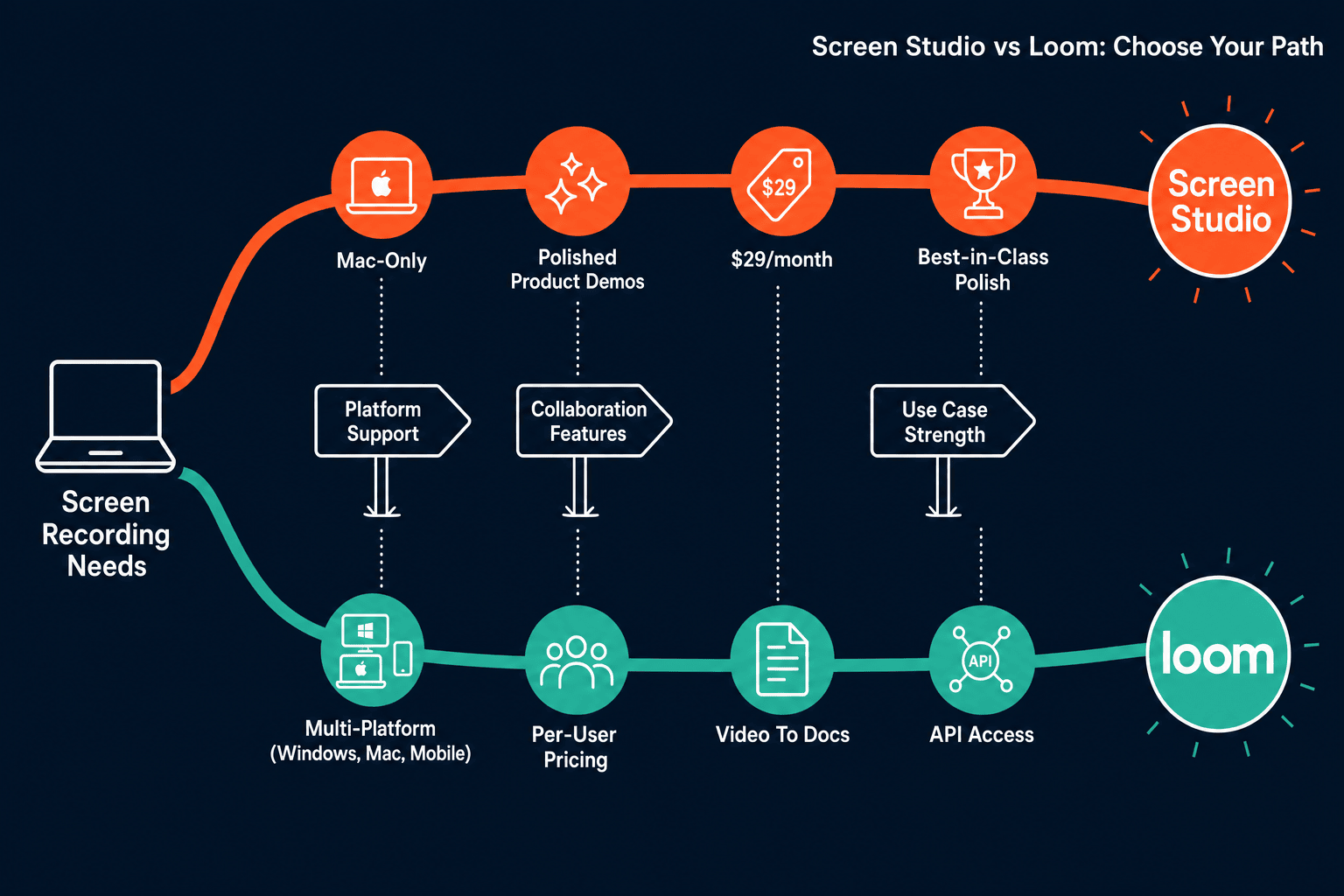
Winner: Docsie Recorder
Both Screen Studio and Loom are strong recorders that stop at video output. Screen Studio has no Windows support, no team tier, and no documentation path. Loom has per-user pricing that compounds quickly and AI features gated behind an additional paid tier. Docsie Recorder is free and open-source, runs on Mac, Windows, and Linux, and is the only recorder in this comparison that natively routes recordings into structured docs through the Docsie Video-to-Docs pipeline — turning one recording session into versioned knowledge base articles delivered through branded portals. For teams that want CREATE to feed CONVERT and MANAGE instead of producing isolated video files, Docsie Recorder eliminates the need for both tools while costing less.
Decision Helper
A direct framework for picking between Screen Studio, Loom, and Docsie based on your specific needs.
Polished Mac-only product demos with cinematic zoom and motion.
Async video messaging with AI summaries and integrations.

Convert real video into searchable docs, then deploy multi-tenant portals.
Common Questions
Q: Does Screen Studio have a free plan or free trial?
A: Screen Studio does not have a confirmed free plan. A downloadable trial has been mentioned, but exact trial limits and duration should be verified on screen.studio before committing. The paid plans are $29/month on monthly billing or $9/month billed annually — there is no free tier with ongoing access.
Q: Is Loom's free Starter plan enough for professional use?
A: Loom's Starter plan is genuinely free but has caps on the number of videos per user and the maximum recording length per video. For light individual use or short demos, it may suffice. Most professional or team use cases will quickly hit the limits and require a paid Business plan. Verify current Starter limits on loom.com/pricing as they change periodically.
Q: Does Loom include AI summaries and chapters in its base Business plan?
A: No. AI summaries, AI chapters, and AI action items are only available on the Business + AI plan, which costs more than the base Business plan. This is a common source of sticker shock for teams who budget based on the base Business price and then discover AI features require an upgrade. Always verify the exact per-user price difference between Business and Business + AI before budgeting.
Q: How does Screen Studio pricing work for teams?
A: Screen Studio does not currently publish a team or multi-seat plan. Each user purchases an individual subscription at $29/month or $9/month billed yearly. There is no volume discount or team dashboard, making it a solo-creator-friendly tool rather than a team-managed platform. For larger teams, this lack of centralized billing and management is a practical limitation.
Q: Is there a better alternative to both Screen Studio and Loom that is also free?
A: Yes. Docsie Recorder is a free, open-source desktop recorder built on OpenScreen that runs on Mac, Windows, and Linux. It includes zoom controls, crop, trim, speed regions, webcam overlay, backgrounds, annotations, and local MP4 and GIF export — all at no cost. Unlike Screen Studio and Loom, it also connects directly to Docsie's Video-to-Docs pipeline, turning your recording into structured Markdown, DOCX, or PDF documentation published into a versioned knowledge base. For teams that need both a capable recorder and a documentation workflow, Docsie Recorder eliminates the need to pay for either Screen Studio or Loom.
Q: Which tool is better value for a 20-person cross-platform team?
A: For a 20-person cross-platform team, Screen Studio is not viable at all since it is Mac-only. Loom Business or Business + AI would be the comparison point, but per-user pricing for 20 seats at Business + AI rates adds up to a significant monthly cost, and SSO still requires a separate Enterprise contract. Docsie Recorder's free recorder core with Docsie AI credit-based Video-to-Docs conversion typically offers better economics for teams that need both recording and documentation output.
Docsie Recorder is free, open-source, and runs on Mac, Windows, and Linux. Unlike Screen Studio (Mac-only, video only) and Loom (per-user pricing, video only), Docsie Recorder connects directly to a Video-to-Docs pipeline that turns your recordings into structured documentation — versioned, published, and delivered through branded knowledge base portals. No per-seat fees. No platform lock-in. Record once, create docs automatically.
Free recorder available now. No credit card required to download and record. AI credit estimate shown before any Video-to-Docs conversion.