
4.8
on G2
 Screen Studio
 Claquette
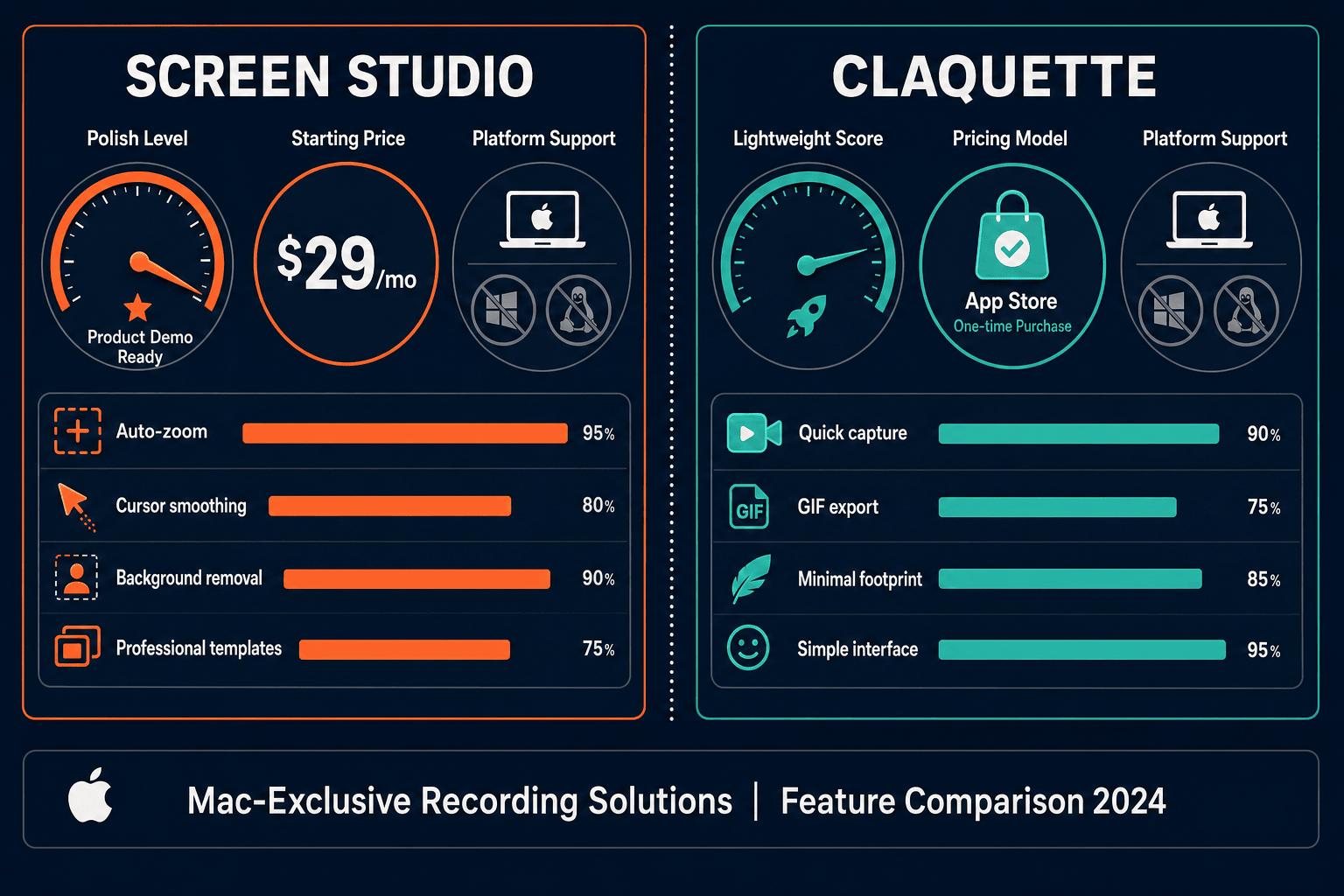
Screen Studio charges $29/month or $9/month billed annually for a polished Mac-only recorder. Claquette is a free Mac App Store download with in-app purchases for full features. Both are Mac-only video and GIF tools with no docs workflow. This page breaks down every pricing tier, what you actually get, and whether either tool justifies the cost for your team.
Screen Studio is the more capable and polished tool — its $9/month annual plan delivers automatic zoom, 4K export, webcam overlay, AI transcription, and shareable links in a single well-designed Mac app.
Pricing Feature Matrix
A side-by-side breakdown of features available across Screen Studio and Claquette pricing tiers, covering recording quality, editing, export, sharing, and team capabilities.
| Feature / Capability |
Screen Studio
|
Claquette
|
|---|---|---|
| Starting Price | $9/month (billed annually) | $0 (free with in-app purchases) |
| Free Plan Available | ||
| Paid Tier Price | $29/month or $9/month annually | In-app purchase via Mac App Store (verify current price) |
| Platform | macOS only | macOS only |
| Screen & Window Recording | ||
| GIF Export | ||
| Video Export Quality | Up to 4K 60fps | Standard video export (verify resolution) |
| Automatic Zoom & Cursor Polish | ||
| Backgrounds, Shadows & Visual Effects | ||
| Webcam Overlay | Verify | |
| Microphone Audio | ||
| System Audio Capture | Verify | |
| iOS Device Recording | ||
| Trim, Crop & Speed Regions | Trim via timeline editor | |
| Shareable Links / Hosted Sharing | ||
| AI Transcription | ||
| Video-to-Docs Conversion | ||
| Knowledge Base or Documentation Output | ||
| Team / Collaboration Features | ||
| Windows or Linux Support |
Pricing verified from official sources as of May 2026. Claquette in-app purchase prices are distributed through the Mac App Store and should be verified before publishing. Screen Studio pricing should be confirmed at screen.studio.
Strengths & Weaknesses
Deep Dive
A closer look at three dimensions that matter most when evaluating pricing — value for money, scalability costs, and hidden limitations at each price point.
Screen Studio's $9/month annual plan delivers genuine value for Mac users who need polished product demos — automatic zoom, 4K export, webcam overlay, system audio, iOS recording, AI transcription, and shareable links are all included at one price with no feature tiers. The $29/month monthly rate is harder to justify for occasional users. Claquette's free entry point is compelling for lightweight GIF and clip work, with a one-time or low in-app purchase unlocking the full feature set. However, Claquette lacks the visual polish, auto-zoom, and sharing infrastructure that Screen Studio provides. Neither tool delivers documentation output at any price.
Screen Studio's flat per-user pricing does not scale gracefully for teams. There are no team accounts, seat discounts, or shared workspaces — each user pays the full $29/month or commits to the annual plan individually. For a five-person team, that is $45-$145/month with no shared asset library or collaboration layer. Claquette is a single-user Mac utility with no team or multi-seat model at all. Both tools are effectively personal productivity tools that hit a ceiling quickly when teams need shared recordings, collaborative review, or centralized publishing. Neither has a clear enterprise or team pricing path.
Screen Studio's hidden cost is the Mac lock-in — any Windows or Linux colleague needs a completely different tool, fragmenting your team's workflow and budget. The absence of a documentation export means recordings become isolated video files with no downstream use in knowledge bases or support portals, creating additional tool spend for documentation. Claquette's hidden cost is feature uncertainty — the App Store in-app purchase model obscures pricing until you download the app, and key features like system audio and webcam overlay are unconfirmed. Both tools stop at video or GIF output, meaning teams that also need written documentation must purchase a separate docs product on top of either recorder subscription.
Pricing Breakdown
A complete side-by-side view of every pricing tier for Screen Studio and Claquette, including what is included, what is missing, and which tool offers better cost efficiency for different use cases.
Pricing Verdict
Screen Studio offers a clear, transparent subscription with a strong feature set at $9/month annually — it is the better-equipped tool and justified for Mac-only teams doing regular product demo or marketing video work. Claquette wins on entry cost with its free tier and likely lower one-time purchase price, making it attractive for casual GIF and clip work without a recurring bill. However, both tools share a fundamental pricing ceiling: neither offers team accounts, enterprise tiers, documentation output, or cross-platform support at any price point. Teams that need recordings to become documentation will spend money on a second tool regardless of which recorder they choose. Docsie Recorder eliminates that second purchase by combining a free, open-source cross-platform recorder with a direct Video-to-Docs pipeline — the recorder is free, and documentation conversion uses Docsie AI credits only when you need them.
Our Recommendation
Screen Studio is the more capable and polished tool — its $9/month annual plan delivers automatic zoom, 4K export, webcam overlay, AI transcription, and shareable links in a single well-designed Mac app. Claquette is the lower-cost entry point for lightweight GIF and clip recording on Mac, with a free tier and a simple one-time purchase model, but it lacks Screen Studio's visual polish and sharing infrastructure. Both tools are Mac-only, produce only video or GIF output, and have no path to documentation — which is a genuine gap for any team that needs recordings to serve a purpose beyond a share link.
Choose Screen Studio if you need. .
Choose Claquette if you need. .
Choose Docsie Recorder if you need. .
Winner: Docsie Recorder
Docsie Recorder is free and open-source, runs on Mac, Windows, and Linux, and includes the same core editing features — zoom, trim, crop, speed regions, backgrounds, motion blur, annotations — that make Screen Studio compelling. Unlike both Screen Studio and Claquette, it does not stop at a video file. The Docsie bridge sends your recording directly into the Video-to-Docs pipeline, generating structured documentation that publishes into Docsie's knowledge base with version control, multi-tenant portal delivery, and enterprise SSO. For teams that need a recorder AND documentation output, Docsie Recorder replaces two tool budgets with one free download.
Decision Helper
A direct framework for picking between Screen Studio, Claquette, and Docsie based on your specific needs.
Polished Mac-only product demos with cinematic zoom and motion.
Mac app for animated GIFs and short screen videos.

Convert real video into searchable docs, then deploy multi-tenant portals.
Common Questions
Q: How much does Screen Studio cost in 2026?
A: Screen Studio offers two plans — $29/month billed monthly, or approximately $9/month billed annually (around $108/year). There is no free plan, though a download may be available to evaluate the app; verify current trial terms on screen.studio before committing. The annual plan is significantly better value for users who record regularly.
Q: Is Claquette really free, or are there hidden costs?
A: Claquette is a free download on the Mac App Store, but full functionality requires in-app purchases for Standard or Pro feature sets. The exact in-app purchase prices are not published on the product website and must be verified inside the App Store. For light GIF and clip recording, the free tier may be sufficient, but power users will likely need the paid upgrade.
Q: Which tool is cheaper for a team of five people?
A: Neither tool has a team plan. Screen Studio charges per individual — five people on the annual plan would cost approximately $540/year with no shared workspace or collaboration features. Claquette is a single-user Mac utility with no multi-seat model at all. Both tools are priced and designed for individual use, making team deployments disproportionately expensive relative to the value delivered.
Q: Is there a better alternative to both Screen Studio and Claquette?
A: Yes — Docsie Recorder is a free, open-source desktop recorder built on OpenScreen that runs on Mac, Windows, and Linux. It includes recorder-grade editing features comparable to Screen Studio (automatic zoom, trim, crop, speed regions, backgrounds, motion blur, annotations) and adds a direct Video-to-Docs pipeline that neither Screen Studio nor Claquette offer. The recorder is free with no subscription required; Video-to-Docs conversion uses Docsie AI credits only when you choose to generate documentation. For teams that need both recording quality and documentation output, Docsie Recorder replaces two separate tool budgets.
Q: Do Screen Studio or Claquette work on Windows or Linux?
A: No — both Screen Studio and Claquette are Mac-only applications. Screen Studio recommends macOS Ventura 13.1 or later. Claquette is distributed exclusively through the Mac App Store. Teams with mixed operating systems cannot standardize on either tool without leaving Windows and Linux colleagues without a supported recorder.
Q: Can either tool turn a screen recording into written documentation?
A: Neither Screen Studio nor Claquette offers any video-to-docs conversion, Markdown export, DOCX output, PDF generation, or knowledge base publishing at any price point. Both tools produce video files and GIFs only. Teams that need recordings to become support articles, onboarding guides, or knowledge base content must purchase a separate documentation tool on top of their recorder subscription — unless they use Docsie Recorder, which connects recording directly to Docsie's Video-to-Docs pipeline.
Both Screen Studio and Claquette are Mac-only tools that stop at video or GIF output — no Windows support, no documentation workflow, no knowledge base publishing. Docsie Recorder is free, open-source, and cross-platform. It records and edits with the same zoom, trim, crop, and background features you expect, then routes your recording directly into Docsie's Video-to-Docs pipeline to generate structured Markdown, DOCX, PDF, and knowledge base content. One tool. One workflow. No second subscription.
Free and open-source recorder. Video-to-Docs uses Docsie AI credits — estimate costs before converting.