
4.8
on G2
 Guidde
 Tango
Tango
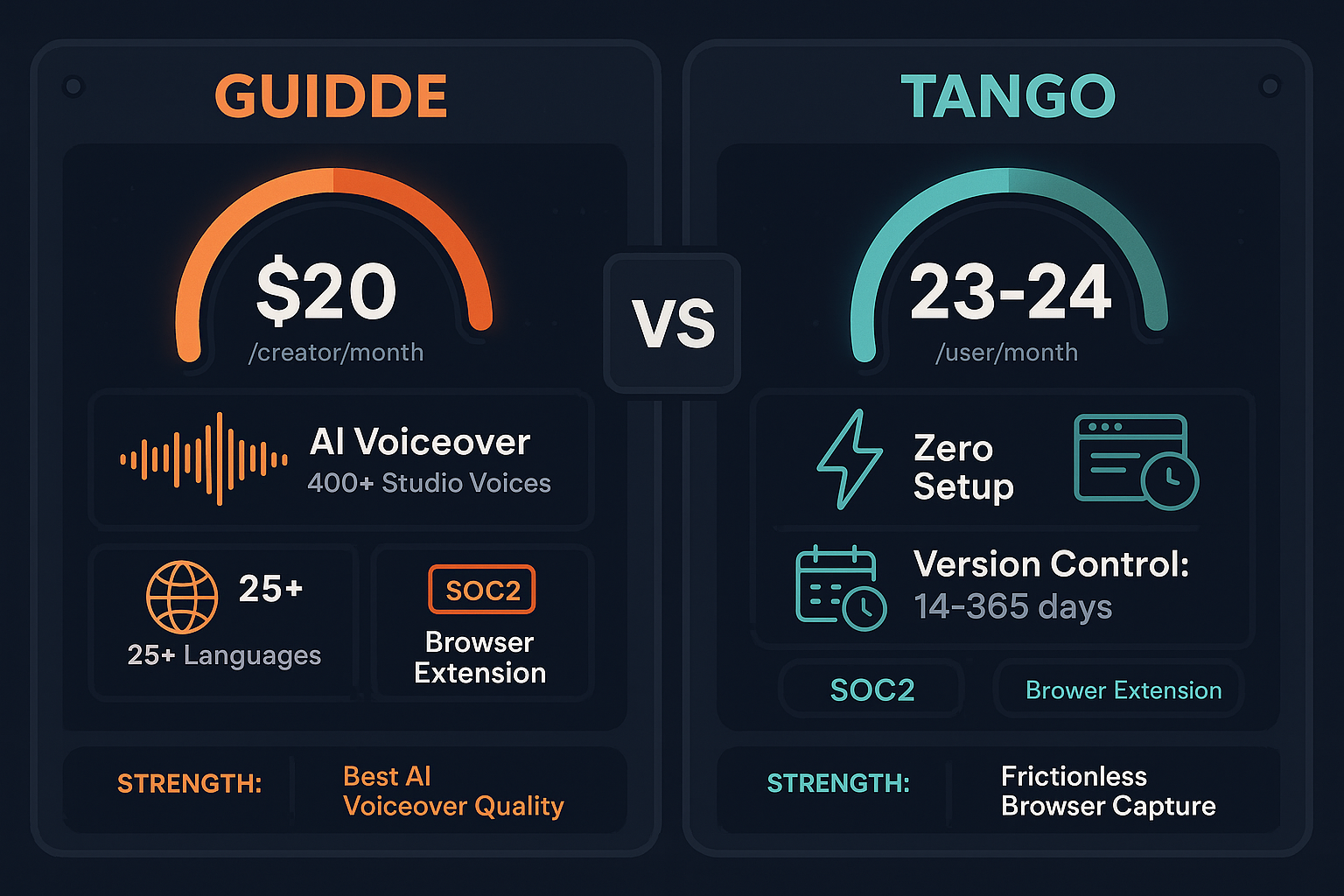
Guidde and Tango both offer free tiers and per-user pricing, but they target different workflows. Guidde creates AI-voiced tutorial videos from screen captures ($16-44/creator/month), while Tango generates screenshot-based workflow guides ($23/user/month). This comparison breaks down the true cost of each platform—including hidden limitations and scale penalties.
Pricing Breakdown
A detailed comparison of pricing tiers, included features, user limits, and capabilities to understand the true value proposition of each platform.
| Feature |
Guidde
|
Tango
|
|---|---|---|
| Free Plan Available | ||
| Free Plan Video/Workflow Limit | 25 videos | 15 workflows |
| Free Plan User Limit | Unlimited viewers | 10 users max |
| Entry Paid Plan Price | $16/creator/mo (annual) | $23-24/user/mo |
| Unlimited Content Creation | Pro tier ($16/mo) | Pro tier ($23/mo) |
| Desktop Capture (Not Just Browser) | Business ($35/mo) | Pro ($23/mo) |
| Remove Branding/Watermark | Pro tier | Pro tier |
| Export Formats | MP4, GIF, PPT | PDF, HTML |
| AI Voiceover Voices | 200+ (Pro), 400+ (Enterprise) | None |
| Version History | None listed | 14 days (Pro), 365 days (Enterprise) |
| SSO (SAML) | Enterprise only | Enterprise only |
| Advanced Analytics | Enterprise only | Pro tier |
| User Cap on Mid-Tier Plan | 5 creators (Business) | Unlimited |
| In-App Guided Walkthroughs | Enterprise (Nuggets) | |
| API Access | ||
| Auto-Translation | Enterprise only | |
| Multi-Language Support | 25+ languages | None |
Pricing as of February 2026. Annual pricing shown where available. Both tools require Enterprise for SSO and advanced features.
Pricing Analysis
Cost Analysis
An in-depth examination of value for money, scalability costs, and hidden limitations that affect total cost of ownership.
Guidde's $16/creator/month Pro tier delivers unlimited AI-voiced videos with 200+ voices, making it excellent value for video-first teams. However, the 5-creator cap on Business tier ($35/creator/mo) creates an artificial bottleneck—teams of 6+ must jump to Enterprise pricing, which can triple costs. Tango's $23/user/month Pro tier offers unlimited workflows and desktop capture with no user caps, providing more predictable scaling. Both tools lack API access at all tiers, limiting automation ROI. For teams primarily creating customer-facing tutorial videos, Guidde's voiceover quality justifies the premium. For internal workflow documentation, Tango's screenshot approach is simpler but offers less production value. Neither tool includes translation or multi-tenant delivery without Enterprise upgrades.
Guidde's per-creator pricing creates painful inflection points. A 10-person team would pay $350-440/month (Business tier, assuming Enterprise unlocks the 5-creator cap), plus custom Enterprise fees for SSO and translation. Tango's per-user model scales more predictably—10 users cost $230/month on Pro—but still suffers from per-seat inflation. Both tools penalize growth with linear cost increases tied to headcount rather than usage. For agencies or consultancies serving multiple clients, neither tool supports multi-tenant delivery, forcing separate subscriptions per client or complex workarounds. Hidden costs include lack of version control (Guidde) or extremely limited version history (Tango's 14-day Pro limit), forcing manual backup processes for compliance-sensitive teams.
Both Guidde and Tango lock critical enterprise features behind custom Enterprise pricing: SSO (SAML), advanced analytics (Guidde), in-app walkthroughs (Tango), and extended version history. Neither tool provides API access at any tier, blocking workflow automation and custom integrations that could justify higher pricing. Guidde's auto-translation is Enterprise-only despite offering 25+ language voiceovers on lower tiers—teams must pay premium prices to deliver multilingual content. Tango's 14-day version history on Pro tier is insufficient for regulated industries requiring audit trails. Both tools lack multi-tenant portals, forcing agencies to purchase separate instances per client or share a single branded environment. For teams with existing training video libraries, neither tool accepts uploaded videos—Guidde and Tango only process new screen captures, leaving legacy content stranded and requiring manual recreation.
Side-by-Side Pricing
Compare all pricing tiers, included features, and limitations to understand the total cost of ownership for each platform.
Both Guidde and Tango use per-seat pricing that penalizes team growth. Guidde offers superior production quality with AI voiceovers but caps Business tier at 5 creators, forcing expensive Enterprise upgrades. Tango provides more predictable scaling but lacks video capabilities entirely. Neither tool supports multi-tenant portals, API access, or comprehensive version control without Enterprise contracts. For teams needing documentation at scale, both tools' per-user economics and feature gaps make them expensive choices.
Our Recommendation
Guidde and Tango both employ per-user pricing models that become expensive as teams grow. Guidde excels at AI-voiced video production but gates critical features behind a 5-creator Business tier cap and custom Enterprise pricing. Tango offers simpler workflow screenshot documentation with more predictable scaling, but lacks video capabilities and multilingual support entirely. Both tools charge for seats rather than usage, creating inflation as teams expand.
Choose Guidde if you need...
Choose Tango if you need...
Choose Docsie if you need...
Winner: Docsie
Docsie's AI credit model eliminates per-seat pricing inflation, charging for content processing rather than team size. Premium tier ($199/month) supports 15 users with 300,000 AI credits monthly—enough to convert ~5 hours of video into structured docs. Unlike Guidde and Tango, which only capture new workflows, Docsie accepts existing videos, PDFs, and websites, unlocking legacy content value. Multi-tenant portals, 100+ language translation, and API access are included without Enterprise upgrades. For teams needing documentation at scale across multiple clients, Docsie provides better economics and broader capabilities than either screenshot or video-only tools.
Common Questions
Q: What does a 10-person team cost on Guidde vs Tango?
A: Guidde's Business tier caps at 5 creators ($175/month annual), forcing a 10-person team into custom Enterprise pricing (typically $500-1,000+/month). Tango charges $23/user/month, totaling $230/month for 10 users on Pro tier. However, neither tool supports multi-tenant delivery or API access at these price points, limiting ROI compared to platforms like Docsie that bundle enterprise features at $199/month for 15 users.
Q: Do Guidde and Tango charge for viewers or only creators?
A: Guidde charges per creator (people making videos), with unlimited free viewers. Tango charges per user (anyone accessing the platform), making it more expensive for teams where many people need to view or edit workflows. Both models penalize team growth, while Docsie's workspace pricing supports 15-90 users without per-seat multipliers.
Q: What's included in free tiers for Guidde vs Tango?
A: Guidde's free tier offers 25 videos with watermarks, web capture only, and no exports—good for individual testing. Tango's free tier allows 15 workflows for up to 10 users with basic browser capture—better for small team evaluation. Both free tiers lack desktop capture, branding removal, and advanced features. Docsie's free plan includes real AI credits to convert a 10-minute video with unlimited viewers, providing more practical trial value.
Q: What are the hidden costs of Guidde and Tango?
A: Both tools lock SSO, advanced analytics, and extended version history behind Enterprise tiers with custom pricing. Neither offers API access at any price, blocking automation ROI. Guidde limits Business tier to 5 creators, forcing expensive upgrades as teams grow. Tango's 14-day version history on Pro requires Enterprise for compliance-grade audit trails. Multi-tenant delivery isn't available—agencies must buy separate subscriptions per client or manually manage shared environments.
Q: How does Guidde and Tango pricing compare to Docsie?
A: Guidde charges $16-44/creator/month with a 5-creator Business cap. Tango charges $23/user/month. Docsie's Premium tier is $199/month for 15 users (effectively $13/user) with 300,000 AI credits/month, multi-tenant portals, API access, and 100+ language translation included. For teams above 10 people or agencies serving multiple clients, Docsie's workspace model provides 40-60% cost savings versus per-seat tools while including enterprise features Guidde/Tango gate behind custom Enterprise contracts.
Q: Is there a better alternative to both Guidde and Tango?
A: Yes—Docsie addresses the core limitations both tools share. Unlike Guidde and Tango (which only process new screen captures), Docsie converts any existing video, PDF, or website into structured documentation using multimodal AI. Docsie's multi-tenant portals let agencies deliver one knowledge base to unlimited clients with custom branding—impossible with Guidde or Tango. AI credit pricing scales with usage, not headcount, avoiding per-seat inflation. Premium tier includes version control, 100+ language translation, API access, and SOC 2 compliance for $199/month (15 users)—features requiring Enterprise contracts on competing tools.
Docsie converts any video, PDF, or website into structured knowledge bases delivered through multi-tenant portals—with AI credit pricing that scales with usage, not team size. Get version control, 100+ language translation, API access, and enterprise compliance without custom Enterprise contracts.
No credit card required. Free AI credits to convert a 10-minute video included. No per-seat pricing penalties.
Start creating professional documentation that your users will love