
4.8
on G2
 Document360
 Scribe
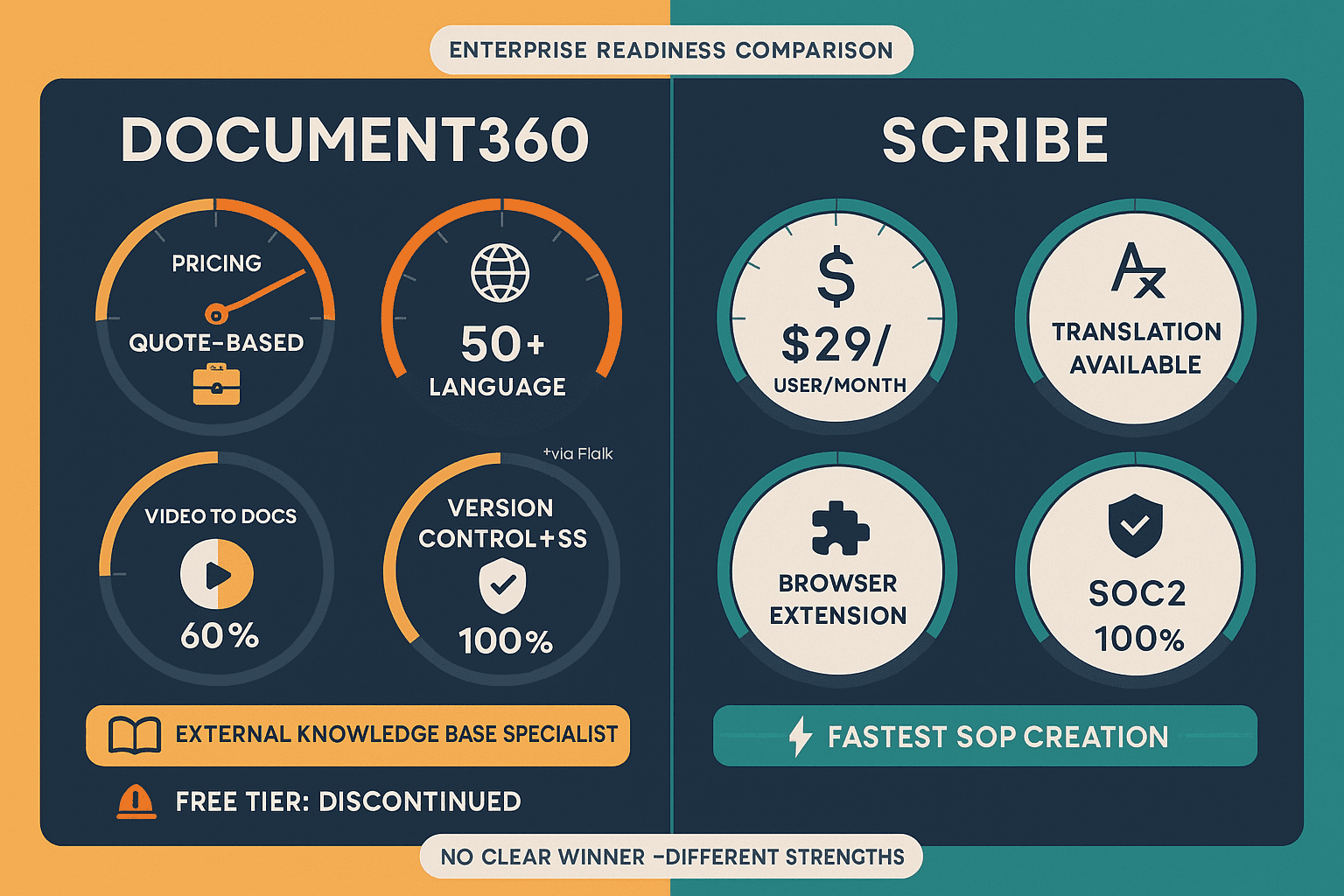
Document360 is a purpose-built knowledge base platform with SOC 2 compliance and approval workflows, while Scribe is a screen-capture SOP tool with AI PII/PHI redaction at its Enterprise tier. Both serve documentation needs but with very different enterprise depth. Here is how they compare — and why enterprise buyers should consider a third option.
Document360 is the stronger enterprise platform of the two — offering a full knowledge base architecture, audit logs, approval workflows, API access, and broad multilingual support.
Enterprise Feature Matrix
A detailed side-by-side comparison of enterprise capabilities including security, compliance, administration, scalability, and support features for both platforms.
| Enterprise Capability |
Document360
|
Scribe
|
|---|---|---|
| SOC 2 Compliance | ||
| GDPR Compliance | ||
| HIPAA Support | Enterprise only (PHI redaction) | |
| SSO (SAML) | Enterprise only | |
| SCIM Provisioning | Enterprise only | |
| Audit Logs | ||
| Role-Based Access Control | ||
| IP Whitelisting | Enterprise only | |
| Data Residency Options | ||
| Air-Gap / Private Infrastructure | ||
| Uptime SLA | Enterprise SLA | |
| Dedicated Support | ||
| API Access | ||
| Multi-Tenant Portals | ||
| Custom Domain | ||
| Approval Workflows | Pro Team only | |
| Advanced Analytics | Pro Team+ | |
| Multi-Language / Localization | 50+ languages | Basic translation |
| Version Control | ||
| Content Reuse & Snippets |
Data as of February 2026. Based on publicly available documentation, vendor websites, and user-reported information. Enterprise tier pricing for Scribe reported at $18,000–$39/user/year.
Strengths & Weaknesses
Deep Dive
Document360 holds SOC 2 certification and GDPR compliance with audit logs and SAML SSO, providing a reasonable baseline for enterprise security. However, it lacks SCIM provisioning, IP whitelisting, and data residency options. Scribe's Enterprise tier adds meaningful security features — AI PII/PHI redaction, SCIM, IP whitelisting, and SAML SSO — making it more compelling for healthcare and financial services. However, Scribe has no audit logs, which is a critical gap for organizations requiring forensic tracking and regulatory evidence of content changes. Neither platform supports air-gap deployment or private infrastructure for sensitive environments.
Document360 is built as a full knowledge base platform capable of supporting large content libraries with version control, content reuse, and multi-language support across 50+ languages. It scales reasonably for mid-market and enterprise knowledge base needs. Scribe is optimized for individual and team SOP creation — it is a capture-first tool, not a knowledge management platform. It lacks version control entirely and has no knowledge base structure for organizing content at scale. For enterprise teams managing thousands of documents across departments, Document360's content architecture offers significantly more scalability than Scribe's flat guide library model.
Document360 provides stronger administrative capabilities with role-based access control, audit logs, approval workflows, and API access for programmatic content management. Enterprise teams can govern content creation, enforce review processes, and integrate with existing systems. Scribe offers RBAC and SCIM at its Enterprise tier but lacks audit logs and API access entirely, limiting administrative visibility and integration options. Document360's approval workflow support is particularly valuable for regulated industries requiring multi-step content sign-off. Neither platform offers the granular multi-tenant administration required by organizations serving multiple client organizations from a single system.
Both Document360 and Scribe offer dedicated support at their Enterprise tiers, but there are notable differences. Scribe explicitly publishes an Enterprise SLA guarantee, giving buyers contractual uptime commitments — an important consideration for mission-critical documentation deployments. Document360 offers dedicated support and account management but does not publish formal uptime SLA terms publicly. Document360's sales-led procurement model means enterprise buyers must negotiate terms directly, which can slow purchasing cycles. Scribe's high Enterprise minimum ($18,000+ reported) is a barrier, but it does provide clearer contractual structure for buyers who clear that threshold.
Our Recommendation
Document360 is the stronger enterprise platform of the two — offering a full knowledge base architecture, audit logs, approval workflows, API access, and broad multilingual support. Scribe is a specialist SOP capture tool that adds meaningful security features at its Enterprise tier (PII/PHI redaction, SCIM, IP whitelisting) but fundamentally lacks the content management infrastructure, version control, and API access that enterprises require for systematic knowledge management. For organizations evaluating both, the decision often comes down to use case — external knowledge bases favor Document360, while internal screen-capture SOPs favor Scribe.
Choose Document360 if you need...
Choose Scribe if you need...
Choose Docsie if you need...
Winner: Docsie
Both Document360 and Scribe share critical enterprise gaps — neither supports multi-tenant portal delivery, neither offers air-gap or private infrastructure deployment, neither provides real-time compliance monitoring, and neither converts existing training videos into structured documentation. Docsie addresses all of these gaps with its six-pillar knowledge orchestration platform, providing deeper enterprise security (SOC 2 Type II, HIPAA-ready, audit logs, 99.9% SLA), true multi-tenant architecture for serving multiple client organizations, 100+ language auto-translation, autonomous agents, and real-time frame-by-frame compliance monitoring for HIPAA, SOX, ITAR, and GDPR — all on private infrastructure if required.
Decision Helper
A direct framework for picking between Document360, Scribe, and Docsie based on your specific needs.
Purpose-built external KB with strong AI writing tools.
Browser process capture that auto-generates step-by-step guides.

Convert real video into searchable docs, then deploy multi-tenant portals.
Common Questions
Q: Which platform is more secure for enterprise use — Document360 or Scribe?
A: Both are SOC 2 and GDPR compliant, but they have different security strengths. Document360 provides audit logs and SAML SSO across its enterprise tiers. Scribe's Enterprise tier adds AI PII/PHI redaction, SCIM provisioning, and IP whitelisting — features Document360 lacks entirely. However, Scribe has no audit logs, which is a meaningful gap for organizations needing forensic tracking of content changes. For healthcare and finance use cases involving sensitive screen content, Scribe's PHI redaction is a standout capability. For broader enterprise governance, Document360's audit logs and approval workflows provide better administrative control.
Q: Does either Document360 or Scribe support multi-tenant documentation portals?
A: Neither platform supports multi-tenant portals. Document360 is a single-tenant knowledge base — each instance serves one organization. Scribe is purely internal and has no mechanism for delivering documentation to external client organizations. This is a significant limitation for consulting firms, implementation partners, or any organization that needs to deliver branded documentation to multiple client organizations simultaneously. Docsie's multi-tenant architecture is specifically designed for this use case.
Q: What are the audit log and compliance tracking capabilities of each platform?
A: Document360 provides audit logs for tracking content changes and user actions, which is important for enterprise compliance requirements. Scribe does not offer audit logs at any tier — including Enterprise — which is a notable gap for organizations in regulated industries that need forensic evidence of who changed what and when. For compliance-heavy environments (financial services, healthcare, legal), the absence of audit logs in Scribe is a disqualifying factor for many enterprise procurement teams.
Q: How does enterprise pricing compare between Document360 and Scribe?
A: Document360 has discontinued its free tier and moved entirely to quote-based pricing — all plans require a sales conversation, with no published rates. This slows procurement for organizations accustomed to transparent software purchasing. Scribe publishes tiered pricing with a Pro Team plan at $15/seat/month (minimum 5 seats) and an Enterprise tier reported at $18,000–$39/user/year minimums. Both tools have high enterprise entry points, and Document360's hidden pricing makes budgeting difficult without a sales cycle. Docsie publishes transparent pricing starting at $199/month with enterprise plans available for larger organizations.
Q: Is there a better alternative to both Document360 and Scribe for enterprise documentation?
A: Yes — Docsie addresses the core enterprise gaps that both platforms share. Neither Document360 nor Scribe supports multi-tenant portal delivery, air-gap private infrastructure deployment, real-time compliance monitoring, or the ability to convert existing training videos into structured documentation. Docsie's six-pillar platform covers the full knowledge lifecycle — CONVERT, MANAGE, DELIVER, LEARN, AUTOMATE, and MONITOR — with SOC 2 Type II, GDPR, HIPAA-ready, SOX, and ITAR compliance, 100+ language auto-translation, autonomous agents, and transparent published pricing starting at $199/month.
Q: Can Document360 and Scribe be used together in an enterprise documentation stack?
A: They can complement each other in specific workflows — Scribe can capture screen-based SOPs quickly and export them to Confluence or SharePoint, while Document360 manages the external-facing knowledge base. However, this creates two separate tools to purchase, administer, and maintain, with no native integration between them. Organizations going this route still lack unified version control across both tools, multi-tenant delivery, and a single compliance posture. A unified platform like Docsie eliminates this fragmentation by handling internal SOPs, external knowledge bases, and multi-client portal delivery in one system.
Docsie gives enterprise teams what both Document360 and Scribe lack — multi-tenant portals for serving multiple clients, air-gap private infrastructure deployment, real-time compliance monitoring for HIPAA/SOX/ITAR/GDPR, and the ability to convert any video or document into structured knowledge bases across 100+ languages. SOC 2 Type II certified, with transparent pricing and a 99.9% uptime SLA.
No credit card required. Free AI credits included to convert a 10-minute training video on signup.