
4.8
on G2
 Docsie Recorder
 VEED.IO
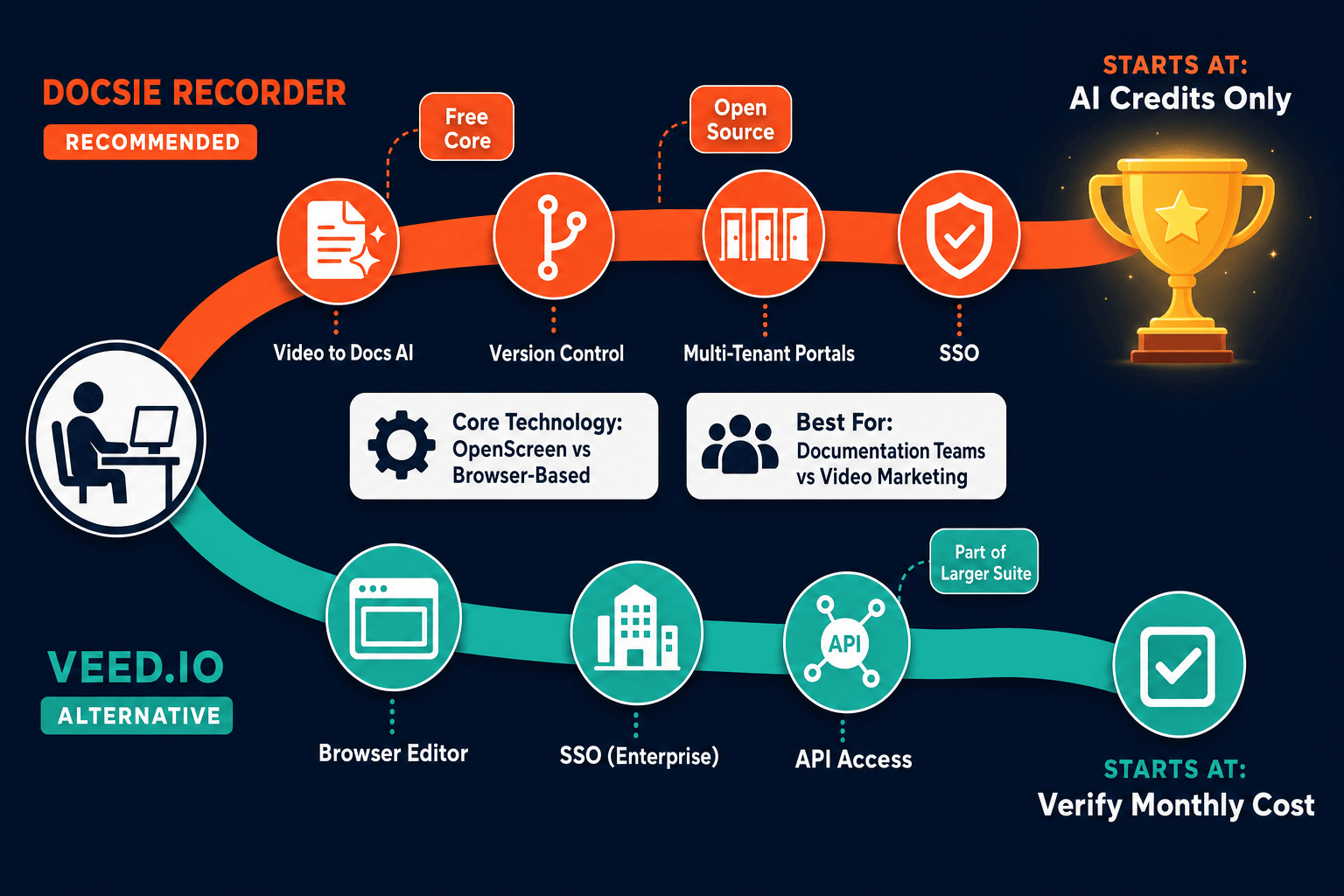
Both Docsie Recorder and VEED.IO let teams capture and edit screen recordings, but their enterprise stories diverge sharply. Docsie Recorder is a free, open-source desktop recorder that converts recordings into structured documentation and feeds a full knowledge base platform with SSO, audit logs, and versioned portals. VEED.IO is a browser-based video creation suite with strong AI media tools but limited documentation delivery and enterprise governance depth.

For enterprise: Docsie Recorder runs video-to-docs plus multi-tenant portals, VEED.IO captures workflows into quick guides, while Docsie Recorder fits when you also need video → structured docs → multi-tenant portals end-to-end.
Feature Matrix
A focused comparison of recording capabilities, cross-platform support, security controls, compliance posture, and documentation delivery features that matter most to enterprise buyers evaluating screen recorders and workflow capture tools.
| Feature |
Docsie Recorder
Our Pick
|
VEED.IO
|
|---|---|---|
| Free Desktop Recorder | ||
| Open-Source Recorder Base | ||
| Mac Support | ||
| Windows Support | ||
| Linux Support | ||
| Window and Full-Screen Capture | Browser only | |
| Microphone Capture | ||
| System Audio Capture | Platform-dependent | |
| Webcam Overlay | ||
| Automatic or Manual Zoom | Manual only | |
| Cursor and Focus Polish | ||
| Annotations and Blur Regions | Partial | |
| Crop, Trim, Speed Regions | ||
| Local MP4 Export | ||
| Local GIF Export | ||
| Video-to-Docs Conversion | ||
| Markdown Export | ||
| DOCX Export | ||
| Knowledge Base Publishing | ||
| Versioned Documentation Management | ||
| Multi-Tenant Portal Delivery | ||
| SSO (SAML / OAuth / OIDC) | Enterprise; confirm | |
| Audit Logs | ||
| Role-Based Access Control | ||
| API Access | ||
| Enterprise Deployment Path | Open-source + Docsie enterprise | Cloud SaaS only |
Data as of February 2026. Features are based on publicly available information and vendor documentation. VEED.IO pricing tiers and AI limits are subject to change; confirm against the live VEED.IO pricing page before relying on this comparison.
Strengths & Weaknesses
Deep Dive
An in-depth analysis of security posture, scalability, administrative control, and support structures that enterprise buyers must evaluate when choosing between a purpose-built recorder-to-docs workflow and a broad browser video suite.
Docsie Recorder's open-source MIT core lets enterprise security teams audit every line of the recording and editing stack — a meaningful advantage over closed-source alternatives when procurement requires software composition analysis. Local-first capture means raw recordings never touch a cloud server unless the user explicitly initiates Video-to-Docs conversion. The downstream Docsie platform adds SSO via SAML, OAuth, and OIDC; audit logs; role-based access control; and compliance monitoring workflows. VEED.IO is a closed-source browser SaaS. Its enterprise plan advertises SSO, but data residency options, audit log availability, and specific compliance certifications all require vendor verification before enterprise procurement can proceed. For regulated industries or teams with strict data-handling mandates, the auditable open-source recorder core plus Docsie's documented enterprise boundary provides a clearer security story than an unconfirmed SaaS promise.
Docsie Recorder processes recordings locally on the user's hardware, so capture quality and editing performance scale with the machine rather than with server load or concurrent-user quotas. There is no upload throttling during the record-and-edit phase. When Video-to-Docs conversion is triggered, Docsie's API handles the processing job asynchronously with polling, keeping the desktop experience responsive. The downstream Docsie platform is designed for multi-tenant knowledge base delivery, meaning one workspace can scale to unlimited portals and readers without per-portal licensing. VEED.IO runs entirely in the browser, making performance contingent on network conditions, browser tab resources, and server-side rendering capacity. AI minute quotas per plan can create bottlenecks for high-volume teams, and per-seat or per-plan export limits may require tier upgrades as recording volume grows.
Enterprise administrators evaluating Docsie Recorder gain control at two layers. At the recorder layer, the open-source codebase can be forked, internally distributed, or locked to a specific release — giving IT teams the same governance they apply to other open-source tooling. At the Docsie platform layer, workspace admins manage user roles, approve documentation before relying on this comparison, version content with inheritance, and deliver output through branded multi-tenant portals with custom domains. VEED.IO provides team seats, brand kit management, and role-based access for video projects, which is appropriate for marketing and content operations. However, it offers no equivalent for documentation governance — there are no approval workflows for structured articles, no versioned knowledge base, and no portal-level access control for delivering content to external users or customers.
Docsie Recorder's open-source core means enterprise teams are not dependent on a single vendor for the capture and editing layer. The MIT license permits internal patching, and the public GitHub repository provides full issue visibility. For the Docsie platform layer, enterprise plans include dedicated support, custom SLAs, and a documented uptime commitment. VEED.IO offers dedicated support on its Business and Enterprise tiers and is a commercially mature product with an established support organization. However, because VEED.IO is a closed-source cloud service, enterprise teams have no fallback if VEED.IO experiences an outage during a critical recording session — the browser recorder is only available when the service is online. Docsie Recorder's local desktop architecture eliminates this dependency for the capture phase entirely.
Our Recommendation
Docsie Recorder and VEED.IO address different enterprise needs despite both carrying a screen recording feature. VEED.IO is a mature browser video creation suite best suited for marketing, content, and social media teams that need AI captions, dubbing, templates, and brand kits. Docsie Recorder is purpose-built for teams that need a CREATE-to-CONVERT-to-MANAGE workflow — where a screen recording becomes structured, versioned, governed documentation delivered through enterprise portals. For enterprise buyers evaluating recorder tools on security posture, auditability, documentation governance, and downstream knowledge management, Docsie Recorder's open-source core and Docsie platform integration provide a significantly deeper enterprise story.
Choose Docsie Recorder if you need...
Choose VEED.IO if you need...
Winner: Docsie Recorder
For enterprise buyers evaluating screen recorders on security posture, documentation governance, and downstream knowledge management, Docsie Recorder wins on depth. The MIT-licensed open-source recorder core provides full auditability and local-first capture, while the Docsie platform delivers the SSO, audit logs, versioned knowledge base, and multi-tenant portal delivery that enterprise documentation workflows require. VEED.IO is a strong browser video suite for marketing teams but does not offer the recorder-to-docs pipeline, open-source transparency, or enterprise documentation governance that distinguishes Docsie Recorder for knowledge-management-oriented enterprise deployments.
Decision Helper
A direct framework for picking between Docsie Recorder, VEED.IO based on your specific needs.
Free, open-source desktop screen recorder that feeds a Video-to-Docs pipeline.
Browser-based video editor with subtitles, transcription, and effects.
Common Questions
Q: Does VEED.IO offer an open-source recorder that enterprise security teams can audit?
A: No. VEED.IO is a closed-source browser SaaS, meaning the recording and editing stack is not available for inspection or internal forking. Docsie Recorder is built on an MIT-licensed open-source core, allowing enterprise security teams to perform software composition analysis, audit the codebase, and distribute a confirmed build internally without vendor dependency.
Q: Can Docsie Recorder work offline without sending data to the cloud?
A: Yes, for the capture and editing phase. Docsie Recorder is a local desktop application that records, edits, and exports MP4 or GIF files entirely on the user's machine with no account required and no cloud upload. Cloud API credits are only consumed when the user explicitly chooses to trigger Video-to-Docs conversion through the Docsie bridge, giving teams clear control over when data leaves the local environment.
Q: How does each tool handle SSO and access control for enterprise teams?
A: Docsie Recorder feeds into the Docsie platform, which supports SSO via SAML, OAuth, OIDC, Azure AD, and Okta, alongside role-based access control and audit logs for documentation governance. VEED.IO advertises SSO on its Enterprise plan, but the specific protocols supported, audit log availability, and data residency options require direct verification with VEED.IO's sales team before enterprise procurement.
Q: Which tool is better if my team needs to convert screen recordings into knowledge base articles?
A: Docsie Recorder is the only option here. After recording and editing locally, users can send the recording through Docsie's Video-to-Docs pipeline, which generates structured Markdown with a result preview, then publishes directly into a versioned Docsie knowledge base. VEED.IO has no video-to-docs conversion, no Markdown or DOCX export, and no knowledge base publishing — its output is always a video file.
Q: Is VEED.IO suitable for teams on Linux or teams that need a native desktop recorder?
A: VEED.IO runs in the browser and does not require a native desktop install, so it functions on Linux browsers but without any dedicated desktop application features. Docsie Recorder ships native desktop builds for macOS, Windows, and Linux, providing hardware-accelerated capture and editing that is not dependent on browser tab resources or network connectivity during the recording session.
Q: Can I use Docsie Recorder for marketing video production the way I would use VEED.IO?
A: Docsie Recorder is optimized for workflow documentation, product walkthroughs, and support content rather than marketing video production. If your primary need is AI-voiced social clips, branded templates, avatar videos, or multi-language dubbing for external marketing campaigns, VEED.IO's broader video creation suite is the better fit. Docsie Recorder excels when the end goal is structured documentation, not a finished promotional video asset.
Download Docsie Recorder free — open-source, cross-platform, and built to convert one recording into structured docs, versioned knowledge bases, and enterprise portals. No watermarks, no cloud upload required to record and export.
Free MIT-licensed recorder. Video-to-Docs conversion uses Docsie AI credits. No account required to record and export MP4 or GIF.