
4.8
on G2
 Docsie Recorder
 Guidde
Both Docsie Recorder and Guidde help teams capture and share screen workflows, but their enterprise readiness profiles are fundamentally different. Docsie Recorder is a free, open-source desktop recorder that feeds directly into Docsie's enterprise knowledge base platform—with SSO, audit logs, versioned docs, and multi-tenant portals. Guidde is a browser-extension recorder with AI voiceovers that adds enterprise features only at its highest tier. If your procurement team needs to sign off on SSO, compliance certifications, and administrative controls, these two tools are not in the same league.

For enterprise buyers, Docsie Recorder and Guidde cover narrow slices (free and soc 2 type ii and gdpr compliance available across plans) while Docsie adds SSO, audit trails, multi-tenant portals, and compliance monitoring in one platform.
Enterprise Feature Matrix
A focused comparison of enterprise capabilities—security, compliance, administration, scalability, and deployment—for teams evaluating both tools against organizational IT and security requirements.
| Enterprise Capability |
Docsie Recorder
Our Pick
|
Guidde
|
|---|---|---|
| Free Desktop Recorder | ||
| Open-Source Recorder Core | ||
| Mac / Windows / Linux Support | All three | Mac & Windows only |
| Local-First Recording (No Upload Required) | ||
| Local MP4 / GIF Export | MP4/GIF on Pro+ | |
| Video-to-Docs Conversion | ||
| Knowledge Base Publishing | Video library only | |
| Versioned Documentation Management | ||
| Multi-Tenant Portal Delivery | ||
| SSO (SAML) | Enterprise only | |
| SOC 2 Type II Compliance | ||
| GDPR Compliance | ||
| Audit Logs | ||
| Role-Based Access Control | ||
| Data Residency Options | ||
| API Access | ||
| Custom Domain Support | ||
| Enterprise Deployment Path | Self-hosted or cloud | Cloud only |
| Dedicated Enterprise Support | Enterprise tier only | |
| Uptime SLA | 99.9% | N/A |
Data as of February 2026. Features are based on publicly available information and vendor documentation. Confirm current plan availability with each vendor before purchase.
Strengths & Weaknesses
Deep Dive
A detailed analysis of how Docsie Recorder and Guidde compare on the four pillars enterprise procurement teams scrutinize most—security and compliance, scalability, administration, and support.
Docsie Recorder's open-source core gives security teams a full audit trail of the capture tool's code—a rare advantage in a market of closed-source SaaS recorders. The downstream Docsie platform holds SOC 2 Type II, GDPR compliance, EU data residency options, and audit logs covering every document action. Guidde also carries SOC 2 Type II and GDPR certifications, which is strong for a video tool, and its PII redaction feature is genuinely useful. However, Guidde has no audit logs and no data residency choice, which disqualifies it from many regulated-industry procurement checklists. For security teams that need to know exactly where captured screen data lives and who accessed what, Docsie's platform provides substantially deeper controls.
Docsie Recorder is built on the OpenScreen engine and runs entirely on the local device, meaning recording performance scales with the user's machine rather than a shared cloud service. Converted documentation feeds into Docsie's cloud platform, which publishes content through multi-tenant portals capable of serving unlimited audiences from a single workspace. Guidde's capture pipeline routes through its cloud on every session, and its Business plan hard-caps at five creators—forcing an Enterprise contract the moment a sixth person needs to record. For organizations planning to roll out screen recording to dozens or hundreds of employees, Docsie's model avoids the per-seat wall that makes Guidde prohibitively expensive at scale.
Enterprise IT administrators evaluating Docsie Recorder get role-based access control, SSO via SAML, versioned documentation with branching and rollback, and a full audit log of every document operation in the downstream Docsie platform. Custom domains and multi-tenant portal configuration give admins granular control over what each audience sees. Guidde offers RBAC and SAML SSO, but only on its Enterprise tier—meaning smaller enterprise teams on Business plans receive no SSO at all. Critically, Guidde has no audit logs and no API access, which means administrators cannot programmatically query user activity, automate provisioning, or integrate Guidde into broader identity governance workflows. For IT teams that need administrative control parity with the rest of their SaaS stack, Docsie's platform is the defensible choice.
Docsie provides a documented 99.9% uptime SLA on its platform, giving procurement and legal teams a contractual reliability anchor for the recorder-to-docs workflow. Dedicated enterprise support is available with Docsie's enterprise plans. Guidde offers dedicated support at its Enterprise tier, but publishes no uptime SLA—meaning there is no contractual basis for service availability commitments. For enterprises where documentation workflows are tied to customer onboarding, employee training, or compliance processes, a missing SLA is a procurement red flag. The open-source nature of Docsie Recorder also means that even if Docsie's cloud were unavailable, teams retain a fully functional local recorder and their exported MP4 and GIF files without any service dependency.
Our Recommendation
Docsie Recorder and Guidde both serve teams that need to capture screen workflows, but their enterprise readiness profiles diverge sharply beyond the recording step. Guidde is a polished video creation tool with solid SOC 2 and GDPR credentials, but it lacks audit logs, data residency, API access, version control, and a published uptime SLA—gaps that disqualify it from many enterprise procurement processes. Docsie Recorder pairs a free, open-source local recorder with Docsie's full enterprise platform, giving IT, security, and compliance teams the controls they need across the entire record-to-publish workflow.
Choose Docsie Recorder if you need...
Choose Guidde if you need...
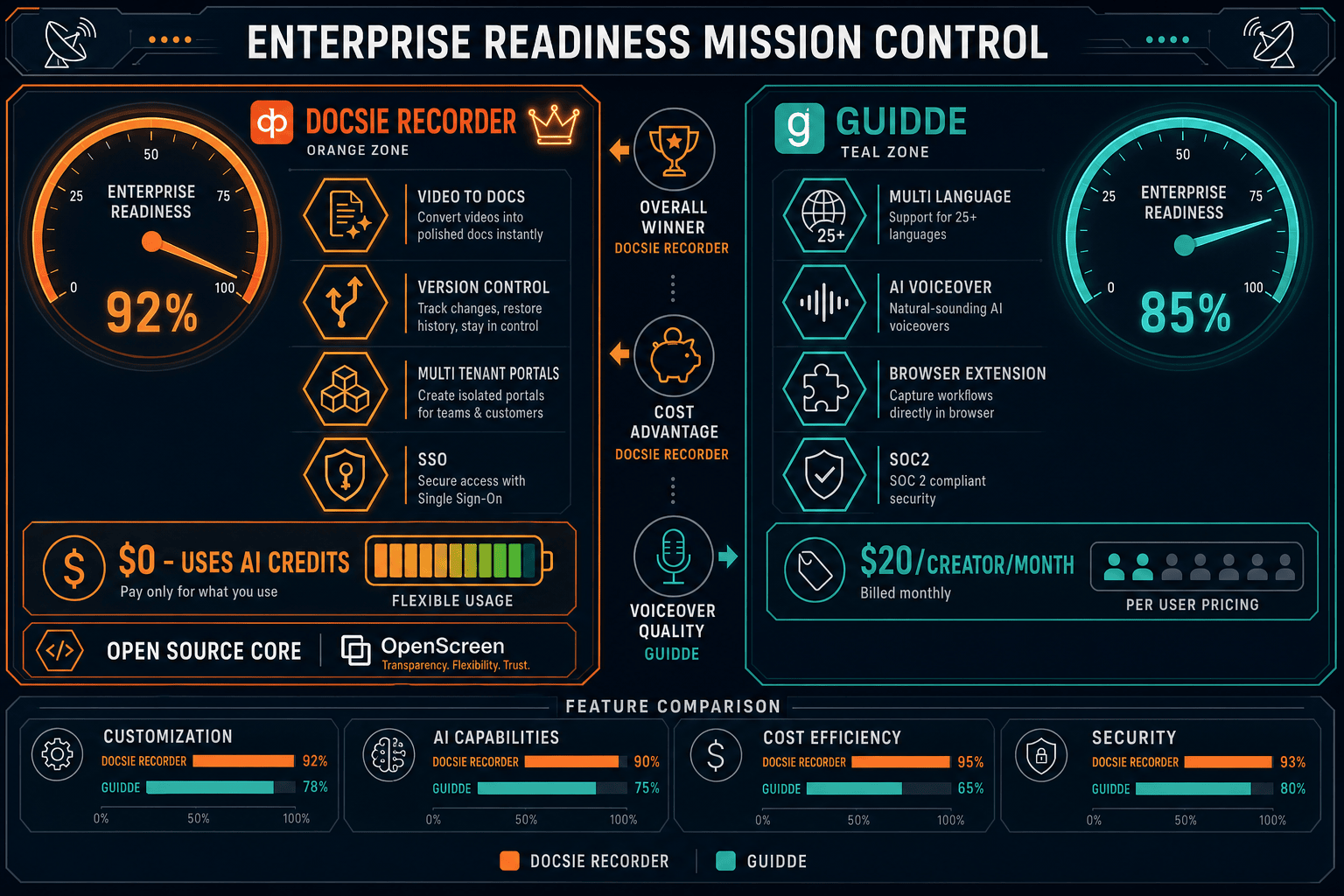
Winner: Docsie Recorder
Docsie Recorder wins on enterprise readiness because it combines a free, open-source local recorder—auditable by any security team—with a downstream platform that delivers audit logs, SSO, versioned documentation, multi-tenant portals, data residency, API access, and a 99.9% uptime SLA. Guidde's missing audit logs, absent uptime SLA, no API access, and cloud-only deployment make it unsuitable for regulated industries or large enterprise rollouts. Docsie's CREATE-to-MANAGE workflow means one recording becomes a compliant, versioned, publishable knowledge base asset rather than an isolated video file.
Decision Helper
A direct framework for picking between Docsie Recorder, Guidde, and Docsie based on your specific needs.
Docsie's free browser-based recorder that pipes captures straight into Docsie SOPs.
AI video walkthroughs with auto-generated transcripts and voiceover.

Convert real video into searchable docs, then deploy via multi-tenant portals.
Common Questions
Q: Does Guidde have audit logs for enterprise compliance requirements?
A: No. Guidde does not currently provide audit logs, which is a hard disqualifier for many regulated industries and enterprise security policies that require records of who accessed, modified, or shared content. Docsie's platform includes full audit logs covering document actions across the recorder-to-knowledge-base workflow, making it the defensible choice for compliance-driven procurement.
Q: Can Docsie Recorder be deployed in an air-gapped or self-hosted environment?
A: The recorder itself is open-source and runs entirely locally—recording, editing, and exporting MP4 and GIF files with no cloud dependency. The Video-to-Docs conversion step currently calls Docsie's cloud API, so a fully air-gapped conversion workflow is not yet available. However, Docsie's broader platform supports private cloud and self-hosted deployment for organizations with strict data residency requirements. Teams in air-gapped environments can still use the recorder for local video production.
Q: Which tool offers better data residency options for EU or regulated-industry buyers?
A: Docsie's platform provides EU data residency options, giving European organizations and regulated industries a contractual basis for where their documentation data is stored and processed. Guidde has no published data residency options—all data is processed in Guidde's cloud with no regional hosting choice. For procurement teams in healthcare, finance, or public sector contexts, Docsie's data residency capability is a meaningful differentiator.
Q: How does per-creator pricing affect Guidde's viability at enterprise scale?
A: Guidde's Business plan is capped at five creators at $35–$44 per creator per month, forcing any team larger than five into a custom Enterprise contract. For organizations planning to give screen recording access to dozens of employees, this pricing wall makes Guidde significantly more expensive than tools with workspace-based or unlimited-creator models. Docsie Recorder is free with no per-seat recording fee, and downstream Docsie platform pricing uses workspace-based tiers rather than per-creator billing.
Q: Does either tool support multi-tenant documentation delivery for different internal teams or external clients?
A: Only Docsie supports multi-tenant portal delivery. One Docsie workspace can power multiple branded documentation portals with separate custom domains, access controls, and content sets—serving different internal departments or external clients from a single content source. Guidde provides a video library and embeddable player but has no multi-tenant architecture. For organizations that need to deliver segmented documentation to different audiences, Guidde cannot meet that requirement.
Q: Is Docsie Recorder suitable for enterprise rollout today, or are there known gaps?
A: Docsie Recorder is production-ready for recording, editing, and local export across macOS, Windows, and Linux. Known gaps for enterprise IT teams include the current build not being notarized with an Apple Developer ID (which may trigger macOS Gatekeeper prompts) and the desktop-to-Docsie auth session handoff still maturing for seamless enterprise SSO. Teams evaluating an enterprise rollout should confirm current notarization status and auth flow maturity directly with Docsie before deployment planning.
Docsie Recorder is free, open-source, and cross-platform. Record locally, export MP4 and GIF without an account, and connect to Docsie's enterprise platform when you're ready for SSO, audit logs, versioned documentation, and multi-tenant portal delivery.
No account required to record and export video locally. Docsie AI credits required for Video-to-Docs conversion.