
4.8
on G2
 Docsie Recorder
 Cap
Cap
Both Docsie Recorder and Cap are open-source screen recorders, but their pricing models diverge sharply the moment you need more than a shareable video link. Docsie Recorder is permanently free to download, record, edit, and export locally—with pay-as-you-go AI credits only when you convert recordings into structured documentation. Cap offers a free self-hosted base but layers desktop licensing fees and per-user cloud charges on top. This breakdown compares every price tier, what you actually get at each level, and which tool delivers more value for teams that need recordings converted into real documentation.
Docsie Recorder and Cap sit at different price points, but neither bundles video-to-docs with multi-tenant knowledge delivery the way Docsie does.
Feature & Pricing Matrix
A feature-by-feature breakdown covering recording capabilities, editing tools, export formats, AI documentation features, and knowledge base publishing—mapped to what each tool actually charges.
| Feature |
Docsie Recorder
Our Pick
|
Cap
|
|---|---|---|
| Free Desktop Recorder | ||
| Open-Source Recorder Base | MIT license | AGPLv3 |
| Mac Support | ||
| Windows Support | ||
| Linux Support | Public build details available | |
| Window and Full-Screen Capture | ||
| Microphone Capture | ||
| System Audio Capture | Platform-dependent | |
| Webcam Overlay | ||
| Automatic or Manual Zoom | Automatic only | |
| Cursor and Focus Polish | ||
| Backgrounds and Visual Effects | Wallpapers, gradients, custom | |
| Crop, Trim, Speed Regions | Partial | |
| Annotations and Blur Regions | Partial | |
| Local MP4 Export | ||
| Local GIF Export | ||
| Project Save Format | .docsiescreen project files | Limited public detail |
| Desktop License Cost | $0 forever | $58 lifetime or $29/year |
| Cloud Sharing Cost | Not applicable — local-first | $12/user/month (Pro) |
| Video-to-Docs Conversion | ||
| Markdown Export | ||
| DOCX Export | ||
| PDF Export | ||
| AI Transcripts and Summaries | Via Video-to-Docs pipeline | |
| Knowledge Base Publishing | ||
| Versioned Documentation Management | ||
| Multi-Tenant Portal Delivery | ||
| Enterprise Deployment Path | Custom pricing |
Pricing data as of May 2026. Cap pricing from cap.so/pricing; Docsie Recorder pricing from docsie.io and GitHub. Reconfirm before relying on this comparison. Cap desktop license is a one-time or annual fee separate from monthly cloud Pro plan.
Strengths & Weaknesses
Deep Dive
Surface-level plan names hide the real cost differences. Here is a deep dive into value for money, scalability costs, and hidden costs and limitations for both tools.
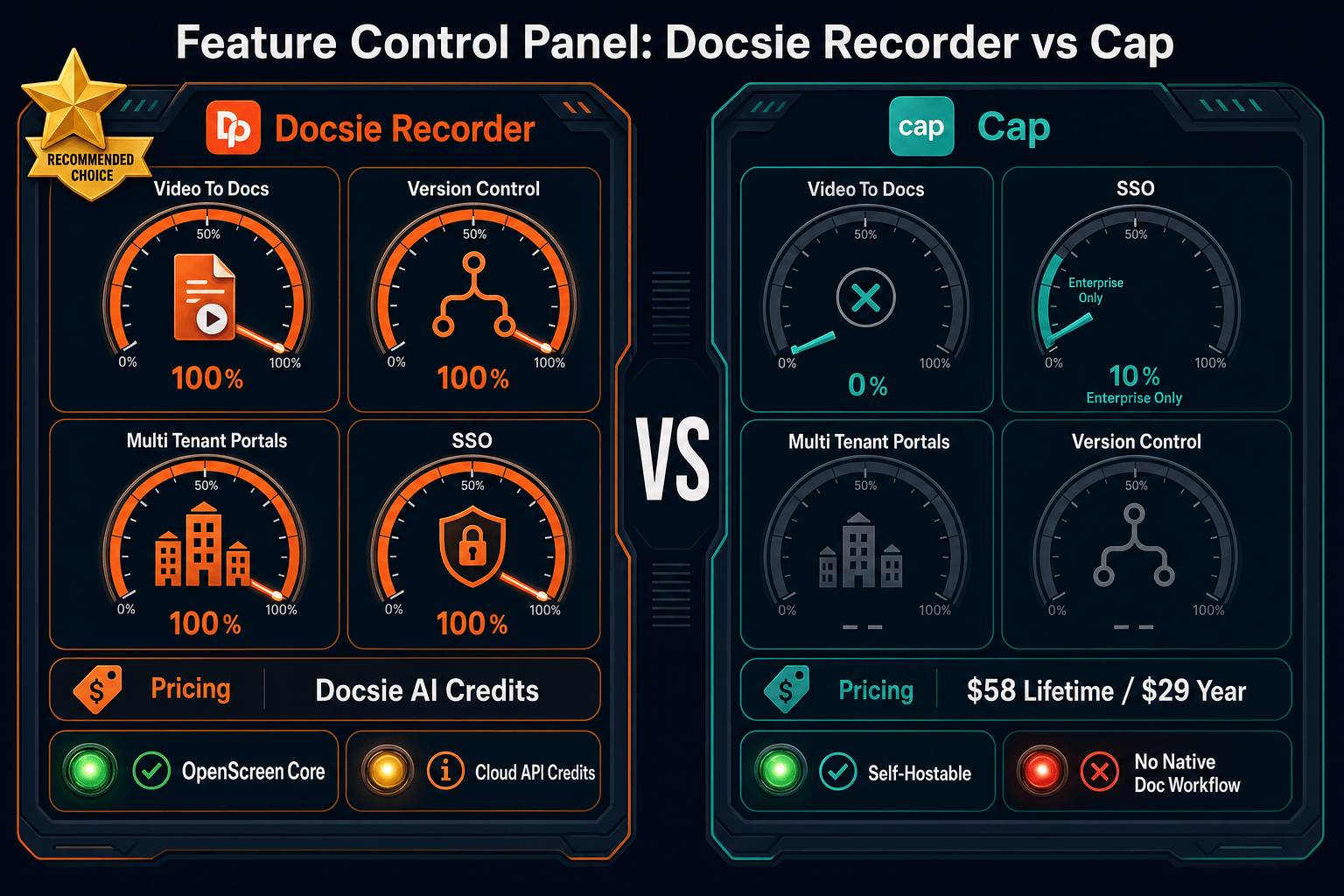
Docsie Recorder delivers a full recording and editing suite at zero cost—no watermarks, no time limits, no subscription gate on the desktop app. Cap's open-source base is also free, but the polished desktop app carries a $58 lifetime or $29/year license fee before you touch cloud features. For teams that primarily need to record, edit locally, and export, Docsie Recorder wins on pure dollar-per-feature math. The calculus shifts only when Cap's cloud sharing and AI summaries matter more than documentation conversion. Once you need structured docs from your recordings, Docsie's pay-as-you-go AI credits add marginal cost while Cap adds nothing—because it cannot do it at all.
Cap's Pro cloud plan charges $12 per user per month, meaning a ten-person team pays $1,440 per year just for video sharing on top of any desktop licensing. Docsie Recorder's recording workflow is free for every team member regardless of headcount. AI credit costs for Video-to-Docs conversion scale with usage volume rather than seat count, which is a fundamentally more predictable cost model for growing teams. At enterprise scale, Cap requires custom pricing negotiations for security review and deployment, while Docsie's downstream platform already includes enterprise controls—versioned documentation, multi-tenant portals, SSO, and compliance monitoring—within its documented enterprise tier.
Cap's pricing page separates the desktop license from the cloud Pro plan, meaning buyers often budget for one and discover they need both. Self-hosting Cap avoids cloud costs but introduces infrastructure, maintenance, and update management overhead that carries its own real cost. The AGPL license adds legal review overhead for teams embedding the recorder in commercial products. Docsie Recorder's hidden cost is the Docsie AI credit model for conversion—buyers need to estimate credit usage before committing. However, the recorder itself, including editing and local export, never incurs a hidden charge. Teams should also factor in Cap's lack of documentation output: if your workflow requires structured docs after recording, Cap forces a separate tool purchase that Docsie eliminates.
Pricing Breakdown
Every published plan for both tools, with what you actually get at each price point and who each tier is designed for.
Docsie Recorder wins the pricing comparison for teams that need recordings converted into structured documentation. The recorder itself is free at every seat count, and AI conversion costs are usage-based rather than per-user. Cap's pricing works well for teams whose entire output is shareable video links, but the combination of a separate desktop license, per-user cloud charges, and the complete absence of documentation output makes Cap significantly more expensive for documentation-driven workflows. Teams evaluating both tools purely on recording cost will find them comparable at the free tier; teams evaluating total workflow cost—recording plus documentation—will find Docsie Recorder materially cheaper and more capable.
Our Recommendation
Docsie Recorder and Cap share an open-source recorder heritage, but their value propositions diverge at the moment after recording ends. Cap is priced for teams whose workflow stops at a shareable video link—and it does that well at $0 to $12/user/month. Docsie Recorder is priced for teams whose workflow continues into structured documentation, knowledge base publishing, and versioned portal delivery—and it does that at $0 for the recorder plus pay-as-you-go credits for conversion. For any team that needs both a recorder and a documentation output, Docsie Recorder eliminates a second tool purchase that Cap cannot replace.
Choose Docsie Recorder if you need...
Choose Cap if you need...
Winner: Docsie Recorder
Docsie Recorder delivers more value per dollar across the full recording-to-documentation workflow. The recorder is free and fully featured with no subscription gate. Video-to-Docs conversion uses pay-as-you-go credits that only activate when you need them, avoiding Cap's per-user cloud charges for teams that primarily record and document rather than share video links. The downstream Docsie platform then handles everything Cap cannot—structured documentation, versioned knowledge bases, and multi-tenant portal delivery—without requiring a second tool purchase. For buyers evaluating screen recorders as the entry point to a documentation workflow, Docsie Recorder is the better-value choice at every team size.
Decision Helper
A direct framework for picking between Docsie Recorder, Cap, and Docsie based on your specific needs.
Docsie's free browser-based recorder that pipes captures straight into Docsie SOPs.
Open-source screen recorder with team workspaces and instant share links.

Convert real video into searchable docs, then deploy via multi-tenant portals.
Common Questions
Q: Is Docsie Recorder really free, or is there a catch?
A: The desktop recorder and editor are genuinely free with no watermark, no time limit, and no account required to record and export locally as MP4 or GIF. The only paid component is the Video-to-Docs conversion, which uses Docsie AI credits when you choose to send a recording through the documentation pipeline. You can record and edit indefinitely without ever spending a dollar.
Q: Does Cap charge separately for the desktop app and the cloud plan?
A: Yes. Cap's desktop license is a separate purchase ($58 lifetime or $29/year per user) from the cloud Pro plan ($12/user/month). Teams that want both the polished desktop recorder and cloud sharing features need to budget for both charges. This is an important distinction from Docsie Recorder, where the full desktop recorder and editor are free regardless of whether you use cloud features.
Q: How do Docsie AI credits for Video-to-Docs compare in cost to Cap's Pro subscription?
A: Cap Pro charges a flat $12 per user per month regardless of how many recordings you actually convert or share. Docsie AI credits are usage-based—you estimate the cost before running a conversion job and only pay for what you use. For teams with variable recording volumes, the credit model is typically more cost-efficient than a flat per-seat subscription, especially when the recorder itself is already free.
Q: Can I use Docsie Recorder without ever paying for Docsie's broader platform?
A: Yes. You can download, record, edit, and export MP4 and GIF files entirely locally without a Docsie account or any payment. The Docsie platform subscription is only required if you want to publish converted documentation into a managed knowledge base or deliver it through Docsie portals. The recorder is a standalone tool that happens to connect to Docsie when you need it.
Q: If both are open-source, why does the license matter for pricing?
A: Cap uses AGPLv3, which requires teams embedding the recorder in commercial products to open-source their own code or obtain a commercial license—adding legal review costs that are easy to overlook. Docsie Recorder's core is MIT-licensed, which is permissive and carries no copyleft obligations. For companies building on top of the recorder or distributing it internally, the license difference has real cost and compliance implications beyond the sticker price.
Q: Which tool is cheaper for a ten-person team that needs both recordings and documentation?
A: Docsie Recorder is significantly cheaper for this scenario. Ten users on Cap Pro pay $1,440 per year for cloud sharing, plus potential desktop license fees, and still have no documentation output—requiring a separate documentation tool purchase. With Docsie Recorder, all ten users record for free, and the team pays AI credits only for the conversion jobs they actually run, with downstream documentation publishing included in the Docsie platform tier. Total cost of ownership across both recording and documentation is lower with Docsie.
Download Docsie Recorder today—free desktop recorder with no subscription, no watermark, and no per-seat fee. When your recordings need to become structured documentation, connect to the Docsie Video-to-Docs pipeline and publish directly into a versioned knowledge base.
MIT-licensed recorder core. No account required to record and export. AI credits used only when you convert recordings to docs.