
You're Drowning in Document Versions and Nobody Has Time to Read Them All
Your legal team just sent over version 12 of the vendor contract. Product marketing updated the competitive analysis spreadsheet for the third time this week. Engineering released new API documentation that differs from the previous version in ways that really matter — but which ones, exactly?
You know there are differences. You know some of them are critical. But right now, you're staring at two documents side by side, scrolling frantically, trying to spot what changed while your meeting starts in 10 minutes.
This isn't a productivity problem. It's a decision-making bottleneck that's costing your team hours every week.
Why Traditional Document Comparison Falls Short
Most teams reach for one of three solutions when they need to compare documents: manual review, basic diff tools, or version control systems. None of them solve the real problem.
Manual review is accurate but impossibly slow. Having someone read through multiple versions of a 50-page document to identify changes isn't just tedious — it's error-prone. Your team members miss details when they're tired, and they can't possibly hold enough context in their heads to understand how changes ripple through the entire document. Plus, nobody trained for their role to become a professional document reader.
Basic diff tools like Microsoft Word's Track Changes or file comparison utilities show you that something changed, but they don't tell you why it matters. You'll see that paragraph 3 on page 7 was modified, but you won't know if that's a critical legal change, a minor typo fix, or a formatting adjustment. These tools treat all changes equally, leaving you to figure out the significance of each one. When you're comparing technical specifications, product descriptions, or competitive intelligence, this lack of context makes the tool nearly useless.
Version control systems work great for code but struggle with natural language documents. Git diffs are line-by-line, which means a single reworded sentence looks like you deleted one line and added another. They don't understand semantic meaning, can't identify when concepts have been added or removed, and certainly can't tell you that the pricing structure fundamentally changed even though 90% of the words stayed the same.
The real issue? None of these tools actually analyze what changed. They show changes, but they don't understand them.
How Docsie's AI Document Comparison Tool Actually Works
This is where an AI document comparison tool changes everything. Docsie doesn't just highlight what's different between documents — it understands what those differences mean.
Auto-discovery of comparison dimensions means you don't need to tell the system what to look for. Upload your product specifications, competitive analyses, or policy documents, and Docsie automatically identifies the relevant dimensions for comparison. For product specs, it might discover pricing, features, technical requirements, and support options. For legal documents, it identifies obligations, timelines, liability clauses, and termination conditions. You're not configuring comparison criteria for 20 minutes before you can see results — the AI figures out what matters based on the content itself.
Intelligent scoring and ranking gives you a prioritized view of changes. When your procurement team receives updated vendor proposals, Docsie's AI document comparison tool doesn't just show that sections changed — it scores how significant those changes are to your evaluation criteria. A modified delivery timeline gets flagged as high-priority. A rephrased introduction gets marked as cosmetic. You can scan the top-priority changes in minutes instead of reading everything.
Side-by-side comparison with context presents differences in a way humans actually process information. Rather than showing disconnected snippets, Docsie displays full context around each change. When comparing two versions of your API documentation, you see not just that a parameter changed, but how it relates to the authentication flow and what impact it has on the examples further down. Your developers immediately understand the implications instead of hunting through the document to piece together the story.
Web research mode for competitive analysis extends beyond document comparison into intelligence gathering. Need to understand how your product documentation compares to competitors? Docsie can pull in publicly available competitor information, analyze it against your content, and identify gaps or opportunities. Your product team discovers that three competitors emphasize a security feature you offer but barely mention, or that your documentation is missing use cases that competitors highlight. This turns document comparison from a reactive task into a strategic advantage.
The difference is understanding versus detection. Traditional tools detect changes. Docsie's AI document comparison tool understands them.
Inside the Content Comparison Wizard: Evidence-Backed Findings
Prefer the deep dive? Watch the full 8-minute walkthrough →
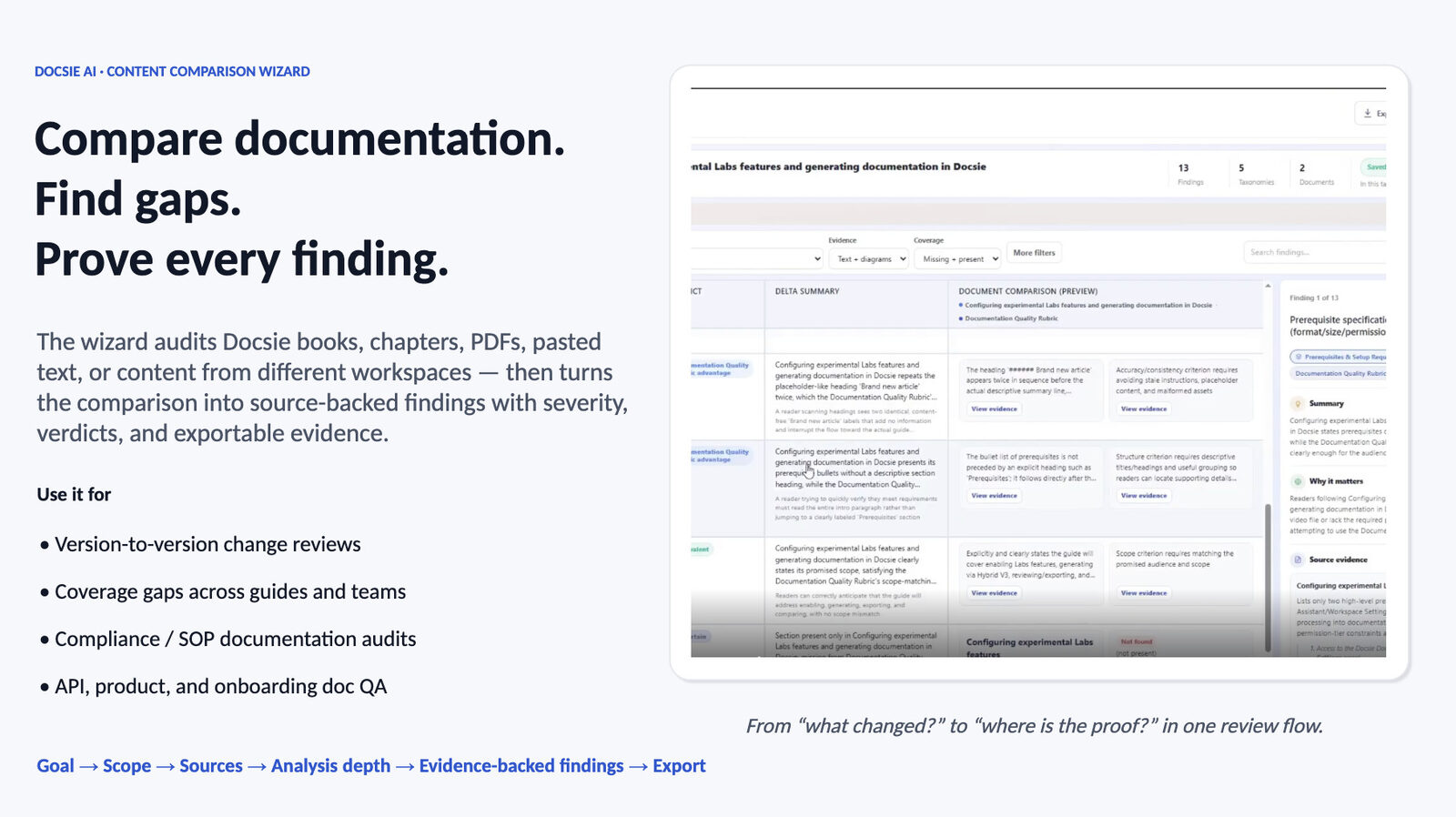
Under the hood, all of this runs through Docsie's Content Comparison Wizard — and the output is not just a summary. Every comparison is broken into structured findings with dimensions, severity, verdicts, delta summaries, and source-verified evidence side by side, so your team can act on the results instead of guessing.
Here's how a comparison actually runs:
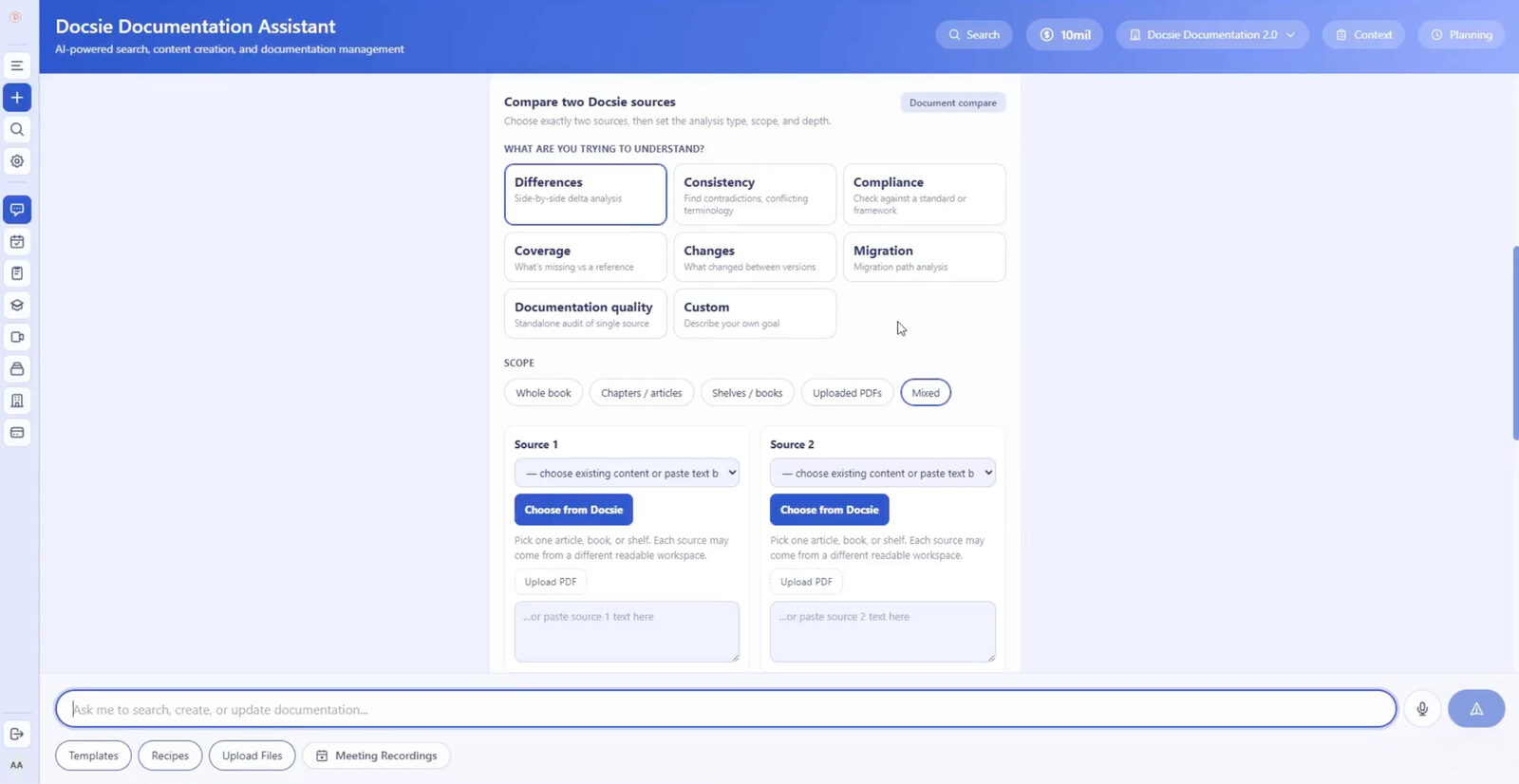
1. Set the goal. Pick what you're trying to understand: Differences, Consistency, Compliance against a standard or framework, Coverage gaps versus a reference, Changes between versions, Migration path analysis, a standalone Documentation Quality audit — or describe a custom goal in your own words.
2. Choose any two sources. Docsie books, chapters, shelves, uploaded PDFs, pasted text — even content from two completely different workspaces. Audit a live book against a pasted policy, or a vendor PDF against your internal documentation.
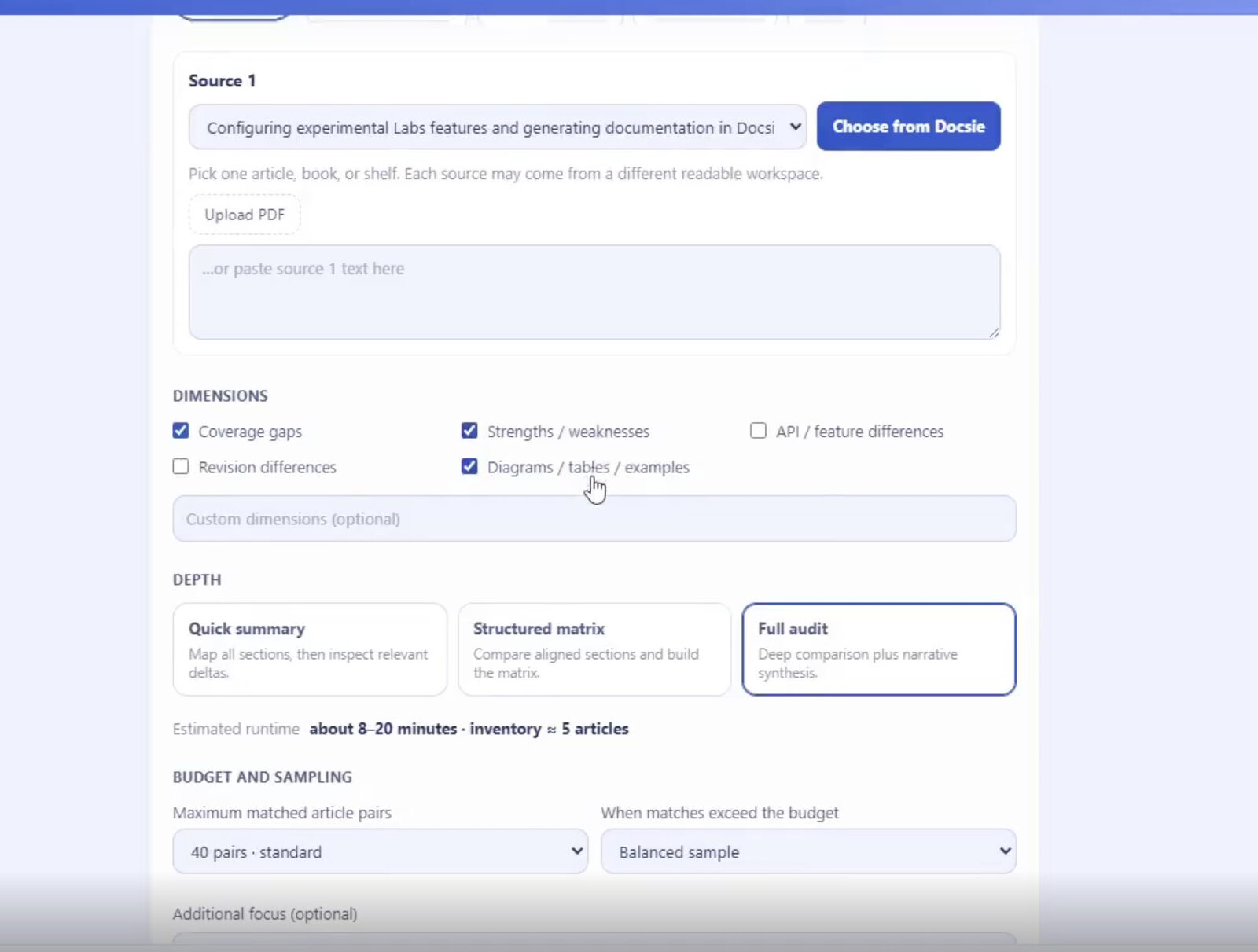
3. Pick dimensions and depth. Select what the analysis should look at — coverage gaps, strengths and weaknesses, revision differences, diagrams and examples, or your own custom dimensions — then choose how deep to go: a Quick Summary, a Structured Matrix of aligned sections, or a Full Audit with narrative synthesis. Budget and sampling controls keep large comparisons predictable.
4. Get findings you can prove. Each finding carries a severity, a verdict, a delta summary, a "why this matters" explanation, and verified source evidence quoted from both documents. Filter findings, drill into related ones, or ask AI follow-up questions about any result.
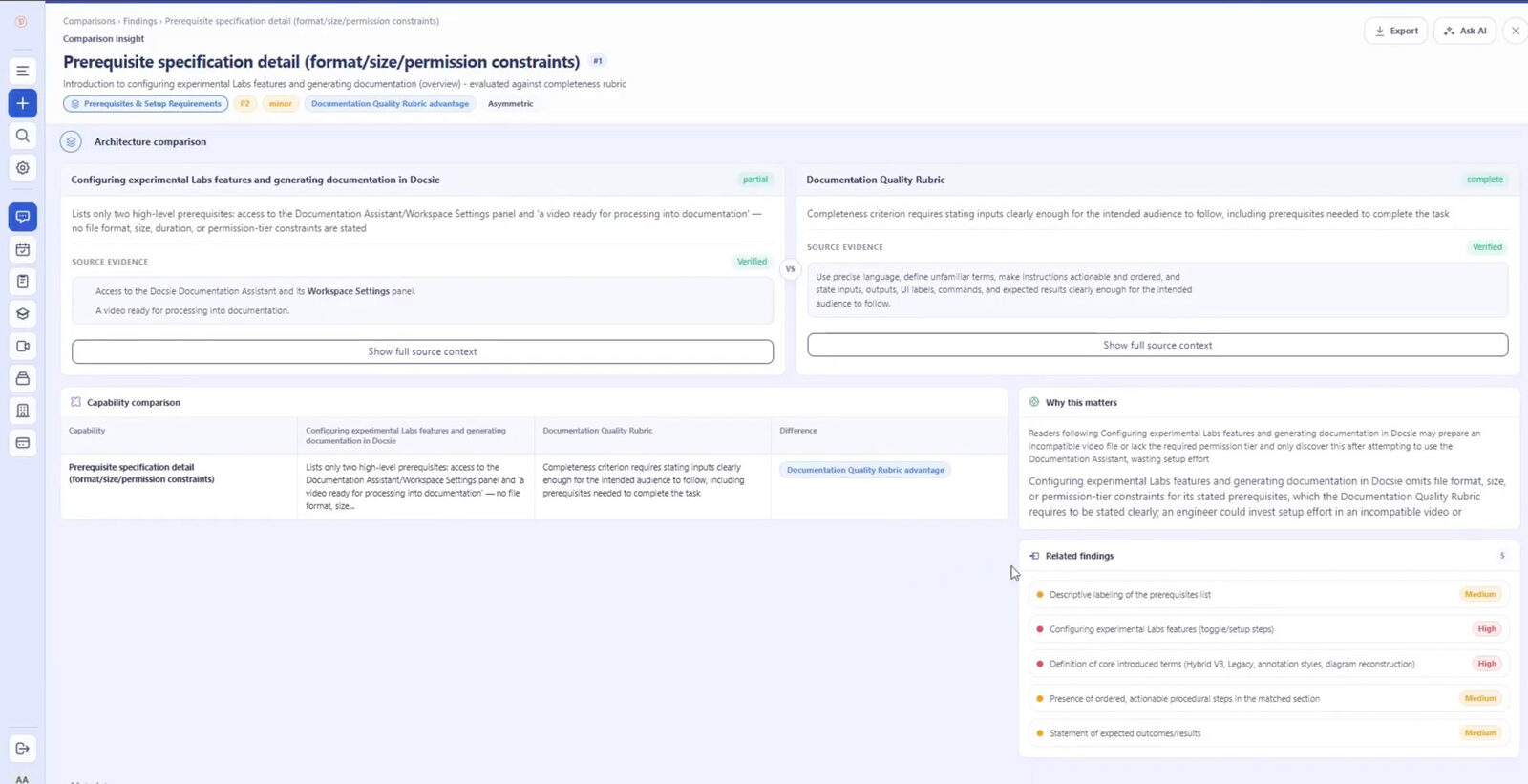
5. Export and act. Send findings to Excel or your external reporting workflow. Instead of manually reading hundreds of pages side by side, the comparison becomes a structured audit you can filter, investigate, question, and share.
That same workflow covers version changes, coverage gaps, compliance audits, product comparisons, documentation QA, and source validation — which is why engineering, documentation, compliance, product, QA, and procurement teams all end up using it.
Who Is This For?
Product Teams Managing Specifications
You're launching a new feature and need to ensure the product spec, marketing brief, and engineering requirements all align. Instead of scheduling a two-hour alignment meeting where everyone reads through documents together, your AI document comparison tool identifies the three places where specs diverge. Your team spends the meeting solving problems, not discovering them.
Legal and Compliance Teams
Contract negotiations generate dozens of document versions with subtle but critical changes. Your legal team uses Docsie to immediately spot modified liability clauses, changed payment terms, or new obligations buried in section 8.3.2. They spend time negotiating favorable terms instead of hunting for differences between versions 7 and 8.
Technical Writers and Documentation Managers
Your engineering team ships updates constantly, and your documentation needs to keep pace. With Docsie's AI document comparison tool, you quickly identify which sections of your docs need updates when a new version launches. You see that authentication changed but the REST endpoints stayed the same, so you know exactly where to focus your revision effort.
Competitive Intelligence Analysts
Your job is keeping the team informed about market changes, but manually tracking competitor product updates, pricing changes, and positioning shifts is a full-time job by itself. Docsie's web research mode automates competitive content comparison, flagging significant changes in competitor messaging or offerings so you can focus on strategic analysis rather than data collection.
Stop Wasting Time on Manual Document Comparison
Your team has better things to do than play "spot the difference" with critical documents. Every hour spent on manual comparison is an hour not spent on strategy, decision-making, or actually shipping your product.
Docsie's AI document comparison tool turns document analysis from a time sink into a strategic asset. Whether you're managing vendor contracts, maintaining technical documentation, or tracking competitive intelligence, you get the insights you need in minutes instead of hours.
Ready to see how much time your team can save? Start your free trial today — no credit card required. Or book a demo to see how Docsie handles your specific document comparison challenges.
The documents aren't going to compare themselves. But with Docsie, they kind of do.