
Creating User Guides with Docsie: A Step-by-Step Guide
Transform your training videos into professional documentation in minutes, not hours. This guide shows you exactly how to use Docsie's video-to-documentation feature to create user guides automatically.
The Problem: Manual Documentation is Broken
If you've ever tried to create a user guide from a training video, you know the pain:
- Watch the video, pause every few seconds
- Screenshot each important step manually
- Write descriptions for each screenshot
- Format everything into a coherent document
- Repeat for dozens (or hundreds) of videos
A 10-minute training video can take 2-3 hours to document manually. For teams with large video libraries—think SAP implementations, employee onboarding, or product training—this becomes impossible to scale.

The result? Most training videos never get documented. They sit in Zoom libraries, unwatched and unsearchable. When employees need help, they can't find the relevant 30-second clip buried in a 45-minute recording.
The Solution: AI-Powered Video-to-Documentation
Docsie solves this by using AI to watch your videos and automatically extract:
- Screenshots at key moments
- Step-by-step instructions based on what's happening on screen
- Structured SOPs ready for publishing
What used to take hours now takes minutes. Upload a video, review the output, publish.

Who Benefits from Video-to-Documentation?
Implementation Consultants (SAP, Workday, Salesforce) - Convert client training recordings into deliverable documentation - Reuse 80-90% of content across similar projects - Reduce documentation time from weeks to days
Training & L&D Teams - Transform Zoom/Teams recordings into searchable knowledge bases - Make onboarding content accessible without watching full videos - Update guides quickly when processes change
Product Teams - Convert demo videos into user guides automatically - Keep documentation in sync with product updates - Support multiple languages with AI translation
IT & Operations - Document internal processes from screen recordings - Create SOPs without dedicated technical writers - Maintain consistency across all procedures
Step-by-Step: Creating a User Guide with Docsie
Step 1: Upload Your Video
- Log into your Docsie workspace
- Navigate to the video upload section
- Select your video file (MP4, MOV, Zoom recording, Loom, etc.)
- Click upload and wait for processing to begin
Docsie accepts most common video formats. You can upload directly from your computer or import from cloud storage.

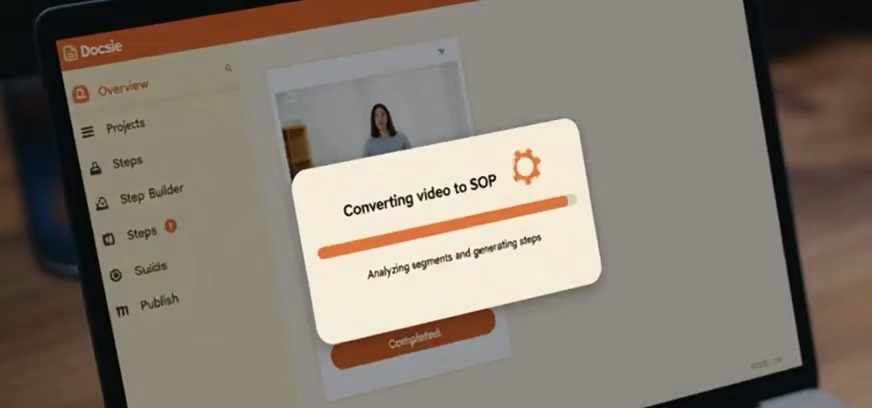
Step 2: Let AI Analyze Your Video
Once uploaded, Docsie's AI automatically:
- Watches the entire video frame by frame
- Identifies key actions and transitions
- Captures screenshots at important moments
- Transcribes audio and on-screen text (OCR)
- Structures everything into logical steps
You can monitor progress in real-time. A 10-minute video typically processes in 2-3 minutes.
Step 3: Review and Edit the Generated Guide
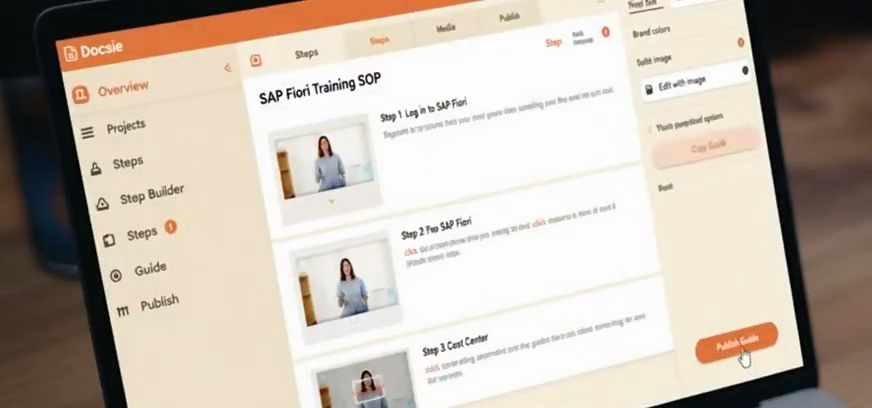
After processing completes, you'll see a structured document with:
- Automatically captured screenshots
- AI-generated step descriptions
- Logical grouping of related actions
Review checklist: - Are all important steps captured? - Do the descriptions accurately reflect each action? - Is the sequence logical and easy to follow?
Make any edits directly in the editor. Add context, clarify instructions, or remove unnecessary steps.
Step 4: Publish and Distribute
When you're satisfied with the guide:
- Click Publish to make it live
- Choose your distribution method:
- Public knowledge base (for customers)
- Private portal (for internal teams)
- Embed in existing documentation
- Share the link with your audience
Docsie handles hosting, search indexing, and version control automatically.

Step 5: Track Usage and Gather Feedback
After publishing, monitor how your guide performs:
- View analytics to see which guides get the most traffic
- Collect feedback directly within the documentation
- Identify gaps where users struggle or drop off
- Iterate based on real usage data

Time Savings: Manual vs. Docsie
| Task | Manual Method | With Docsie |
|---|---|---|
| 10-min training video | 2-3 hours | 15 minutes |
| 50 onboarding videos | 100-150 hours | 12 hours |
| 200 client training recordings | 400+ hours | 2-3 days |
For a typical SAP implementation with 200 training videos, Docsie saves 350+ hours of documentation work—equivalent to $25,000+ in technical writing costs.
Additional Features
Once your guide is created, Docsie offers:
AI Translation - Translate guides to 80+ languages instantly - Maintain formatting and structure - No per-word fees
Version Control - Track changes over time - Roll back to previous versions - Branch documentation for different clients
Collaboration - Multiple editors can work simultaneously - Comments and review workflows - Approval processes for sensitive content
Analytics - See which guides are most viewed - Identify search terms users can't find - Measure documentation effectiveness
Getting Started
Ready to stop manually documenting videos? Here's how to begin:
- Book a demo to see Docsie in action with your content
- Upload your first training video
- Review the AI-generated guide
- Publish and share with your team