
Clueso vs Tango: Which Documentation Tool Pricing Model Actually Fits Your Workflow?
Your team needs better documentation. You've recorded dozens of training videos. Your browser-based workflows are scattered across Loom links and Google Docs. Someone suggests Clueso for video polish. Another person champions Tango's screenshot simplicity. Then you see the pricing pages and realize these tools operate in completely different universes.
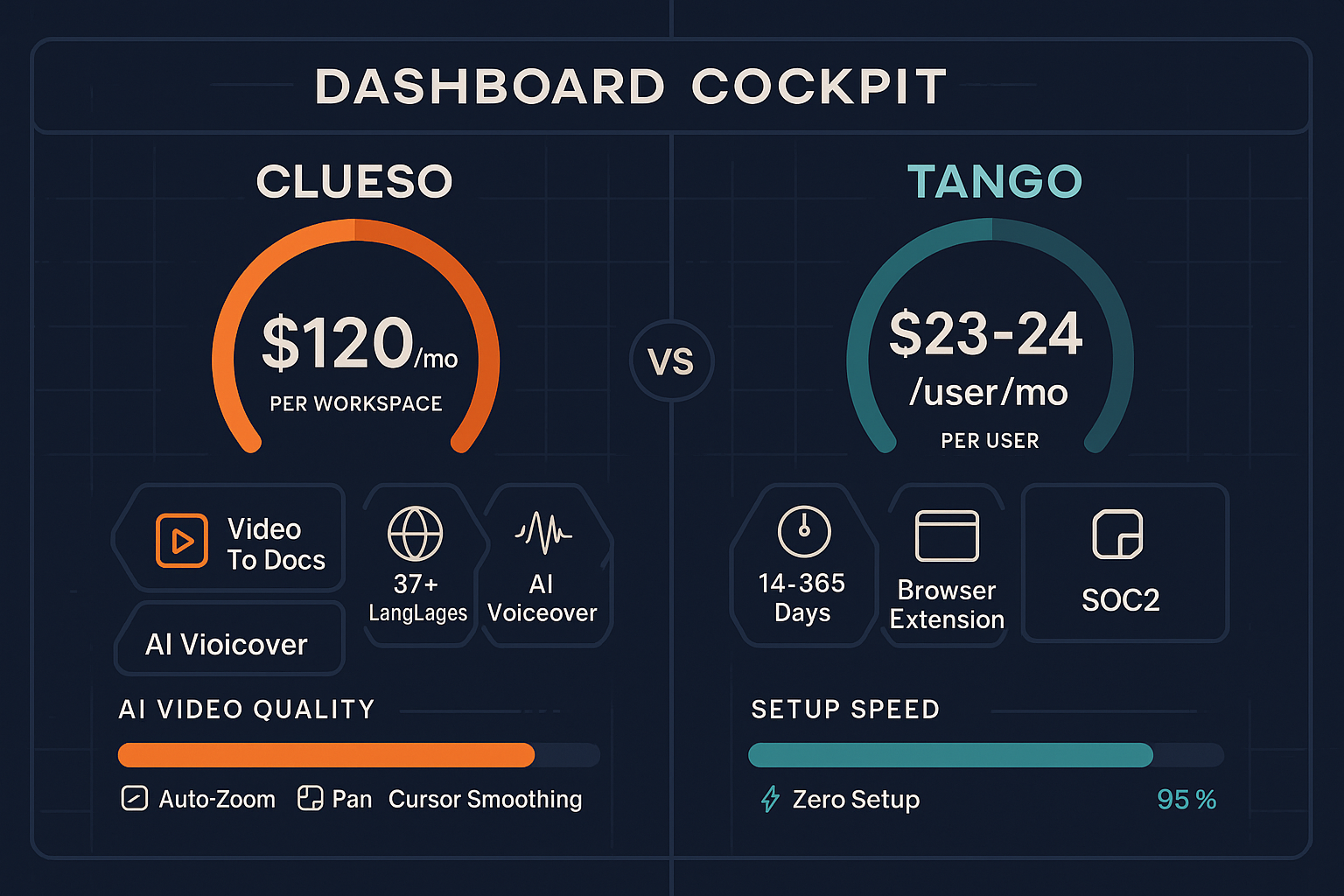
Clueso charges $1,440-$2,400 per year per workspace with hard limits on export minutes. Tango charges $0-$24 per user per month with unlimited output. One optimizes for video quality with quota constraints. The other optimizes for screenshot volume with per-seat inflation. Neither pricing model reflects how documentation teams actually work—and both create expensive bottlenecks as you scale.
Let's break down what you're really paying for with each platform, where the hidden costs emerge, and why the traditional choice between "workspace pricing" and "per-user pricing" might be the wrong question entirely.
What Clueso Actually Does (And Charges For)
Clueso transforms screen recordings into polished product videos with AI-powered editing, voiceovers, and branded styling. You record your screen, upload the footage, and Clueso's AI applies auto-zoom, cursor smoothing, professional transitions, and generates narration in 37+ languages. The output looks like a professionally edited tutorial video—without hiring a video editor.
The platform simultaneously creates step-by-step text articles from the same recording, giving you dual-format content from a single input. It's specifically designed for SaaS companies producing customer education content: onboarding videos, feature tutorials, help center documentation. Clueso holds SOC 2 Type II and ISO 27001 certifications, making it enterprise-ready from day one.
The catch? Clueso only processes screen recordings. You can't upload existing training videos, real-world footage, or arbitrary video content. It's built for creating new polished tutorials from scratch, not converting legacy video libraries into searchable documentation.

What Tango Actually Does (And Charges For)
Tango is a Chrome extension that captures browser-based workflows as screenshot guides. Click the extension, perform your workflow in the browser, and Tango automatically generates a step-by-step visual guide with annotated screenshots. It's frictionless for documenting web application processes—no video editing, no export queues, just instant screenshot documentation.
Tango also offers "Nuggets"—in-app guided walkthroughs that overlay directly onto web applications, coaching users through processes inside the actual interface. For teams documenting Salesforce configurations, HubSpot workflows, or internal web tools, Tango delivers clean visual output with minimal learning curve.
The limitation? Zero video capability. Tango only captures screenshots from browser workflows. You can't process video content, add voiceovers, or create multimedia documentation. And while Tango has pivoted heavily toward CRM automation features, the core documentation functionality remains browser-screenshot-focused.
Pricing Model Comparison: Workspace Quotas vs Per-User Inflation
Clueso: Annual Workspace Pricing with Export Minute Caps
Clueso charges $1,440/year (Starter) or $2,400/year (Pro) per workspace. The critical constraint isn't seat count—it's export minutes:
- Starter: 60 export minutes/year ($24 per exported minute annually)
- Pro: 180 export minutes/year ($13.33 per exported minute annually)
This pricing optimizes for teams that need high-quality video output but produce relatively small volumes. A dedicated documentation team of 5-10 people can share a single workspace without per-user costs stacking up. The economics work if you're creating polished tutorials for external customers where quality matters more than quantity.
The problem emerges when you need more output. Sixty export minutes converts to roughly 30-40 finished tutorial videos per year (assuming 1.5-2 minute tutorials). Larger documentation libraries hit the quota wall quickly. And there's no "pay as you go" option—you jump to Enterprise pricing (custom quotes) once Pro limits feel tight.
Tango: Per-User Monthly Pricing with Unlimited Output
Tango charges $0 (Free), $8/user/month (Pro), or $24/user/month (Enterprise), billed annually. The critical constraint isn't output volume—it's team size:
- Free: Up to 10 users, unlimited workflows, basic features
- Pro: $8/user/month for advanced workflows and integrations
- Enterprise: $24/user/month for SSO, API access, analytics, and priority support
This pricing optimizes for small teams documenting browser workflows at scale. Unlimited workflow creation means you can document hundreds of processes without hitting artificial caps. The Free tier provides genuine utility for startups and small teams under 10 people.
The problem emerges as headcount grows. A 50-person organization documenting internal processes pays $4,800-$14,400/year even if only 10 people actively create documentation—everyone accessing the workflows counts as a "user." Per-seat pricing inflates with team growth regardless of actual documentation usage.
The Hidden Costs Neither Model Addresses
Both pricing structures optimize for their respective workflow strengths but create expensive gaps:
Clueso's quota model penalizes content updates. Need to refresh outdated tutorials? Each re-export consumes precious export minutes. Documentation naturally requires continuous updates as products evolve, but Clueso's pricing treats exports as one-time events. Version control and iterative improvement become expensive.
Tango's per-user model penalizes knowledge sharing. The more people who need to access documentation, the higher your monthly bill—even if only a handful create content. This creates perverse incentives against democratizing documentation access across large organizations.
Neither platform offers usage-based pricing that matches actual documentation work patterns: heavy creation during product launches, lighter maintenance periods, and the need to convert existing video libraries without starting from scratch.
Feature Value Per Dollar: What You Actually Get
Clueso: Premium Video Quality at Premium Workspace Rates
For $1,440-$2,400 annually, Clueso delivers genuinely impressive AI video editing that would cost $100-200 per video with human editors:
- Professional auto-zoom and camera movement that highlights important UI elements
- AI voiceover in 37+ languages (avoiding expensive narration costs)
- Branded templates and consistent styling across all videos
- Dual output (video + article) from single recordings
- Enterprise compliance (SOC 2, ISO 27001) included at entry pricing
If your documentation strategy centers on creating polished, branded video tutorials for customer-facing help centers—and you need fewer than 180 videos per year—Clueso's workspace pricing delivers strong value. You're essentially getting professional video production capabilities for the cost of one junior editor.
The value proposition weakens if you need higher volume output, want to process existing video content, or require documentation features like version control and multi-tenant delivery. Clueso optimizes for quality over quantity and new creation over legacy conversion.
Tango: Maximum Output Volume at Minimum Entry Cost
For $0-$24/user/month, Tango delivers unlimited browser workflow documentation with minimal friction:
- Zero-setup screenshot capture from any web application
- Unlimited workflow creation (no artificial export caps)
- Clean, shareable visual guides that require no training
- In-app walkthroughs (Nuggets) for interactive guidance
- Free tier provides real value for teams under 10 users
If your documentation strategy focuses on capturing internal browser-based processes at scale—and you have a small team under 20 people—Tango's per-user pricing delivers strong value. The Free tier alone provides more utility than many paid documentation tools.
The value proposition weakens as team size grows (per-user costs multiply), if you need video content (Tango can't process it), or if you require enterprise documentation features like API access, version control, or multi-tenant customer portals (locked behind $24/user Enterprise tier).
Who Should Choose What (And Why)
Choose Clueso If You Need...
High-quality branded video output with workspace-based team economics. You're a SaaS company producing customer-facing tutorials where professional polish matters more than documentation volume. Your team of 5-15 documentation specialists can share a workspace without per-seat inflation. You need SOC 2/ISO 27001 compliance at standard pricing and are creating content in multiple languages.
Clueso works when: You're creating new screen recording content (not converting existing videos), can work within 60-180 export minutes annually, and prioritize video quality over documentation platform features like version control or multi-tenant delivery.
Choose Tango If You Need...
Unlimited browser workflow documentation with minimal entry cost. You're documenting internal processes in web applications (Salesforce, HubSpot, custom tools) where screenshot clarity beats video complexity. Your team is under 20 people, and you need to capture dozens or hundreds of workflows without hitting artificial caps. The Free tier covers your needs, or $8/user/month fits your budget.
Tango works when: You're documenting browser-only workflows (not desktop applications or video content), have a small team where per-user costs stay manageable, and don't need enterprise documentation platform features like API access, version control, or external customer portals at affordable pricing.
Choose Docsie When You Need Actual Documentation Platform Economics
Both Clueso and Tango optimize for specific content creation workflows—polished video production or browser screenshot capture—but neither addresses the broader documentation platform requirements that enterprise teams actually face.
Docsie charges based on AI processing credits ($199-$750/month for 5-25 hours of video conversion), not arbitrary workspace quotas or inflating per-user seats. You pay for what you process, when you process it. This pricing model matches actual documentation work patterns: heavier usage during product launches, lighter maintenance periods, and the flexibility to convert existing training video libraries—not just create new screen recordings.
More importantly, Docsie provides documentation platform infrastructure both competitors ignore:
-
Multi-tenant customer portals: Deliver branded knowledge bases to unlimited external clients from a single platform—essential for consultancies, agencies, and B2B SaaS companies. Neither Clueso nor Tango offers this capability.
-
Version control and content reuse: Track documentation changes, maintain version history, and reuse content blocks across multiple documents. Critical for regulated industries and enterprise teams managing complex documentation lifecycles.
-
100+ language auto-translation: Built-in translation infrastructure that converts documentation into any language automatically—broader than Clueso's 37 languages and far beyond Tango's English-only output.
-
Enterprise features at mid-tier pricing: SSO, API access, audit logs, and compliance features included in $199-$750/month plans, not locked behind custom "Enterprise" pricing that requires sales calls.
-
Existing video conversion: Process any video content—not just new screen recordings—into searchable, structured documentation. Extract value from legacy training libraries both competitors can't touch.
The Real Question: Do You Need a Creation Tool or a Documentation Platform?
Clueso and Tango are creation tools with strong workflows for specific content types. Clueso excels at turning screen recordings into polished videos. Tango excels at capturing browser workflows as screenshot guides. Both tools do their specific jobs well within their pricing constraints.
But documentation at scale requires more than content creation workflows. You need version control for updates. Multi-tenant portals for external customers. Translation infrastructure for global teams. API access for integrations. Audit trails for compliance. And pricing that scales with actual usage rather than arbitrary quotas or headcount inflation.
Docsie delivers these documentation platform capabilities while also converting video content into structured knowledge bases—combining creation tool functionality with enterprise documentation infrastructure that neither Clueso nor Tango addresses.
For a detailed feature-by-feature breakdown of how Clueso and Tango's pricing models compare, see our complete Clueso vs Tango pricing comparison.
Ready to test a documentation platform that matches your actual workflow economics? Start your free Docsie trial and see how AI-powered video conversion, multi-tenant portals, and usage-based pricing eliminate the trade-offs between creation quality and platform scalability.