
Docsie vs Tango: Feature Comparison 2026
You've accumulated hundreds of training videos, product demos, and recorded walkthroughs. Your team needs documentation, but the thought of manually transcribing and structuring all that content feels overwhelming. Meanwhile, you're evaluating tools that promise to "make documentation effortless" — but are they solving the same problem?
Docsie and Tango both appear in searches for documentation tools, but they operate in fundamentally different spaces. Docsie is a knowledge orchestration platform that converts existing video content into structured, multilingual knowledge bases deliverable through multi-tenant portals. Tango is a browser extension that captures new workflows as screenshot guides. The distinction matters: one transforms what you already have, the other helps you create from scratch.
This comparison cuts through the marketing noise to help enterprise decision-makers understand which tool fits their actual documentation challenges.
What Is Docsie?
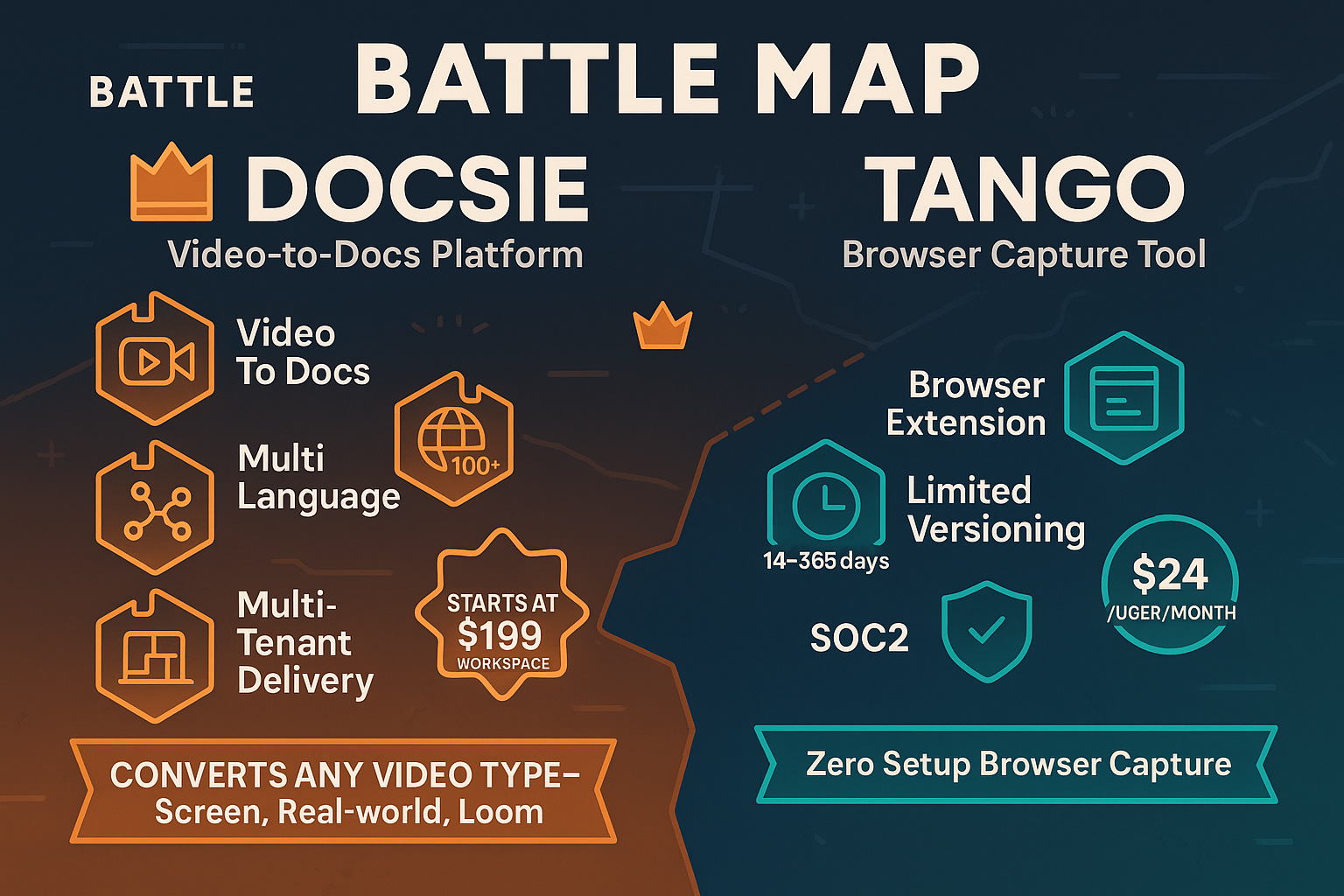
Docsie is an agentic knowledge orchestration platform that converts training videos, PDFs, and websites into structured knowledge bases using multimodal AI. The platform handles the full CONVERT → MANAGE → DELIVER workflow: it processes any video type (not just screen recordings), structures the content with version control and reuse capabilities, then delivers it as branded portals, AI chatbots, and embedded widgets across 100+ languages.
The platform's core value proposition centers on multi-tenant architecture. You create one knowledge base, then deliver it through unlimited client-branded portals — each with custom domains, branding, and access controls. This makes Docsie particularly valuable for consulting firms, implementation partners, and enterprises managing documentation for multiple clients or divisions.
Docsie's agentic AI search uses tool calls rather than traditional RAG (Retrieval-Augmented Generation), resulting in more accurate chatbot responses that can execute actions, not just retrieve information.

What Is Tango?
Tango started as a workflow documentation tool built around a Chrome extension that captures browser-based processes as screenshot guides. You click through a workflow in your browser, and Tango automatically generates a step-by-step guide with screenshots, editable descriptions, and shareable links.
The tool has pivoted significantly toward CRM automation in recent years, with heavy emphasis on Salesforce and HubSpot integrations. Their "Nuggets" feature provides in-app guided walkthroughs that overlay directly on web applications, helping users complete processes in real-time.
Tango excels at frictionless capture: install the extension, click through your process, and you have a guide. It's lightweight, visual, and requires minimal setup — making it attractive for teams that need quick internal documentation of browser-based SaaS workflows.
However, Tango operates exclusively in the screenshot domain. It has zero video capability, cannot process existing training content, and doesn't handle audio or voice.
Feature Comparison: Where They Diverge
Content Input & Conversion Capabilities
This is where the tools diverge most dramatically.
Docsie processes multimodal content: training videos (both screen recordings and real-world footage), Loom videos, PDFs, websites, and existing documentation. The platform's AI extracts information from video, audio, and visual elements, then structures it into searchable knowledge base articles. If you've recorded product demos, training sessions, or subject matter expert interviews, Docsie converts that accumulated content into documentation without manual transcription.
Tango captures only browser workflows in real-time through its Chrome extension. There's no video processing, no conversion of existing content, and no ability to work with recorded material. You're creating documentation from scratch by performing the workflow while Tango watches.
For enterprises with existing content libraries, this distinction is decisive. Docsie unlocks value from content you already have. Tango requires creating new documentation through manual capture.
Knowledge Management & Structure
Documentation isn't just about creating content — it's about managing it over time.
Docsie provides comprehensive version control, content reuse through embedded components, and shelf-based organization that mirrors how enterprises actually structure information. You can track changes, roll back versions, and maintain documentation across product releases. The platform includes collaboration features, approval workflows, and audit logs that satisfy enterprise governance requirements.
Tango offers basic organization through folders and collections, but lacks sophisticated version control. You can edit guides after creation, but there's no branching, no structured content reuse, and limited capabilities for managing documentation at scale. The platform primarily serves as a repository of individual guides rather than a knowledge management system.
For organizations managing documentation across multiple products, versions, or client implementations, Docsie's infrastructure becomes essential. Tango works for small teams documenting individual processes, but struggles with enterprise complexity.
Delivery & Multi-Tenancy
How you deliver documentation matters as much as how you create it.
Docsie's multi-tenant architecture lets you create one knowledge base and deliver it through unlimited client-branded portals. Each portal has its own custom domain, branding, access controls, and analytics — while the underlying content remains centrally managed. Update the knowledge base once, and changes propagate to all portals. The platform also delivers content through AI chatbots, embedded widgets, and API access.
This architecture is transformative for consulting firms, implementation partners, and SaaS companies managing documentation for multiple clients. You maintain one source of truth while delivering customized experiences.
Tango shares guides through links, embeds, or exports. There's no multi-tenant infrastructure, no branded portal capability, and no way to deliver the same content customized for different audiences. Each guide is essentially standalone.
For internal documentation, Tango's sharing model suffices. For external documentation delivered to clients or customers, Docsie's portal infrastructure becomes necessary.
Enterprise Security & Compliance
Enterprise buyers evaluate security capabilities seriously.
Docsie holds SOC 2 Type II certification, offers HIPAA-ready deployment, supports data residency requirements, and provides comprehensive audit logs. The platform includes SSO, role-based access controls, and field-level permissions. For regulated industries or enterprises with strict compliance requirements, these capabilities are table stakes.
Tango provides SSO and basic access controls but lacks the depth of compliance documentation and certifications that enterprise security teams require. The platform works for general business use but may not satisfy regulated industry requirements.
Translation & Localization
Docsie supports 100+ languages with AI-powered translation that maintains context and technical accuracy. You create documentation once and deliver it globally with language-specific portals. The platform handles right-to-left languages, preserves formatting, and maintains search functionality across translations.
Tango offers no built-in translation capabilities. You'd need to manually duplicate and translate guides, then manage separate versions for each language.
For global enterprises or companies serving international markets, Docsie's translation infrastructure eliminates a massive operational burden.
Who Should Choose What?
Choose Docsie If You Need...
- To convert existing video content — training recordings, product demos, Loom videos, or subject matter expert sessions — into structured documentation without manual transcription
- Multi-tenant knowledge base portals for delivering documentation to multiple clients, divisions, or partners with individual branding and access controls
- Multilingual documentation at scale with 100+ language support and maintenance of one source of truth
- Enterprise security and compliance including SOC 2 Type II, HIPAA-ready deployment, audit logs, and data residency
- Comprehensive knowledge management with version control, content reuse, approval workflows, and governance
Docsie fits consulting firms, implementation partners, ISVs, and enterprises managing complex documentation requirements across multiple audiences.
Choose Tango If You Need...
- Quick browser workflow capture with zero setup through a Chrome extension
- Simple screenshot guides for documenting internal SaaS processes and web application workflows
- In-app guided walkthroughs (Nuggets) that overlay on web applications for real-time user guidance
- Lightweight documentation for small teams with straightforward browser-only workflows
Tango works for small to mid-sized teams documenting internal processes who don't need video conversion, multi-tenant delivery, or enterprise knowledge management infrastructure.
The Verdict: Different Tools for Different Jobs
Docsie and Tango address fundamentally different documentation challenges. Tango captures new browser workflows as screenshot guides — valuable for teams starting from scratch with simple processes. Docsie converts existing content into structured knowledge bases and delivers them through enterprise infrastructure.
The decision hinges on your content and delivery requirements.
If you have accumulated video content, need to serve multiple clients with branded experiences, require multilingual documentation, or must satisfy enterprise compliance requirements, Docsie provides capabilities that Tango simply doesn't offer. The platform's ability to process any video source, manage knowledge at scale, and deliver through multi-tenant portals makes it essential for organizations operating beyond simple workflow documentation.
Tango serves a legitimate use case: frictionless capture of browser workflows for internal use. But it's a capture tool, not a knowledge management platform. If your documentation needs stop at "create screenshot guides of web processes," Tango delivers that efficiently. If you need infrastructure for managing and delivering knowledge at enterprise scale, you're evaluating the wrong category of tool.
For organizations serious about documentation as strategic infrastructure — particularly those with existing content libraries, multi-client delivery needs, or global operations — Docsie represents a fundamentally more comprehensive solution.
Ready to Transform Your Documentation?
Stop manually transcribing videos and maintaining scattered documentation. See how Docsie converts your existing content into structured, multilingual knowledge bases deliverable through branded portals.
Start your free trial and convert your first video into documentation in minutes. No credit card required.