
Docsie vs ScribeHow: Feature Comparison 2026
Your team has accumulated hundreds of training videos. Your product demos live in Loom. Your compliance walkthroughs sit in unlabeled folders. Meanwhile, your support team fields the same questions daily because nobody can find—or quickly consume—the documentation they need.
You're evaluating documentation tools, and two names keep appearing: Docsie and ScribeHow (also known as Scribe). Both promise to simplify documentation creation, but they solve fundamentally different problems. One transforms video content into structured knowledge bases for enterprise delivery. The other captures browser workflows as screenshot guides for internal processes.
Here's what you need to know to choose the right tool for your use case.
What is Docsie?
Docsie is an agentic knowledge orchestration platform that converts training videos, PDFs, and websites into structured knowledge bases using multimodal AI. But it doesn't stop at content creation—Docsie manages documentation lifecycles through version control and content reuse, then delivers that knowledge through branded portals, AI chatbots, and embedded widgets across 100+ languages.
The platform handles any video type: screen recordings, real-world training footage, Zoom meetings, or Loom tutorials. It processes the visual, audio, and on-screen text to generate documentation that maintains context and structure. For enterprises managing multiple clients or product lines, Docsie's multi-tenant architecture means one knowledge base powers unlimited client-branded portals—each with its own domain, styling, and access controls.
What is ScribeHow?
ScribeHow (marketed as "Scribe" in the product interface) is a process documentation tool that automatically captures browser-based workflows and converts them into annotated screenshot guides. Install the browser extension, click record, complete your workflow, and ScribeHow generates a step-by-step guide with numbered screenshots and editable annotations.
It's purpose-built for internal standard operating procedures: HR onboarding checklists, IT support documentation, software training for internal tools. The output is clean, shareable, and integrates with platforms your team already uses like Notion, Confluence, and SharePoint. ScribeHow excels at one thing: making screenshot-based process documentation fast and painless.
Feature Comparison: Where They Diverge
Content Input: Video vs. Browser-Only Capture
This is the foundational difference that determines everything else.
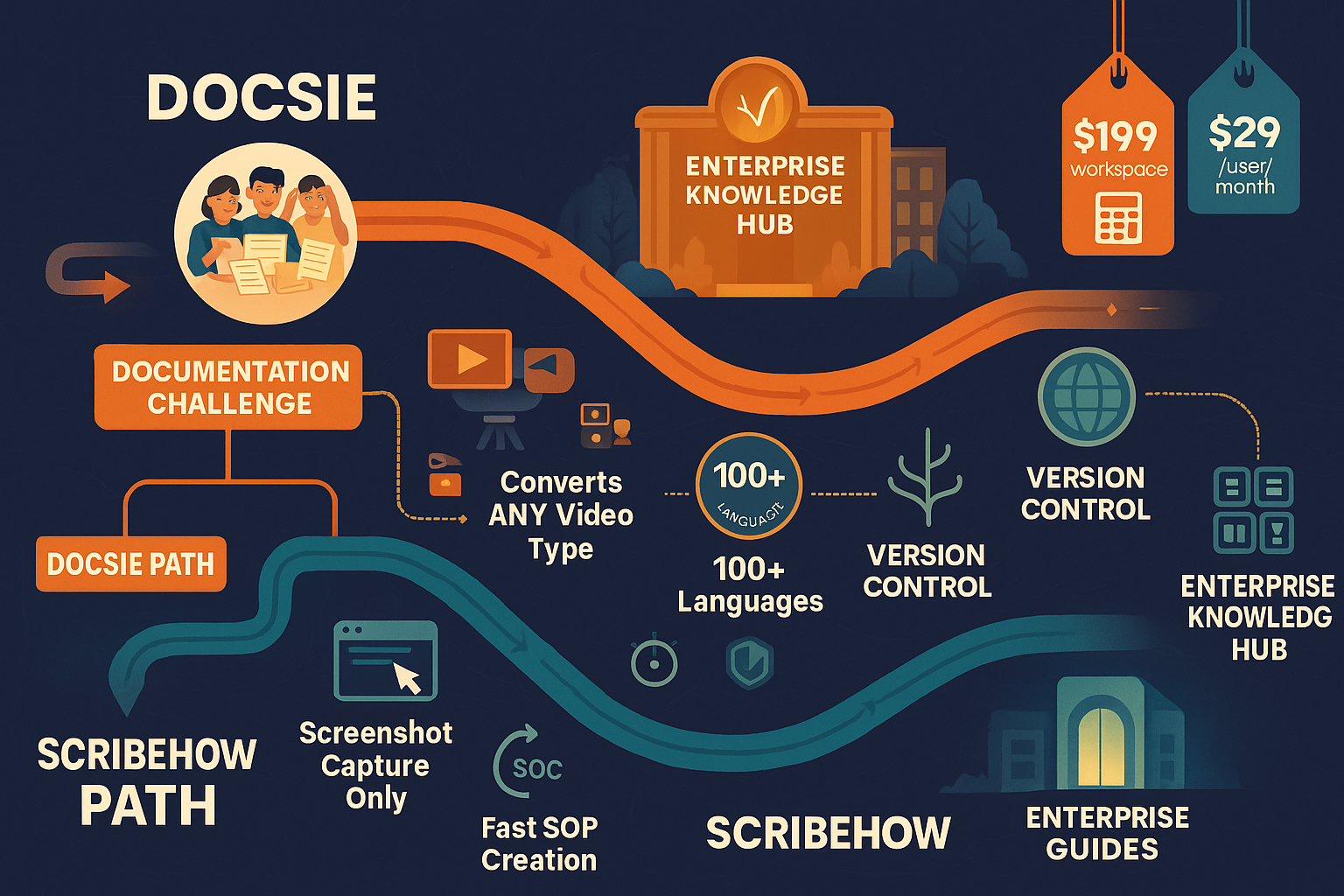
Docsie processes video content—any video. Upload a 45-minute SAP training session recorded in 2019, and Docsie's multimodal AI extracts the workflow, identifies UI elements, transcribes speech, and structures it into searchable documentation. Feed it a Zoom recording where a consultant walks a client through your platform, and it becomes a knowledge base article complete with visual context and spoken explanations captured as text.
This matters because most enterprise knowledge already exists as video. Product demos delivered to prospects. Training sessions from implementation consultants. Compliance walkthroughs recorded for audit purposes. Docsie unlocks that trapped knowledge.
ScribeHow only captures live browser workflows. You must perform the process in real-time while the extension records. It cannot process existing videos, Zoom recordings, or real-world training footage. If your knowledge exists as video libraries, ScribeHow cannot help you convert them.
The implication: ScribeHow works when you're creating new documentation for browser-based processes. Docsie works when you need to transform existing video assets and create new documentation from any source—including non-screen content like machinery operation videos or in-person training sessions.
Documentation Management: Full Lifecycle vs. Export-and-Forget
Docsie treats documentation as a managed asset with version control, content reuse blocks, and lifecycle management. Update a procedure once, and it propagates across every portal where that content block appears. Maintain multiple versions simultaneously for different product releases or client configurations. Track who changed what, when, and why with full audit logging.
For regulated industries or enterprises serving multiple clients with slightly different implementations, this infrastructure is non-negotiable. You need to know that Client A sees documentation for version 3.2 while Client B still operates on 3.1—and that both stay synchronized with their respective product versions.
ScribeHow generates guides that you export to other platforms. Create a Scribe, then share it via link or embed it in Confluence, Notion, or your wiki. Updates happen in Scribe, then you re-export or update the link. There's no native version control system for managing documentation at scale across multiple audiences or product versions.
For small teams creating internal SOPs where version control means "edit the Confluence page," this works fine. For enterprises managing documentation across multiple clients, languages, and product versions, it doesn't scale.
Delivery Infrastructure: Multi-Tenant Portals vs. Embeds and Links
Docsie includes full delivery infrastructure through multi-tenant knowledge base portals. One Docsie instance powers unlimited client-branded portals, each with custom domains (help.clienta.com), white-label styling, role-based access control, and analytics. Each portal can serve different content subsets, languages, or versions—all managed from one system.
Add AI chatbots trained on your knowledge base, embeddable widgets for contextual help, and 100+ language auto-translation, and you have an enterprise documentation delivery platform. Customers get branded, searchable, multilingual help centers without you building separate infrastructure for each client.
ScribeHow outputs guides as shareable links or embeds that you place in your existing tools. The Scribe itself lives in ScribeHow's environment, and you integrate it elsewhere. This approach works when you already have documentation infrastructure (Confluence, Notion, SharePoint) and need to populate it with process guides.
But if you're building customer-facing help centers, partner portals, or multi-client knowledge bases, ScribeHow doesn't provide that infrastructure. You'd still need Zendesk, HubSpot Knowledge Base, or a custom-built solution.
AI and Search: Agentic Tool Calls vs. Basic Search
Docsie uses agentic AI search with tool calls rather than traditional RAG (Retrieval-Augmented Generation). When users query the AI chatbot, it doesn't just retrieve semantically similar text chunks—it can execute actions, navigate documentation structure, and combine information across sources with contextual understanding.
This architecture delivers more accurate answers because the AI understands documentation structure and relationships, not just keyword similarity. For complex enterprise products where answers require synthesizing information from multiple articles, architecture diagrams, and version-specific details, this matters significantly.
ScribeHow offers basic search within your Scribe library and standard text search in the guides themselves. There's no AI chatbot layer for natural language queries or intelligent answer synthesis. Users navigate guides manually or search by keyword.
For simple process documentation ("How do I reset a password in Workday?"), this suffices. For complex product documentation where users ask open-ended questions requiring context synthesis, it doesn't.
Who Should Choose What?
Choose Docsie If You Need...
To unlock existing video libraries. You have hundreds of training videos, product demos, or recorded sessions that contain valuable knowledge but aren't searchable or structured. Docsie converts them into documentation automatically.
Multi-tenant knowledge delivery. You serve multiple clients, partners, or product lines and need each to have branded, versioned, access-controlled documentation portals—all managed from one system without duplicating content.
Global documentation distribution. Your users span 50+ countries, and manually translating documentation into dozens of languages isn't feasible. Docsie's 100+ language auto-translation handles this automatically while maintaining version control across all language variants.
Enterprise compliance and security. You need SOC 2 Type II certification, GDPR compliance, HIPAA-ready infrastructure, SSO integration, and full audit logging for documentation access and changes.
Documentation lifecycle management. You must track versions, reuse content blocks across multiple documentation sets, maintain multiple versions simultaneously, and ensure updates propagate correctly across different client portals or product releases.
Choose ScribeHow If You Need...
Quick internal SOPs from browser workflows. Your HR team needs onboarding checklists. IT support needs password reset guides. You want the fastest path from "perform the task" to "annotated screenshot guide" with zero learning curve.
Simple screenshot-based process documentation. Your use case genuinely requires step-by-step screenshot guides rather than structured knowledge bases, video-derived documentation, or searchable reference material.
Integration with existing tools. You already use Confluence, Notion, or SharePoint for documentation hosting and need to populate it with process guides that integrate natively.
PII/PHI redaction for sensitive processes. You're documenting workflows that include sensitive data, and ScribeHow's Enterprise tier offers automatic redaction of personally identifiable or health information from screenshots.
The Verdict: Different Tools for Different Jobs
Compare Docsie vs ScribeHow feature-by-feature and the distinction becomes clear: these tools serve fundamentally different documentation needs.
ScribeHow captures browser processes as screenshot guides for internal documentation. It does this one thing exceptionally well, with minimal setup and a near-zero learning curve.
Docsie orchestrates knowledge transformation and delivery at enterprise scale. It converts any video into structured documentation, manages content lifecycles with version control and reuse, and delivers that knowledge through multi-tenant portals, AI chatbots, and embedded widgets across 100+ languages.
For enterprise teams managing video-based knowledge assets, serving multiple clients or global audiences, and requiring documentation infrastructure beyond simple screenshot guides—Docsie addresses use cases that ScribeHow fundamentally cannot. ScribeHow's browser-only capture means it cannot process your existing training video libraries, real-world instructional footage, or spoken-word explanations that provide critical context.
If your documentation needs involve transforming video content, managing documentation at scale across multiple audiences, or delivering knowledge through branded customer-facing portals, ScribeHow isn't competing in the same category.
Ready to Transform Your Video Content Into Structured Knowledge?
Stop letting valuable knowledge sit trapped in video libraries while your team recreates the same documentation manually.
Start your free Docsie trial and see how quickly you can convert existing training videos into searchable, structured, multilingual knowledge bases—then deliver them through branded portals your customers will actually use.
No credit card required. Full platform access. Convert your first videos in minutes.