
Confluence vs GitBook: Enterprise Readiness Comparison 2026
Your engineering team swears by GitBook's developer-friendly interface. Your IT security team wants Confluence because "everyone uses Atlassian." Your CFO wants to know why documentation software costs six figures at scale. Sound familiar?
Choosing enterprise documentation infrastructure isn't just about features—it's about scalability, compliance, support guarantees, and total cost of ownership when you're managing knowledge for hundreds or thousands of users. Both Confluence and GitBook check the baseline enterprise boxes (SOC 2, SSO, reasonable security), but they diverge significantly in how they handle large-scale deployment, administrative control, and pricing economics.
This comparison examines Confluence and GitBook specifically through an enterprise readiness lens: scalability limits, compliance depth, support SLAs, administrative tooling, and what happens when your documentation needs grow beyond a single team.
Meet the Contenders
Confluence is Atlassian's enterprise wiki and collaboration platform—the market leader that virtually every large organization recognizes. It's the default choice for companies already using Jira, built for internal documentation, project pages, meeting notes, and cross-functional knowledge management. With the 2024 integration of Rovo AI into all paid plans (not an add-on), Confluence added 20+ pre-built AI agents for documentation tasks, making AI-powered knowledge work standard rather than premium.
GitBook is a Git-based documentation platform purpose-built for technical documentation and developer portals. Engineering teams love its Git-native version control, OpenAPI/Swagger spec support, and clean documentation UI. GitBook restructured pricing in 2024-2025 to a site-based model—significant for enterprise scalability planning since costs scale per documentation site rather than per user.
Both platforms meet baseline enterprise security requirements, but their approaches to large-scale deployment couldn't be more different.
Scalability & Performance: How They Handle Enterprise Scale
Confluence explicitly supports up to 150,000 users on Data Center deployments and provides a published 99.9% uptime SLA at Enterprise tier. This isn't theoretical—Fortune 500 companies routinely run Confluence instances with tens of thousands of concurrent users across global teams. The platform handles massive page trees, complex permission hierarchies, and heavy media content without architectural limitations.
When you hit 10,000 pages or 50,000 users, Confluence's infrastructure doesn't break. It's built for this scale, with dedicated performance monitoring, load balancing, and disaster recovery capabilities that enterprise infrastructure teams expect.
GitBook doesn't publish user limits or uptime SLAs—a significant gap for enterprise buyers who need contractual performance guarantees. The platform scales based on documentation sites rather than users, which creates different economics: each separate documentation portal counts as a billable site.
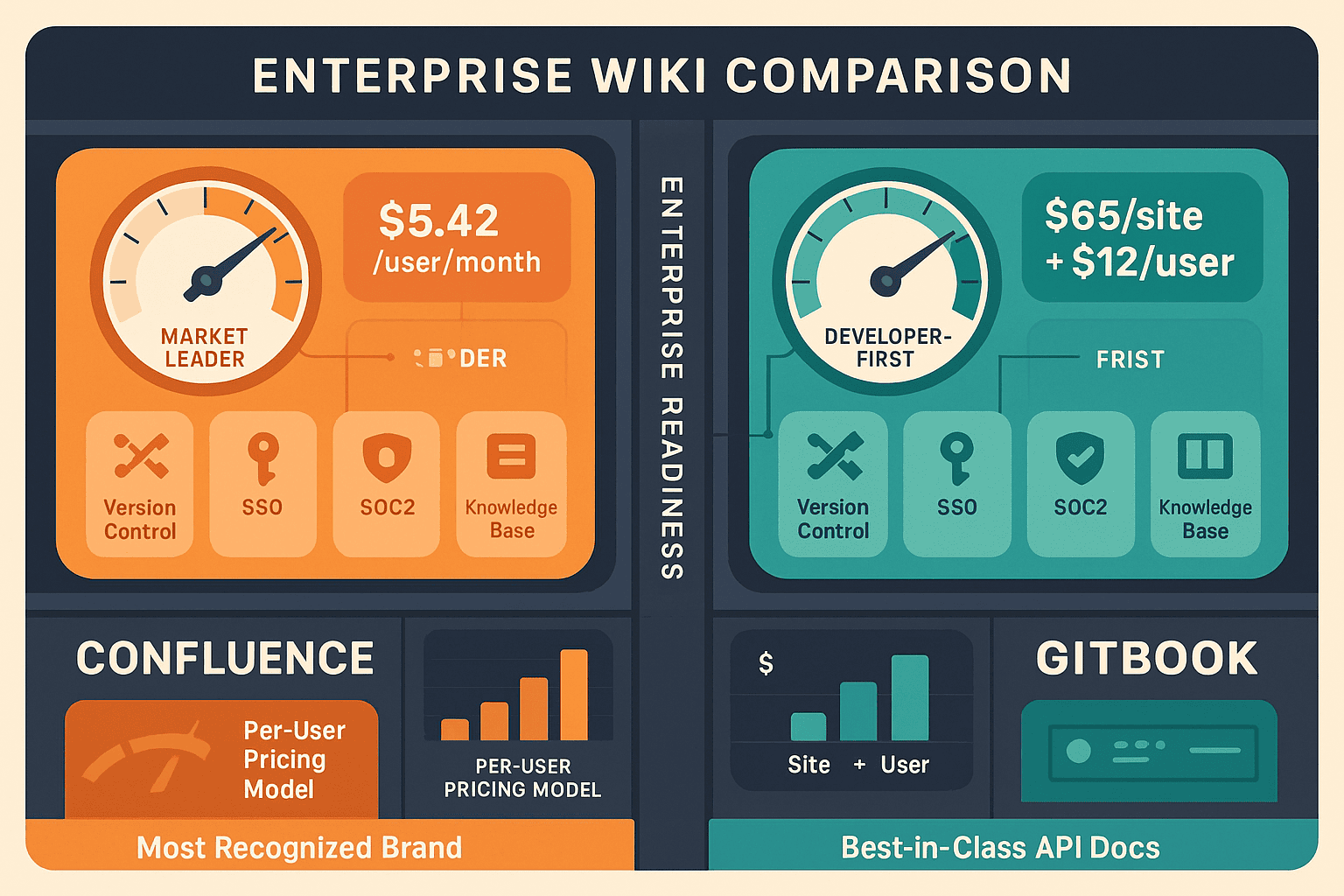
For a single developer documentation portal serving unlimited readers, GitBook scales beautifully. But for organizations needing multiple documentation sites (partner documentation, internal wikis, customer portals, API docs for different products), the per-site pricing model becomes expensive quickly. Custom domains cost $65 per site—prohibitive when you're managing documentation for multiple products, clients, or business units.
Security, Compliance & Administrative Control
Both platforms achieve SOC 2 Type II and ISO 27001 certification—table stakes for enterprise consideration. But compliance depth and administrative tooling differ substantially.
Confluence provides comprehensive audit logging that tracks every page view, edit, permission change, and export across the entire instance. Enterprise security teams can monitor who accessed what documentation, when, and what they did with it—critical for regulated industries like healthcare, finance, or government contractors.
Confluence supports multiple identity providers simultaneously (SAML SSO with Okta, Azure AD, OneLogin), allowing complex organizations to maintain different authentication systems for different user populations. Advanced encryption options include encryption at rest and in transit, with data residency controls for GDPR compliance.
Administrative controls scale to enterprise complexity: space-level permissions, group-based access control, content archiving policies, and automated retention rules. IT teams can delegate administration without surrendering central oversight.
GitBook provides SSO via SAML (Ultimate tier) and basic audit logging, but the administrative tooling is lighter-weight. The platform wasn't designed for the kind of granular permission management and compliance reporting that heavily regulated industries require.
GitBook's strength is Git-native version control—every documentation change is a commit with branch, pull request, and change approval workflows that developers understand intuitively. This approach to version control is architecturally superior for technical teams, but it trades compliance breadth for workflow elegance.
For security-conscious organizations, GitBook lacks the audit trail depth and retention policy automation that Confluence provides out of the box.
Support, SLAs & Enterprise Guarantees
Confluence Premium tier (accessible pricing for mid-market enterprises) includes 24/7 support with guaranteed response times. Enterprise tier adds dedicated success managers, quarterly business reviews, and priority escalation channels—standard enterprise support infrastructure.
The 99.9% uptime SLA is contractually guaranteed with service credits for violations. Enterprise buyers can build this into vendor risk assessments and business continuity planning with confidence.
GitBook provides email support at Business tier and priority support at Ultimate tier, but doesn't publish SLA guarantees or response time commitments. There's no 24/7 support option or dedicated account management at any pricing tier.
For enterprises where documentation downtime impacts customer success, product launches, or compliance audits, the absence of published SLAs is a meaningful gap. You can't build documentation infrastructure into critical business processes without uptime guarantees.
Integration Ecosystems & Workflow Fit
Confluence integrates deeply with the Atlassian ecosystem—Jira, Bitbucket, Trello, Jira Service Management. For organizations already standardized on Atlassian tools, this creates unified workflows: link Jira tickets directly in documentation, embed Jira roadmaps, sync sprint planning pages with project status.
Rovo AI (included in all paid plans) provides 20+ pre-built AI agents for documentation tasks: summarization, Q&A, content generation, meeting note extraction. This isn't a separate AI add-on—it's native to the platform.
GitBook excels in developer workflow integration: GitHub/GitLab sync, branch-based documentation workflows, OpenAPI/Swagger spec imports, code block syntax highlighting. Engineering teams can treat documentation as code, with PR reviews, CI/CD integration, and automated builds.
The Ultimate tier adds MCP (Model Context Protocol) server integration, connecting GitBook content to AI agent ecosystems—significant for organizations building custom AI workflows around documentation knowledge bases.
For developer documentation and API portals, GitBook's workflow fit is superior. For cross-functional enterprise wikis integrating project management and documentation, Confluence provides broader organizational utility.
Who Should Choose What?
Choose Confluence if you need:
- Proven scalability to 150,000+ users with contractual 99.9% uptime guarantees
- Deep Atlassian ecosystem integration (Jira, Bitbucket) for unified project and documentation workflows
- Comprehensive audit logging and advanced encryption for regulated industries (HIPAA, SOX, FedRAMP)
- 24/7 enterprise support starting at Premium tier with dedicated account management at Enterprise level
- Multiple simultaneous identity providers for complex organizational authentication requirements
Confluence is the right choice for large-scale internal wikis, cross-functional knowledge management, and organizations where documentation infrastructure must integrate tightly with project management and issue tracking systems.
Choose GitBook if you need:
- Git-native version control with branch, PR, and change request workflows that developers understand intuitively
- Best-in-class API documentation with OpenAPI/Swagger spec support and code-first workflows
- Clean technical documentation UI specifically designed for developer audiences
- MCP server integration (Ultimate tier) for connecting documentation to AI agent ecosystems
GitBook is the right choice for developer documentation, API portals, and technical teams where Git workflows are non-negotiable and documentation-as-code is a requirement.
The Enterprise Documentation Gap Both Tools Miss
Here's what neither platform addresses: multi-tenant documentation delivery at scale.
Both Confluence and GitBook are single-tenant platforms. You create documentation for internal teams (Confluence) or publish it publicly/privately (GitBook), but you can't efficiently serve multiple external clients, partners, or subsidiaries from one system with separate branded portals and isolated access controls.
Enterprise organizations increasingly need this capability: SAP implementation partners managing documentation for 50+ clients, consulting firms delivering knowledge bases to multiple customers, SaaS platforms providing documentation portals to enterprise clients, manufacturers distributing product documentation to regional distributors.
When you need to deliver documentation to multiple external audiences with separate branding, access controls, and content variations, you face a choice: deploy dozens of separate Confluence/GitBook instances (administrative nightmare) or force all clients into one shared portal (security and branding disaster).
Neither scales economically or operationally.
Why Enterprise Teams Are Choosing Docsie Instead
Docsie was purpose-built for what Confluence and GitBook can't address: multi-tenant enterprise knowledge management that delivers documentation to unlimited client portals from one system.
True Multi-Tenant Architecture: Create one knowledge base, deliver it to unlimited client portals with separate branding, domains, access controls, and content variations—without deploying separate instances or paying per-site fees.
Video-to-Documentation AI: Convert training videos, screen recordings, or real-world footage into structured documentation automatically using multimodal AI. Neither Confluence nor GitBook offers video-to-docs capability—critical for organizations with legacy training content.
Enterprise Scalability Without Pricing Penalties: Manage 10,000+ documentation sites with workspace-based pricing plus AI credits—not per-user fees that penalize growth (Confluence) or per-site fees that make multi-client delivery prohibitively expensive (GitBook).
100+ Language Auto-Translation: Deploy global documentation with automatic translation to 100+ languages—essential for multinational enterprises where manual translation creates documentation lag.
Complete CONVERT → MANAGE → DELIVER Workflow: Combined content creation (video-to-docs, AI writing), version control, and multi-channel delivery in one platform instead of stitching together separate tools.
Enterprise Compliance: SOC 2 Type II, GDPR compliance, HIPAA-ready with EU data residency options—meeting the same security standards as Confluence without the Atlassian ecosystem lock-in.
See the detailed feature comparison at Confluence vs GitBook: Enterprise Readiness Comparison.
Make Documentation Infrastructure a Competitive Advantage
Confluence and GitBook both serve valid use cases—Confluence for Atlassian-centric internal wikis, GitBook for developer documentation. But neither addresses the multi-tenant, multi-client documentation delivery that modern enterprises increasingly require.
If you're managing documentation for multiple clients, partners, or business units—or converting video training content into structured documentation—evaluate platforms built for those requirements from the ground up.
Try Docsie free for 14 days and see how multi-tenant documentation infrastructure transforms enterprise knowledge management at scale.